1. Introduction
The MQFORU Electronic Acupuncture Pen is a versatile 3-in-1 device designed for meridian energy therapy, offering a non-invasive approach to pain relief and muscle stimulation. This manual provides essential information for safe and effective use of your device.
2. Important Safety Information
Please read all instructions carefully before use.
- Keep the device away from water.
- Do not use on broken skin or areas with inflammation.
- Avoid using near the eyes or on sensitive areas of the body.
- Always turn off the device when not in use.
- Do not leave the device unattended while in use.
- If you experience any discomfort or pain, stop using immediately and consult a healthcare professional.
- Statements regarding dietary supplements have not been evaluated by the FDA and are not intended to diagnose, treat, cure, or prevent any disease or health condition. This device is not a medical device and should not replace professional medical advice.
3. Package Contents
Your MQFORU Electronic Acupuncture Pen package includes:
- 1 x Electronic Acupuncture Pen
- 3 x Replaceable Massage Heads (Dome Type, Spheroidal Type, Node Type)
- 1 x User Manual
- (Note: Contact gel may be included, but its condition is not guaranteed.)
4. Product Overview
Familiarize yourself with the components of your Electronic Acupuncture Pen:

Figure 1: The Electronic Acupuncture Pen showing its adjustable intensity from 1 to 9. Initial use is suggested at gear 2-3.
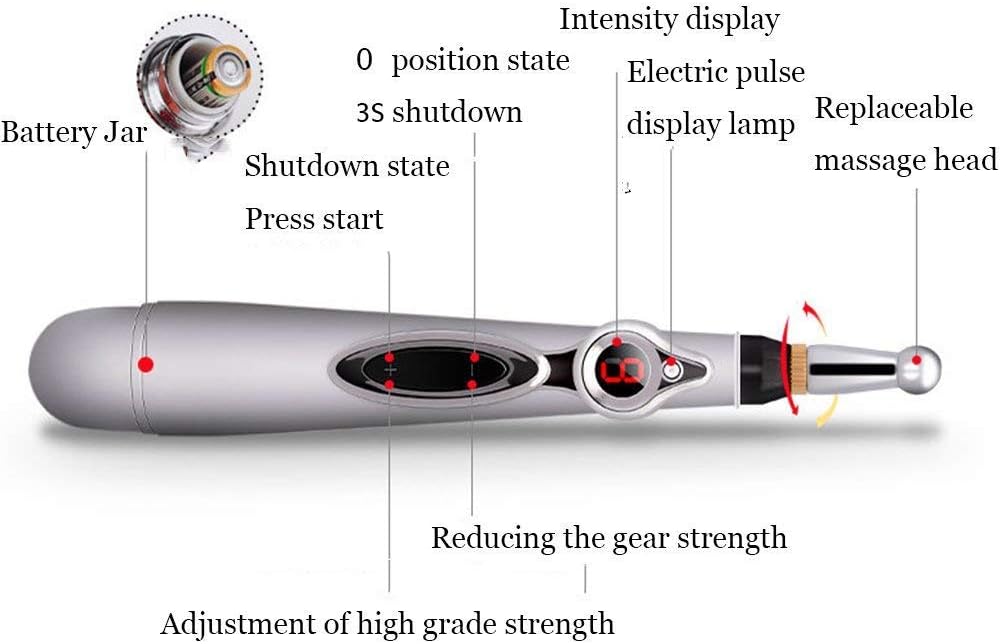
Figure 2: Detailed diagram of the pen, highlighting the battery compartment, intensity display, electric pulse display lamp, and replaceable massage head connection point. It also shows buttons for increasing and decreasing intensity.
4.1. Replaceable Massage Heads
The device comes with three distinct massage heads for varied applications:
- Dome Type: Suitable for facial muscles and general health care.
- Spheroidal Type: Designed for body muscles, offering a broader contact area for a softer massage.
- Node Type: Ideal for precise application on painful areas and acupoints.

Figure 3: The three interchangeable massage heads: Node Type (left), Dome Type (middle), and Spheroidal Type (right).
5. Setup
5.1. Battery Installation
- Locate the battery compartment at the bottom of the pen (refer to Figure 2).
- Open the battery lid.
- Insert one AA battery, ensuring correct polarity (+/-).
- Tighten the battery cover securely.
5.2. Attaching a Massage Head
Select the desired massage head and screw it onto the pen's tip until secure.
6. Operating Instructions
- Power On: Press the '+' button to turn on the device. The intensity display will light up.
- Adjust Intensity: Use the '+' button to increase the intensity level (1-9) and the '-' button to decrease it. For initial use, it is suggested to start at gear 2-3.
- Application: Apply the tip of the pen directly to the skin in the desired area. You may use a small amount of contact gel (if available) to improve conductivity and sensation.
- Movement: Move the pen slowly over the area, or hold it on specific acupoints. The electric pulse display lamp will indicate activity.
- Duration: A typical session is around 10 minutes per area.
- Power Off: Press the '-' button repeatedly until the intensity display shows '0' and the device shuts down after 3 seconds.
The device is designed to stimulate muscles and meridians, which may result in a tingling or mild electrical sensation. This is normal. Adjust the intensity to a comfortable level.
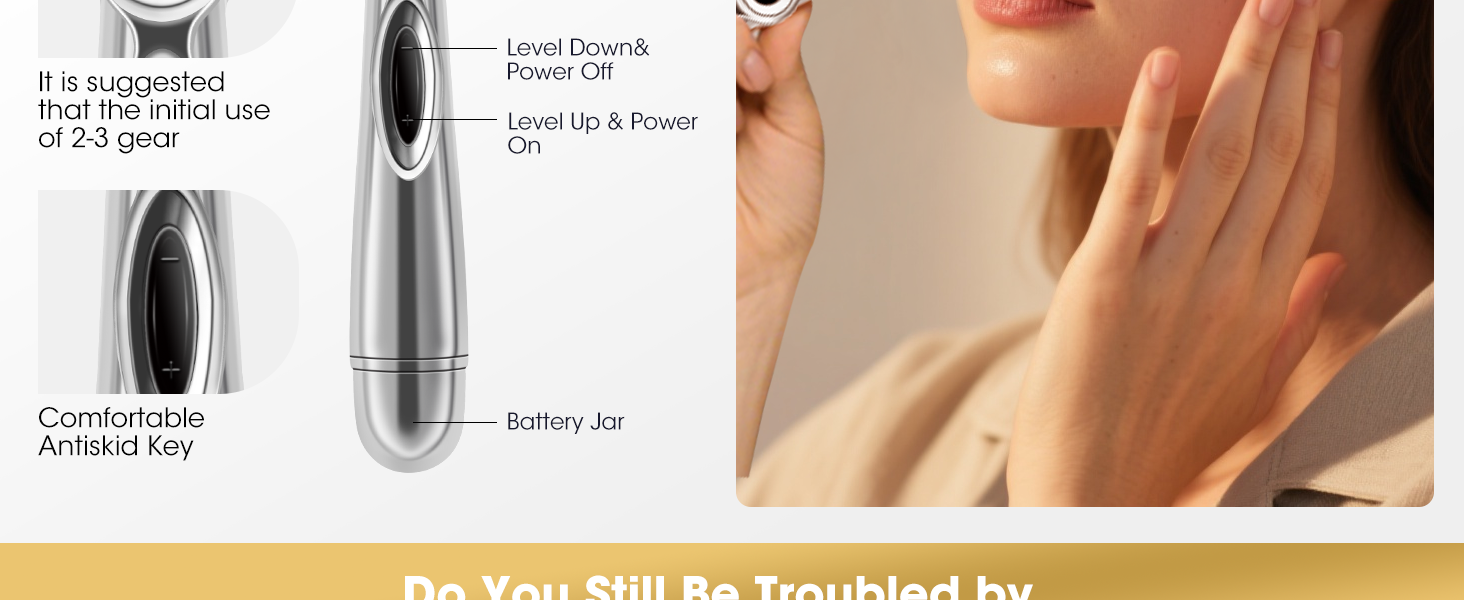
Figure 4: Example of using the Electronic Acupuncture Pen for facial stimulation.
7. Maintenance
7.1. Cleaning
- Ensure the device is turned off and the battery is removed before cleaning.
- Wipe the pen and massage heads with a soft, damp cloth. Do not use harsh chemicals or abrasive cleaners.
- Do not immerse the device in water.
7.2. Storage
Store the device in a cool, dry place, away from direct sunlight and out of reach of children. If not in use for an extended period, remove the battery to prevent leakage.
8. Troubleshooting
| Problem | Possible Cause | Solution |
|---|---|---|
| Device does not turn on. | Battery is dead or incorrectly installed. | Replace the battery or ensure it is inserted with correct polarity. |
| No sensation or weak sensation. | Low intensity setting, poor skin contact, or dry skin. | Increase intensity. Ensure firm contact with skin. Apply contact gel if available. |
| Uncomfortable sensation. | Intensity setting is too high. | Decrease the intensity to a comfortable level. |
9. Specifications
- Model: Meridian Energy Pen
- Power Source: 1 x AA Battery (not included)
- Material: Stainless Steel
- Item Weight: Approximately 0.29 Pounds (4.64 ounces)
- Product Dimensions: 8.66 x 9.45 x 7.87 inches (packaging dimensions, actual pen dimensions are smaller)
- Intensity Levels: 1-9 adjustable gears
10. Warranty and Support
For warranty information or technical support, please refer to the product packaging or contact the retailer where the product was purchased. Keep your purchase receipt as proof of purchase.