1. Safety Instructions
Please read these instructions carefully before using the device and retain them for future reference. Incorrect use may result in injury or damage to the device.
- Ensure the power supply voltage matches the requirements specified on the device.
- Do not expose the device to rain, moisture, or extreme temperatures.
- Avoid placing the device near heat sources or in direct sunlight.
- Do not open the casing. Refer all servicing to qualified personnel.
- Disconnect the power adapter during thunderstorms or when not in use for extended periods.
- Keep the device away from children.
2. Product Overview
The Nedis MIXD050GY is a compact 3-channel DJ mixer designed for mixing multiple audio sources. It features a crossfader for smooth transitions, microphone inputs with talkover function, and a headphone output for monitoring.
Front Panel Controls
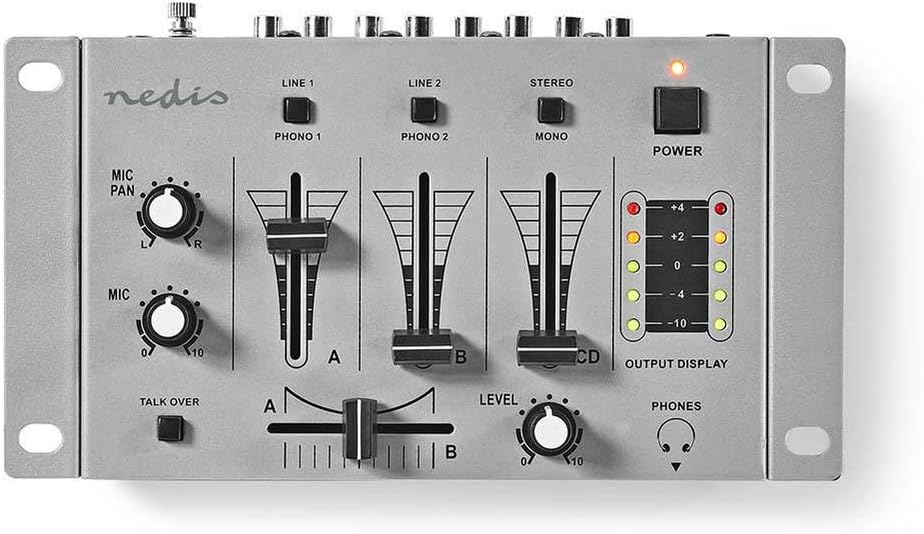
Image Description: This image displays the front panel of the Nedis MIXD050GY DJ Mixer. Key controls visible include input selectors (LINE 1, LINE 2, STEREO), PHONO 1, PHONO 2, MONO, channel faders (A, B, CD), a main crossfader, MIC PAN and MIC level knobs, a TALK OVER button, a LEVEL knob for headphones, a POWER button, and an OUTPUT DISPLAY with LED indicators. The overall color is silver/grey with black knobs and fader caps.
- Input Selectors: Switches for selecting audio sources for each channel (Line 1/Phono 1, Line 2/Phono 2, Stereo/CD/Mono).
- Channel Faders: Adjust the volume level of individual channels.
- Crossfader: Blends between channels A and B.
- MIC PAN: Adjusts the stereo position of the microphone input.
- MIC: Controls the microphone input volume.
- TALK OVER: Automatically reduces music volume when the microphone is used.
- LEVEL: Adjusts the headphone output volume.
- OUTPUT DISPLAY: LED meters indicating the main output level.
- POWER: On/Off switch for the mixer.
Rear Panel Connections

Image Description: This image shows the rear panel of the Nedis MIXD050GY DJ Mixer. From left to right, it features an AC IN 12V power input, RCA stereo outputs labeled AMP (L/R), RCA stereo inputs labeled CD (L/R), LINE 2 / PHONO 2 (L/R), LINE 1 / PHONO 1 (L/R), and two 6.35mm (1/4 inch) microphone inputs labeled MICRO L and MICRO R, along with a GND (ground) terminal. The panel is black with silver connectors.
- AC IN 12V: Power input for the included adapter.
- AMP (L/R): Main stereo RCA outputs to connect to an amplifier or powered speakers.
- CD (L/R): Stereo RCA inputs for a CD player or other line-level source.
- LINE 2 / PHONO 2 (L/R): Stereo RCA inputs for line-level devices or turntables (selectable via front panel switch).
- LINE 1 / PHONO 1 (L/R): Stereo RCA inputs for line-level devices or turntables (selectable via front panel switch).
- MICRO L / MICRO R: 6.35mm (1/4 inch) jack inputs for microphones.
- GND: Ground terminal for turntables.
3. Setup
3.1 Power Connection
Connect the supplied 12V power adapter to the 'AC IN 12V' port on the rear of the mixer. Plug the adapter into a suitable wall outlet. Do not power on the mixer until all audio connections are made.
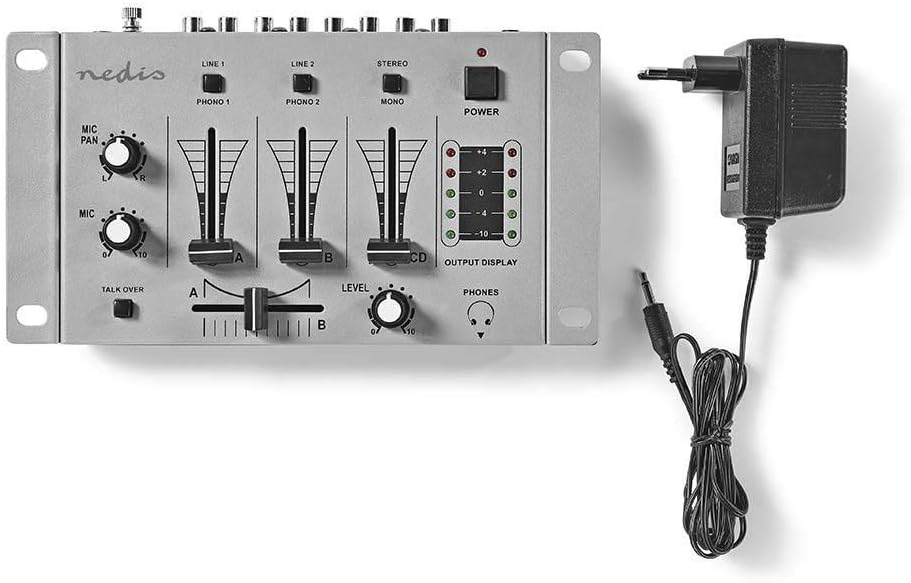
Image Description: This image shows the Nedis MIXD050GY DJ Mixer positioned next to its power adapter. The power adapter is a black block with a cable ending in a barrel connector, which would typically plug into the mixer's power input. This illustrates the power connection component.
3.2 Audio Source Connections
- Turntables: Connect turntables to the 'PHONO 1' and 'PHONO 2' RCA inputs. Ensure the ground wire from the turntable is connected to the 'GND' terminal on the mixer. Set the corresponding input selector switch on the front panel to 'PHONO'.
- CD Players/Line Devices: Connect CD players, media players, or other line-level devices to the 'CD', 'LINE 1', or 'LINE 2' RCA inputs. Set the corresponding input selector switch on the front panel to 'LINE' or 'CD'.
- Microphones: Connect up to two microphones with 6.35mm (1/4 inch) jack connectors to the 'MICRO L' and 'MICRO R' inputs on the rear panel.
3.3 Output Connections
- Amplifier/Speakers: Connect the 'AMP (L/R)' RCA outputs on the rear panel to the inputs of your amplifier or powered speakers.
- Headphones: Plug your headphones into the 6.35mm (1/4 inch) headphone jack located on the side of the mixer.

Image Description: This image shows a side view of the Nedis MIXD050GY DJ Mixer, highlighting the 6.35mm (1/4 inch) headphone jack located on the right side of the unit. This port is used for connecting headphones for audio monitoring.
4. Operating Instructions
4.1 Powering On/Off
Press the 'POWER' button on the front panel to turn the mixer on. The output display LEDs will illuminate. Press it again to turn the mixer off.
4.2 Selecting Inputs and Adjusting Levels
- For each channel (1, 2, CD), use the corresponding selector switch to choose between the connected audio sources (e.g., LINE 1 or PHONO 1).
- Adjust the individual channel faders (A, B, CD) to control the volume of each source.
- Monitor the 'OUTPUT DISPLAY' to ensure your main output levels are not clipping (reaching the red LEDs), which can cause distortion. Aim for levels in the green/yellow range.
4.3 Using the Crossfader
The crossfader allows for smooth transitions between channels A and B. Slide the crossfader to the left to hear only channel A, to the right for only channel B, and to the center for a blend of both.
4.4 Microphone Controls
- MIC: Rotate this knob to adjust the overall volume of the connected microphones.
- MIC PAN: Use this knob to position the microphone sound in the stereo field (left to right).
- TALK OVER: Press this button to activate the talkover function. When active, speaking into the microphone will automatically reduce the volume of the music channels, making your voice more prominent. Press again to deactivate.
4.5 Headphone Monitoring
Connect your headphones to the headphone jack. Use the 'LEVEL' knob to adjust the headphone volume for comfortable monitoring of your mix.
5. Maintenance
Proper maintenance ensures the longevity and optimal performance of your DJ mixer.
- Cleaning: Use a soft, dry cloth to clean the exterior of the mixer. Do not use abrasive cleaners, solvents, or waxes.
- Storage: When not in use, store the mixer in a clean, dry environment, away from direct sunlight and extreme temperatures.
- Faders and Knobs: Avoid excessive force when operating faders and knobs. Do not spray any lubricants or cleaning agents directly into the controls, as this can damage internal components.
6. Troubleshooting
If you encounter issues with your Nedis MIXD050GY mixer, refer to the following common problems and solutions:
| Problem | Possible Cause | Solution |
|---|---|---|
| No sound output |
|
|
| Distorted sound |
|
|
| Microphone not working |
|
|
| Humming/Buzzing noise |
|
|
7. Specifications
The following specifications apply to the Nedis MIXD050GY DJ Mixer:
- Brand: NEDIS
- Model: MIXD050GY
- Number of Channels: 3
- Connectivity Technology: Auxiliary, USB (Note: USB connectivity is not explicitly detailed in product overview, but listed in specifications. Refer to product packaging for specific USB functionality if applicable.)
- Power Source: Corded Electric (AC IN 12V)
- Item Weight: 1.01 Kilograms
- Product Dimensions: 120 x 230 x 37 cm (approximate, as per product data)
- Color: Black / Silver
- Connector Type: Audio estéreo (RCA), 6.35mm (1/4 inch) jack
8. Warranty and Support
For information regarding warranty terms and conditions, please refer to the warranty card included with your product or visit the official Nedis website. If you require technical support or have questions not covered in this manual, please contact Nedis customer service.
Nedis Website: www.nedis.com