
Sennheiser 009422
Sennheiser e945 Supercardioid Dynamic Handheld Vocal Microphone Instruction Manual
Model: 009422 | Brand: Sennheiser
1. Introduction
This manual provides comprehensive instructions for the setup, operation, maintenance, and troubleshooting of your Sennheiser e945 Supercardioid Dynamic Handheld Vocal Microphone. Please read this manual carefully before using the product to ensure optimal performance and longevity.
The Sennheiser e945 is a professional-grade dynamic handheld microphone engineered for lead vocals, delivering a rich and smooth audio response suitable for both live stage performances and studio recordings. Its robust metal construction and shock-mounted capsule minimize handling noise and impact sensitivity. The supercardioid polar pattern effectively rejects off-axis sound and feedback, while the neodymium magnet with a hum-compensating coil ensures reliable performance by reducing electrical interference.
This product bundle also includes a durable tripod microphone stand and a 20-foot XLR cable, providing a complete solution for your vocal recording and performance needs.
2. Package Contents
Please verify that all the following components are included in your package:
- Sennheiser e945 Supercardioid Dynamic Handheld Vocal Microphone
- Protective Pouch
- MZQ 800 Microphone Clamp
- Tripod Microphone Stand
- Microphone Stand Cable Clip
- 20-foot XLR-XLR Cable
- Warranty Card
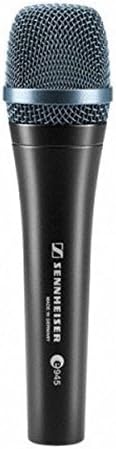
Image 2.1: The Sennheiser e945 Supercardioid Dynamic Handheld Vocal Microphone, front view.

Image 2.2: The included tripod microphone stand with collapsible legs.

Image 2.3: The 20-foot XLR-XLR cable for connecting the microphone.
3. Setup Guide
Follow these steps to set up your Sennheiser e945 microphone system:
- Assemble the Microphone Stand:
- Unfold the tripod legs of the microphone stand until they are fully extended and stable.
- Adjust the height of the stand using the ergonomic twist-action clutch. Ensure the stand is at a comfortable height for your use (e.g., 36.2 to 63 inches).
- Securely tighten the clutch to prevent the stand from slipping.
- Attach the Microphone Clamp:
- Screw the MZQ 800 Microphone Clamp onto the threaded top of the microphone stand. Ensure it is firmly attached. Note: Some microphone stands may have a removable adapter on the thread; ensure the correct thread size is exposed for the clamp.
- Mount the Microphone:
- Gently insert the Sennheiser e945 microphone into the MZQ 800 Microphone Clamp. The clamp is designed to securely hold the microphone.
- Connect the XLR Cable:
- Connect one end of the 20-foot XLR-XLR cable to the XLR output port at the base of the Sennheiser e945 microphone. Ensure the connection clicks into place.
- Connect the other end of the XLR cable to your audio mixer, audio interface, or amplifier's microphone input.
- Cable Management:
- Use the included cable clip to secure the XLR cable along the microphone stand, preventing it from dangling and reducing trip hazards.

Image 3.1: The XLR connector at the base of the Sennheiser e945 microphone.
4. Operating Instructions
Once your microphone system is set up, follow these guidelines for optimal operation:
- Microphone Placement:
Position the microphone approximately 2-6 inches from the sound source (e.g., vocalist's mouth). Experiment with distance to achieve the desired tone and to control proximity effect (increased bass response when close to the microphone).
- Gain Staging:
Adjust the gain (input level) on your mixer or audio interface. Start with the gain low and gradually increase it until you achieve a strong signal without clipping (distortion). The e945 is a dynamic microphone and does not require phantom power.
- Supercardioid Polar Pattern:
The e945 features a supercardioid polar pattern, which is highly effective at rejecting sound from the sides and rear. This is beneficial for minimizing feedback on stage and isolating the desired sound source in noisy environments. Ensure the microphone is pointed directly at the sound source.
- Minimizing Handling Noise:
While the e945 has a shock-mounted capsule to reduce handling noise, holding the microphone firmly and avoiding excessive movement will further minimize unwanted sounds.
- Hum Compensation:
The integrated hum-compensating coil helps reduce electrical interference. If you experience hum, ensure all cables are properly shielded and connected, and try to keep the microphone away from strong electromagnetic fields.
5. Care and Maintenance
Proper care will extend the life and performance of your Sennheiser e945 microphone:
- Cleaning:
Wipe the microphone body with a soft, dry cloth. For the microphone grille, use a soft brush to remove any debris. Do not use liquid cleaners directly on the microphone, especially near the grille or connector.
- Storage:
When not in use, store the microphone in its protective pouch to shield it from dust, moisture, and physical damage. Store in a cool, dry place.
- Cable Care:
Avoid kinking or sharply bending the XLR cable. Coil the cable loosely when storing to prevent internal wire damage.
- Environmental Conditions:
Avoid exposing the microphone to extreme temperatures, high humidity, or direct sunlight for prolonged periods.
6. Troubleshooting
If you encounter issues with your Sennheiser e945, refer to the following common problems and solutions:
| Problem | Possible Cause | Solution |
|---|---|---|
| No Sound Output |
|
|
| Low Volume / Weak Signal |
|
|
| Feedback (High-pitched squeal) |
|
|
| Hum or Buzzing Noise |
|
|
7. Technical Specifications
| Feature | Detail |
|---|---|
| Brand | Sennheiser |
| Model Number | 009422 |
| Microphone Form Factor | Microphone System |
| Polar Pattern | Supercardioid (Unidirectional) |
| Connectivity Technology | XLR |
| Connector Type | XLR |
| Frequency Response | 40 Hz |
| Audio Sensitivity | 54 dB |
| Signal-to-Noise Ratio | 73 dB |
| Material | Alloy Steel, Metal |
| Color | Black |
| Item Weight (Microphone) | 365 Grams (12.9 ounces) |
| Product Dimensions (L x W x H) | 1.85 x 1.85 x 7.32 inches |
| Recommended Uses | Singing, Speech |
| Compatible Devices | Smartphone, Laptop, Personal Computer, Tablet, Camera, Speaker, Amplifier, Gaming Console (via appropriate adapters/interfaces) |
| UPC | 745150750572 |
8. Warranty Information
The Sennheiser e945 Supercardioid Dynamic Handheld Vocal Microphone comes with a Limited 1-Year Warranty. The Tripod Microphone Stand also includes a Limited 1-Year Warranty, and the 20' XLR-XLR Cable comes with a 90-Day Warranty.
Please refer to the included warranty card for detailed terms and conditions, including coverage, duration, and how to make a claim. Retain your proof of purchase for warranty validation.
9. Customer Support
For technical assistance, product inquiries, or warranty claims, please contact Sennheiser customer support. Visit the official Sennheiser website for the most up-to-date contact information, including phone numbers, email support, and online resources.
You can also visit the Sennheiser Store on Amazon for additional product information and resources.
Related Documents - 009422
 |
Sennheiser e 945 Super-Cardioid Dynamic Vocal Microphone Instruction Manual Comprehensive instruction manual for the Sennheiser e 945 super-cardioid dynamic vocal microphone. Learn about its features, specifications, positioning, maintenance, and warranty. |
 |
Sennheiser e 935 Microphone: Quick Start Guide and Specifications Concise guide to the Sennheiser e 935 cardioid dynamic microphone, covering setup, in-box contents, cleaning, detailed specifications, connector pinouts, polar pattern, and frequency response data. Includes textual descriptions of diagrams and visuals. |
 |
Sennheiser Headphones User Manual Comprehensive user manual for Sennheiser headphones, detailing safety guidelines, usage instructions, maintenance, features, and troubleshooting steps. |
 |
Sennheiser e 906 Professional Drum Microphone User Manual User instructions and technical specifications for the Sennheiser e 906 professional drum microphone, covering installation and performance details. |
 |
e 604 Dynamic Instrument Microphone Instruction Manual Comprehensive instruction manual for the e 604 dynamic instrument microphone, covering setup, positioning, maintenance, and technical specifications. |
 |
Sennheiser e 865 / e 865 S Microphone Instruction Manual Comprehensive instruction manual for Sennheiser's e 865 and e 865 S super-cardioid condenser microphones, detailing installation, operation, positioning, maintenance, and technical specifications for optimal audio performance. |
Ask a question about this manual
Ask about setup, troubleshooting, compatibility, parts, safety, or missing instructions. Manuals+ will review the question and use this page’s manual context to help answer it.