
1. Product Overview
The BABY JOY Baby Walker is designed to provide a fun and practical experience for infants aged 6-18 months, supporting a maximum weight of 30 lbs. It features a foldable design for easy storage and transport, adjustable height settings to accommodate your baby's growth, and a large tray with removable interactive toys.

Figure 1: BABY JOY Baby Walker highlighting key features.
2. Safety Information
Your child's safety is paramount. Please read and follow all safety instructions carefully before using the BABY JOY Baby Walker.
- This baby walker is ASTM & CPSIA certified, ensuring it meets safety standards.
- Equipped with 6 anti-slip pads to reduce the risk of falling down stairs or rolling down slopes.
- A gap is reserved between the front of the walker and the wall to prevent finger pinching.
- The enlarged base ensures a stable center of gravity and prevents tipping over.
- Always supervise your child while they are in the walker.
- Do not use the walker near stairs, steps, or uneven surfaces.
- Ensure all locking mechanisms are securely engaged before placing your child in the walker.
- Regularly inspect the walker for any loose parts, damage, or wear.

Figure 2: Stable structure and anti-slip pads for enhanced safety.
3. Setup
The BABY JOY Baby Walker is designed for easy, tool-free assembly.
- Unfold the Walker: Carefully unfold the walker frame until it locks into an upright position. Ensure all hinges are securely engaged.
- Attach the Seat: Place the comfortable seat cushion into the designated area, ensuring it is properly aligned and secured.
- Adjust Height: The walker features 3 adjustable heights. Locate the adjustment lever (typically underneath the main tray) and press it to select the appropriate height for your baby. Ensure your baby's feet can comfortably touch the floor.
- Attach Toy Bar (Optional): The interactive toy bar can be easily snapped onto the front tray.

Figure 3: Height adjustment mechanism for growing babies.
4. Operating Instructions
- Placing Your Baby: Gently place your baby into the seat, ensuring their legs are through the leg openings and their feet can touch the floor.
- Height Adjustment: As your baby grows, adjust the walker's height using the lever located beneath the tray. There are 3 levels to ensure a comfortable and safe fit.
- Removable Toy Bar: The interactive toy bar can be easily removed by unsnapping it from the tray. This allows for a clear tray surface for snacks or other toys.
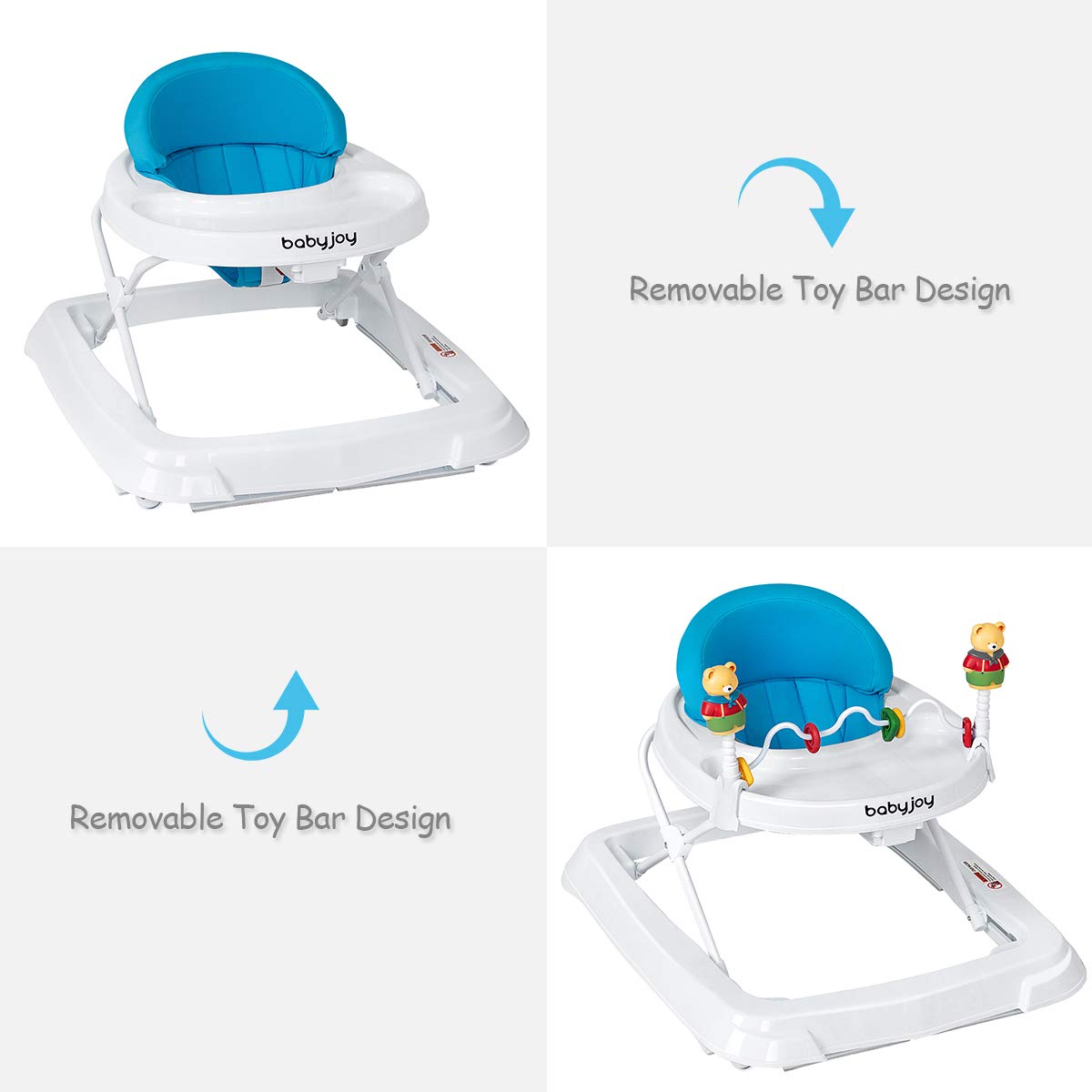
Figure 4: Removable toy bar for versatile use.

Figure 5: Detailed view of the height adjustment lever.
5. Maintenance
Regular cleaning and maintenance will ensure the longevity and hygiene of your baby walker.
- Cleaning the Tray: The large, fixed wrap-around tray is easy to clean. Wipe it down with a damp cloth and mild soap. Rinse thoroughly and dry completely before next use.
- Cleaning the Seat Cushion: The comfortable and breathable seat cushion is removable for convenient cleaning. It can be hand-washed with mild detergent and air-dried. Do not machine wash or tumble dry.
- Frame Cleaning: Wipe the plastic and metal parts of the frame with a damp cloth. Avoid abrasive cleaners.
- Inspection: Periodically check all screws, bolts, and moving parts to ensure they are secure and functioning correctly.

Figure 6: Removable and washable seat cushion for easy maintenance.
6. Troubleshooting
- Difficulty Moving on Carpet: The walker is designed with wheels for smooth surfaces. On some carpets, especially deep pile, movement may be restricted due to the anti-slip pads. If safe and desired, the anti-slip pads can be removed using a screwdriver to improve carpet mobility. Ensure increased vigilance if pads are removed.
- Seat Not Staying Connected: Ensure the seat cushion is correctly aligned and all attachment points are securely fastened to the walker frame. Refer to the assembly instructions for proper seat installation.
- Height Adjustment Issues: Verify that the height adjustment lever is fully disengaged before attempting to change the height. Apply firm, even pressure to the lever and adjust the tray to the desired level until it clicks into place.
7. Specifications
| Feature | Detail |
|---|---|
| Model Number | 1752 |
| Product Dimensions | 28"L x 24"W x 22"H |
| Item Weight | 8 pounds |
| Material Type | Plastic, Polyester (PP + TRP + Sponge) |
| Target Gender | Unisex |
| Age Range (Description) | 6-18 Months |
| Maximum Weight Recommendation | 30 Pounds |
| Additional Features | Foldable, 3-Level Height Adjustment, Removable Toys, Anti-slip Pads |

Figure 7: Product dimensions for reference.
8. Storage
The BABY JOY Baby Walker features a convenient foldable design for easy storage and transport.
- To fold, locate the red tab/lever underneath the tray. Twist and push it forward, then gently push the walker down until it collapses flat.
- Once folded, it takes up minimal space and can be stored under a sofa, bed, or in a car trunk.

Figure 8: Folded walker for compact storage.
9. Warranty and Support
For any questions, concerns, or support regarding your BABY JOY Baby Walker, please contact the manufacturer directly. Refer to the product packaging or the official BABY JOY website for contact information and warranty details.