
1. Introduction
This manual provides essential information for the safe and effective operation, maintenance, and troubleshooting of your Cuckoo Air Purifier C Model (B-CAC-C1210FW). Please read this manual thoroughly before using the appliance and retain it for future reference.
The Cuckoo Air Purifier C Model is designed to improve indoor air quality by filtering airborne particles and allergens. It features a multi-stage filtration system including a True HEPA filter, Pre-filter, and Active Carbon filter, capable of removing up to 99.97% of airborne particles as small as 0.3µg.
2. Safety Instructions
- Ensure the power cord is securely plugged into a suitable electrical outlet.
- Do not operate the appliance with a damaged cord or plug.
- Keep the air purifier away from water or other liquids. Do not immerse the unit.
- Do not block the air inlet or outlet vents. Maintain adequate clearance around the unit.
- Unplug the air purifier before cleaning or performing any maintenance.
- This appliance is for indoor use only.
- Do not allow children to operate the air purifier without supervision.
- Do not use the appliance near flammable gases or combustible materials.
3. Product Overview
3.1 Components
The Cuckoo Air Purifier C Model consists of the main unit, a multi-stage filter set, and a power cord.

Figure 3.1: Front view of the Cuckoo Air Purifier C Model. This image shows the sleek white design of the air purifier with the CUCKOO logo on the front panel and the illuminated top air outlet.
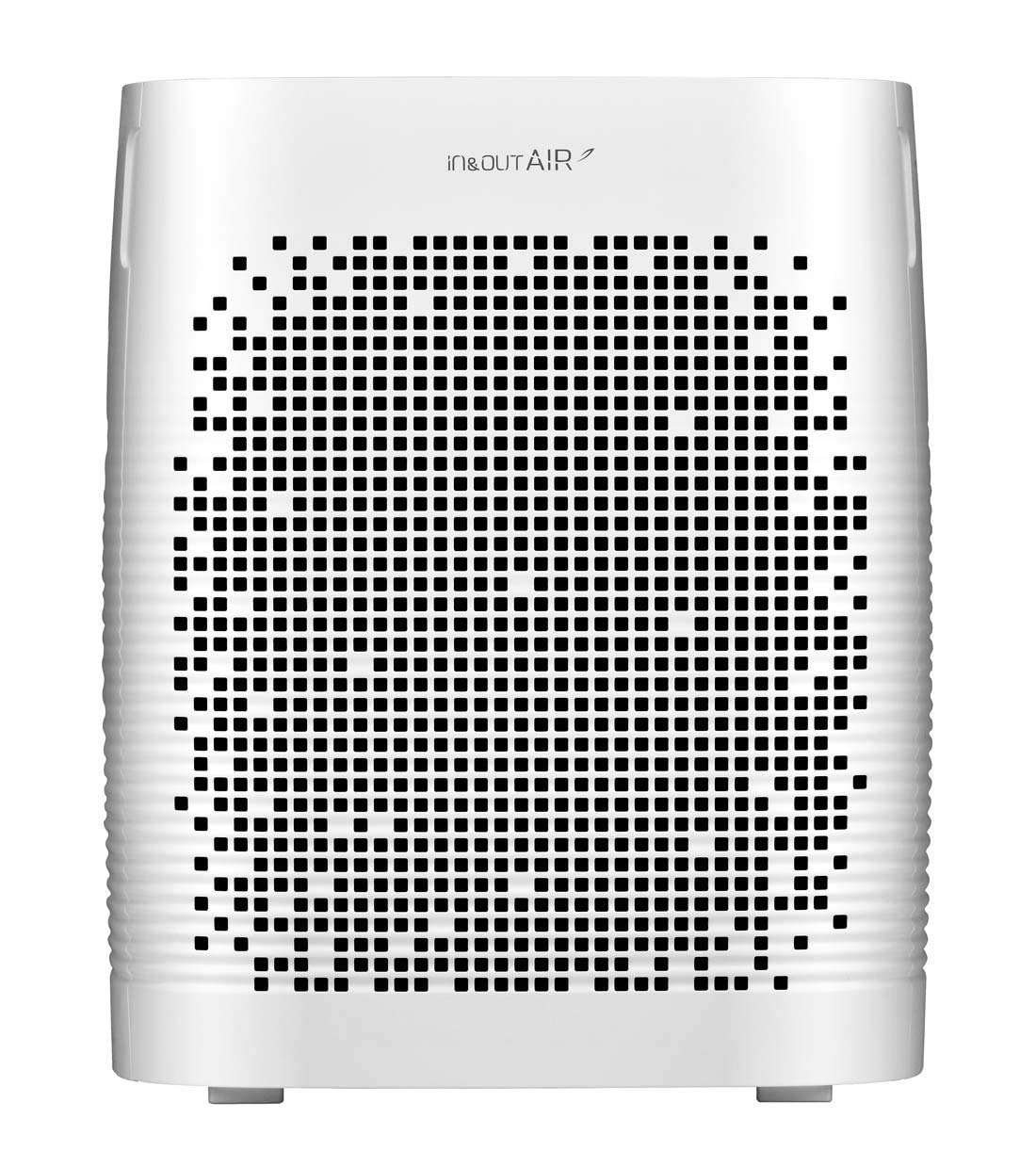
Figure 3.2: Rear view of the Cuckoo Air Purifier C Model. This image displays the back panel of the air purifier, featuring the air intake grille and the 'in&outAIR' branding.

Figure 3.3: Top view of the Cuckoo Air Purifier C Model control panel. This image highlights the intuitive touch control panel with various function buttons and a digital display, surrounded by the illuminated air outlet.
3.2 Filtration System
The Cuckoo Air Purifier C Model employs a comprehensive multi-stage filtration process to ensure clean air:
- Pre-filter: Captures large particles such as dust, dirt, and pet dander.
- Deodorization Filter: Eliminates unpleasant odors, volatile organic compounds (VOCs), smoke, and harmful gases.
- Ultra PM 2.5 HEPA Filter: Removes ultra-fine dust, PM2.5 particles, pollen, and dead body of mites with 99.97% efficiency.

Figure 3.4: Diagram illustrating the multi-stage filtration process. This image visually explains how the Pre-filter, Deodorization Filter, and Ultra PM 2.5 HEPA Filter work in sequence to purify the air, showing harmful elements being captured and clean air being released.

Figure 3.5: Close-up view of the individual filter layers. This image provides a detailed look at the structure of the Pre-filter, Deodorization Filter, and Ultra PM 2.5 HEPA Filter, highlighting their distinct designs and functions.
4. Setup
- Unpacking: Carefully remove the air purifier from its packaging. Remove all protective films and packaging materials.
- Filter Installation: Open the filter cover (usually located at the back or side) and ensure all filters are correctly installed. Remove any plastic bags from the filters before use.
- Placement: Place the air purifier on a flat, stable surface. Ensure there is at least 20-30 cm (8-12 inches) of clear space around the air inlet and outlet for optimal airflow. Avoid placing it directly against a wall or furniture.
- Power Connection: Plug the power cord into a standard electrical outlet.
5. Operating Instructions
5.1 Control Panel Functions
Refer to Figure 3.3 for the layout of the control panel.
- ON/OFF Button: Powers the unit on or off.
- MODE Button: Cycles through various operating modes (e.g., Auto, Sleep, Turbo).
- FAN SPEED Button: Adjusts the fan speed manually.
- TIME Button: Sets the operating timer.
- LOCK Button: Activates or deactivates the child lock function.
- AIR CLEANLINESS Indicator: Displays the current air quality level.
5.2 Operating Modes
The Cuckoo Air Purifier C Model offers several specialized modes:
- Auto Mode: Automatically adjusts fan speed based on detected air quality.
- Sleep Mode (Silent Mode): Operates at the lowest fan speed with reduced light indicators for quiet operation during sleep.
- Turbo Mode: Runs at maximum fan speed for rapid air purification.
- Baby Mode: Optimized for environments with infants, providing gentle and effective purification.
- Heavy Dust Mode: Specifically designed to handle high levels of dust and particulate matter.
- Repeat Mode: Cycles through specific settings or modes.

Figure 5.1: Overview of Cuckoo Air Purifier C Model features. This image lists key functionalities such as HEPA/Ultra PM 2.5 pollution sensor, Energy Eye, Air Curator mode, Auto mode, Sleep mode, Turbo mode, Baby mode, Heavy Dust mode, Repeat mode, and Air Cleanliness indicator.
5.3 Energy Eye Feature
The Energy Eye feature detects ambient light conditions. In dark environments, it automatically lowers power consumption and reduces display brightness to save energy.

Figure 5.2: Illustration of the Energy Eye feature. This image depicts the air purifier detecting light/dark conditions and automatically adjusting its operation to save energy, represented by icons for power plug and muted sound.
5.4 Air Circulation
The air purifier is designed to effectively circulate purified air throughout various room sizes.

Figure 5.3: Diagram showing air circulation patterns for small, medium, and large rooms. This image illustrates how the air purifier effectively distributes clean air across different room dimensions, with blue arrows indicating airflow.
6. Maintenance
Regular maintenance ensures optimal performance and extends the lifespan of your air purifier.
6.1 Cleaning the Pre-filter
- The pre-filter should be cleaned regularly, typically every 2-4 weeks, depending on air quality.
- Unplug the unit before cleaning.
- Remove the pre-filter from the unit.
- Use a vacuum cleaner to remove dust or rinse it under running water. If washing, ensure it is completely dry before re-installing.
6.2 Replacing Deodorization and HEPA Filters
- The deodorization and HEPA filters are not washable and must be replaced periodically.
- Filter replacement frequency depends on usage and air quality, typically every 6-12 months.
- Refer to the filter indicator light on the control panel for replacement alerts.
- To replace, unplug the unit, open the filter cover, remove the old filters, and insert new ones in the correct order.
- Dispose of used filters responsibly.
7. Troubleshooting
| Problem | Possible Cause | Solution |
|---|---|---|
| Unit does not turn on | Power cord not plugged in; No power at outlet | Check power cord connection; Test outlet with another device |
| Weak airflow | Filters are dirty or clogged; Air inlets/outlets blocked | Clean or replace filters; Ensure clear space around the unit |
| Unusual noise | Foreign object inside; Unit not on a stable surface | Unplug and check for obstructions; Place on a flat, stable surface |
| Odor coming from unit | Filters need replacement; New filter odor | Replace deodorization filter; Odor should dissipate after a few days of use |
| Air quality indicator always red/poor | High pollution level; Sensor dirty | Allow more time for purification; Clean the PM2.5 sensor (refer to maintenance section) |
If the problem persists after attempting these solutions, please contact customer support.
8. Specifications
| Feature | Detail |
|---|---|
| Model Number | B-CAC-C1210FW |
| Brand | CUCKOO |
| Colour | White |
| Product Dimensions (D x W x H) | 20D x 54W x 73H Centimeters |
| Item Weight | 4 kg |
| Control Method | Touch Control |
| Filtration Type | True HEPA, Pre-filter, Active Carbon |
| Included Components | 1 Air Purifier |
9. Warranty and Support
9.1 Warranty Information
This Cuckoo Air Purifier C Model comes with a 1-year warranty from the date of purchase. Please retain your purchase receipt as proof of warranty. The warranty covers manufacturing defects and malfunctions under normal use. It does not cover damage caused by misuse, accidents, unauthorized repairs, or normal wear and tear.
9.2 Product Registration
To ensure hassle-free service and support, it is recommended to register your product.

Figure 9.1: Product registration and support contact details. This image provides instructions to visit cuckooindia.in for product registration and lists contact information for support.
Visit: www.cuckooindia.in and click on 'product registration' to fill in your details.
9.3 Customer Support
For any support or inquiries, please contact Cuckoo customer service:
- Toll-Free Number: 1800 212 1978
- Email: info@cuckooindia.in


