
Introduction
This manual provides detailed instructions for the installation, operation, maintenance, and troubleshooting of your Kenwood DDX276BT Double DIN Bluetooth Car Stereo. The DDX276BT features a 6.2-inch clear resistive touchscreen display and offers various media playback options, including DVD, USB, and Bluetooth audio.
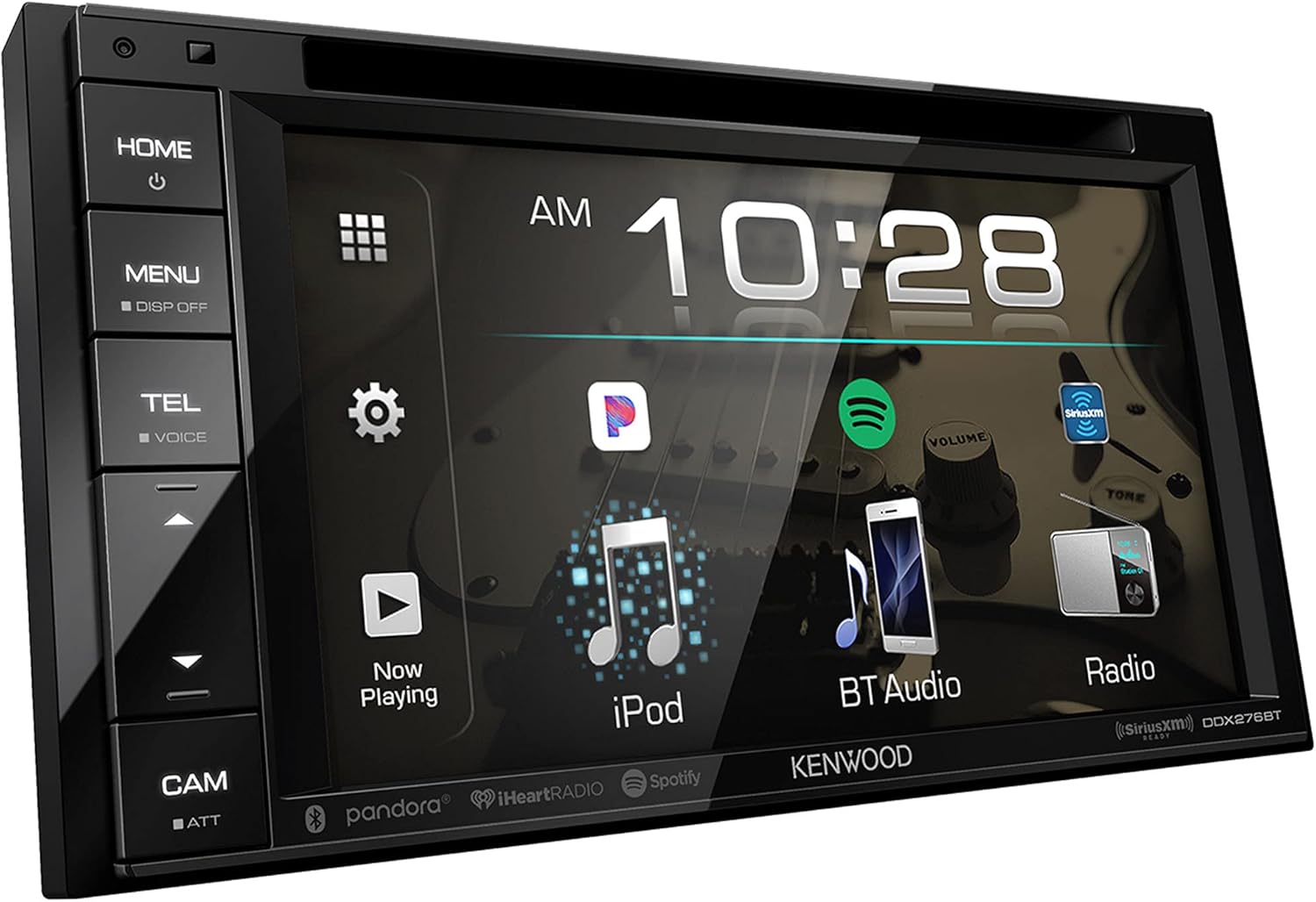
Figure 1: Front view of the Kenwood DDX276BT. This image displays the Kenwood DDX276BT's 6.2-inch clear resistive touchscreen, showing the main home screen interface with digital clock, AM/FM radio, iPod, Bluetooth Audio, Pandora, iHeartRadio, and Spotify icons.
Setup and Installation
Proper installation is crucial for optimal performance. It is recommended to have this unit installed by a qualified professional. Ensure the vehicle's power is disconnected before beginning installation.
Wiring Connections
Refer to the wiring diagram provided with your unit for specific connections. Key connections include power, ground, speaker outputs, and auxiliary inputs/outputs. The unit also includes dedicated wires for parking brake (PRK SW) and reverse camera (REVERSE) signals.

Figure 2: Rear panel connections. This image provides a detailed view of the rear panel of the Kenwood DDX276BT, highlighting the power harness, USB input, audio/video input/output, and specific wiring for parking brake (PRK SW) and reverse camera (REVERSE) connections.
iDatalink Maestro RR Integration
When an Automotive Data Solutions iDatalink Maestro RR is connected to the DDX276BT, it provides an interface with factory infotainment features such as Satellite Radio, USB Media Player, Bluetooth hands-free, and music streaming. Vehicle information like HVAC, performance data, and TPMS can also be displayed.
Operating Instructions
Touchscreen Interface
The DDX276BT features a 6.2-inch clear resistive touchscreen LCD. Navigate menus and control functions by touching the corresponding icons on the screen. The interface is designed for intuitive use with easy-to-identify icons.
Audio and Media Playback
- DVD Playback: Insert a DVD into the disc slot to begin playback.
- USB Media: Connect a USB device to the USB port to access audio and video files.
- Radio: Select the Radio source to access AM/FM tuning.
- Audio Adjustments: The receiver offers various volume level adjustments and bass management features to customize your audio output.

Figure 3: Music Playback Interface. The Kenwood DDX276BT screen during iPod music playback, illustrating album artwork, track title, artist, and playback controls. This demonstrates the unit's media display capabilities.
Bluetooth Connectivity
Pair your iPhone or Android device via Bluetooth for hands-free calling and audio streaming. Access popular music applications directly from the unit.
- Pairing: Refer to the Bluetooth settings menu on the unit and your mobile device to initiate pairing.
- Smartphone Apps: Install Spotify, Pandora, and/or iHeartAuto apps on your device. Connect your iPhone (via USB or Bluetooth) or Android (via Bluetooth only) to enjoy music playback through the receiver.
Rear View Camera
An optional rear view camera (sold separately) can be connected to enhance safety when backing up. The unit supports built-in, adjustable parking guidelines to assist with maneuvering.
Maintenance
To ensure the longevity and optimal performance of your DDX276BT, follow these maintenance guidelines:
- Screen Cleaning: Use a soft, dry cloth to gently wipe the touchscreen. For stubborn smudges, slightly dampen the cloth with water or a screen-safe cleaner. Avoid abrasive materials or harsh chemicals.
- General Care: Keep the unit free from dust and debris. Avoid exposing it to extreme temperatures or direct sunlight for extended periods.
Troubleshooting
If you encounter issues with your Kenwood DDX276BT, refer to the following common troubleshooting steps:
| Problem | Possible Cause | Solution |
|---|---|---|
| No power | Incorrect wiring, blown fuse | Check power and ground connections. Inspect vehicle fuses and the unit's fuse. |
| No sound | Speaker wiring issue, volume too low, mute activated | Verify speaker connections. Increase volume. Check if mute function is active. |
| Bluetooth connection unstable or fails to connect | Interference, device compatibility, pairing issue | Ensure device is within range. Delete existing pairings on both devices and re-pair. Update device firmware if available. Try restarting both the stereo and the mobile device. |
| Touchscreen unresponsive | System freeze, calibration issue | Perform a soft reset (refer to the unit's specific reset procedure). If issue persists, contact support. |
If the problem persists after attempting these solutions, please contact Kenwood customer support or your authorized dealer.
Specifications
- Model: DDX276BT
- Display: 6.2 Inches, Clear Resistive Touch Panel LCD with LED Backlighting
- Display Resolution: 800 (H) x 480 (V) x RGB (1,152,000 total pixels)
- Media Type: DVD, USB
- Connectivity: Bluetooth, USB
- Dimensions (Product): 12 x 6.5 x 9.5 inches (approximate)
- Item Weight: 5.01 pounds (approximate)
- Manufacturer: KENWOOD
Warranty Information
Your Kenwood DDX276BT is covered by a manufacturer's warranty. Please refer to the warranty card included with your product packaging or visit the official Kenwood website for detailed terms and conditions regarding warranty coverage, duration, and service procedures.
Customer Support
For further assistance, technical support, or service inquiries, please contact Kenwood customer support. You can typically find contact information, FAQs, and additional resources on the official Kenwood website.
Online Resources: Visit the Kenwood official website for product updates, FAQs, and support documents.