1. Introduction
Thank you for purchasing the Boxis Autoshred AF60 Micro-Cut Paper Shredder. This manual provides important information regarding the setup, operation, maintenance, and troubleshooting of your new shredder. Please read this manual thoroughly before using the shredder to ensure safe and efficient operation.
The Boxis Autoshred AF60 is designed for secure destruction of sensitive documents, transforming them into tiny micro-cut particles. Its auto-feed feature allows for convenient shredding of multiple sheets, making it ideal for home or small office use.
2. Safety Instructions
WARNING: Failure to follow these safety instructions may result in injury or damage to the shredder.
- Keep hands, hair, loose clothing, ties, and jewelry away from the paper feed opening.
- Do not insert fingers or other body parts into the shredder opening.
- Keep children and pets away from the shredder at all times.
- Unplug the shredder from the power outlet when not in use or before moving, cleaning, or emptying the waste bin.
- Do not shred metal objects, large paper clips, or adhesive labels (unless specifically designed for shredding).
- Do not spray any flammable aerosols or lubricants into or around the shredder.
- Do not shred wet or damp paper, as this can cause jams and damage the shredder.
- Operate the shredder on a flat, stable surface.
- Do not operate the shredder if the power cord is damaged.
3. Package Contents
Please check the box for the following items:
- Boxis AF60 Paper Shredder Unit
- User Manual
4. Setup
- Unpack the Shredder: Carefully remove the shredder from its packaging.
- Position the Shredder: Place the shredder on a flat, stable surface. Ensure there is adequate space around the unit for ventilation and access to the waste bin. The shredder is equipped with casters for easy movement.
- Connect Power: Plug the power cord into a standard electrical outlet.
- Waste Bin: Ensure the pull-out waste bin is correctly inserted into the shredder. The shredder will not operate if the bin is not properly seated.

Figure 4.1: Boxis Autoshred AF60 Paper Shredder with shredded paper in the waste bin.

Figure 4.2: Side view of the shredder showing the pull-out waste bin.
5. Operating Instructions
5.1 Control Panel
The control panel typically features an Auto/On setting, an Off setting, and a Reverse setting. Indicators for Overload and Overheat may also be present.
5.2 Auto-Feed Operation
The auto-feed tray allows for convenient shredding of up to 60 sheets of paper at once.
- Ensure the shredder is plugged in and the power switch is set to 'Auto' or 'On'.
- Lift the auto-feed tray cover.
- Place up to 60 sheets of paper neatly into the auto-feed tray. Ensure the paper is flat and aligned.
- Close the auto-feed tray cover. The shredder will automatically detect the paper and begin shredding.

Figure 5.1: Auto-feed tray for up to 60 sheets.
5.3 Manual Feed Operation
For smaller quantities of paper or credit cards, use the manual feed slot.
- Ensure the shredder is plugged in and the power switch is set to 'Auto' or 'On'.
- For Paper: Insert up to 6 sheets of paper into the manual feed slot. The shredder will start automatically.
- For Credit Cards: Insert one credit card at a time into the designated credit card slot (usually within the manual feed opening).
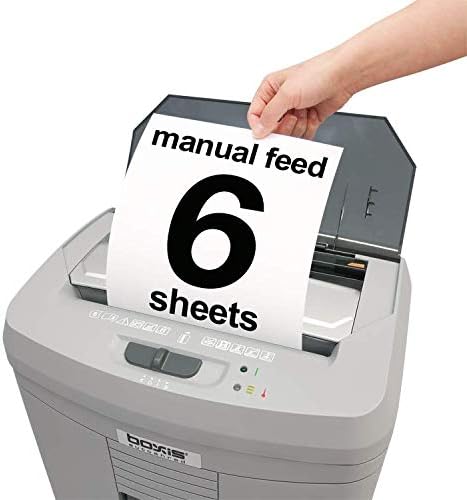
Figure 5.2: Manual feed slot for up to 6 sheets.
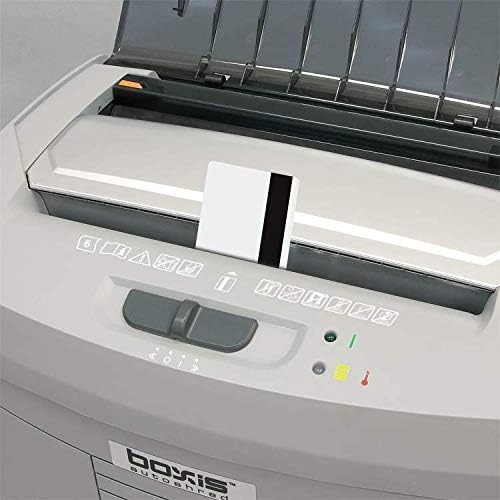
Figure 5.3: Shredding a credit card through the manual feed slot.
5.4 Overload and Overheat Protection
The shredder is equipped with safety features to prevent damage:
- Overload Protection: If too many sheets are inserted, the shredder may stop. Use the 'Reverse' function to clear the jam, then reduce the number of sheets.
- Overheat Protection: For continuous shredding tasks, the motor may overheat. An indicator light will illuminate, and the shredder will automatically shut off. Allow the shredder to cool down for approximately 20-30 minutes before resuming operation.
6. Maintenance
6.1 Emptying the Waste Bin
The Boxis Autoshred AF60 has a 3.6-gallon pull-out waste bin with a window to monitor the shredded material level. Empty the bin regularly to prevent jams and ensure optimal performance.
- Unplug the shredder from the power outlet.
- Pull out the waste bin from the front of the shredder.
- Dispose of the shredded material.
- Slide the waste bin back into the shredder until it is securely in place.
6.2 Shredder Oiling
Regular oiling of the shredder blades is recommended, especially for micro-cut shredders, to maintain performance and extend the life of the unit. Use shredder-specific oil (not aerosol lubricants).
- Apply a thin line of shredder oil across the paper entry slot.
- Run the shredder in 'Reverse' for 5-10 seconds to distribute the oil.
- Repeat this process after every 30 minutes of continuous shredding or at least once a month with regular use.
6.3 Cleaning
Clean the exterior of the shredder with a soft, dry cloth. Do not use abrasive cleaners or solvents.
7. Troubleshooting
| Problem | Possible Cause | Solution |
|---|---|---|
| Shredder does not turn on. | No power; Waste bin not properly inserted; Overheat protection active. | Check power connection; Ensure waste bin is fully seated; Allow shredder to cool down. |
| Paper jam. | Too many sheets inserted; Paper not inserted straight; Staples/paper clips. | Switch to 'Reverse' to clear; Remove excess paper; Remove staples/clips before shredding. |
| Shredder stops during operation. | Overheat protection activated; Waste bin full. | Allow shredder to cool down; Empty the waste bin. |
| Shredder runs continuously. | Paper sensor obstructed or faulty. | Turn off the shredder, unplug, and check for any paper debris in the feed slot. Clean if necessary. |
8. Specifications
| Feature | Specification |
|---|---|
| Brand | BOXIS |
| Model | AF60 |
| Cut Type | Micro Cut |
| Shred Size | 0.16" x 0.39" (4 x 10mm) |
| Security Level | DIN P-4 |
| Auto-Feed Capacity | 60 sheets (20 lb bond paper) |
| Manual Feed Capacity | 6 sheets (20 lb bond paper) |
| Shred Speed | Up to 11 feet per minute |
| Waste Bin Capacity | 3.6 Gallons |
| Continuous Run Time | 20 minutes |
| Cool Down Time | Approx. 20-30 minutes |
| Noise Level | 65dB |
| Dimensions (L x W x H) | 32.77 x 22.61 x 46.48 cm (12.9 x 8.9 x 18.3 inches) |
| Weight | 7.26 kg (16 lbs) |
| Material | Plastic, Metal |
| Special Features | Auto feed, Anti-jam, Auto start/stop, Pull-out bin with window, Overload & Overheat indicator, Casters |
9. Warranty & Support
Warranty information for your Boxis Autoshred AF60 shredder is typically included with the product packaging or can be found on the manufacturer's official website. Please refer to these resources for details on warranty coverage and terms.
For technical support, service, or replacement parts, please contact Boxis customer service through the contact information provided in your product documentation or on the official Boxis website.