
1. Introduction
Thank you for purchasing the BeamZ SLIMPAR 30 LED PAR Projector. This compact and powerful lighting fixture is designed for a variety of applications, from stage lighting to architectural uplighting. It features 6 high-power 3W RGB LEDs, offering vibrant color mixing and a range of dynamic effects. This manual provides essential information for safe operation, setup, and maintenance of your device.
Key features include DMX control, multiple pre-programmed shows, sound-activated mode with adjustable sensitivity, and an auto mode with adjustable speed. Its robust design and versatile functionality make it an ideal choice for DJs, bands, event organizers, and venues.

Image 1.1: The BeamZ SLIMPAR 30 LED PAR Projector, showcasing its compact design and six bright green LEDs.
2. Safety Instructions
WARNING: To reduce the risk of electric shock, do not open this unit. There are no user-serviceable parts inside. Refer all servicing to qualified service personnel.
- Read this manual thoroughly before operating the unit.
- Keep this manual for future reference.
- Always connect the unit to a grounded power outlet.
- Disconnect from mains power before cleaning or servicing.
- Do not expose the unit to rain or moisture.
- Ensure adequate ventilation around the unit.
- Do not look directly into the light source when the unit is on.
- Use only the specified voltage (230Vac / 50Hz).
3. Package Contents
Upon opening the box, ensure all items listed below are present and in good condition:
- 1x BeamZ SLIMPAR 30 LED PAR Projector
- 1x Double Mounting Bracket
- 1x Power Cable
- 1x User Manual (this document)
- 1x IRC Remote Control (if included with your specific package)
If any items are missing or damaged, please contact your dealer immediately.
4. Setup
4.1 Mounting
The SLIMPAR 30 comes with a double mounting bracket for versatile positioning. It can be placed on a flat surface, mounted to a truss using a clamp (not included), or attached to a wall/ceiling.
- Ensure the mounting surface or truss can support the weight of the fixture.
- Always use a safety cable when mounting overhead.
- Adjust the bracket to the desired angle and secure it with the locking knobs.
4.2 Power Connection
Connect the supplied power cable to the power input on the rear of the unit and then to a suitable 230Vac / 50Hz grounded power outlet.
4.3 DMX Connection (Optional)
For DMX control, connect a 3-pin XLR DMX cable from your DMX controller's output to the DMX IN port of the SLIMPAR 30. For multiple units, daisy-chain them by connecting the DMX OUT of the first unit to the DMX IN of the next, and so on.
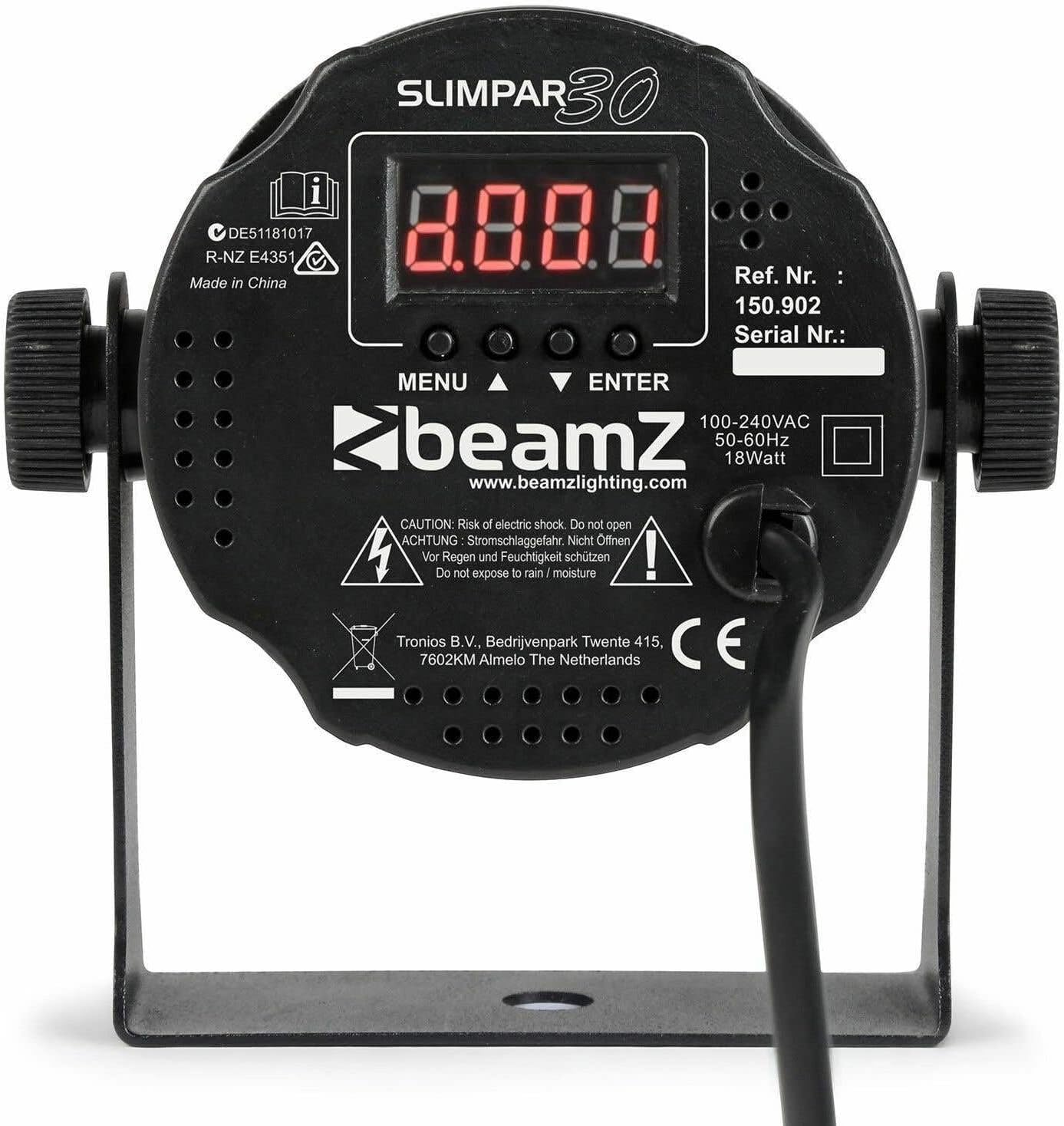
Image 4.1: Rear view of the BeamZ SLIMPAR 30, showing the control panel with LED display, DMX input/output, and power connection.
5. Operating
5.1 Control Panel Overview
The SLIMPAR 30 features a 4-digit LED display and four control buttons on its rear panel:
- MENU: Cycles through the main menu options.
- UP/DOWN: Navigates through sub-menus or adjusts parameter values.
- ENTER: Confirms the selected option or value.
5.2 Operating Modes
The SLIMPAR 30 offers several operating modes:
- DMX Mode: Allows control via an external DMX controller. Select the desired DMX channel mode (3, 4, or 7 channels) and set the DMX address.
- Auto Mode: The unit runs through pre-programmed light shows automatically. Speed can be adjusted.
- Sound-Activated Mode: The light shows react to music or sound detected by the built-in microphone. Sensitivity can be adjusted.
- Master/Slave Mode: Link multiple SLIMPAR 30 units together. One unit acts as the master, controlling all other slave units.
- Manual Color Mode: Allows direct selection of static colors or manual mixing of RGB values.

Image 5.1: Visual representation of the BeamZ SLIMPAR 30's pre-programmed shows and auto mode with adjustable speed, demonstrating dynamic lighting effects.

Image 5.2: The BeamZ SLIMPAR 30 demonstrating its ability to produce various colored lighting effects, suitable for different event atmospheres.

Image 5.3: The BeamZ SLIMPAR 30 effectively illuminating a room, showcasing its suitability for architectural and event lighting.
5.3 Remote Control (IRC)
If your package includes the IRC remote control, you can conveniently operate the SLIMPAR 30 from a distance. The remote allows access to various functions such as mode selection (Auto, Sound, DMX), color selection, strobe, and blackout.

Image 5.4: The IRC remote control for the BeamZ SLIMPAR 30, showing buttons for various functions like auto mode, sound mode, DMX, color selection, and strobe.
6. Maintenance
6.1 Cleaning
Regular cleaning helps maintain optimal light output and extends the lifespan of the unit.
- Always disconnect the unit from power before cleaning.
- Use a soft, lint-free cloth to wipe the exterior casing.
- Clean the lens regularly with a soft cloth and a mild glass cleaner to ensure clear light projection.
- Do not use abrasive cleaners or solvents.
6.2 Storage
When not in use, store the unit in a dry, dust-free environment, preferably in its original packaging or a suitable carrying case.
7. Troubleshooting
| Problem | Possible Cause | Solution |
|---|---|---|
| No power | Power cable disconnected; no power from outlet. | Check power cable connection; test outlet with another device. |
| No light output | Unit in blackout mode; incorrect DMX setting; internal fault. | Check remote/control panel for blackout; verify DMX address/mode; contact support if fault persists. |
| DMX not working | Incorrect DMX address; wrong DMX mode; faulty cable; DMX terminator missing. | Verify DMX address and channel mode; check DMX cables; use a DMX terminator on the last unit. |
| Sound mode not reacting | Sensitivity too low; no sound input. | Increase sound sensitivity; ensure sound source is loud enough and close to the unit. |
If the problem persists after trying these solutions, please contact BeamZ customer support or your dealer.
8. Specifications
| Feature | Detail |
|---|---|
| Light Source | 6 x 3W 3-in-1 RGB LEDs |
| Beam Angle | 12° |
| Field Angle | 29° |
| Luminous Intensity | 3642 lx @ 1m |
| Flash Speed | 1 - 21 fps |
| DMX Channels | 3, 4, or 7 channels |
| DMX Connection | 3-pin XLR In/Out |
| Operating Modes | DMX, Auto, Sound-Activated, Master/Slave, Manual Color |
| Power Supply | 230Vac / 50Hz |
| Power Consumption | 18 Watts (Max) |
| Dimensions (L x W x H) | 13 x 8.5 x 12.5 cm |
| Weight | 0.25 kg (250 g) |
| Manufacturer | Tronios B.V. |
| Model Number | SlimPar30 (Ref. 150902) |
9. Warranty and Support
This product is covered by a manufacturer's warranty against defects in materials and workmanship. For specific warranty terms and conditions, please refer to the warranty card included with your product or contact your local dealer.
For technical support, troubleshooting assistance, or spare parts, please contact your authorized BeamZ dealer or visit the official BeamZ website for contact information.
Please retain your proof of purchase for any warranty claims.


