
1. Introduction
This manual provides instructions for the TV Bolts Universal Mounting Hardware Kit, designed to facilitate the secure wall mounting of Hisense flat screen and curved televisions. This kit includes a comprehensive selection of bolts, screws, and washers to accommodate various Hisense TV models and wall mount types.
2. Product Overview
The TV Bolts Universal Mounting Hardware Kit is engineered for compatibility with all Hisense flat screen and curved televisions. The components are manufactured from zinc-plated steel and feature an electrostatic discharge preventive coating. The kit is assembled in the USA and shipped in an ESD-safe package.
Kit Contents:
- Various sizes of screws and bolts for TV wall mounting.
- Assorted washers to ensure proper fit and protection.
- Spacers for achieving correct bolt length and clearance.
All components meet ASTM, ISO, ANSI, and DIN specifications for quality and performance.
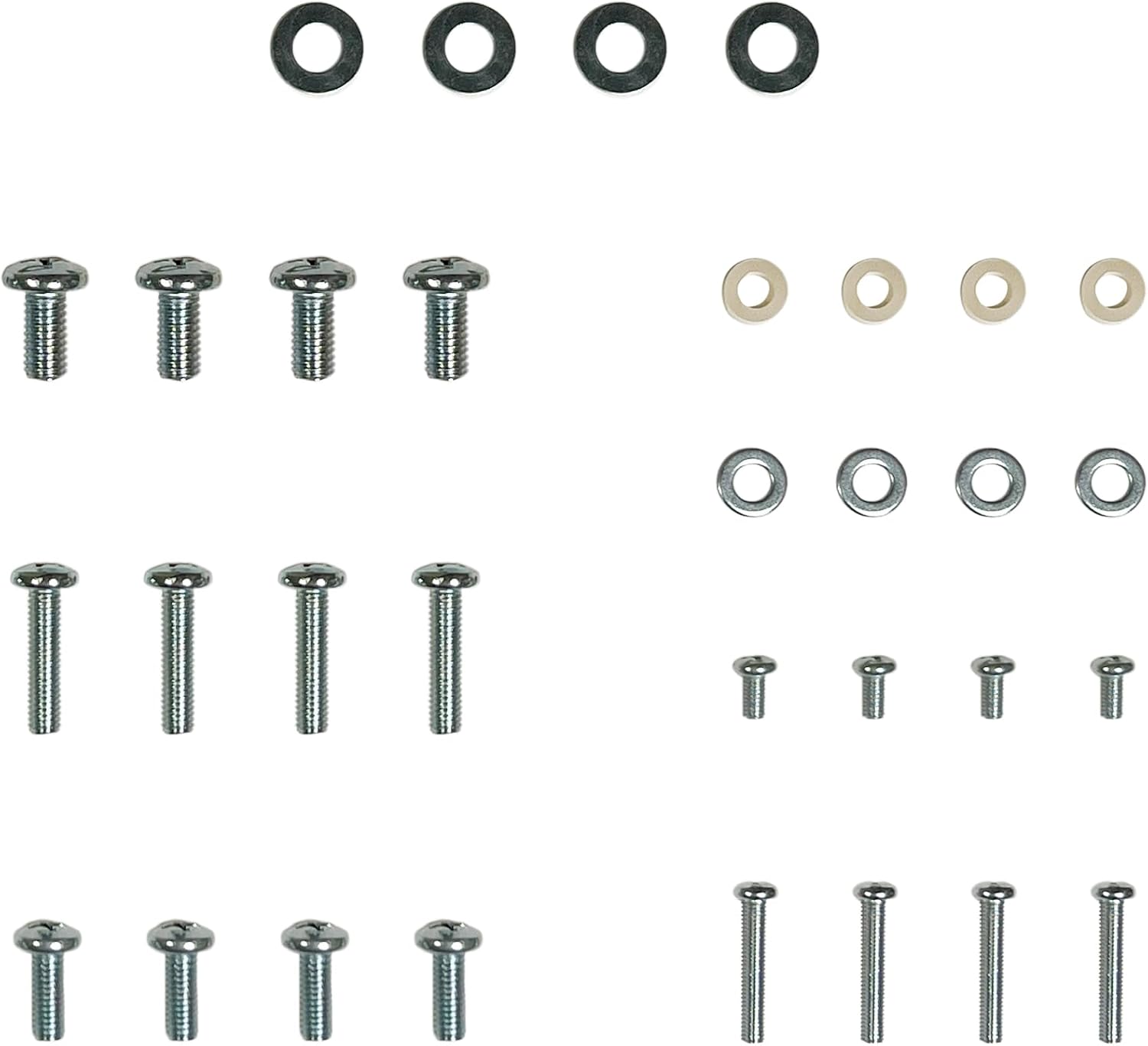
3. Setup and Installation
Before beginning installation, ensure you have your TV wall mount and the TV Bolts hardware kit. Always refer to your specific TV's user manual for any model-specific mounting instructions or VESA pattern requirements.
3.1 Identifying Mounting Holes
Locate the four threaded mounting holes on the back of your Hisense television. These holes are typically arranged in a square or rectangular pattern, known as the VESA mounting standard.

3.2 Selecting Hardware
From the kit, select the bolts that fit snugly into your TV's mounting holes without being excessively long. The bolt should engage several threads but not bottom out or protrude too far into the TV's internal components. Use the provided washers to protect the TV's casing and ensure a secure fit. If the bolts are slightly too long, use the appropriate spacers to achieve the correct length.
3.3 Attaching Mounting Brackets
Align your wall mount's vertical brackets with the TV's mounting holes. Insert the selected bolts through the bracket holes, then through any necessary washers or spacers, and into the TV's threaded holes. Hand-tighten the bolts initially, then use a screwdriver to secure them firmly. Do not overtighten, as this can damage the TV or the bolts.
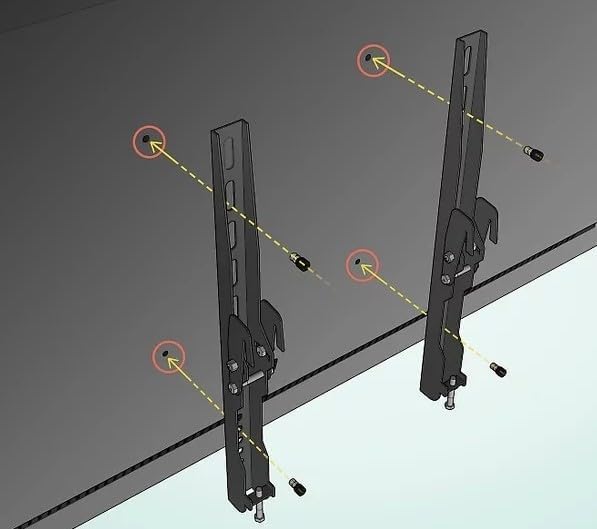
Once the brackets are securely attached to the TV, proceed with mounting the TV to your wall mount according to your wall mount's specific instructions.
4. Usage Considerations
- Always ensure the selected bolt length is appropriate for your TV model to prevent internal damage.
- Use washers to distribute pressure evenly and protect the TV's plastic casing from direct contact with the bolt head.
- Avoid overtightening the bolts. Tighten until snug, then apply a small additional turn to secure.
- Ensure the wall mount itself is securely fastened to a structural element in your wall, such as a stud, according to the wall mount manufacturer's instructions.
5. Maintenance
Periodically inspect the mounting bolts and connections for any signs of loosening. If any bolts appear loose, gently retighten them. Check for any visible signs of corrosion or wear on the hardware. If corrosion is present, consider replacing the affected components.
6. Troubleshooting
6.1 Bolts Do Not Fit
- Too large or too small diameter: Double-check your TV's manual for the correct bolt diameter (e.g., M6, M8). This kit is designed for Hisense TVs, but variations can occur.
- Too long: Use the provided spacers to adjust the effective length of the bolt. Ensure the bolt does not bottom out in the TV's threaded hole before securing the bracket.
- Too short: Ensure you are not using too many washers or spacers. If the shortest appropriate bolt still does not engage enough threads, contact customer support.
The TV Bolts kit is guaranteed to fit any Hisense flat screen or curved TV. If you encounter fitment issues, a full refund will be issued.
7. Specifications
| Attribute | Detail |
|---|---|
| Brand | TV Bolts |
| Manufacturer | QuipFlex Industries |
| Material | Alloy Steel |
| Mounting Type | Wall Mount |
| Compatible Devices | Television |
| Product Dimensions | 17.78 x 12.7 x 0.64 cm |
| Product Weight | 200 g |
| UPC | 606314938635 |
8. Warranty and Support
The TV Bolts Universal Mounting Hardware Kit is guaranteed to fit any Hisense flat screen or curved television. If the kit does not fit your specific Hisense TV model, a full refund will be issued.
For further assistance, technical support, or to inquire about the fitment guarantee, please contact QuipFlex Industries, the manufacturer of TV Bolts products.