
Introduction
This manual provides detailed instructions for the safe and effective use of the TUIREL K100 Laser Distance Measure. Please read this manual thoroughly before operating the device and keep it for future reference.
The TUIREL K100 is a compact and durable laser distance meter designed for accurate measurements up to 100 meters (328 feet). It features an aluminum alloy frame, a backlit LCD display, and various measurement functions including distance, area, volume, and Pythagorean calculations.
Safety Information
Laser Radiation: This device emits Class 2 laser radiation. Do not stare into the laser beam. Avoid direct eye exposure. The laser output is less than 1mW at 650nm.
Battery Safety: Use only specified battery types (2x AAA). Do not mix old and new batteries, or different types of batteries. Remove batteries if the device will not be used for an extended period.
General Safety:
- Do not attempt to disassemble or modify the device.
- Keep the device away from water and extreme temperatures.
- Ensure the measurement surface is clear and stable.
- Do not use the device in explosive environments.
Product Overview
The TUIREL K100 Laser Distance Measure is designed for precision and ease of use. It incorporates a backlit LCD for clear readings and a robust aluminum alloy casing for durability. The device also includes an integrated cross lens for auxiliary line projection.
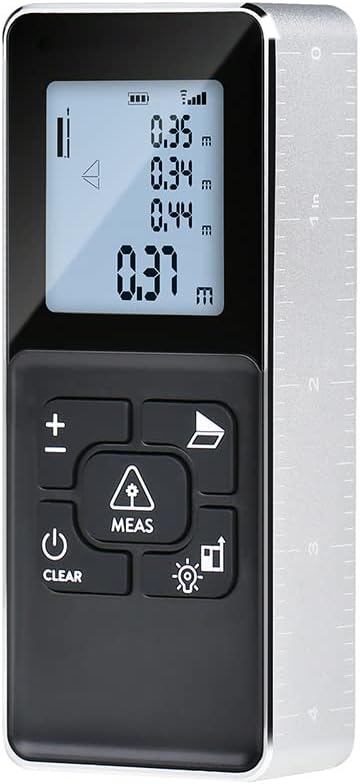
Figure 1: Front view of the TUIREL K100 Laser Distance Measure, showing the display and control buttons.

Figure 2: Detailed view of the TUIREL K100 LCD display and button functions, indicating battery level, signal strength, measurement modes, and control buttons.
Setup
1. Battery Installation
The TUIREL K100 requires two AAA batteries (not included). To install:
- Locate the battery compartment on the back of the device.
- Open the battery compartment cover.
- Insert two AAA batteries, ensuring correct polarity (+/-).
- Close the battery compartment cover securely.
2. Powering On/Off
Press the ON/MEAS button (labeled with a power symbol and "CLEAR") once to power on the device. The backlit LCD will illuminate. To power off, press and hold the ON/MEAS button for a few seconds.
Operating Instructions
1. Basic Measurement
To perform a single distance measurement:
- Power on the device.
- Point the laser beam at the target.
- Press the MEAS button once. The measurement will be displayed on the main display.
2. Unit Conversion
The device supports measurements in Inches, Feet, Decimal Feet, and Metric Units (meters). To change the unit, press the +/- button (also used for addition/subtraction) repeatedly until the desired unit is displayed.
3. Measurement Reference Setting
The measurement reference point can be adjusted (front or rear edge of the device). Press the Lighting/Measurement Reference Setting button to toggle between reference points. An icon on the LCD will indicate the current reference point.
4. Advanced Measurement Functions
The K100 offers several advanced measurement modes:
- Distance Measurement: Standard single measurement.
- Continuous Measurement (Min/Max): Press and hold the MEAS button to activate. The device will continuously measure, displaying the current, minimum, and maximum distances.
- Area Measurement:
- Press the Volume button (labeled with a square icon) once to enter area mode.
- Measure the first side (e.g., length).
- Measure the second side (e.g., width). The device will automatically calculate and display the area.
- Volume Measurement:
- Press the Volume button twice to enter volume mode.
- Measure the length.
- Measure the width.
- Measure the height. The device will automatically calculate and display the volume.
- Pythagorean Method (Two Points / Three Points): Used for indirect height or distance measurements.
- Press the Volume button three or four times to select the desired Pythagorean mode.
- Follow the on-screen prompts to take the required measurements (e.g., hypotenuse, base). The device will calculate the unknown side.
- Addition/Subtraction: After a measurement, press the +/- button to add or subtract subsequent measurements.

Figure 3: Illustration of various measurement methods including Distance, Area, Volume, Continuous, Single Pythagorean, and Dual Pythagorean.
5. Backlight and Integrated Cross Lens
The device features a backlit display for visibility in dark areas. Press the Lighting/Measurement Reference Setting button briefly to toggle the backlight. The integrated cross lens, stored in the battery hole, can be used to project auxiliary lines for tasks like picture hanging.
Maintenance
Proper maintenance ensures the longevity and accuracy of your TUIREL K100 Laser Distance Measure.
- Cleaning: Use a soft, damp cloth to clean the device. Do not use abrasive cleaners or solvents. Clean the laser lens gently with a lens cloth.
- Storage: Store the device in a dry, cool place, away from direct sunlight and extreme temperatures. If storing for an extended period, remove the batteries.
- Avoid Impact: Protect the device from drops and impacts, as this can affect its calibration and functionality.
Troubleshooting
If you encounter issues with your TUIREL K100, refer to the following common problems and solutions:
| Problem | Possible Cause | Solution |
|---|---|---|
| Device does not power on. |
|
|
| Inaccurate measurements. |
|
|
| Display is dim or flickering. | Low battery level. | Replace batteries. |
Specifications
| Feature | Detail |
|---|---|
| Model | K100 |
| Measuring Range | 0.05m - 100m (0.16ft - 328ft) |
| Measurement Accuracy | ±1/13 inch (±2mm) |
| Measurement System | Meters (M), Feet (Ft), Inches (In) |
| Laser Class | Class 2, < 1mW |
| Laser Wavelength | 650 nm |
| Display | 4-line Backlit LCD |
| Power Source | 2 x AAA batteries (not included) |
| Material | Aluminum Alloy |
| Special Features | Built-in Tilt sensor, Integrated Cross lens, Distance, Continuous, Area, Volume, Pythagorean (2 & 3 points), Addition/Subtraction, Beep on/off. |
| Dimensions | 17.6 x 10 x 5.2 cm (Package dimensions) |
| Weight | 234 g (Package weight) |
| Water Resistance Level | Waterproof (as per product specifications, though typically implies splash resistance for such devices) |
Warranty and Support
Warranty Information
The TUIREL K100 Laser Distance Measure comes with a 24-month warranty from the date of purchase. This warranty covers manufacturing defects and material faults under normal use. It does not cover damage caused by misuse, accidents, unauthorized modifications, or normal wear and tear.
Customer Support
For technical assistance, warranty claims, or any questions regarding your TUIREL K100 device, please contact your retailer or the manufacturer's customer service. Refer to your purchase documentation for specific contact details.