
PRIXTON AT801
PRIXTON AT801 Smartband User Manual
Model: AT801
1. Introduction
Welcome to the user manual for your PRIXTON AT801 Smartband. This device is designed to help you monitor your daily physical activity and health metrics. It features a color touch screen, water resistance, and compatibility with both Android and iOS devices. Please read this manual carefully to ensure proper use and maintenance of your smartband.
2. Product Overview
Features
- Daily Activity Tracking: Monitors steps taken, calories burned, and distance covered.
- Multi-Sport Mode: Provides more accurate data for specific exercises such as running, rope skipping, and squats.
- Health Monitoring: Measures heart rate, blood pressure, and blood oxygen levels.
- Notifications: Receives alerts for calls, messages, and app notifications when connected to your smartphone.
- Sleep Monitoring: Tracks sleep patterns to help you understand your sleep quality.
- Sedentary Reminder: Alerts you when you have been inactive for too long.
- Water Resistance: IP67 rated for protection against dust and temporary immersion in water.
Components
The PRIXTON AT801 Smartband consists of a main unit with a 0.96-inch color touch screen and an integrated optical sensor on the back for health monitoring. It comes with a durable, adjustable strap.

Front view of the PRIXTON AT801 Smartband display, showing time, date, day, battery level, Bluetooth connection icon, and step count.

Angled view of the PRIXTON AT801 Smartband, showcasing its sleek design and the display with basic information.
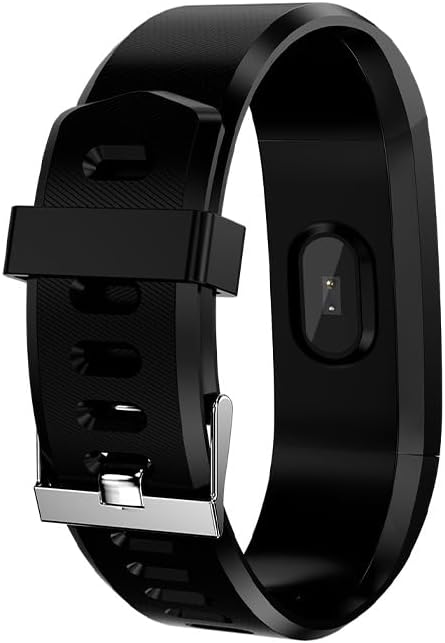
Rear view of the PRIXTON AT801 Smartband, highlighting the optical sensor used for health monitoring.
3. Setup
Charging the Smartband
Before first use, fully charge your PRIXTON AT801 Smartband. The device features direct USB charging. Carefully remove one side of the strap to reveal the USB connector and plug it into any standard USB port (e.g., computer, USB wall adapter).
A full charge typically takes approximately 1-2 hours. The battery indicator on the screen will show charging status.
App Installation and Pairing
- Download the App: Search for the official PRIXTON smartband application in your smartphone's app store (Google Play Store for Android, Apple App Store for iOS). Ensure your device meets the compatibility requirements: Android 4.4 or higher / iOS 8.1 or higher.
- Enable Bluetooth: On your smartphone, go to settings and ensure Bluetooth is enabled.
- Open the App: Launch the downloaded smartband application.
- Pair Device: Follow the in-app instructions to search for and connect to your AT801 Smartband. The app will typically guide you through the pairing process. Ensure your smartband is close to your phone during pairing.
- Profile Setup: Complete your personal profile within the app (e.g., age, height, weight) for more accurate activity and health data.
4. Operating the Smartband
Basic Navigation
The AT801 Smartband features a touch screen for navigation. Tap the screen to wake it up or to cycle through different display modes (time, steps, heart rate, etc.). Long-press the screen in some modes to access specific functions or settings.
Activity Tracking
The smartband automatically tracks your daily steps, distance, and calories burned. You can view these statistics directly on the smartband's display or in more detail within the connected app.

A user wearing the PRIXTON AT801 Smartband, with the display showing the current step count.

The smartband display showing calories burned, indicating active energy expenditure.
Multi-Sport Mode
To activate multi-sport mode, navigate to the sport section on your smartband. Select the desired activity (e.g., running, jumping, sit-ups) to begin tracking. The smartband will record specific data points relevant to that exercise, providing more precise insights into your workout.
Health Monitoring
The AT801 Smartband can measure your heart rate, blood pressure, and blood oxygen levels. To take a measurement, navigate to the respective function on the smartband. Ensure the smartband is worn snugly on your wrist, and remain still during the measurement process for accurate readings.

The PRIXTON AT801 Smartband display showing a blood pressure reading.

Close-up of the smartband's optical sensor, which emits a green light during health monitoring.
Sleep Monitoring
Wear the smartband to bed, and it will automatically monitor your sleep patterns. Data such as deep sleep, light sleep, and awake times can be viewed in the companion app the next morning.
Notifications
Once paired with your smartphone, the smartband will display notifications for incoming calls, text messages, and alerts from selected applications. Ensure notification permissions are granted in your phone's settings and within the smartband app.
5. Maintenance
Water Resistance
The PRIXTON AT801 Smartband is IP67 water-resistant, meaning it is protected against dust ingress and can withstand immersion in water up to 1 meter for up to 30 minutes. It is suitable for daily use, such as washing hands or light rain. However, it is not recommended for swimming, showering with hot water, or diving.
Cleaning
To clean your smartband, wipe it gently with a soft, damp cloth. Do not use harsh chemicals or abrasive cleaners, as these can damage the device. Ensure the charging contacts are clean and dry before charging.
Battery Care
The smartband is equipped with a 50 mAh Lithium Ion battery, offering approximately 7 days of standby time. To prolong battery life, avoid extreme temperatures and fully charge the device regularly. If the smartband will not be used for an extended period, charge it to about 50% before storing.
6. Troubleshooting
Connectivity Issues
- Smartband not connecting to phone: Ensure Bluetooth is enabled on your phone and the smartband is charged. Restart both the smartband and your phone. Try unpairing and re-pairing the device through the app.
- App not syncing data: Check your phone's internet connection. Ensure the app has all necessary permissions (e.g., location, storage). Close and reopen the app.
Inaccurate Data Readings
- Inaccurate step count: Ensure the smartband is worn snugly on your wrist. Arm movements not associated with walking can sometimes be counted as steps.
- Inaccurate heart rate/blood pressure/blood oxygen: Ensure the smartband is worn correctly and tightly on your wrist. Remain still during measurements. These measurements are for reference only and should not be used for medical diagnosis.
Display Issues
- Screen unresponsive: Try restarting the smartband. Ensure the screen is clean and dry.
Charging Problems
- Smartband not charging: Ensure the USB connector is fully inserted into a working USB port. Check for any debris in the USB port of the smartband.
7. Specifications
| Brand | PRIXTON |
| Model Name | AT801 |
| Product Dimensions | 60 x 60 x 85 cm |
| Product Weight | 100 g |
| Display Type | 0.96" Color Touch Screen (OLED or LCD) |
| Connectivity | Bluetooth 4.0 |
| Battery | 50 mAh Lithium Ion (included) |
| Standby Time | Up to 7 days |
| Water Resistance | IP67 |
| Compatible Devices | Smartphone (Android 4.4+ / iOS 8.1+) |
| Included Components | User Manual |
8. Warranty and Support
Your PRIXTON AT801 Smartband comes with a standard manufacturer's warranty. Please refer to the warranty card included in your product packaging for specific terms and conditions. For technical support, troubleshooting assistance, or warranty claims, please contact PRIXTON customer service through their official website or the contact information provided with your purchase.
Keep your purchase receipt as proof of purchase for warranty purposes.
Related documentsAT801


Ask a question about this manual
Ask about setup, troubleshooting, compatibility, parts, safety, or missing instructions. Manuals+ will review the question and use this page’s manual context to help answer it.