
Introduction
This manual provides essential instructions for the safe and efficient operation of your iLive Portable Bluetooth Waterproof Speaker, Model ISBW108LG. Please read this guide thoroughly before use and retain it for future reference.

Image: The iLive Portable Bluetooth Waterproof Speaker in Light Gray, showcasing its compact design.
Included Components:
- iLive Portable Bluetooth Waterproof Speaker (ISBW108LG)
- Micro-USB to USB Charging Cable
- Detachable Carabiner Clip
- User's Guide (this document)
Setup
1. Charging the Speaker
Before initial use, fully charge the speaker. Connect the supplied Micro-USB to USB cable to the speaker's Micro-USB port and the other end to a powered USB port (e.g., computer, USB wall adapter). The charging indicator light will illuminate during charging and turn off when fully charged. A full charge provides approximately 2.5 hours of playback at 100% volume.
2. Powering On/Off
- To power ON: Press and hold the Power button located on the top panel until the indicator light illuminates.
- To power OFF: Press and hold the Power button until the indicator light turns off.
3. Bluetooth Pairing
- Ensure the speaker is powered on and within 30 feet (10 meters) of your Bluetooth-enabled device.
- The speaker will automatically enter pairing mode when powered on for the first time, or if no paired device is found. The Bluetooth indicator light will flash rapidly.
- On your Bluetooth device, enable Bluetooth and search for new devices. Select "ISBW108LG" from the list of available devices.
- Once paired, the Bluetooth indicator light on the speaker will glow solid, and a confirmation tone may sound.
- To pair with a new device or re-enter pairing mode, press and hold the Pairing button (often combined with the Play/Pause button) until the indicator light flashes rapidly again.

Image: The speaker with water droplets, illustrating its IPX5 waterproof rating.
Operating Instructions
Controls Overview:
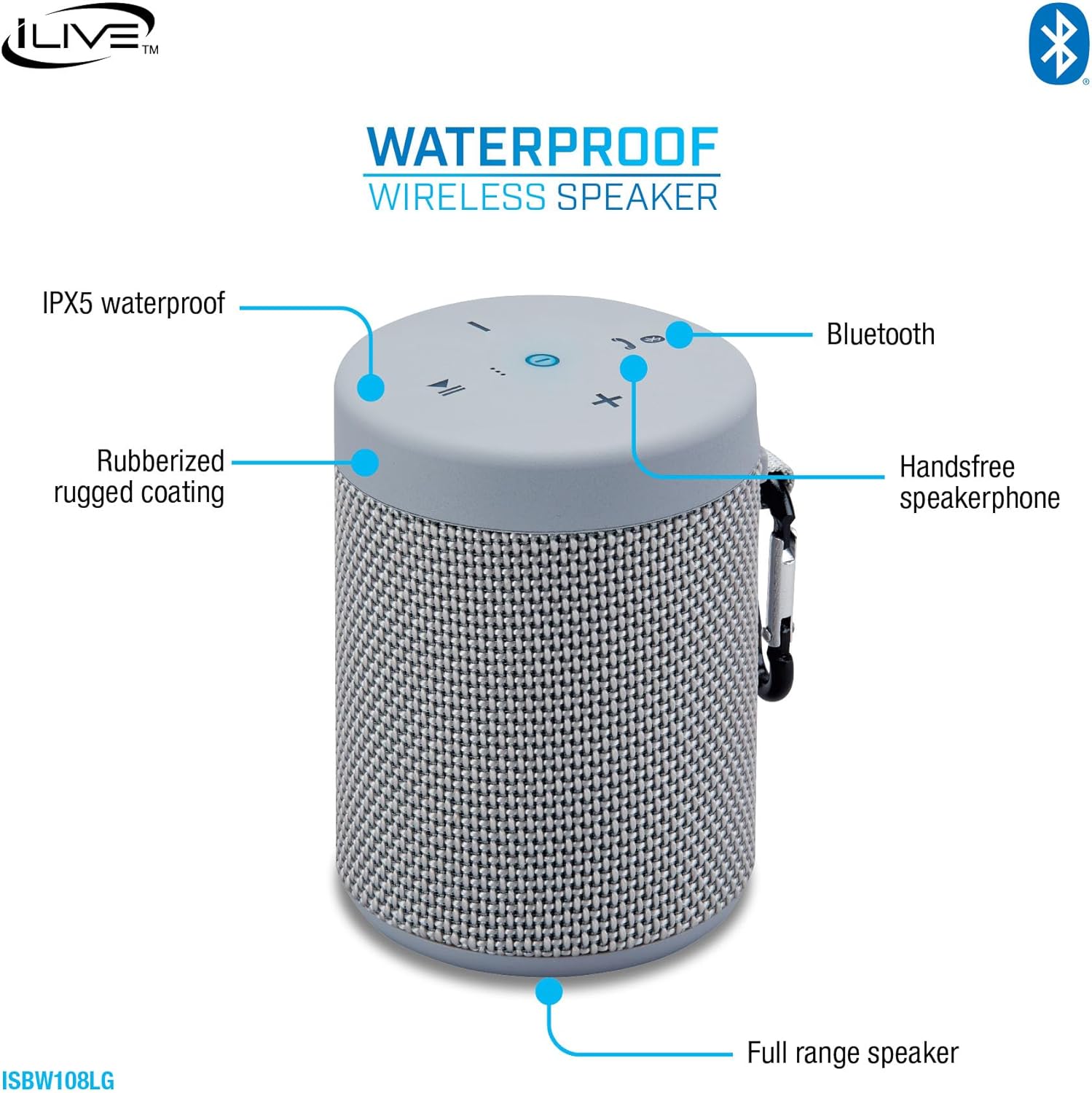
Image: A diagram highlighting the speaker's controls and features, including Bluetooth, handsfree speakerphone, IPX5 waterproof, rubberized coating, and full-range speaker.
- Power Button: Press and hold to turn the speaker on or off.
- Volume Up (+): Press to increase volume.
- Volume Down (-): Press to decrease volume.
- Play/Pause Button: Press to play or pause audio.
- Pairing/Answer Phone Button: Press and hold to enter Bluetooth pairing mode. Press briefly to answer or end a phone call.
Hands-Free Speakerphone:
When paired with a smartphone, the built-in microphone allows you to answer calls directly through the speaker. Press the 'Answer Phone' button to accept an incoming call and again to end it.
Waterproof Functionality (IPX5):
The speaker features an IPX5 waterproof rating, meaning it is protected against low-pressure water jets from any direction. It is suitable for use in environments where it may be exposed to splashes or light rain. Do not submerge the speaker in water.

Image: A man relaxing on a couch, using his smartphone with the iLive speaker positioned on a table, illustrating Bluetooth wireless connectivity.
Auxiliary Input:
The speaker may also feature an auxiliary input for wired connections to non-Bluetooth devices. Connect a 3.5mm audio cable (not included) from your device's audio output to the speaker's AUX input port. The speaker will automatically switch to AUX mode.

Image: A diagram illustrating various devices such as TVs, smartphones, tablets, laptops, CD players, video game systems, cassette players, and turntables, all capable of connecting via AUX IN.
Maintenance
Cleaning:
To clean the speaker, use a soft, dry cloth. Do not use abrasive cleaners, solvents, or harsh chemicals, as these may damage the finish or internal components. For stubborn dirt, a slightly damp cloth can be used, ensuring the speaker is powered off and all ports are securely closed.
Storage:
Store the speaker in a cool, dry place away from extreme temperatures and direct sunlight. If storing for an extended period, ensure the battery is partially charged (around 50%) to prolong its lifespan.
Troubleshooting
| Problem | Possible Solution |
|---|---|
| Speaker does not power on. | Ensure the battery is charged. Connect the speaker to a power source using the Micro-USB cable. |
| Cannot pair with Bluetooth device. |
|
| No sound or low volume. |
|
| Poor audio quality. |
|
Specifications

Image: The iLive speaker with indicated dimensions: 3.4 inches (height) and 2.6 inches (diameter).
| Feature | Detail |
|---|---|
| Model Number | ISBW108LG |
| Connectivity | Bluetooth, Micro-USB (charging) |
| Bluetooth Range | Up to 60 feet (10 meters) |
| Water Resistance | IPX5 (Protected against low-pressure water jets) |
| Battery Life | Approximately 2.5 hours at 100% volume |
| Speaker Output Power | 5 Watts |
| Speaker Size | 40 Millimeters |
| Dimensions | 3.4"D x 2.56"W x 2.56"H (approx.) |
| Weight | 10.4 ounces |
| Material | Fabric, Rubberized |
Warranty and Support
This product comes with a limited warranty. For detailed warranty information, please refer to the warranty card included with your purchase or visit the official iLive Electronics website. For technical support or further assistance, please contact iLive customer service.
You can find more information and support resources on the iLive Electronics Store.


