Introduction
Elegant, unique, and so much fun, the Disney Princess Style Collection combines everyday play with contemporary Disney Princess style. This collection of real-life inspired toys is for every modern girl with big goals and exceptional style. Get ready to take on the world with the Disney Princess Style Collection. Functional, fabulous, and perfect for any girl on the go, the Disney Princess Style Collection Click & Go Play Laptop features a double-sided removable background. Press the ON button and click the keys, and the play laptop will make a variety of computer sounds. Slide and change the laptop background for a whole new look.
SAFETY WARNING: Not suitable for children under 3 years. To be used under adult supervision.
Package Contents
- Disney Princess Style Collection Click & Go Play Laptop
- Double-sided removable background
- 3 x Button Batteries (pre-installed)
Setup
Battery Installation/Replacement
The Disney Princess Style Collection Click & Go Play Laptop comes with 3 button batteries pre-installed. If replacement is needed:
- Locate the battery compartment on the underside of the laptop.
- Using a small Phillips head screwdriver, unscrew the battery compartment cover.
- Remove the old batteries and insert 3 new button batteries (AG13/LR44, 1.5V) ensuring correct polarity (+/-).
- Replace the battery compartment cover and secure it with the screw.
Note: Always use fresh batteries of the same type. Do not mix old and new batteries.
Operating Instructions
Turning On/Off
To turn on the laptop, locate the ON/OFF button, usually found near the keyboard or on the side. Press it once to activate the laptop. To turn it off, press the button again.
Using the Keyboard and Sounds
The laptop features a play keyboard. Pressing any of the keys will trigger a variety of computer sounds, enhancing the imaginative play experience. The power button also lights up when pressed.
Changing the Background
The laptop includes a double-sided removable background. To change the display:
- Gently slide out the current background from the screen slot.
- Flip the background to its other side or insert the alternative background.
- Slide the desired background into the screen slot until it is securely in place.
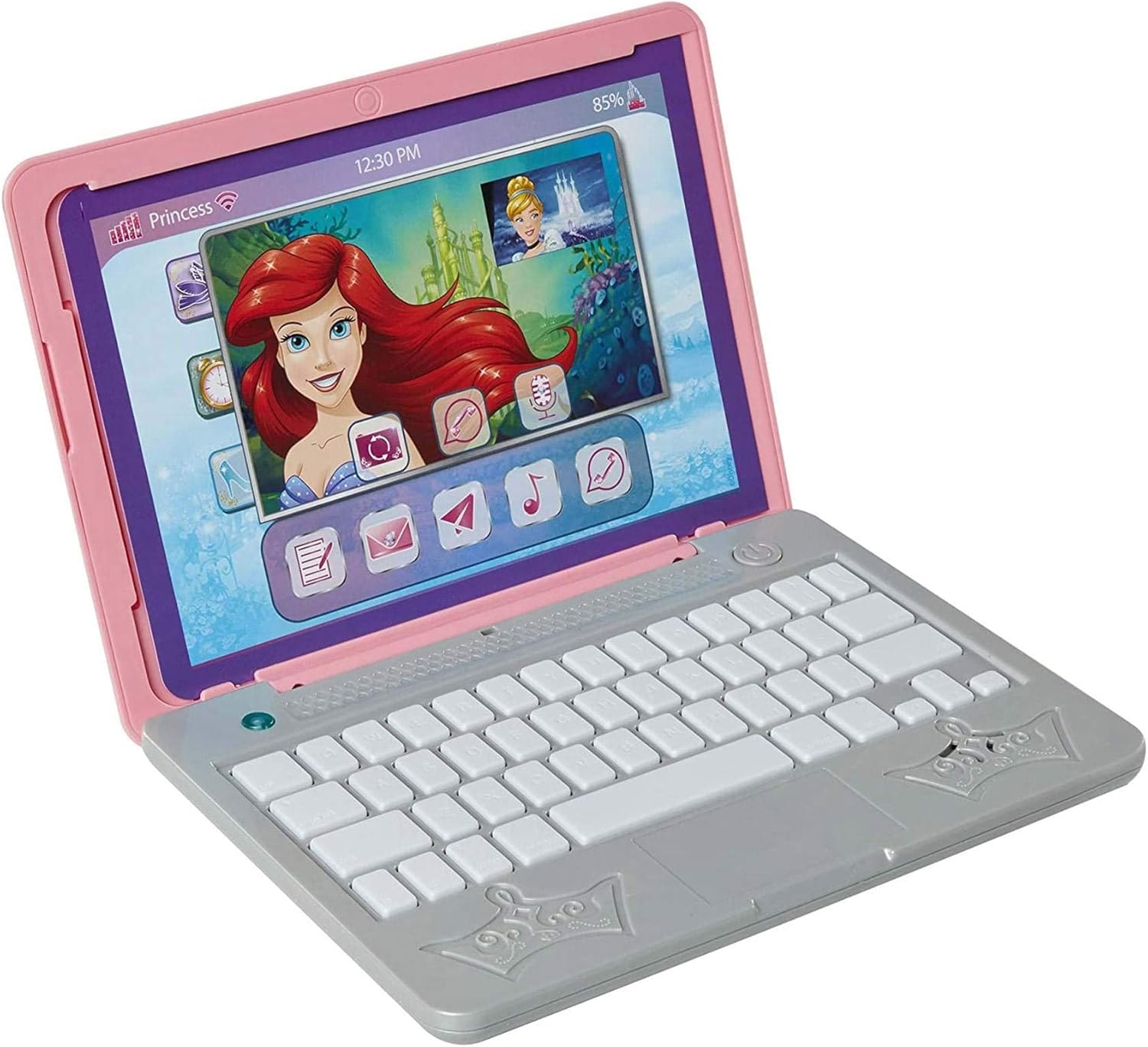
Image 1: The Disney Princess Play Laptop with a screen showing Ariel and other icons, demonstrating the interactive display.

Image 2: The Disney Princess Play Laptop displaying an alternative background featuring a castle and various application icons, highlighting the changeable screen feature.

Image 3: The Disney Princess Play Laptop shown open with the removable screen insert placed beside it, illustrating how the background can be changed.
Maintenance and Care
- Cleaning: Wipe the laptop with a soft, dry cloth. Do not use abrasive cleaners or immerse in water.
- Storage: Store the laptop in a cool, dry place away from direct sunlight and extreme temperatures.
- Battery Care: Remove batteries if the toy will not be used for an extended period to prevent leakage.
Troubleshooting
| Problem | Possible Cause | Solution |
|---|---|---|
| Laptop does not turn on. | Batteries are dead or incorrectly installed. | Check battery polarity. Replace with new batteries if necessary. |
| Sounds are distorted or too quiet. | Low battery power. | Replace batteries. |
| Keys do not produce sounds. | Laptop is off or batteries are low. | Ensure laptop is turned on. Replace batteries if needed. |
Specifications
| Feature | Detail |
|---|---|
| Product Dimensions (L x W x H) | 22.86 x 5.97 x 22.86 cm; 358 grams |
| Recommended Age | 36 months - 18 years |
| Educational Value | Social behavior |
| Model Number | 70594 |
| Number of Players | 1 |
| Assembly Required | No |
| Batteries Required | Yes |
| Batteries Included | Yes |
| Battery Type | Alkaline (Button Batteries AG13/LR44, 1.5V) |
| Main Material | Plastic |
| Color | Multicolor (Pink/Silver) |
| ASIN | B07H444B4D |
| Date First Available | September 5, 2018 |
Warranty and Support
Specific warranty information for the Disney Princess Style Collection Click & Go Play Laptop is not available in this manual. Please refer to the product packaging or the manufacturer's official website for detailed warranty terms and conditions.
For customer support or inquiries, please contact the manufacturer, Disney Princess, through their official channels.


