
Your Choice Aquatics DC10000
Your Choice Aquatics DC10000 (2500 GPH) Water Pump Instruction Manual
Model: DC10000
1. Introduction
Thank you for choosing the Your Choice Aquatics DC10000 Water Pump. This pump is designed for various aquatic applications, offering high performance, energy efficiency, and reliability. It is suitable for both reef and saltwater environments. This manual provides essential information for the safe and effective installation, operation, and maintenance of your pump.
2. Safety Instructions
- Always disconnect the power supply before performing any maintenance, installation, or cleaning.
- Ensure the pump is fully submerged in water during operation to prevent overheating and damage.
- Do not operate the pump if the power cord or plug is damaged.
- This pump is designed for aquatic use only. Do not use it for flammable liquids or other non-aquatic applications.
- Keep the controller and power adapter away from water to prevent electrical hazards.
- Ensure all connections are secure before powering on the unit.
- Children should be supervised to ensure they do not play with the appliance.
3. Package Contents
Please check the package to ensure all components are present:
- DC10000 Water Pump
- Digital Controller
- Power Adapter
- Hose Barbs/Fittings (various sizes)
4. Setup and Installation
Follow these steps for proper installation of your DC10000 water pump:
- Placement: Position the pump in your aquarium or sump where it will be fully submerged. Ensure there is adequate space around the pump for water intake and outflow.
- Connect Fittings: Attach the appropriate hose barb or fitting to the pump's outlet. Secure with a hose clamp if necessary (not included).
- Connect to Controller: Plug the pump's cable into the designated port on the digital controller.
- Connect Power Adapter: Plug the power adapter into the controller, then plug the power adapter into a grounded electrical outlet. Ensure a drip loop is formed with the power cord to prevent water from traveling along the cord to the outlet.
- Initial Operation: Once all connections are secure and the pump is submerged, plug in the power adapter. The pump should start automatically or can be turned on via the controller.
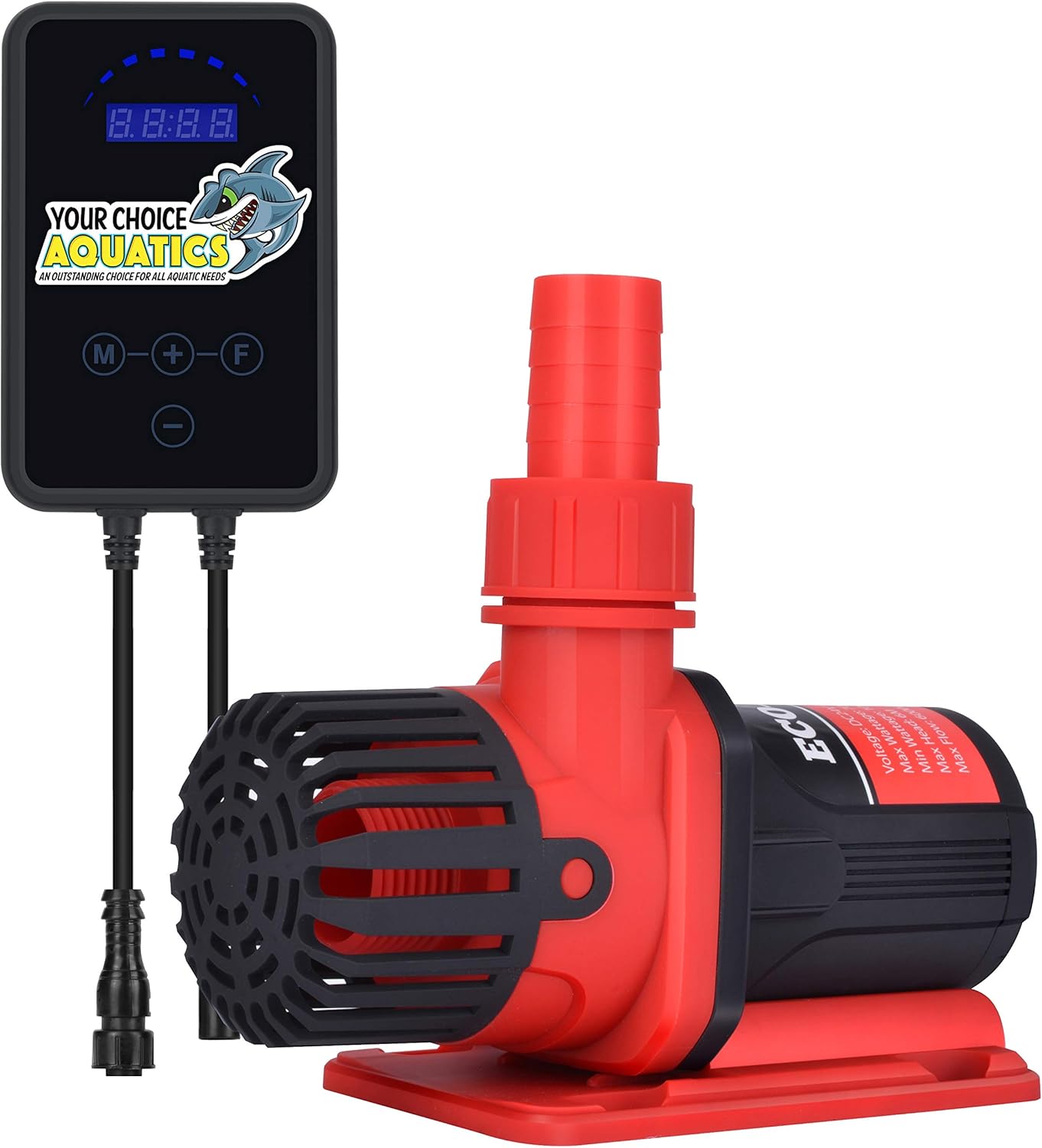
Image 1: The Your Choice Aquatics DC10000 Water Pump shown with its digital controller. The pump is red and black, designed for submersible use, and connected to a separate digital control unit via a cable.

Image 2: A diagram illustrating the connection sequence for the DC10000 pump. It shows the pump connecting to the digital controller, which then connects to the power adapter, and finally to a wall outlet.
5. Operating Instructions
The DC10000 pump features a digital controller for easy adjustment of flow and modes.
Controller Functions:
- Power Button (M): Press to turn the pump ON or OFF.
- Speed Adjustment (+/-): Use the '+' and '-' buttons to increase or decrease the pump's flow rate. The digital display will show the current speed setting.
- Mode Button (F): Press to switch between operating modes. The DC10000 offers two primary modes:
- Constant Speed Mode: The pump operates at a continuous, user-defined flow rate.
- Pulsing Mode (Wave): The pump's flow rate will fluctuate to create a wave-like effect in the aquarium.
The pump operates efficiently, consuming between 10-85 watts depending on the selected flow rate.
6. Maintenance
Regular maintenance ensures optimal performance and longevity of your pump.
- Disconnect Power: Always unplug the pump from the power outlet before any maintenance.
- Remove from Water: Carefully remove the pump from the aquarium or sump.
- Disassemble: Gently twist or unclip the intake screen and impeller cover. Remove the impeller assembly.
- Clean Components: Use a soft brush and clean water (or a mild vinegar solution for stubborn calcium deposits) to clean the impeller, impeller housing, and intake screen. Ensure all debris, algae, and mineral buildup are removed.
- Inspect: Check the impeller for any signs of wear or damage. Ensure the ceramic shaft is intact.
- Reassemble: Carefully reassemble the pump, ensuring all parts fit securely.
- Test: Place the pump back into the water and reconnect power to test its operation.
Perform this cleaning routine every 1-3 months, depending on the water conditions and pump usage.
7. Troubleshooting
If you encounter issues with your DC10000 pump, refer to the following common problems and solutions:
- Pump Not Starting:
- Check if the power adapter is securely plugged into the outlet and the controller.
- Ensure the pump cable is firmly connected to the controller.
- Press the 'M' button on the controller to ensure the pump is turned on.
- Inspect the impeller for any obstructions or damage.
- Reduced Flow Rate:
- Check for blockages in the intake screen or impeller housing. Clean as per maintenance instructions.
- Ensure the hose or plumbing connected to the pump is not kinked or obstructed.
- Verify the speed setting on the controller is at the desired level.
- Unusual Noise:
- Disconnect power and inspect the impeller for foreign objects or damage.
- Ensure the pump is fully submerged and not drawing air.
- Check for vibrations against the tank or sump walls; adjust placement if necessary.
If problems persist after following these steps, please contact customer support.
8. Specifications
| Feature | Specification |
|---|---|
| Brand | Your Choice Aquatics |
| Model | DC10000 |
| Maximum Flow Rate | 10000 Liters Per Hour (2500 GPH) |
| Maximum Lifting Height | 5 Meters |
| Power Consumption | 10-85 Watts |
| Power Source | AC/DC |
| Style | Submersible |
| Material | Stainless Steel |
| Color | Red |
| UPC | 748388704409 |
| ASIN | B07H2MTYS5 |
| Date First Available | September 3, 2018 |
9. Warranty and Support
The Your Choice Aquatics DC10000 Water Pump comes with a 12-month warranty from the date of purchase, covering manufacturing defects. Please retain your proof of purchase for warranty claims.
For technical support, troubleshooting assistance, or warranty inquiries, please contact Your Choice Aquatics customer service through the retailer where the product was purchased or refer to the official Your Choice Aquatics website for contact information.
Ask a question about this manual
Ask about setup, troubleshooting, compatibility, parts, safety, or missing instructions. Manuals+ will review the question and use this page’s manual context to help answer it.