
Introduction
This manual provides essential instructions for the setup, operation, and maintenance of your 1MORE Dual Driver BT ANC In-Ear Headphones. These wireless Bluetooth earphones feature Active Noise Cancellation (ANC), Environmental Noise Cancellation (ENC), fast charging capabilities, magnetic earbuds, and integrated microphone and volume controls.
What's in the Box
- 1MORE Dual Driver BT ANC In-Ear Headphones
- USB-C Charging Cable
- Multiple sizes of ear tips (for optimal fit)
- User Manual (this document)
Product Overview
The 1MORE Dual Driver BT ANC In-Ear Headphones are designed for high-quality audio and user convenience. Key components and features are highlighted below.

Figure 1: Front view of the 1MORE Dual Driver BT ANC In-Ear Headphones, showcasing the neckband design and earbuds.
Key Features:
- Dual Drivers: Features one dynamic driver and one balanced armature for superior sound quality.
- Active Noise Cancellation (ANC): Reduces ambient noise for an immersive listening experience.
- Environmental Noise Cancellation (ENC): Utilizes a precise microphone array to filter background noise during calls.
- Wireless & Wired Listening: Supports Bluetooth V4.2 for wireless connectivity (up to 30 ft range) and a Type-C to 3.5mm connection for lossless wired playback.
- Fast Charging: Provides extended usage with quick charge times.
- Magnetic Earbuds: Earbuds magnetize together for convenient storage around the neck and can automatically power off when connected.
- Integrated Controls: Microphone and volume controls are conveniently located on the neckband.
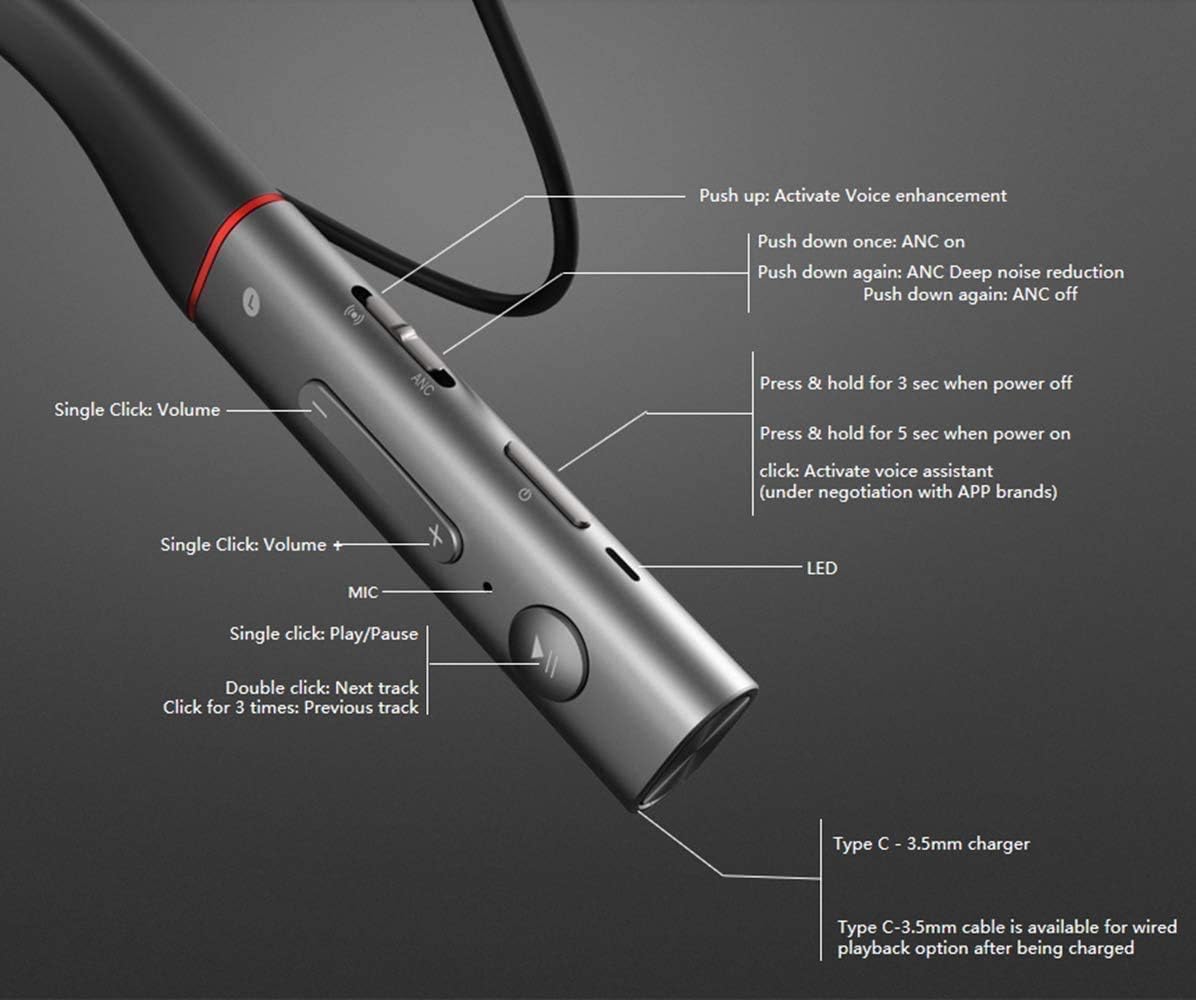
Figure 2: Close-up of the neckband controls, including power, volume, play/pause, and ANC/ENC buttons, along with the Type-C charging port.
Setup
1. Charging the Headphones
Before first use, fully charge your headphones. Connect the provided USB-C charging cable to the charging port on the neckband and to a power source. A full charge takes approximately 1 hour. Fast charging provides significant playback time with short charging periods.

Figure 3: Image illustrating the fast charge capabilities of the 1MORE headphones, showing the USB-C port.
2. Finding the Best Fit
Optimal sound quality and noise cancellation depend on a proper fit. Experiment with the different sizes of ear tips included in the package to find the most comfortable and secure fit for your ears. The ear tips should create a good seal in your ear canal.
Note: If the earbud tips do not match your ear canals or the headset is not worn properly, sound quality and call performance may be affected. Adjust ear tips for a snug fit.
3. Bluetooth Pairing
- Ensure your headphones are charged and powered off.
- Press and hold the power button on the neckband until the LED indicator blinks, indicating pairing mode.
- On your device (smartphone, tablet, laptop), enable Bluetooth and search for available devices.
- Select "1MORE Dual Driver BT ANC" from the list of devices.
- Once connected, the LED indicator will change to a steady light or stop blinking, depending on the model.
Operating Instructions
Power On/Off
- Power On: Separate the magnetic earbuds. The headphones will automatically power on.
- Power Off: Bring the magnetic earbuds together. The headphones will automatically power off. Alternatively, press and hold the power button for 3 seconds.
Volume and Playback Controls
The controls are located on the neckband for easy access:
- Volume Up/Down: Use the dedicated volume buttons (+/-).
- Play/Pause: Single click the multi-function button.
- Next Track: Double click the multi-function button.
- Previous Track: Triple click the multi-function button.
Active Noise Cancellation (ANC) and Environmental Noise Cancellation (ENC)
The headphones feature a dedicated switch for ANC and ENC modes:
- ANC On: Push the ANC switch once.
- ANC Deep Noise Reduction: Push the ANC switch again.
- ANC Off: Push the ANC switch a third time.
- Activate Voice Enhancement: Push the ANC switch up.
Call Management
- Answer/End Call: Single click the multi-function button.
- Reject Call: Press and hold the multi-function button.
Video 1: An overview of the 1MORE Dual Driver BT ANC Earphones, demonstrating key features and usage.
Maintenance
- Cleaning: Regularly clean the earbuds and ear tips with a soft, dry cloth. Do not use harsh chemicals or abrasive materials.
- Storage: When not in use, store the headphones in a cool, dry place away from direct sunlight and extreme temperatures. The magnetic earbuds help keep them tangle-free.
- Water Resistance: The headphones are water resistant. Avoid submerging them in water or exposing them to heavy rain for prolonged periods.
Troubleshooting
| Issue | Possible Solution |
|---|---|
| Cannot pair via Bluetooth | Ensure headphones are in pairing mode (blinking LED). Turn off and on Bluetooth on your device. Try forgetting the device on your phone/tablet and re-pairing. |
| Poor sound quality | Check ear tip fit for a proper seal. Ensure headphones are fully charged. Move closer to your connected device to avoid interference. |
| Headphones not turning on | Ensure the headphones are charged. Try separating and re-connecting the magnetic earbuds to activate. |
| ANC not working effectively | Ensure earbuds are properly seated in your ears. Cycle through ANC modes using the dedicated switch. |
Factory Reset
If you experience persistent issues, a factory reset may resolve them. Refer to the product's official support resources for specific factory reset instructions, as this process can vary.
Specifications
- Model Name: E1004BA
- Brand: 1MORE Here I Hear
- Color: Silver
- Connectivity Technology: Wireless (Bluetooth), Wired (USB-C to 3.5mm)
- Wireless Communication Technology: Bluetooth V4.2
- Bluetooth Range: Up to 30 feet
- Noise Control: Active Noise Cancellation (ANC), Environmental Noise Cancellation (ENC)
- Audio Driver Type: Hybrid Driver (Dual Driver)
- Impedance: 32 Ohms
- Battery Life: 7 Hours (with ANC on)
- Charging Time: 1 Hour
- Material: Silicone (neckband)
- Item Weight: 1.55 ounces
- Product Dimensions: 6.7 x 1.6 x 7.9 inches
- Water Resistance Level: Water Resistant
- Special Features: Lightweight, Microphone Included, Volume Control, Water Resistant
Warranty and Support
For warranty information, technical support, or further assistance, please refer to the official 1MORE website or contact their customer service directly. Keep your proof of purchase for warranty claims.