
1. Introduction
This Akozon 35W Adjustable USB Constant Current Electronic Load Tester is designed to simulate electrical loads for various testing purposes. It is primarily used to evaluate the performance of batteries, power banks, and to assess the quality and current delivery capabilities of USB cables. The device features an integrated cooling system and an LCD display for real-time monitoring of voltage, current, and capacity.
2. Product Overview
The Akozon AKZ-001 USB Load Tester is a compact and efficient tool for electronic testing. It incorporates several key components for optimal functionality and user interaction.

Figure 2.1: Main view of the Akozon 35W USB Load Tester. This image shows the device from an angled perspective, highlighting the USB-A input, the cooling fan, the heatsink, and the two adjustment knobs on the side.
Key Components:
- USB-A Input: Standard USB connector for connecting to the power source under test.
- Cooling Fan: An integrated fan for active heat dissipation, essential during high-power discharge.
- Aluminum Heatsink: Located beneath the fan, it helps to efficiently dissipate heat generated by the load.
- LCD Display: A small screen that shows real-time measurements of voltage, current, and accumulated capacity.
- Coarse Adjustment Knob: Used for making large adjustments to the discharge current (0-3A range).
- Fine Adjustment Knob: Used for precise, small adjustments to the discharge current (+/- 0.2A).

Figure 2.2: Angled view showing the two adjustment knobs (Coarse and Fine) on the side of the device, along with the cooling fan and USB-A connector.

Figure 2.3: Top-down view of the USB Load Tester, clearly showing the cooling fan and the USB-A input connector.

Figure 2.4: Diagram illustrating the physical dimensions of the Akozon USB Load Tester: 10.5 cm (4.1 inches) in length, 5.5 cm (2.2 inches) in width, and 4.3 cm (1.7 inches) in height.
3. Specifications
| Voltage Range | 4-30 V DC |
| Test Current Range | 0.1-4.5 A |
| Operating Temperature | -10 to 65 °C |
| Dimensions (L x W x H) | 105 x 55 x 43 mm (4.1 x 2.2 x 1.7 inches) |
| Heatsink Dimensions | 40 x 40 x 10 mm |
| Constant Discharge Current Adjustment | 0.1-4.5 A (Coarse: 0-3 A, Fine: +/- 0.2 A) |
| Current Measurement Error | Less than 2% + 3 mA |
| Rated Constant Discharge Power | 35 W (Note: If voltage is 21V, discharge current must be less than 1.6A to stay within 35W limit) |
| Measurement Type | Voltmeter, Ammeter, Capacity Meter |
| UPC | 798382621127 |
4. Setup
- Prepare Power Source: Ensure the battery, power bank, or USB charger you intend to test is fully charged or ready to supply power.
- Connect the Load Tester: Insert the USB-A connector of the Akozon Load Tester into the USB output port of the device you wish to test. The LCD display should illuminate, showing initial voltage and current readings.
- Initial Current Setting: Before starting a discharge test, ensure both the coarse and fine adjustment knobs are set to their minimum positions (fully counter-clockwise) to prevent sudden high current draw.

Figure 4.1: The Akozon USB Load Tester being held, demonstrating its compact size and ease of handling for connection to a power source.
5. Operating Instructions
- Adjusting Discharge Current:
- Use the Coarse Adjustment Knob to set the approximate desired discharge current. Turning it clockwise increases the current from 0A up to approximately 3A.
- Use the Fine Adjustment Knob for precise control. Turning it clockwise increases the current by small increments (up to +0.2A), while counter-clockwise decreases it (down to -0.2A).
Note: Always monitor the LCD display while adjusting the current to ensure you do not exceed the rated power of the device under test or the load tester itself (35W).
- Monitoring Readings: The LCD display continuously shows the current voltage (V), current (A), and accumulated capacity (mAh or Wh). These readings are crucial for evaluating the performance of your power source.
- Cooling Fan Operation: The integrated cooling fan will automatically activate when the internal temperature of the load tester exceeds 55°C. It will continue to operate until the temperature drops below 45°C, at which point it will automatically switch off. This ensures stable operation and prevents overheating.
- Ending a Test: To stop the discharge test, turn both adjustment knobs fully counter-clockwise to reduce the current to 0A, then disconnect the USB Load Tester from the power source.
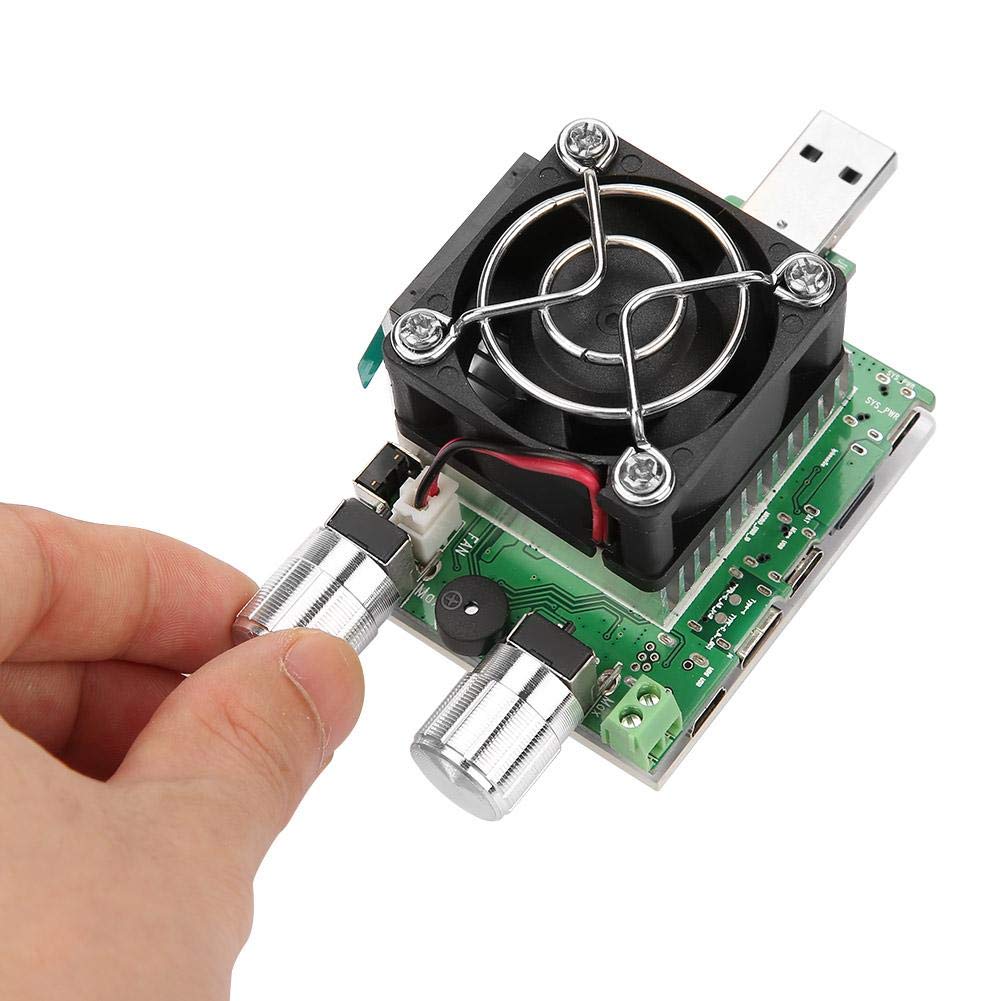
Figure 5.1: A hand demonstrating the adjustment of the knobs on the Akozon USB Load Tester to control the discharge current.
6. Maintenance
- Cleaning: Use a soft, dry cloth to clean the exterior of the device. Do not use liquid cleaners or solvents. Ensure no dust or debris obstructs the cooling fan or heatsink fins.
- Storage: Store the device in a cool, dry place away from direct sunlight and extreme temperatures. Keep it protected from dust and physical impact.
- Inspection: Periodically inspect the USB connector for any signs of damage or bending. Ensure the adjustment knobs turn smoothly.
7. Troubleshooting
- No Display/No Power:
- Ensure the USB Load Tester is securely connected to a functioning USB power source.
- Verify that the power source is providing voltage within the 4-30V DC range.
- Incorrect Readings:
- Confirm that the connection is stable and there are no loose contacts.
- Ensure the device is operating within its specified voltage and current ranges.
- Note that the current measurement error is less than 2% + 3mA, which is normal for this device.
- Fan Not Activating:
- The fan only activates when the internal temperature exceeds 55°C. If the load is low, the device may not generate enough heat to trigger the fan.
- Check for any obstructions around the fan or heatsink.
- Device Overheating:
- Ensure the discharge current and voltage do not exceed the 35W rated power. For example, at 21V, the current should not exceed 1.6A.
- Provide adequate ventilation around the device during operation.
- Physical Damage (e.g., Bent USB Port):
- Handle the device with care during connection and disconnection.
- If the USB port is bent or damaged, contact customer support for assistance.
8. Safety Information
- Do not exceed the maximum rated voltage (30V) or current (4.5A) of the device.
- Ensure proper ventilation during operation, especially during high-power discharge, to prevent heat buildup.
- Keep the device away from water, moisture, and flammable materials.
- Do not attempt to disassemble or modify the device. This may void the warranty and pose safety risks.
- Keep out of reach of children.
9. Warranty and Support
Akozon products are tested before leaving the factory to ensure quality. If you encounter any issues during use, please contact our customer support team. We are available to assist you 24 hours a day.
For support, please refer to the contact information provided with your purchase or visit the official Akozon website.