
1. Introduction
This manual provides detailed instructions for the setup, operation, and maintenance of your NEARPOW Dual Digital Light Timer, Model T19S. This device is designed to automatically control the power supply to electrical appliances, offering convenience and energy efficiency. Please read this manual thoroughly before use to ensure proper function and safety.
2. Safety Instructions
- For indoor use only. Do not expose to rain or moisture.
- Do not exceed the maximum load rating of 15A/1800W.
- Ensure the timer is securely plugged into a grounded 3-prong outlet.
- Do not disassemble or attempt to repair the device. Contact customer support for assistance.
- Keep out of reach of children. The Child Lock function should be utilized when necessary.
- Unplug the timer from the wall outlet before cleaning. Clean with a dry cloth only.
3. Product Overview
The NEARPOW T19S is a digital timer featuring two independently-controlled outlets, allowing for flexible scheduling of multiple devices. It supports up to 18 ON/OFF programs across a 7-day cycle.
Key Features:
- Dual Independently-Controlled Outlets: Manage two separate appliances with distinct schedules.
- 18 ON/OFF Programs: Set up to 9 programs for each outlet.
- 7-Day Programmable: Offers 15 choices for week settings, including daily, specific days, weekdays, weekends, etc.
- Minimum Setting Time: Precise control down to 1 second.
- Multifunctional: Includes 12/24-hour system, Daylight Saving Time (DST) adjustment, Random Vacation Mode, and Child Lock function.
- Large LCD Screen: Provides clear visibility of settings and current time.
- Rechargeable Backup Battery: Retains programming during power outages.
Component Identification:
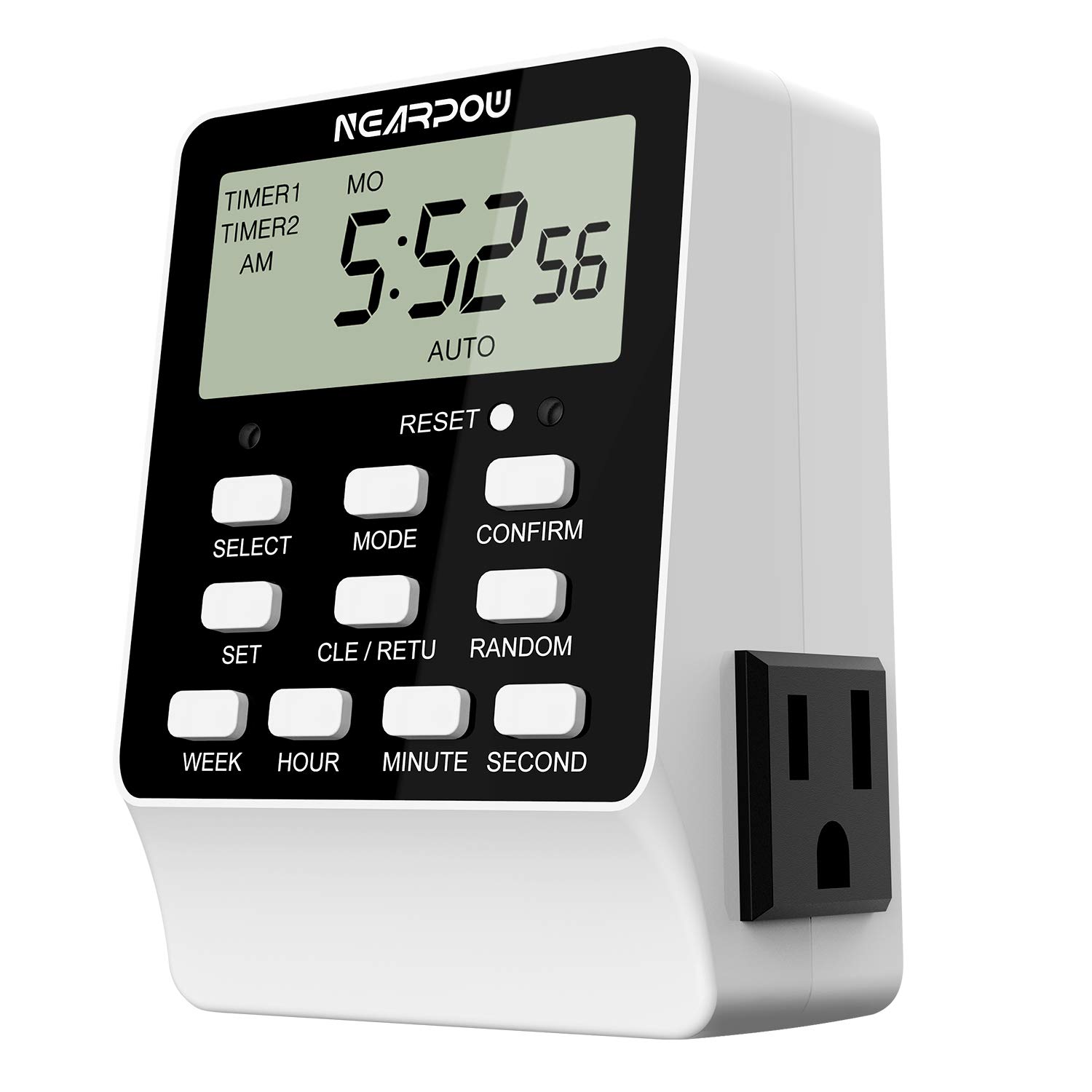
This image displays the front of the NEARPOW T19S digital timer. It features a large LCD screen at the top, displaying the current time and day. Below the screen are several control buttons: SELECT, MODE, CONFIRM, SET, CLE/RETU (Clear/Return), RANDOM, WEEK, HOUR, MINUTE, and SECOND. A small reset button is also visible. On the right side, a 3-prong electrical outlet is integrated into the unit's housing.

This image shows the NEARPOW T19S digital timer from a top-down perspective, highlighting its two independently-controlled outlets. The timer's display shows "TIMER1" and "TIMER2" indicators, confirming its dual functionality. Text overlays explain that each timer can handle up to 9 programs, totaling 18 ON/OFF programs, and can be set to "Always ON/OFF".

This image provides the physical dimensions of the NEARPOW T19S digital timer. The height is approximately 4.02 inches, the width is 2.64 inches, and the depth is 1.89 inches. These measurements indicate a compact design suitable for wall outlets.
4. Setup
4.1 Initial Power-Up and Battery Charging
- Plug the timer into a standard 120V AC wall outlet.
- The internal rechargeable battery will begin charging. Allow approximately 30 minutes for the battery to charge sufficiently to retain settings when unplugged.
- If the display is blank or shows erratic characters, press the RESET button with a pointed object (e.g., a pen tip). This will clear all settings and restore the display.
4.2 Setting Current Time and Day
- Press the SET button once. The hour digit will flash.
- Use the HOUR, MINUTE, and SECOND buttons to adjust the current time.
- Press the WEEK button to select the current day of the week.
- Press CONFIRM to save the current time and day settings.
- To switch between 12-hour (AM/PM) and 24-hour formats, press the MODE button while the current time is displayed.

This image highlights the "WEEK", "HOUR", "MINUTE", and "SECOND" buttons, indicating their direct use for setting time. It also points out the large LCD screen for clear viewing of settings.
5. Operating Instructions
5.1 Programming ON/OFF Times
The timer allows for up to 9 ON/OFF programs for each of the two outlets (Timer 1 and Timer 2).
- Press the MODE button repeatedly until "TIMER1" or "TIMER2" is displayed, indicating which outlet you are programming.
- Press the SET button. The display will show "1 ON" and the hour will flash.
- Use HOUR, MINUTE, and SECOND buttons to set the desired ON time for Program 1.
- Press the WEEK button to select the days of the week for this program. You can cycle through 15 different combinations (e.g., Mon-Sun, Mon-Fri, Sat-Sun, individual days, etc.).
- Press SET again. The display will show "1 OFF" and the hour will flash.
- Use HOUR, MINUTE, and SECOND buttons to set the desired OFF time for Program 1.
- Press CONFIRM to save Program 1.
- Repeat steps 2-7 for additional programs (2 ON/OFF to 9 ON/OFF). If you do not need all 9 programs, simply press CONFIRM after setting your last required program.
- After setting all programs, press MODE to return to the current time display. Ensure the display shows "AUTO" for the timer to operate automatically.
Important Note: Each ON program must have a corresponding OFF program. If you want a device to turn OFF first and then ON later, set the ON time to be AFTER the OFF time within the same program pair. The timer will interpret this to mean the device should be ON until the OFF time, then OFF until the ON time, and then ON again. If the ON time is set after the OFF time, the outlet will be immediately ON until the scheduled OFF time.

This image illustrates the timer's display showing the days of the week (SU MO TU WE TH FR SA) and highlights the 7-Day Programmable feature with "Up to 15 Choices". It also notes the "Min Time 1 Second" capability, providing an example of precise timing.
5.2 Random Vacation Mode
This feature randomly turns connected lights ON and OFF within a set period to simulate occupancy, enhancing home security when you are away.
- From the current time display, press the RANDOM button. "RND" will appear on the display.
- The timer will now randomly activate the connected devices for varying durations within a window (typically 6 PM to 6 AM, but check specific model behavior).
- To deactivate, press RANDOM again. "RND" will disappear.
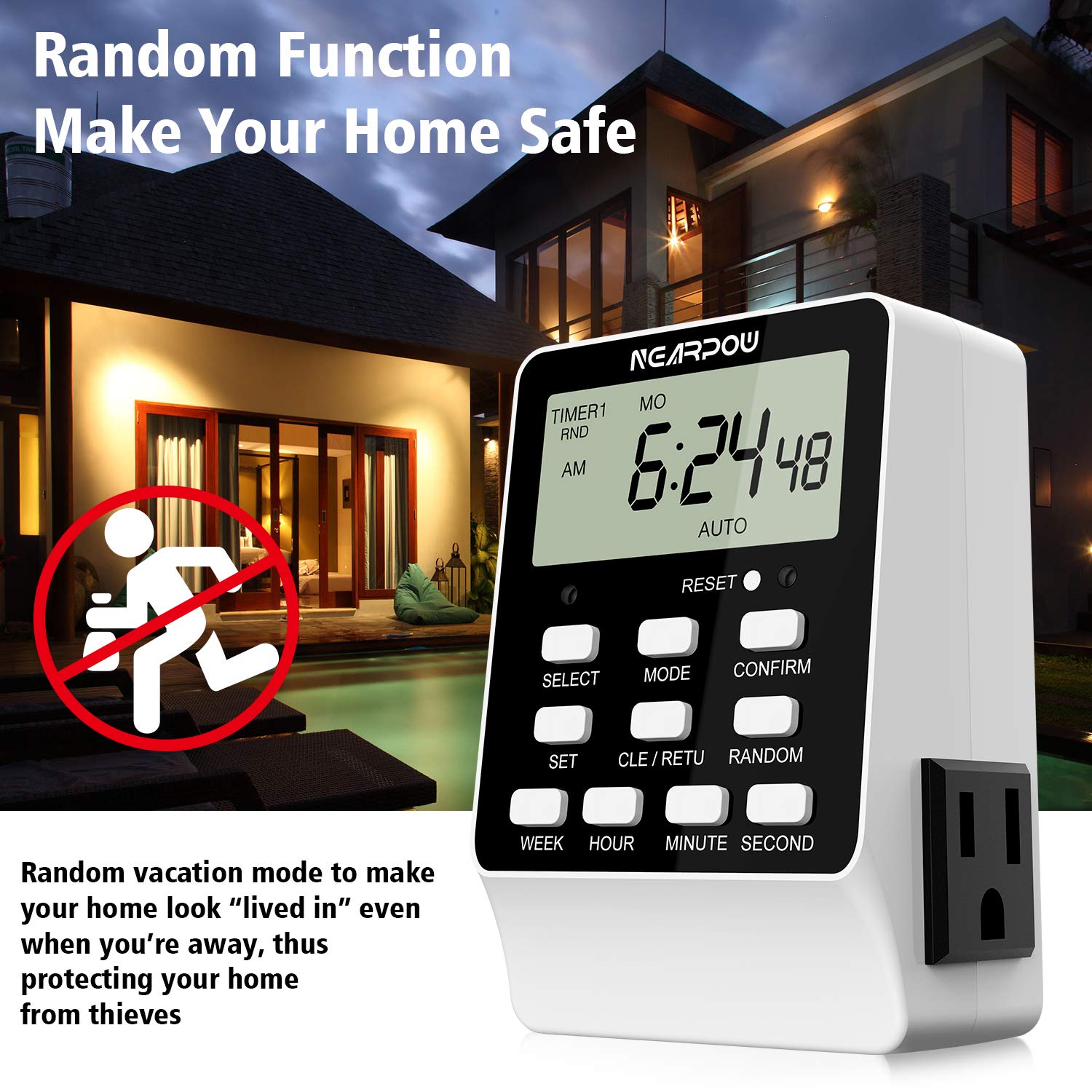
This image shows the NEARPOW T19S timer with "RND" visible on its display, indicating the Random Vacation Mode is active. The accompanying text explains that this mode makes your home appear occupied when you are away, deterring potential intruders.
5.3 Daylight Saving Time (DST) Adjustment
To adjust for Daylight Saving Time:
- From the current time display, press and hold the HOUR button for 3 seconds.
- The time will advance or recede by one hour, and "DST" will appear or disappear on the display.
5.4 Child Lock Function
To prevent accidental changes to programmed settings:
- From the current time display, press and hold the CONFIRM button for 3 seconds.
- A lock icon will appear on the display, indicating that the buttons are now locked.
- To unlock, press and hold the CONFIRM button again for 3 seconds. The lock icon will disappear.
6. Applications
The NEARPOW T19S timer is suitable for a wide range of indoor applications, including:
- Controlling indoor lighting (lamps, holiday lights).
- Automating small appliances (coffee makers, fans).
- Managing heating and cooling systems (portable heaters, window AC units).
- Operating aquariums and terrariums (lights, pumps).
- Scheduling hydroponic systems (grow lights, pumps).
- Enhancing home security with random light activation.

This collage image displays various household items and scenarios where the NEARPOW T19S timer can be used. Examples include controlling Christmas tree lights, a desk lamp, an air conditioner, a television, a ceiling fan, an aquarium, and a small humidifier or nebulizer, demonstrating its versatility.
7. Troubleshooting
| Problem | Possible Cause | Solution |
|---|---|---|
| Display is blank or erratic. | Low internal battery or system error. | Plug the timer into an outlet for at least 30 minutes to charge the battery. Press the RESET button with a pointed object. |
| Programs are not activating. | Timer is not in "AUTO" mode, programs not confirmed, or incorrect time/day settings. |
|
| Outlet is ON immediately, but I want it OFF first. | ON time is set after the OFF time in a program. | This is expected behavior. If your ON time is set after your OFF time for a program, the outlet will be ON until the scheduled OFF time. To have it OFF initially, ensure the first scheduled event is an OFF time, or manually turn off the connected device until the first ON event. |
| Cannot change settings. | Child Lock function is active. | Press and hold the CONFIRM button for 3 seconds to deactivate the Child Lock. |
8. Specifications
- Model: T19S
- Input Voltage: 120V AC, 60Hz
- Max Load: 15A, 1800W
- Outlets: 2 (Independently controlled, 3-prong grounded)
- Programs: Up to 18 ON/OFF programs (9 per outlet)
- Minimum Setting Time: 1 second
- Material: Acrylonitrile Butadiene Styrene (ABS)
- Product Dimensions: 4.02 x 2.64 x 1.89 inches
- Battery: 1 CR2 battery (rechargeable, internal)
9. Warranty and Support
NEARPOW products are designed for reliability and performance. This product comes with:
- Warranty: 24 Months
- Return Policy: 6 Months
- Support: Lifetime technical support
If you encounter any issues or have questions regarding your NEARPOW Dual Digital Light Timer, please contact NEARPOW customer support for assistance. Contact information can typically be found on the product packaging or the official NEARPOW website.


