
SNOOPER S6900 VENT
Snooper Ventura S6900 Pro Motorhome Sat Nav User Manual
Model: S6900 VENT
Introduction
The Snooper Ventura S6900 Pro is a specialized satellite navigation system designed for motorhomes, caravans, HGVs, lorries, and trucks. It provides safe and efficient routing by considering vehicle dimensions and environmental settings, helping to avoid height, width, and weight restrictions. This manual provides essential information for setting up, operating, maintaining, and troubleshooting your device.
Key Features
- Vehicle-Specific Routing: Calculates safe routes based on your vehicle's width, length, height, and weight, with an option to switch to 'Car Mode' when not towing.
- 7-inch LCD Touch Screen: Large, clear display with adjustable text size for enhanced readability.
- My Speed Software: Displays correct speed limits based on vehicle type to help prevent speeding.
- Lane Guidance and Junction View: Provides clear instructions on which lane to take for safe navigation through junctions.
- Free Lifetime Map Updates: Includes UK and European map updates via an 8GB Micro SD card, ensuring up-to-date navigation data.
- Active Magnetic Mount: Facilitates easy installation and provides clutter-free cabling.
- Bluetooth Handsfree: Allows for safe call management while driving.
- Video Input Socket: Supports connection of a reversing camera, automatically switching to camera view when reverse gear is selected.
- Vehicle Profiles: Store multiple vehicle configurations for quick selection.
- Multi-Route Technology: Plan routes with multiple stops.
What's in the Box
Upon unboxing your Snooper Ventura S6900 Pro, please ensure all the following components are present:
- 1x S6900 portable satellite navigation system with 7” touchscreen
- 1x Windscreen bracket with magnetic active powered mount
- 1x In-vehicle power supply (12V-24V) with combined TMC antenna
- 1x Micro USB to USB cable
- 1x Hard carry case
- 1x AV input cable
Setup
1. Mounting the Device
The Snooper Ventura S6900 Pro comes with an active magnetic mount for secure and easy installation. Choose a location on your windscreen that does not obstruct your view of the road.
- Clean the chosen area on your windscreen thoroughly to ensure a strong suction.
- Attach the windscreen bracket to the desired location by pressing the suction cup firmly against the glass and engaging the lever to create a vacuum seal.
- Connect the magnetic active powered mount to the bracket.
- Align the S6900 device with the magnetic mount. The strong magnets will securely hold the device in place, ensuring proper power and data connection.

Image: The rear of the Snooper Ventura S6900 Pro showing the magnetic mount connection point. The mount provides power and data connectivity.
2. Powering On and Initial Configuration
Use the provided in-vehicle power supply to connect the device to your vehicle's 12V-24V power outlet. The device will automatically power on. Follow the on-screen prompts for initial setup, including language selection and time zone.
For optimal performance, ensure the device has a clear view of the sky to acquire GPS signals.
Operating Instructions
1. Entering Vehicle Profiles
The Ventura S6900 Pro's primary advantage is its ability to calculate routes based on your vehicle's specific dimensions. This ensures you avoid unsuitable roads, bridges, and tunnels.
- From the main menu, navigate to "Vehicle Profiles".
- Select "Add New Profile" or choose an existing profile to edit.
- Enter the accurate Height, Width, Length, and Weight of your motorhome, caravan, HGV, or truck. You can also specify the Vehicle Type (e.g., Caravan, Motorhome, Lorry).
- Save the profile. You can create multiple profiles for different vehicles or configurations.
- When planning a route, ensure the correct vehicle profile is selected.

Image: The Snooper Ventura S6900 Pro screen showing the input fields for vehicle dimensions, crucial for safe routing.
2. Planning a Route
To get directions to your destination:
- From the main menu, select "Navigate To" or "Find Address".
- Enter your destination using the on-screen keyboard. You can input by postcode, city, street, or point of interest.
- Confirm the destination. The device will calculate the most suitable route based on your active vehicle profile.
- Review the route summary and then select "Go" to start navigation.

Image: The 7-inch LCD touchscreen displaying the keyboard for address input, demonstrating the device's interactive interface.
3. Multi-Route Technology
For journeys with multiple stops, utilize the multi-route planning feature:
- After setting your first destination, look for an option like "Add Stop" or "Multi-Route".
- Add subsequent destinations in the desired order.
- The device will optimize the route to include all stops efficiently.

Image: The Snooper Ventura S6900 Pro displaying a list of multiple destinations, illustrating its multi-route planning capability.
4. Points of Interest (POIs)
The device includes a comprehensive database of POIs relevant to motorhome and caravan users, such as campsites, rest stops, petrol stations, and cafes.
- Access POIs from the main menu or during navigation.
- Search for specific categories or browse nearby POIs.
- Select a POI to navigate directly to it or add it as a stop on your current route.

Image: A map view on the Snooper Ventura S6900 Pro screen showing icons for various Points of Interest, including campsites and petrol stations.
5. Lane Guidance and Junction View
As you approach complex junctions or motorway exits, the device will provide clear visual cues and spoken instructions to guide you into the correct lane. The Junction View feature displays a realistic representation of the upcoming junction.

Image: The Snooper Ventura S6900 Pro's main navigation screen, showing a clear junction view with lane guidance and speed limit information.
6. Reversing Camera Integration (Optional)
The S6900 Pro features a video input socket, allowing you to connect a compatible reversing camera (sold separately). When reverse gear is engaged, the screen will automatically switch to the camera view, assisting with safe maneuvering.
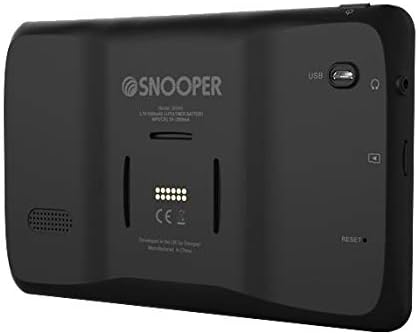
Image: The back of the Snooper Ventura S6900 Pro, highlighting the various ports including the AV input for a reversing camera.
Maintenance
Software and Map Updates
Snooper provides free lifetime system software and map updates for the Ventura S6900 Pro. Regularly updating your device ensures you have the latest features, bug fixes, and the most accurate map data.
- Visit the official Snooper website for instructions on how to download and install updates.
- Typically, updates involve connecting your device to a computer via the Micro USB cable and using a dedicated update tool.
- Ensure your device is fully charged or connected to power during the update process to prevent interruptions.

Image: The Snooper Ventura S6900 Pro screen showing a map, representing the comprehensive UK and EU mapping that is regularly updated.
Cleaning the Device
To maintain the clarity of the touchscreen and the device's overall appearance:
- Use a soft, lint-free cloth to wipe the screen and casing.
- For stubborn marks, slightly dampen the cloth with water or a screen-cleaning solution. Avoid harsh chemicals or abrasive materials.
- Do not spray liquids directly onto the device.
Troubleshooting
This section addresses common issues you might encounter with your Snooper Ventura S6900 Pro.
Device is Slow or Unresponsive
- Restart the Device: A simple restart can often resolve temporary performance issues. Locate the reset button (often a small pinhole) on the back of the device and use a paperclip to press it gently.
- Close Background Applications: If the device allows, ensure no unnecessary applications are running in the background.
- Update Software: Ensure your device's software is up to date. Outdated software can sometimes lead to performance degradation.
- Clear Data (Last Resort): If issues persist, consider performing a factory reset (refer to the device's settings menu). Warning: This will erase all personal data and settings.
Screen Freezes or Device Shuts Down Unexpectedly
- Check Power Connection: Ensure the power cable is securely connected to both the device and the vehicle's power outlet. A loose connection can cause intermittent power loss.
- Battery Charge: Ensure the device battery is sufficiently charged. If the battery is low, it might shut down unexpectedly.
- Reset Device: Perform a soft reset using the reset button.
- Overheating: Ensure the device is not exposed to direct sunlight for prolonged periods or placed in an area with poor ventilation, which could lead to overheating and shutdowns.
GPS Signal Loss or Inaccurate Positioning
- Clear View of Sky: Ensure the device has an unobstructed view of the sky. Tall buildings, tunnels, or dense foliage can interfere with GPS signals.
- Move Away from Interference: Other electronic devices in the vehicle might cause interference. Try repositioning the sat nav.
- Update Maps: Outdated map data can sometimes lead to perceived inaccuracies. Ensure your maps are current.
Specifications
| Feature | Detail |
|---|---|
| Brand | SNOOPER |
| Model Name | S6900 VENT |
| Screen Size | 7 Inches |
| Product Dimensions | 18.5 x 18.7 x 11.6 cm |
| Item Weight | 320 g |
| Batteries | 1 Lithium Ion battery required |
| Vehicle Service Type | Motorhome, Caravan, Lorry, Truck |
| Connectivity Technology | Bluetooth, USB |
| Map Type | Europe (UK & EU) |
| Special Features | Touchscreen, Multi-route technology, Junction view and lane guidance, Vehicle Profiles, Truck-specific points of interest |
| Audio Output Mode | Stereo |
Warranty and Support
Snooper is committed to providing reliable products and support. Your Ventura S6900 Pro comes with free lifetime system software and map updates, ensuring your device remains current and functional.
For detailed warranty information, technical support, or to register your product, please visit the official Snooper website or contact their customer service. Keep your purchase receipt as proof of purchase.
Official Snooper Website: www.snooper.co.uk (Note: This is a placeholder URL, please refer to your product documentation for the exact support website.)
Related Documents - S6900 VENT
 |
Snooper Sat Navs Support Guide & FAQ: S6900, S5100, SC5900 Comprehensive support guide and FAQ for Snooper Sat Nav devices including models S6900, S5100, and SC5900. Find troubleshooting tips, software information, and manufacturer support contacts. |
 |
Snooper RC60 Parking Camera Installation Guide Installation guide for the Snooper RC60 Parking Camera, including connection diagrams, installation steps, specifications, and warranty information. |
 |
Snooper DVR-4HD & DVR-5HD User Manual - 2nd Generation Vehicle Drive Recorder Comprehensive user manual for the Snooper DVR-4HD and DVR-5HD 2nd Generation Vehicle Drive Recorders. Learn about features, installation, operation, settings, and specifications. |
 |
Snooper SMH Series Car Multimedia System Instruction Manual This instruction manual provides detailed information on the features, operation, and installation of the Snooper SMH series car multimedia systems, including models SMH-620DAB, SMH-725DAB, SMH-525DAB, SMH-550DAB, and SMH-580VW. It covers system settings, radio functions, DVD playback, Bluetooth connectivity, media playback, car DVR, file management, software installation, GPS navigation, Carplay and Android Auto integration, accessories, and wiring diagrams. |
 |
Snooper PL2400 GPS Poids Lourd - Camion Découvrez le Snooper PL2400, un GPS poids lourd et camion avec écran HD de 4,3 pouces, conçu pour les professionnels du transport. Il offre un guidage adapté au gabarit du véhicule, des mises à jour cartographiques et info trafic gratuites à vie, et une vaste base de points d'intérêt spécifiques aux transporteurs et autocars. Sécurisez vos trajets avec des alertes de sécurité et une planification d'itinéraire optimisée. |