
1. Introduction
This manual provides essential instructions for the proper installation, operation, and maintenance of the EDILKAMIN 612600 Synoptic Panel. This panel is an original spare part designed for specific EDILKAMIN heating appliances, including the TORONTO and QUEBEC models. It serves as the primary interface for monitoring and controlling your appliance's functions.
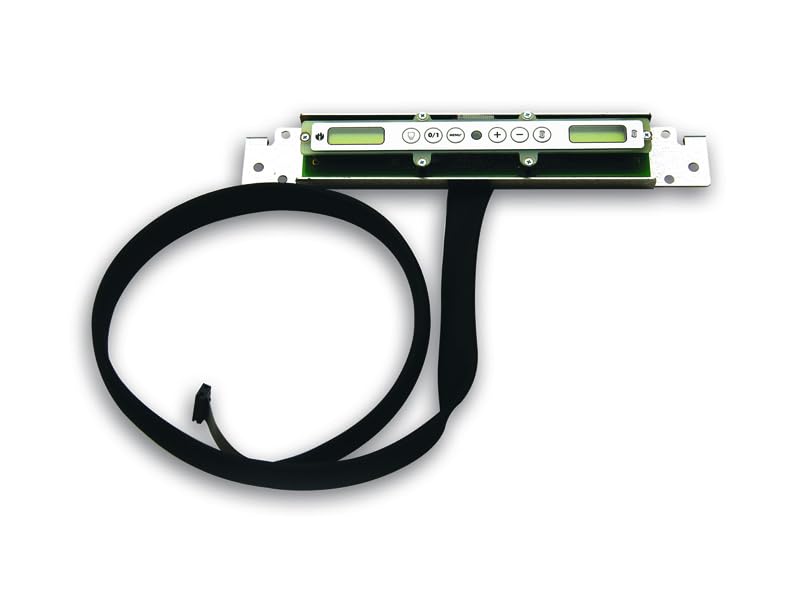
Figure 1: Main view of the EDILKAMIN 612600 Synoptic Panel. This image shows the front face of the control panel, typically featuring a display screen and control buttons.
2. Safety Information
- Always disconnect the appliance from the main power supply before attempting any installation, maintenance, or repair.
- Installation and replacement should only be performed by qualified technical personnel to ensure safety and proper function.
- Do not expose the panel to excessive moisture, direct sunlight, or extreme temperatures.
- Use only original EDILKAMIN spare parts for replacement.
3. Setup and Installation
The EDILKAMIN 612600 Synoptic Panel is designed as a direct replacement part. Ensure you have the correct model before proceeding with installation.
- Power Disconnection: Turn off and unplug the EDILKAMIN appliance from the electrical outlet. Wait for the appliance to cool down completely if it was recently in operation.
- Access Old Panel: Carefully locate and access the existing synoptic panel on your appliance. This may involve removing a cover or fascia.
- Disconnect Old Panel: Gently disconnect all electrical connectors from the old panel. Note the orientation and connection points for reassembly.
- Remove Old Panel: Unscrew or unclip the old panel from its mounting.
- Install New Panel: Position the new EDILKAMIN 612600 Synoptic Panel in the mounting location. Secure it using the original screws or clips.
- Connect New Panel: Reconnect all electrical connectors to the new panel. Ensure connections are firm and correctly oriented. Refer to the appliance's main wiring diagram if unsure.
- Secure Covers: Replace any covers or fascia removed during the process.
- Power On: Plug the appliance back into the electrical outlet and turn on the power. The panel should illuminate and display initial startup information.
Important: If you are unsure about any step, consult a qualified technician or the EDILKAMIN service center. Incorrect installation can lead to damage or safety hazards.

Figure 2: Rear view of the EDILKAMIN 612600 Synoptic Panel, showing electrical connectors. This image highlights the connection points for wiring the panel to the main appliance.
4. Operating Instructions
The synoptic panel provides real-time information and control over your EDILKAMIN heating appliance. While specific functions may vary slightly between TORONTO and QUEBEC models, the general operation principles are similar.
4.1. Display Overview
The display typically shows:
- Current operating status (e.g., ON, OFF, Standby, Ignition)
- Set temperature and actual room temperature
- Power level or flame intensity
- Fan speed (if applicable)
- Time and date
- Error codes or warning messages
4.2. Basic Controls
Most panels feature a set of buttons for navigation and control:
- ON/OFF Button: To switch the appliance on or off.
- MENU/SET Button: To access the main menu and confirm selections.
- UP/DOWN Arrows: To navigate through menu options or adjust values (e.g., temperature, power level).
- ESC/BACK Button: To exit a menu or cancel an operation.
4.3. Setting Parameters
To adjust settings such as temperature, power, or programming:
- Press the MENU button to enter the main menu.
- Use the UP/DOWN arrows to navigate to the desired setting (e.g., "Temperature," "Power," "Timer").
- Press SET to select the option.
- Use UP/DOWN arrows to adjust the value.
- Press SET again to confirm the new value.
- Press ESC to exit the menu.
For detailed programming instructions, refer to the specific user manual of your EDILKAMIN TORONTO or QUEBEC appliance.
5. Maintenance
Regular maintenance ensures the longevity and optimal performance of your synoptic panel.
- Cleaning: Gently wipe the display and buttons with a soft, dry, or slightly damp cloth. Do not use abrasive cleaners, solvents, or excessive moisture, as these can damage the panel.
- Inspection: Periodically check for any visible damage to the panel or its connections. Ensure the panel is securely mounted.
- Software Updates: If your appliance supports software updates for the control panel, follow the instructions provided in your appliance's main manual or by EDILKAMIN technical support.
6. Troubleshooting
If you encounter issues with your synoptic panel, try the following basic troubleshooting steps:
| Problem | Possible Cause | Solution |
|---|---|---|
| Panel does not light up or respond. | No power supply; loose connection; faulty panel. |
|
| Display shows an error code. | Appliance malfunction; sensor issue. |
|
| Buttons are unresponsive. | Software glitch; physical damage; dirt/debris. |
|
For more complex issues or if troubleshooting steps do not resolve the problem, contact EDILKAMIN authorized service personnel.
7. Specifications
| Model Number: | 612600 |
| Brand: | EDILKAMIN |
| Product Type: | Synoptic Panel / Display Panel (Original Spare Part) |
| Compatibility: | EDILKAMIN TORONTO and QUEBEC models |
| ASIN: | B07GXFT6P4 |
8. Warranty and Support
For warranty information regarding your EDILKAMIN 612600 Synoptic Panel, please refer to the documentation provided with your original EDILKAMIN appliance or contact your authorized EDILKAMIN dealer or the manufacturer directly. As this is a spare part, its warranty may be subject to the terms of the original appliance or the specific spare parts policy.
For technical support, service, or to order additional spare parts, please contact EDILKAMIN customer service or an authorized service center. You can typically find contact information on the EDILKAMIN official website or in your appliance's main user manual.
EDILKAMIN Official Website: www.edilkamin.com


