
Nowley 8-5745-0-1
Nowley Men's Watch Instruction Manual
Model: 8-5745-0-1
Introduction
Thank you for choosing the Nowley Men's Watch. This manual provides detailed instructions on how to set up, operate, maintain, and troubleshoot your new timepiece. Please read this manual carefully to ensure proper use and longevity of your watch.
The Nowley Men's Watch is designed for reliability and style, featuring a multi-function dial that displays time, day of the week, and date.
Product Overview
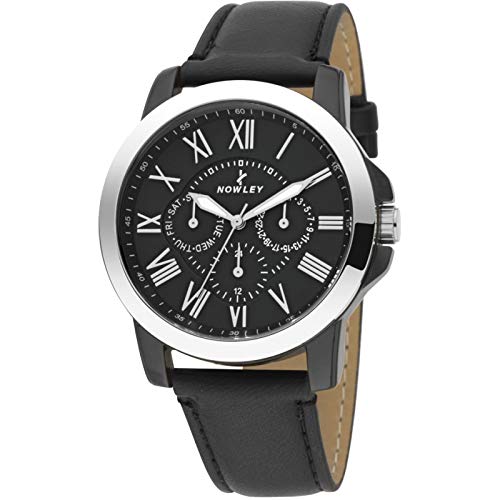
Figure 1: Nowley Men's Watch
This image displays the Nowley Men's Watch, featuring a round black dial with Roman numeral hour markers (II, IV, V, VII, VIII, X, XI, XII) and stick markers for others. It has three sub-dials: one for the day of the week (at 9 o'clock), one for the date (at 3 o'clock), and a 24-hour indicator (at 6 o'clock). The watch has a silver-tone bezel and case, and is fitted with a black leather strap. The brand name 'NOWLEY' is visible below the 12 o'clock position.
Setup
1. Initial Inspection
Upon unboxing, carefully inspect the watch for any visible damage. Ensure all protective films are removed from the crystal and case back.
2. Setting the Time and Date
- Pull out the crown: Gently pull the crown (the knob on the side of the watch) to its outermost position (Position 2).
- Set the time: Rotate the crown clockwise or counter-clockwise to set the hour and minute hands to the correct time. Pay attention to AM/PM if your watch has a 24-hour indicator or date change mechanism.
- Set the date: Push the crown in one click to Position 1. Rotate the crown to adjust the date sub-dial (typically at 3 o'clock).
- Set the day of the week: Rotate the crown in Position 1 to adjust the day of the week sub-dial (typically at 9 o'clock).
- Push in the crown: Once time, date, and day are set, push the crown back into its normal operating position (Position 0) to start the watch movement.
Note: Avoid setting the date or day between 9 PM and 3 AM, as this can interfere with the automatic date change mechanism. If you need to set the date during this period, first adjust the time outside this window, then set the date, and finally reset the time.
3. Adjusting the Strap
The watch comes with a standard leather strap. To adjust the fit, simply use the buckle to select the appropriate hole that provides a comfortable and secure fit on your wrist. Ensure it is not too tight to restrict circulation, nor too loose to slide around excessively.
Operating Your Watch
Basic Time Reading
The main hands indicate the hour and minute. The thin hand indicates seconds. The Roman numerals on the dial mark the hours.
Using the Sub-dials
- Day of the Week Sub-dial (at 9 o'clock): Displays the current day of the week (e.g., MON, TUE, WED).
- Date Sub-dial (at 3 o'clock): Displays the current date (e.g., 1, 5, 10).
- 24-Hour Indicator (at 6 o'clock): Shows the current time in a 24-hour format, useful for distinguishing AM/PM when setting the time.
Maintenance
Cleaning Your Watch
Wipe the watch case and crystal regularly with a soft, dry cloth to remove dust and fingerprints. For the leather strap, avoid excessive moisture and clean with a specialized leather cleaner if necessary.
Water Resistance
This watch is designed with a certain level of water resistance. Refer to the markings on the watch case back for specific water resistance ratings (e.g., 3 ATM, 5 ATM). Generally, 3 ATM (30 meters) is suitable for daily use and splashes, but not for swimming or showering. Always ensure the crown is fully pushed in before any contact with water.
Battery Replacement
Your watch is powered by a quartz movement and requires a battery. When the watch stops or the second hand starts skipping, it's an indication that the battery needs replacement. It is recommended to have the battery replaced by a qualified watchmaker to ensure proper sealing and maintain water resistance.
Storage
When not in use, store your watch in a cool, dry place, away from direct sunlight, extreme temperatures, and strong magnetic fields. A watch box or pouch is ideal for protection.
Troubleshooting
| Problem | Possible Cause | Solution |
|---|---|---|
| Watch has stopped or is running intermittently. | Depleted battery. | Replace the battery. |
| Time is incorrect. | Crown not fully pushed in; time not set correctly. | Ensure crown is fully pushed in. Reset the time as per "Setting the Time and Date" section. |
| Date/Day not changing or changing at wrong time. | Date/Day set during restricted hours (9 PM - 3 AM); incorrect setting. | Reset date/day outside restricted hours. Ensure AM/PM is correctly set for the 24-hour indicator. |
| Condensation under the crystal. | Exposure to extreme temperature changes or water ingress. | Immediately take the watch to a qualified watchmaker for inspection and drying to prevent damage. |
Specifications
- Brand: Nowley
- Model Number: 8-5745-0-1
- Product Weight: 150 g
- Department: Men
- ASIN: B07GWP32N5
- First Available Date: August 28, 2018
- Manufacturer: Nowley
Warranty and Support
Your Nowley watch is covered by a manufacturer's warranty against defects in materials and workmanship. Please refer to the warranty card included with your purchase for specific terms and conditions, including the warranty period.
For technical support, service, or warranty claims, please contact your authorized Nowley dealer or the customer service department. Keep your purchase receipt as proof of purchase.
For more information, you may visit the official Nowley website or contact their customer service through the details provided on your warranty documentation.
Ask a question about this manual
Ask about setup, troubleshooting, compatibility, parts, safety, or missing instructions. Manuals+ will review the question and use this page’s manual context to help answer it.