
Introduction
This manual provides instructions for the Panasonic KX-TGEA60M additional cordless phone handset. This handset is designed to expand your existing Panasonic KX-TGE63x or KX-TGE64x series cordless phone system. It does not function as a standalone unit and must be paired with a compatible base station.
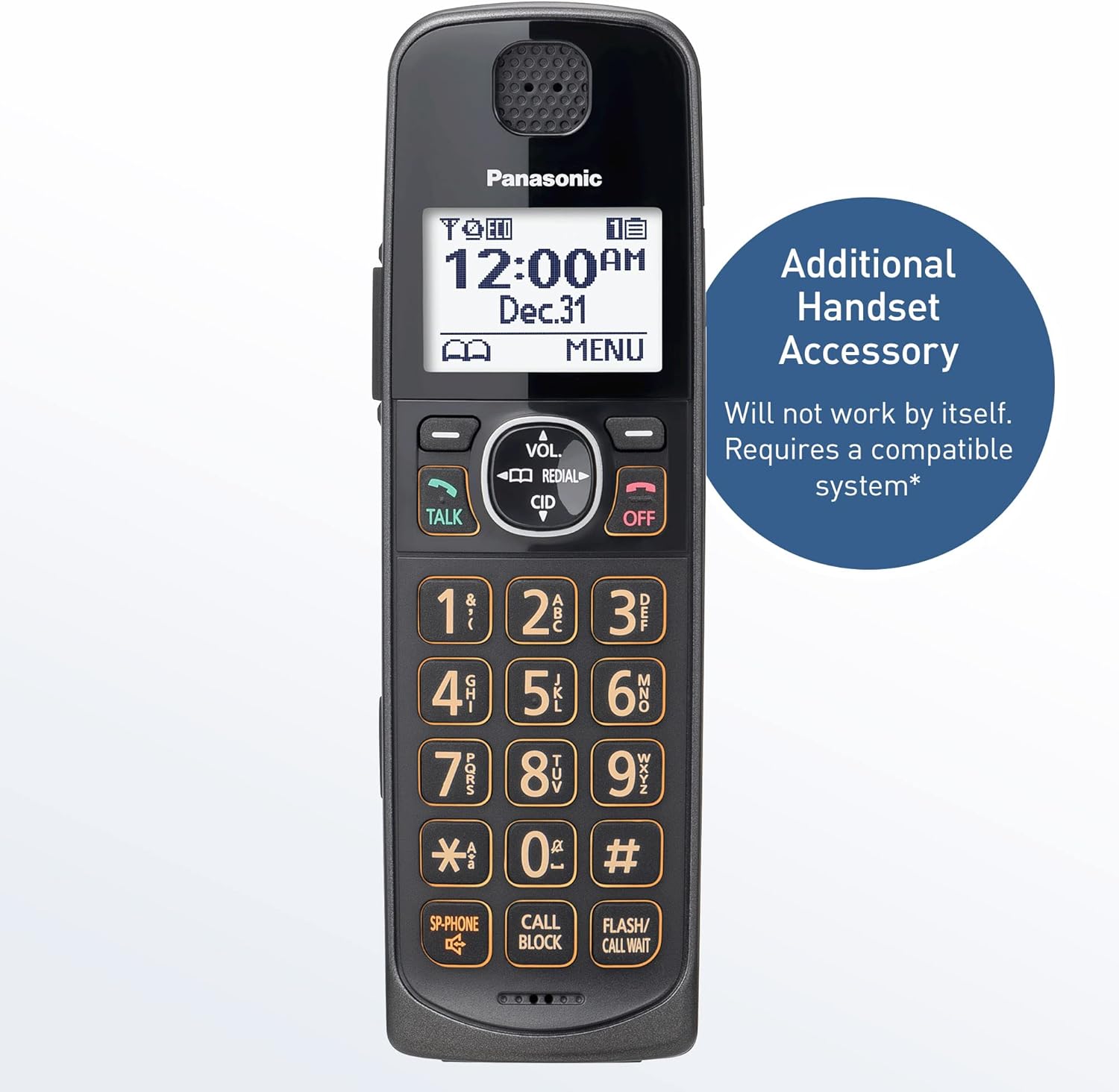
Image: Panasonic KX-TGEA60M handset. This handset is an accessory and requires a compatible Panasonic phone system to operate.
What's in the Box
Verify that all items are included in your package:
- One (1) KX-TGEA60M Handset
- One (1) Charger Unit for the handset
- Two (2) AAA NiMH Rechargeable Batteries
Setup
1. Battery Installation
- Locate the battery compartment cover on the back of the handset.
- Slide the cover downwards to remove it.
- Insert the two (2) AAA NiMH rechargeable batteries, observing the correct polarity (+ and -).
- Replace the battery compartment cover by sliding it upwards until it clicks into place.
2. Charging the Handset
- Connect the AC adapter of the charger unit to a standard electrical outlet.
- Place the handset on the charger unit. The charge indicator on the handset should illuminate, indicating that charging has begun.
- Allow the handset to charge for at least 7 hours before initial use to ensure full battery capacity.
3. Registering the Handset to a Base Unit
This handset must be registered to a compatible Panasonic KX-TGE63x or KX-TGE64x series base unit. Refer to your base unit's manual for specific registration instructions. Generally, the process involves:
- Placing the handset on the base unit or charger.
- Pressing and holding the LOCATOR/INTERCOM button on the base unit for approximately 5 seconds until the registration tone sounds.
- Within 60 seconds, pressing the OK button on the handset, then selecting "Register Handset" from the menu and following the on-screen prompts.
- A confirmation tone will sound on both the base unit and handset upon successful registration.
Note: Up to 6 handsets can be registered to a single compatible base unit.
Operation
Handset Features Overview

Image: Key features of the handset including a large screen, backlit keypad, side volume controls, and a visual ringer.
- Large Screen: The 1.8-inch full-dot display provides clear readability of caller ID, menu options, and time.
- Backlit Keypad: Illuminated keys enhance visibility in low-light conditions, making dialing and navigation easier.
- Side Volume Keys: Conveniently located buttons on the side of the handset allow for quick adjustment of call volume during a conversation.
- Visual Ringer: A bright LED flashes when an incoming call is received, providing a visual alert in addition to the audible ringtone.
Making and Receiving Calls
- To Make a Call: Press the TALK button, then dial the phone number. Alternatively, dial the number first and then press TALK.
- To Receive a Call: Press the TALK button when the phone rings.
- To End a Call: Press the OFF button or place the handset back on the charger.
Call Blocking Features
The handset supports advanced call blocking to help reduce unwanted calls.

Image: The 'CALL BLOCK' button on the handset keypad, used for one-touch call blocking.
- One-Touch Call Block: During an incoming call or while reviewing caller ID history, press the CALL BLOCK button to add the number to your block list.
- Automated Call Blocking: When enabled on the base unit, the system can prompt unknown callers for an access code, automatically disconnecting robocalls.
Bilingual Talking Caller ID
The handset can announce caller information in either English or Spanish, allowing you to identify callers without looking at the screen. This feature requires subscription to a Caller ID service from your telephone provider.

Image: The handset's screen showing caller ID information, with an indication of bilingual (English/Spanish) announcement capability.
Digital Answering System Access
If your base unit has a digital answering system, this handset can be used to access and manage messages. The system can store up to 17 minutes of messages.
- Playing Messages: Press the PLAY button (if available on handset) or navigate through the menu to "Answering System" to listen to messages.
- Quick-Read Message Counter: The base unit typically displays the number of new messages.
Maintenance
Cleaning the Handset
Wipe the handset and charger unit with a soft, damp cloth. Avoid using abrasive cleaners, benzene, thinner, or any other harsh chemicals, as these can damage the surface.
Battery Care
- Use only the specified AAA NiMH rechargeable batteries. Using non-rechargeable batteries or other types may cause damage or malfunction.
- For optimal battery life, keep the handset on the charger when not in use.
- If the handset will not be used for an extended period, remove the batteries to prevent leakage.

Image: A battery icon on the handset screen, indicating battery status.
Troubleshooting
| Problem | Solution |
|---|---|
| Handset does not turn on or has no power. |
|
| Cannot make or receive calls. |
|
| Poor sound quality or static. |
|
| Handset displays "Unregistered". |
|
Specifications
- Model: KX-TGEA60M
- Brand: Panasonic
- Color: Metallic Black
- Dimensions (H x W x D): Approximately 6.8 x 2.2 x 1.3 inches (17.3 x 5.6 x 3.3 cm)
- Weight: Approximately 4.8 ounces (136 grams)
- Power Source: 2 x AAA NiMH rechargeable batteries (included)
- Display: 1.8-inch Full Dot Monochrome LCD
- Answering System Type: Digital (requires compatible base unit)
- Compatibility: Panasonic KX-TGE63x and KX-TGE64x series cordless phone systems

Image: Dimensional overview of the Panasonic KX-TGEA60M handset.
Warranty and Support
For warranty information, technical support, or to purchase replacement parts, please refer to the documentation included with your main Panasonic cordless phone system or visit the official Panasonic support website. Keep your proof of purchase for warranty claims.
You can find more information and support resources on the Panasonic Store on Amazon.