
SQUEGG T9-DZT9-96RR
SQUEGG Smart Hand Grip Trainer User Manual
Model: T9-DZT9-96RR
1. Introduction
The SQUEGG Smart Hand Grip Trainer is a Bluetooth-enabled digital dynamometer designed to evaluate, track, and improve your grip strength. This device, combined with its companion app, offers a fun and engaging way to enhance hand strength, motor skills, and overall physical function. It is portable, easy to use, and suitable for various users looking to monitor and improve their grip strength.
The SQUEGG utilizes gamification techniques and provides detailed progress tracking, making grip training an interactive experience. It also supports isometric exercises recommended for blood pressure regulation.
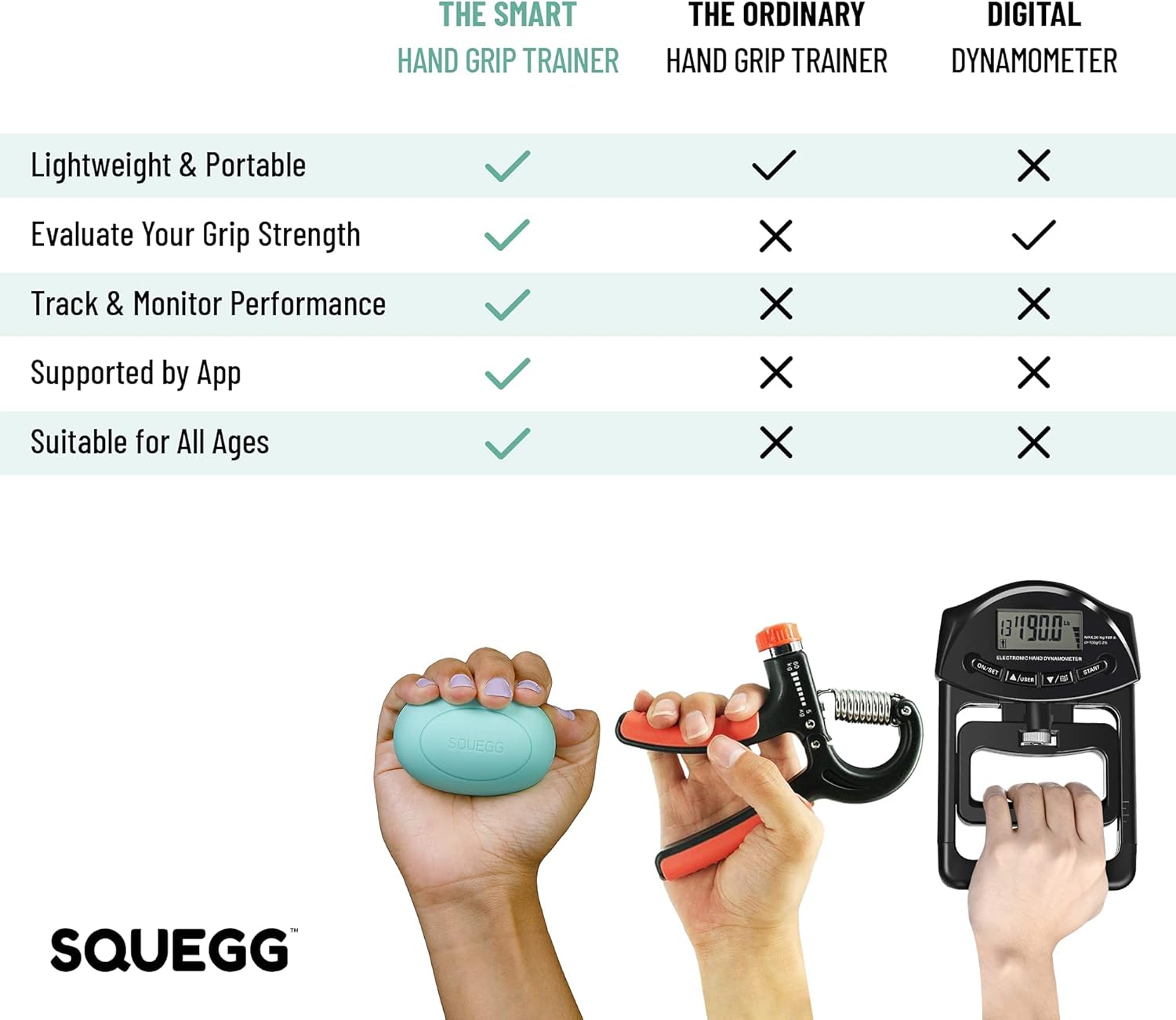
Image 1.1: Comparison highlighting the advantages of the SQUEGG Smart Hand Grip Trainer, including portability, grip strength evaluation, performance tracking, app support, and suitability for all ages, compared to traditional hand grip trainers and digital dynamometers.
2. Package Contents
Please ensure all items are present in your SQUEGG Smart Hand Grip Trainer package:
- SQUEGG Smart Hand Grip Trainer (Mint color)
- USB Charging Cable
- Quick Start Guide (not shown in image, but typically included)
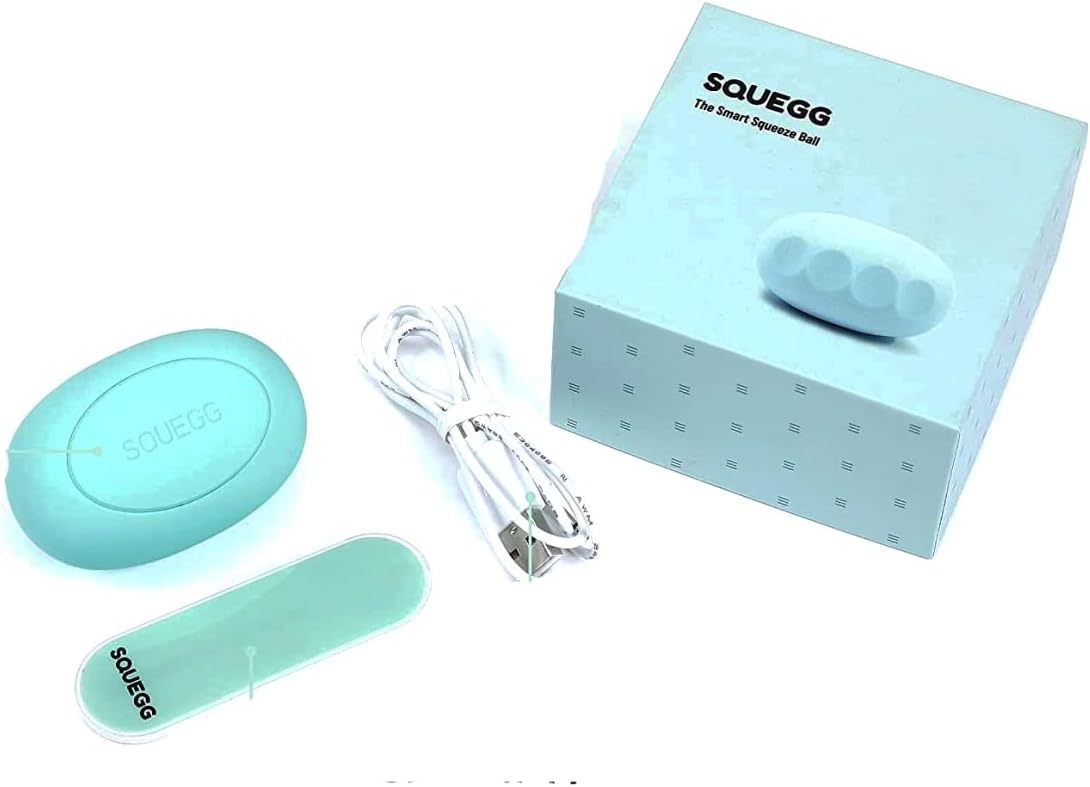
Image 2.1: The SQUEGG Smart Hand Grip Trainer, its USB charging cable, and the product packaging, illustrating the complete contents of the box.
3. Product Features & Design
The SQUEGG Smart Hand Grip Trainer is designed for comfort, durability, and smart functionality:
- Ergonomic Silicone Shell: Provides a comfortable grip and resists moisture from sweat.
- High Sensitive Sensor: Accurately measures grip strength.
- Easy Bluetooth Connectivity: Seamless pairing with the companion app.
- Long Standby Battery Life: Up to 80 hours of continuous use on a single charge.
- Eco-Friendly Material: Constructed from sustainable materials.
- Compact Size: Approximately 3 inches long and 2 inches wide, making it highly portable.
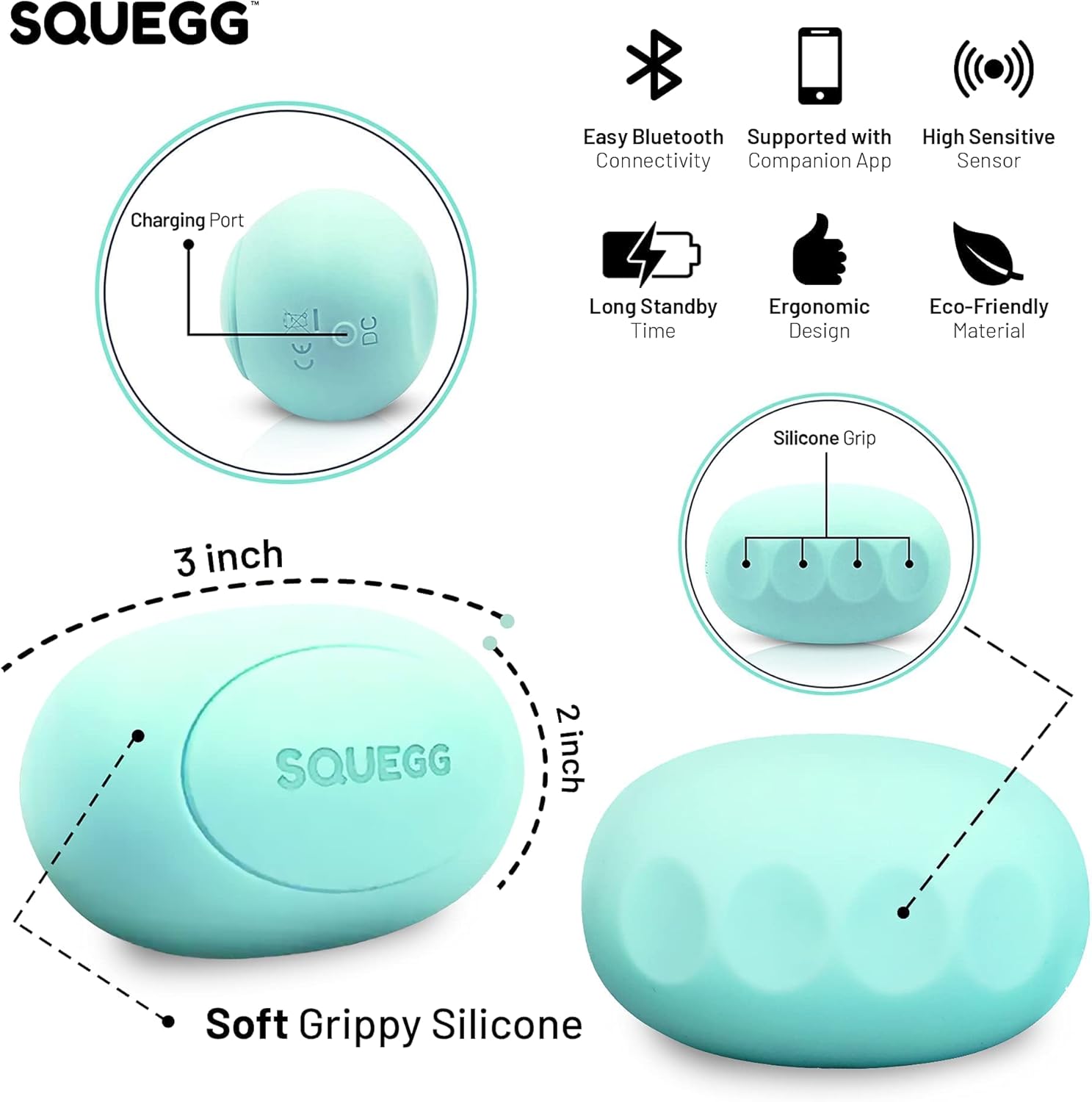
Image 3.1: A detailed diagram illustrating the key features and dimensions of the SQUEGG device, including its charging port, soft grippy silicone material, and icons representing Bluetooth connectivity, app support, high sensitive sensor, long standby time, ergonomic design, and eco-friendly material.
4. Safety Information
Please read and follow these safety guidelines to ensure safe and proper use of your SQUEGG device:
- Do not expose the device to extreme temperatures, direct sunlight, or excessive moisture.
- Keep the device away from children and pets to prevent accidental ingestion of small parts.
- Use only the provided USB charging cable or a certified equivalent.
- Do not attempt to disassemble or repair the device yourself. This will void the warranty and may cause damage or injury.
- If you experience any pain or discomfort during exercise, stop immediately and consult a healthcare professional.
- This device is intended for personal fitness and wellness tracking. It is not a medical device and should not be used for diagnosis or treatment of any medical condition.
5. Setup Guide
5.1 Charging the Device
- Locate the charging port on your SQUEGG device (refer to Image 3.1).
- Connect the small end of the USB charging cable to the SQUEGG device.
- Connect the larger end of the USB cable to a standard USB power adapter (not included) or a computer USB port.
- Allow approximately 2 hours for a full charge. The device will indicate charging status (e.g., LED light). A full charge provides up to 80 hours of continuous use.
5.2 Downloading the Companion App
The SQUEGG app is essential for using your device. It is available for both iOS and Android devices.
- Open the App Store (iOS) or Google Play Store (Android) on your smartphone.
- Search for "SQUEGG" or "SQUEGG Smart Hand Grip Trainer".
- Download and install the official SQUEGG app.
5.3 Pairing via Bluetooth
- Ensure your SQUEGG device is charged and powered on.
- Enable Bluetooth on your smartphone.
- Open the SQUEGG app.
- Follow the on-screen instructions within the app to connect to your SQUEGG device. The app will guide you through the pairing process.
6. Operating Instructions
Once paired, the SQUEGG app unlocks the full potential of your Smart Hand Grip Trainer.
6.1 Grip Strength Assessment & Tracking
The app provides an inbuilt grip strength assessment feature, allowing you to measure and track your progress over time.
- Within the SQUEGG app, navigate to the assessment or tracking section.
- Follow the prompts to perform grip exercises, squeezing the SQUEGG ball as instructed.
- The app will display your grip strength in real-time and record your results.
- Review visually appealing reports and statistics to monitor your daily performance and personal bests.
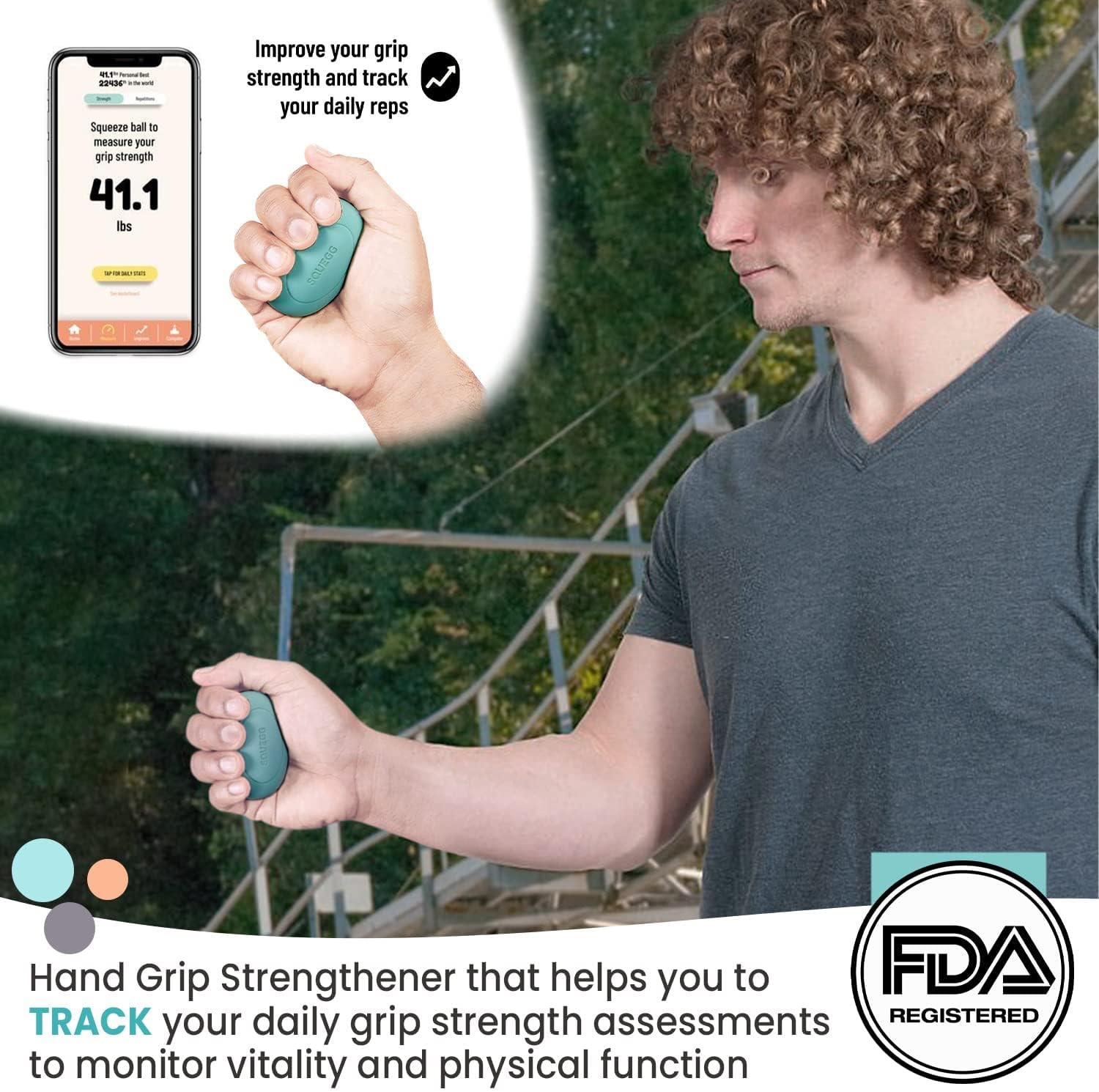
Image 6.1: A user demonstrating the SQUEGG device while viewing their real-time grip strength measurement on the companion app, highlighting the ability to track daily repetitions and progress.

Image 6.2: An elderly man engaging in exercise with the SQUEGG device, while his smartphone displays an exercise summary, demonstrating the portability and ease of use for improving hand grip strength anytime and anywhere.
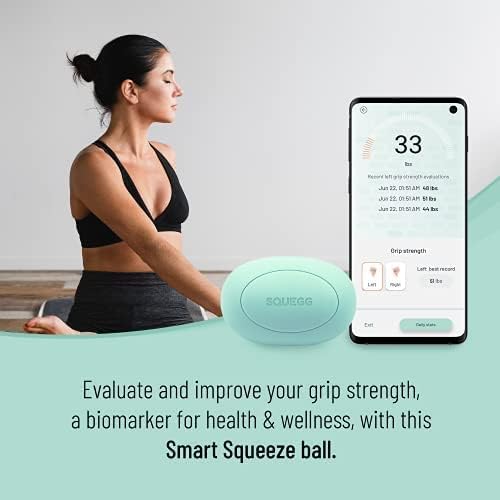
Image 6.3: A woman in a meditative pose with the SQUEGG device, and a smartphone displaying grip strength evaluation, emphasizing the device's role in assessing and improving grip strength as a biomarker for health and wellness.
6.2 Gamification and Exercises
The SQUEGG app features exciting, grip-strengthening games and exercises to make your training fun and engaging.
- Explore various games and routines within the app.
- Play interactive games that require you to squeeze the SQUEGG ball to achieve goals.
- These activities help improve motor skills and mind-muscle coordination.

Image 6.4: A woman relaxing on a couch while interacting with the SQUEGG app on her smartphone, which displays various engaging in-app activities, routines, and games designed to improve motor skills and mind-muscle coordination through gamification.
6.3 Isometric Exercises for Blood Pressure
The American Heart Association recommends isometric hand exercise to help regulate blood pressure. The SQUEGG app facilitates this by tracking your percentage of maximum grip strength and time.
- Access the isometric exercise section in the app.
- Follow the guided exercises, typically involving sustained squeezes at a certain percentage of your maximum grip strength.
- The app automatically tracks your performance, making it easy to adhere to recommended guidelines (e.g., 12 minutes daily).

Image 6.5: A woman and a healthcare professional reviewing the SQUEGG app, which displays an interface for isometric exercises, highlighting how the device can be used for cardiovascular fitness, blood pressure regulation, and guided in-app exercises recommended by the American Heart Association.
7. Maintenance
7.1 Cleaning the Device
The SQUEGG device features an ergonomic silicone shell that resists moisture from sweat build-up, making it easy to clean.
- Wipe the device with a soft, damp cloth after each use.
- For deeper cleaning, use a mild soap solution on the cloth, then wipe with a clean, damp cloth to remove any soap residue.
- Do not submerge the device in water or use harsh chemicals or abrasive cleaners.
- Ensure the device is completely dry before charging or storing.
7.2 Battery Care
- Charge the device regularly, even if not in frequent use, to maintain battery health.
- Avoid fully discharging the battery frequently.
- Store the device in a cool, dry place when not in use.
8. Troubleshooting
If you encounter issues with your SQUEGG Smart Hand Grip Trainer, try the following solutions:
8.1 Device Not Powering On / Not Charging
- Ensure the USB cable is securely connected to both the SQUEGG device and the power source.
- Try a different USB port or power adapter.
- Allow the device to charge for at least 15-30 minutes before attempting to power it on.
8.2 Unable to Connect to App / Bluetooth Issues
- Ensure Bluetooth is enabled on your smartphone.
- Make sure the SQUEGG device is within close proximity to your smartphone.
- Close and reopen the SQUEGG app.
- Restart your smartphone.
- Forget the SQUEGG device in your phone's Bluetooth settings and attempt to pair again through the app.
- Ensure the SQUEGG device is sufficiently charged.
8.3 App Not Responding / Freezing
- Force close the app and reopen it.
- Check for app updates in your phone's app store and install any available updates.
- Ensure your smartphone's operating system is up to date.
8.4 Inaccurate Readings
- Ensure you are holding the SQUEGG device correctly and consistently during measurements.
- Calibrate the device if the app provides a calibration option.
- Ensure the device is clean and free from debris that might interfere with the sensor.
9. Specifications
| Attribute | Detail |
|---|---|
| Model Number | T9-DZT9-96RR |
| Brand | SQUEGG |
| Colour | Mint |
| Material | Silicone |
| Style | Ball |
| Shape | Oval |
| Item Weight | 24.49 Grams |
| Package Dimensions | 9.14 x 9.14 x 5.08 cm |
| Batteries Required | 1 Lithium Ion (included) |
| Battery Life (Continuous Use) | Approx. 80 hours |
| Charging Time | Approx. 2 hours |
| Connectivity | Bluetooth |
| UPC | 860278001020 |
10. Support
For further assistance, technical support, or warranty inquiries, please contact SQUEGG customer service through their official website or the contact information provided in your product packaging. Please have your model number (T9-DZT9-96RR) and purchase details ready when contacting support.
Ask a question about this manual
Ask about setup, troubleshooting, compatibility, parts, safety, or missing instructions. Manuals+ will review the question and use this page’s manual context to help answer it.