
1. Introduction
This manual provides essential instructions for the proper installation, operation, and maintenance of your Kenwood DDX376BT Double DIN In-Dash 6.2-inch DVD Receiver. Please read this manual thoroughly before using the unit to ensure safe and optimal performance. Keep this manual for future reference.
2. Product Overview and Features
The Kenwood DDX376BT is a versatile in-dash car stereo system designed to enhance your driving experience with advanced audio and video capabilities. It features a 6.2-inch clear resistive touch panel display and integrated Bluetooth technology.
Key Features:
- 6.2-inch Clear Resistive Touch Screen LCD: Features LED backlight, high contrast ratio, and a resolution of 800 (H) x 480 (V) x RGB (total 1,152,000 pixels) for clear and vivid display.
- Integrated Bluetooth 3.0: Enables wireless hands-free calling and audio streaming from compatible smartphones. Supports dual phone connection.
- Media Playback: Supports DVD-Video, DVD-R/RW, DVD+R/RW, CD-Audio, CD-R/RW discs. Compatible with various music, video, and photo files via CD and DVD.
- Smartphone Integration: Access and control popular music applications like Spotify, Pandora, and iHeartRadio from your iPhone (via USB or Bluetooth) or Android device (via Bluetooth).
- iDatalink Maestro RR Compatibility: Seamlessly integrates with factory infotainment features and displays vehicle information such as HVAC, performance data, and TPMS (requires optional iDatalink Maestro RR module).
- Audio Outputs: Includes 3 sets of 4-volt RCA pre-outs for system expansion.
- FLAC Support: High-resolution audio playback up to 96kHz/24-bit via USB.
- A/V Input: 1 A/V input (requires optional CA-C3AV adapter).

3. Setup and Installation
Professional installation is recommended for this product. Incorrect wiring can cause damage to the unit or vehicle. Refer to the detailed wiring diagram included in the package for specific connections.
Package Contents:
Before installation, verify that all components are present:
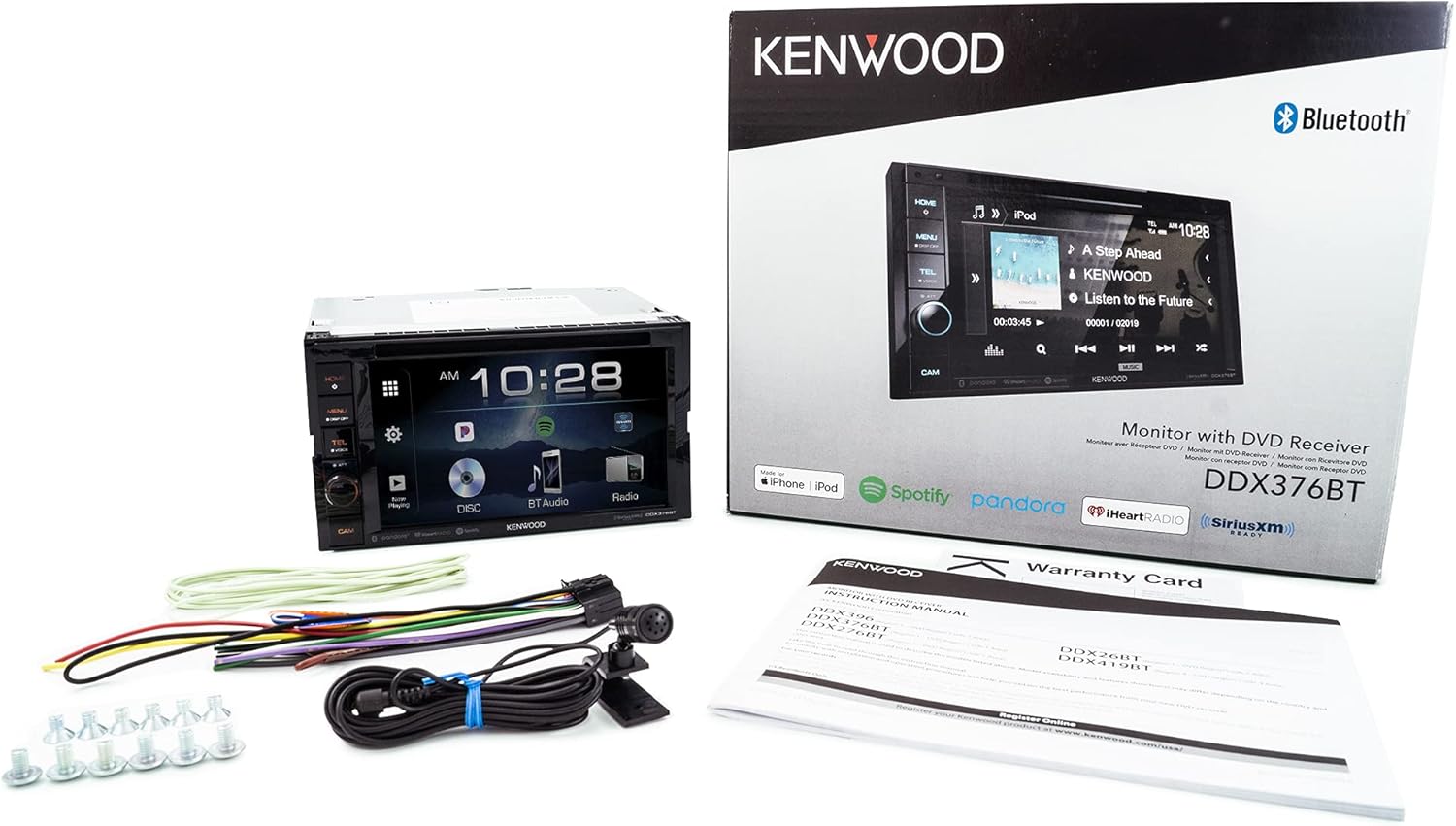
Wiring Connections:
Ensure all power, ground, speaker, and accessory wires are connected correctly. The unit includes a dedicated input for a rearview camera and connections for optional accessories.

Initial Power-On:
After installation, turn on your vehicle's ignition. The unit should power on and display the Kenwood logo or main menu. Follow any on-screen prompts for initial setup.
4. Operating Instructions
Basic Controls:
- Power Button: Press to turn the unit on/off.
- Volume Knob: Rotate to adjust the audio volume. Press to mute/unmute.
- Home Button: Returns to the main menu screen.
- Menu Button: Accesses various settings and options.
- Display Off Button: Turns off the display for reduced distraction.
- CAM Button: Activates the rearview camera display (if connected).
Touch Screen Operation:
The 6.2-inch touch screen allows for intuitive control. Tap icons to select functions, swipe to navigate menus, and use drag-and-drop for customization where available.
5. Media Playback
Disc Playback (DVD/CD):
Insert a disc into the front-loading disc slot. The unit will automatically detect the disc type and begin playback. Use the on-screen controls for play, pause, skip, and other functions.
USB Media Playback:
Connect a USB device containing audio, video, or photo files to the USB input. Select the USB source from the main menu. The unit supports various file formats, including FLAC up to 96kHz/24-bit resolution.
iPod/iPhone Playback:
Connect your iPod or iPhone via USB. The unit will recognize the device and allow you to browse and play music directly from the touch screen. For certain apps, Bluetooth connection may also be used.

6. Bluetooth Connectivity
Pairing a Bluetooth Device:
- Ensure Bluetooth is enabled on your mobile device.
- On the DDX376BT, go to the Bluetooth settings menu.
- Select "Pairing" or "Add Device."
- Search for available devices on your mobile phone and select "DDX376BT."
- Confirm the pairing code on both devices if prompted.
Hands-Free Calling:
Once paired, you can make and receive calls directly through the unit. The external microphone ensures clear communication. The unit supports dual phone connection, allowing two phones to be connected simultaneously.
Bluetooth Audio Streaming:
Stream music wirelessly from your paired smartphone. Use the unit's controls to play, pause, and skip tracks. Contact lists from both connected phones will download to the receiver for easy access.
7. iDatalink Maestro Integration
The Kenwood DDX376BT is compatible with the Automotive Data Solutions iDatalink Maestro RR module (sold separately). When connected, this module provides a seamless interface with your vehicle's factory systems.
Benefits of iDatalink Maestro RR:
- Retains factory infotainment features such as satellite radio, USB media player, and Bluetooth hands-free.
- Displays vehicle information including HVAC controls, performance data, and Tire Pressure Monitoring System (TPMS) on the DDX376BT screen.
- Allows for integration with steering wheel controls.
Consult the iDatalink Maestro RR manual for specific installation and configuration details.
8. Specifications
| Feature | Specification |
|---|---|
| Model Number | DDX376BT |
| Display Size | 6.2 inches |
| Display Type | Clear Resistive Touch Screen LCD |
| Resolution | 800 x 480 pixels |
| Bluetooth Version | 3.0 |
| Media Types Supported | DVD-Video, DVD-R/RW, DVD+R/RW, CD-Audio, CD-R/RW |
| USB Audio Support | FLAC up to 96kHz/24-bit |
| Pre-outs | 3 sets (4-volt RCA) |
| Color | Black |
| Compatible Items | Mobile phone, Headphone, Rearview camera |
9. Maintenance
To ensure the longevity and optimal performance of your Kenwood DDX376BT, follow these maintenance guidelines:
- Cleaning the Screen: Use a soft, dry cloth to gently wipe the touch screen. For stubborn smudges, slightly dampen the cloth with water or a screen-safe cleaner. Avoid harsh chemicals or abrasive materials.
- Disc Care: Handle discs by their edges. Keep them clean and free of scratches. Store discs in their cases when not in use.
- General Cleaning: Keep the unit's front panel and buttons free of dust and debris. Use a soft brush or compressed air for hard-to-reach areas.
- Temperature: Avoid exposing the unit to extreme temperatures.
10. Troubleshooting
If you encounter issues with your DDX376BT, refer to the following common troubleshooting steps:
- No Power: Check all power connections and the vehicle's fuse box. Ensure the ignition is on.
- No Sound: Verify speaker connections. Check volume levels and ensure the unit is not muted. Confirm the correct audio source is selected.
- Bluetooth Connection Issues: Ensure Bluetooth is enabled on both the unit and your mobile device. Try unpairing and re-pairing the device. Clear previous Bluetooth connections if necessary.
- Disc Playback Errors: Ensure the disc is clean and free of scratches. Verify the disc format is supported by the unit.
- Touch Screen Unresponsive: Try resetting the unit (refer to the full manual for reset instructions, usually a small reset button). Ensure the screen is clean.
For more detailed troubleshooting or persistent issues, please consult the comprehensive Kenwood DDX376BT service manual or contact Kenwood customer support.
11. Warranty and Support
Your Kenwood DDX376BT is covered by a manufacturer's warranty. Please refer to the warranty card included in your product packaging for specific terms, conditions, and duration. Retain your proof of purchase for warranty claims.
Customer Support:
For technical assistance, product inquiries, or warranty service, please visit the official Kenwood website or contact their customer support department. Contact information can typically be found on the Kenwood website or in the warranty documentation.