
1. Introduction
This manual provides instructions for the installation, operation, and maintenance of your WOWLED RGB LED Strip Lights. These magnetic LED strips are designed for use in mid and full tower PC cases, offering customizable lighting effects through a 4-pin RGB header compatible with systems like Asus Aura, Gigabyte RGB Fusion, and MSI Mystic Light.

Image 1.1: Example of WOWLED RGB LED Strip Lights installed in a PC case and desk setup, showcasing various lighting effects.
2. Package Contents
Verify that all components are present in your package:
- 3 x RGB LED Strip (1 Ft per strip)
- 1 x 3-Way Splitter Extension Cable (1 Ft)
- 1 x 1-Way Extension Cable (1.5 Ft)
- 1 x WOWLED Hook and Loop Tape
3. Important Safety Information
- Ensure your motherboard has a 12V 4-pin RGB header. These strips are not compatible with 5V 3-pin addressable RGB headers. Connecting to an incompatible header may cause damage to the strips or your motherboard.
- Do not cut or modify the LED strips, as this may damage the product and void the warranty.
- Keep the product away from water and excessive heat.
- Handle all cables and connectors with care to prevent damage.
4. Installation Guide
4.1. Compatibility Check
Before installation, confirm your motherboard has a 12V 4-pin RGB header. This is crucial for proper functionality and to prevent damage. The header is typically labeled "RGB_HEADER" or "12V GRB".

Image 4.1: Illustration of the 12V 4-pin RGB header on a motherboard and the corresponding connector.
4.2. Physical Installation of LED Strips
The LED strips feature built-in magnets for easy attachment to steel PC cases. For aluminum cases or non-magnetic surfaces, use the provided hook and loop tape.
- Identify desired locations within your PC case for the LED strips. Common placements include the top, bottom, or side panels.
- For steel cases, simply place the magnetic side of the strip onto the metal surface.
- For aluminum or non-magnetic surfaces, apply the hook and loop tape to the back of the LED strip and then to the desired surface.

Image 4.2: Magnetic installation for steel cases and adhesive tape installation for aluminum cases.
4.3. Connecting the LED Strips
Use the included 3-way splitter extension cable to connect multiple LED strips to a single motherboard RGB header.
- Connect the 4-pin connector from each LED strip to one of the female ends of the 3-way splitter cable.
- Connect the single male end of the 3-way splitter cable to the 12V 4-pin RGB header on your motherboard. Ensure the pins align correctly (usually indicated by an arrow on the connector aligning with the 12V pin on the motherboard header).
- If additional reach is needed for a strip, use the 1-way extension cable between a strip and the splitter.

Image 4.3: The 3-way splitter cable allows connection of multiple RGB devices to a single header.
4.4. Cable Management
Proper cable management improves airflow and aesthetics within your PC case. Route cables neatly behind the motherboard tray or along the case edges.
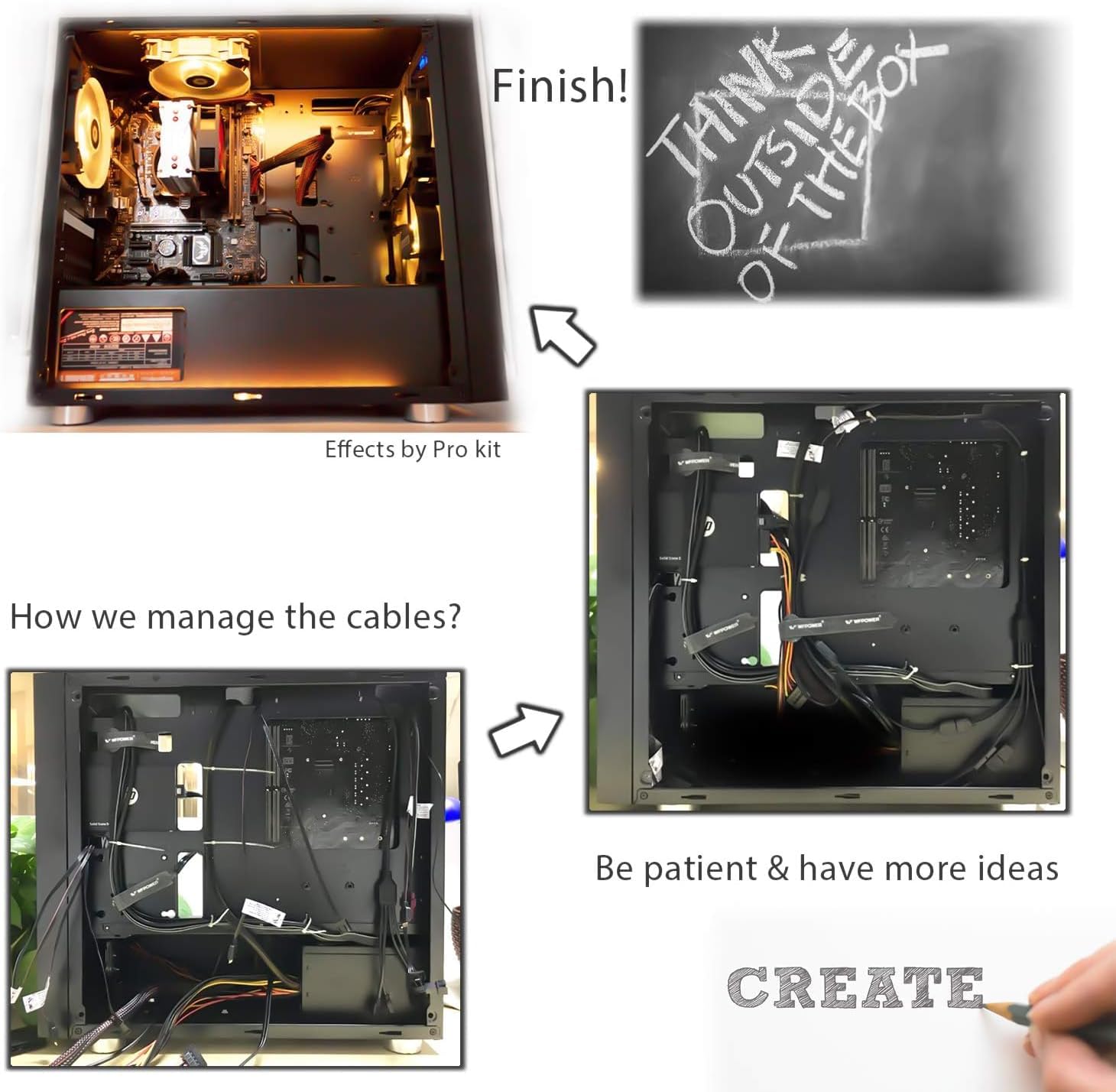
Image 4.4: Example of effective cable management for a clean PC build.
5. Operation
Once installed and connected, the RGB LED strips are controlled via your motherboard's RGB software (e.g., Asus Aura Sync, Gigabyte RGB Fusion, MSI Mystic Light). These strips are designed for synchronized lighting effects.
5.1. RGB Sync Functionality
The strips will synchronize with other compatible RGB components connected to your motherboard's 12V 4-pin RGB header. Use your motherboard's software to select and customize lighting patterns and colors.
5.2. Available Lighting Effects
The specific lighting effects available depend on your motherboard's RGB software. Common effects include:
- Static: A single, constant color.
- Breathing: Colors fade in and out.
- Strobing: Colors flash on and off.
- Color Cycle: Fades between various colors of the rainbow.
- Music Effect: Pulses to the beat of music (if supported by software).
- GPU Temperature: Changes color based on GPU load (if supported by software).

Image 5.1: Overview of common RGB lighting effects controllable via motherboard software.
6. Specifications
| Feature | Detail |
|---|---|
| Model Number | 7901033 |
| Light Type | LED (5050 SMD) |
| Light Color | RGB (Red, Green, Blue) |
| Voltage | 12 Volts |
| Wattage | 3 watts (per strip) |
| Number of Light Sources | 54 (total for 3 strips) |
| Strip Length | 11.81 inches (30 cm) per strip |
| Dimensions (L x W x H) | 11.81 x 0.39 x 0.16 inches |
| Mounting | Magnetic / Hook and Loop Tape |
| Compatibility | Motherboards with 12V 4-pin RGB Header (e.g., Asus Aura, Gigabyte RGB Fusion, MSI Mystic Light) |
| Indoor/Outdoor Usage | Indoor |
For detailed energy information, refer to the EPREL database: https://eprel.ec.europa.eu/qr/1608125
7. Troubleshooting
- Lights not turning on:
- Ensure the 4-pin connector is securely plugged into the 12V RGB header on your motherboard.
- Verify that your motherboard's RGB software is installed and configured correctly.
- Check if the power supply to your PC is adequate and stable.
- Incorrect colors or flickering:
- Confirm that the 4-pin connector is aligned correctly with the 12V pin on the motherboard header. Incorrect alignment can cause color issues.
- Update your motherboard's RGB software to the latest version.
- Ensure no pins are bent or damaged on the connectors.
- Strips not sticking:
- For steel cases, ensure the surface is clean and free of dust or debris.
- For non-magnetic surfaces, use the provided hook and loop tape, ensuring both surfaces are clean and dry before application.
8. Care and Maintenance
- To clean the LED strips, gently wipe them with a dry, soft cloth. Do not use liquid cleaners or abrasive materials.
- Avoid bending the strips sharply, especially near the LED components, to prevent damage.
- Regularly check cable connections to ensure they remain secure.
9. Warranty and Support
WOWLED products are manufactured with quality and performance in mind. For warranty information or technical support, please contact WOWLED customer service through the retailer where the product was purchased or visit the official WOWLED website.
Please have your product model number (7901033) and purchase details ready when contacting support.