
Introduction
This manual provides instructions for the installation, maintenance, and troubleshooting of your USonline911 3X Replacement Shaver Heads. These replacement heads are designed to restore the performance of compatible Philips Norelco electric shavers. Please read this manual thoroughly before use to ensure proper function and safety.
Product Overview
The USonline911 3X Replacement Shaver Heads are precision-engineered components for electric shavers. Each package contains three replacement shaver blades, featuring a two-layer cutter design for effective and durable shaving performance. The heads are constructed from metal and have a silver finish.

Image: Three complete replacement shaver heads, ready for installation.
Compatibility
These replacement shaver heads are compatible with a wide range of Philips Norelco shaver models, including but not limited to:
- 700RL Series: 700RL, 705RL, 710RL, 715RL, 720RL, 725RL, 750RL
- 800RX Series: 800RX, 805RX
- HQ Series: HQ300, HQ302, HQ304, HQ320, HQ322, HQ340, HQ342, HQ360, HQ362, HQ380, HQ382, HQ384, HQ386, HQ3405, HQ3425, HQ3445, HQ3601, HQ3604, HQ3605, HQ3610, HQ3801, HQ3805, HQ3825, HQ3830, HQ3865, HQ3870, HQ442, HQ443, HQ444, HQ481, HQ482, HQ483, HQ484, HQ485, HQ486, HQ487, HQ4401, HQ4402, HQ4403, HQ4404, HQ4405, HQ4406, HQ4407, HQ4411, HQ4413, HQ4425, HQ4445, HQ4601, HQ4602, HQ4603, HQ4604, HQ4605, HQ4630, HQ4800, HQ4805, HQ4806, HQ4807, HQ4810, HQ4816, HQ4821, HQ4825, HQ4826, HQ4830, HQ4845, HQ5605, HQ5699, HQ5801, HQ5802, HQ5806, HQ5810, HQ5811, HQ5814, HQ5815, HQ5816, HQ5818, HQ5819, HQ5821, HQ5825, HQ5826, HQ5830, HQ5841, HQ5842, HQ5845, HQ5846, HQ5847, HQ5848, HQ5849, HQ5850, HQ5851, HQ5853, HQ5854, HQ5855, HQ5856, HQ5861, HQ5865, HQ5866, HQ5870, HQ6405, HQ6415, HQ6423, HQ6424, HQ6445, HQ6605, HQ6613, HQ6614, HQ6615, HQ6616, HQ6617, HQ6618, HQ6640, HQ6645, HQ6675, HQ6676, HQ6695, HQ6696, HQ6831, HQ6842, HQ6843, HQ6844, HQ6849, HQ6853, HQ6854, HQ6855, HQ6856, HQ6857, HQ6859, HQ6861, HQ6863, HQ6868, HQ6874, HQ6879, HQ6900, HQ6920, HQ6940, HQ6970, HQ6990, HQ902, HQ904, HQ906, HQ912, HQ914, HQ916
- HS Series: HS190, HS260, HS360, HS375, HS465, HS470, HS480, HS485, HS702, HS703, HS704, HS705, HS706, HS708, HS709, HS715, HS755, HS765, HS766, HS775, HS800, HS820, HS825, HS830, HS840, HS850, HS860, HS875, HS885, HS890, HS895, HS896, HS900, HS905, HS915, HS920, HS925, HS930, HS945, HS950, HS955, HS965, HS969, HS970, HS975, HS980, HS990
- HP Series: HP1318, HP1319, HP1323, HP1327, HP1328, HP1335, HP1336, HP1337, HP1338, HP1339, HP1601, HP1602, HP1604, HP1605, HP1606, HP1607, HP1608, HP1700
Please verify your shaver model number against this list to ensure compatibility.
Safety Information
- Use caution to avoid cuts and skin irritation during installation and use.
- Do not use the shaver near water or while the device is charging, unless your specific shaver model is designed for wet use and is unplugged.
- Keep replacement heads out of reach of children.
- Handle blades with care to prevent injury.
Setup: Installation Instructions
To replace the shaver heads in your compatible Philips Norelco electric shaver, follow these general steps:
- Prepare the Shaver: Ensure your electric shaver is turned off and unplugged from any power source.
- Remove the Old Shaver Head Unit: Depending on your shaver model, you may need to press release buttons or twist the shaver head unit counter-clockwise to detach it from the shaver body.
- Open the Shaver Head Unit: Carefully open the shaver head unit. This usually involves flipping open a hinge or pressing a release mechanism to expose the individual cutter and foil components.
- Remove Old Cutters and Foils: Gently lift out the old cutter blades and their corresponding foils. Dispose of them responsibly.
- Install New Cutters and Foils: Place the new USonline911 replacement foils into the shaver head unit, ensuring they sit correctly. Then, place the new cutter blades on top of their respective foils. Ensure the purple center piece of the cutter aligns with the drive shaft.

Image: Individual cutter blades and foils, ready for assembly into the shaver head unit.
- Close the Shaver Head Unit: Carefully close the shaver head unit, ensuring all components are securely in place. You should hear a click if it has a locking mechanism.
- Attach to Shaver Body: Reattach the assembled shaver head unit to the shaver body. Twist clockwise or press until it locks into position.
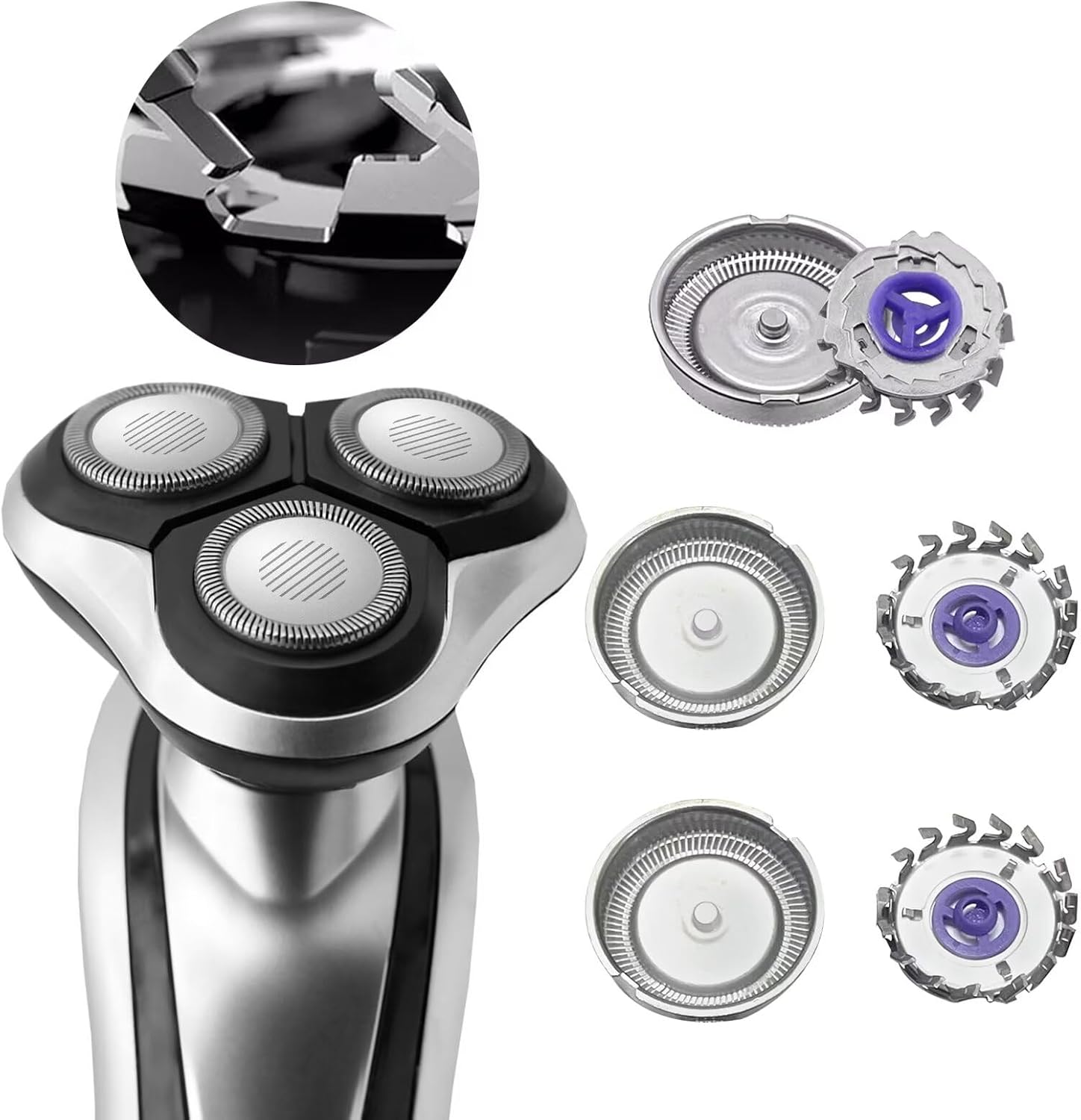
Image: Example of shaver head unit and individual replacement heads.
For specific instructions tailored to your exact shaver model, please refer to your original shaver's user manual.
Operating Instructions
Once the replacement shaver heads are correctly installed, your electric shaver is ready for use. Operate your shaver according to the instructions provided in your original shaver's user manual. These replacement heads are designed to provide a close and comfortable shave when used with compatible Philips Norelco electric shavers.
Maintenance
Regular cleaning and timely replacement of shaver heads are essential for optimal performance and hygiene.
Cleaning
After each shave, it is recommended to clean the shaver heads. Most Philips Norelco shavers allow for rinsing the head under running water. Refer to your shaver's manual for specific cleaning instructions.

Image: Shaver heads being cleaned with water.
Replacement Frequency
Shaver heads naturally dull over time with regular use. For best shaving results and to prevent skin irritation, it is generally recommended to replace shaver heads every 12 to 18 months, or sooner if you notice a decrease in shaving performance, increased pulling, or discomfort.
Troubleshooting
- Shaver is pulling hair or not cutting effectively: This is a primary indicator that the shaver heads are dull and need replacement. Ensure the new heads are installed correctly and securely.
- Skin irritation after shaving: Dull blades can cause irritation. Ensure your shaver heads are clean and sharp. If irritation persists with new heads, ensure proper shaving technique and consider your skin's sensitivity.
- Heads do not fit: Double-check the compatibility list in this manual and your shaver's model number. Ensure you are attempting to install the heads into the correct shaver head unit for your model.
- Unusual noise from shaver: Ensure all parts of the shaver head unit are correctly assembled and securely attached to the shaver body. Loose components can cause rattling or grinding noises.
Specifications
| Product Name | 3X Replacement Shaver Head |
| Brand | USonline911 |
| Model Compatibility | Philips Norelco 700RL Series (700RL, 705RL, etc.) and other listed HQ, HS, HP series. |
| Included Components | 3X Shaver Blades (Cutters and Foils) |
| Blade Material | Metal |
| Color | Silver |
| Head Type | Rotary |
| Number of Blades | 3 (per set of replacement heads) |
| Package Dimensions | 4.61 x 2.91 x 0.2 inches |
| Item Weight | 0.42 ounces |
Warranty and Support
For information regarding warranty coverage or product support, please contact the seller, USonline911, directly through the platform where the purchase was made. Keep your proof of purchase for any warranty claims.