
Menics PMEZ-402-RYGB
Menics PMEZ-402-RYGB Tower Light User Manual
Model: PMEZ-402-RYGB
1. Product Overview
The Menics PMEZ-402-RYGB is a 45mm LED modular stack tower light featuring four distinct light stacks (Red, Yellow, Green, Blue) and a built-in buzzer. It supports both steady and flashing light modes and operates on 24VAC/VDC power. This tower light is designed for industrial applications requiring clear visual and audible signaling.

Image: Front view of the Menics PMEZ-402-RYGB Tower Light, showing its four colored LED stacks (Red, Yellow, Green, Blue) and the base with a buzzer opening.
Key Features:
- Ø45mm (1.77") LED Modular Stack Tower Light.
- LED modules and lenses are replaceable for simplified maintenance.
- Features a prism-cut lens for enhanced light visibility.
- Designed with a rubber insert in the light body to absorb vibration, enhancing durability.
- Includes a built-in buzzer for audible alerts.
2. Setup and Installation
Proper installation is crucial for the optimal performance and safety of your tower light. This section outlines the assembly of LED modules and various mounting options.
2.1. Assembling LED Modules
The tower light is designed with modular LED stacks for easy assembly and replacement. Each module consists of an LED PCB, a reflector lens, and a colored lens.
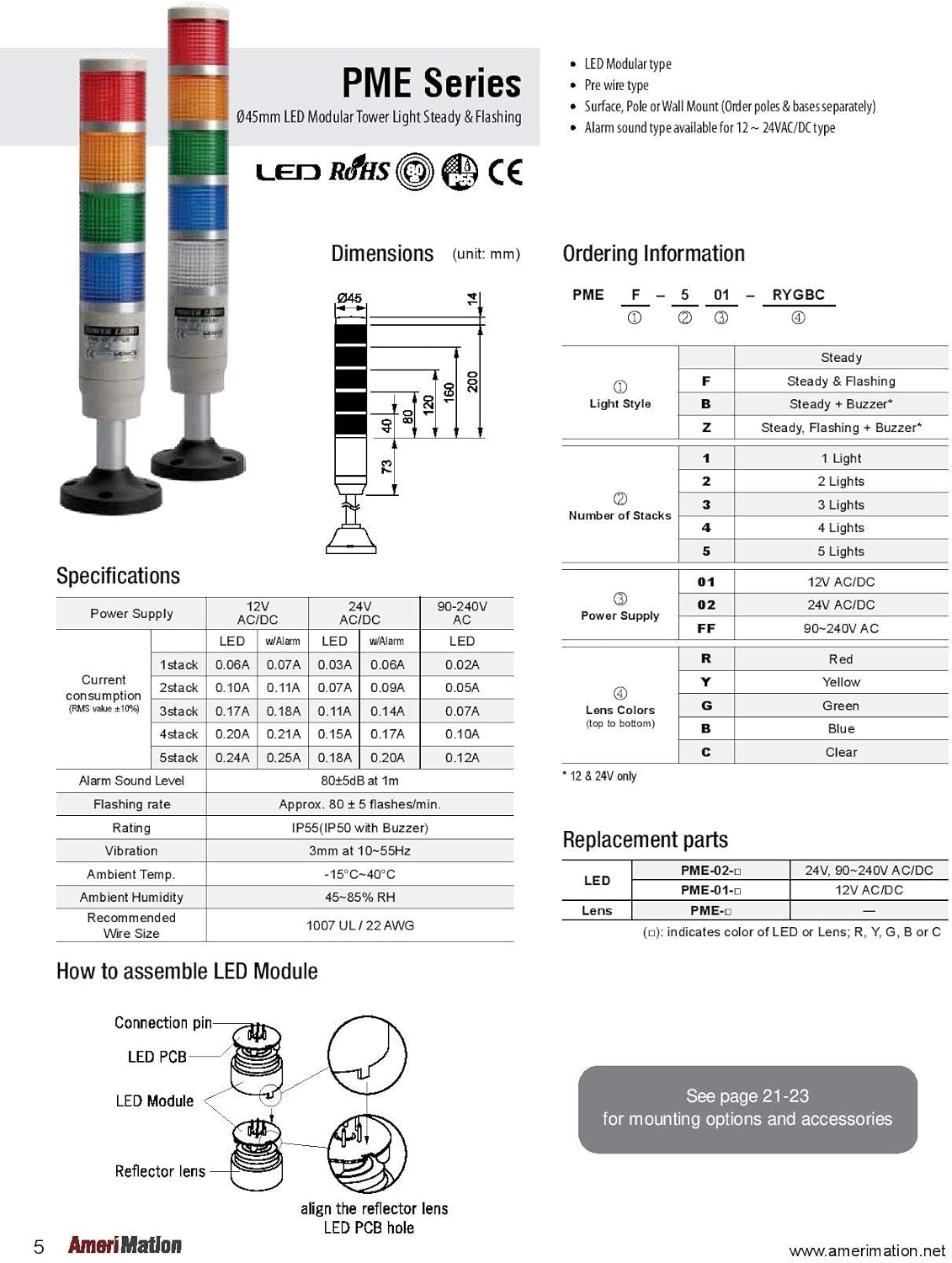
Image: Diagram showing the PME Series overview, including dimensions, ordering information, detailed specifications, and an exploded view of how to assemble an LED module by aligning the reflector lens with the LED PCB.
- Ensure the power is disconnected before assembly.
- Align the reflector lens with the LED PCB.
- Insert the assembled LED module into the corresponding colored lens.
- Stack the modules onto the main body, ensuring secure connections.
2.2. Wiring Diagrams
The PMEZ-402-RYGB tower light supports various wiring configurations for steady, flashing, and buzzer operations. Refer to the diagrams below for correct electrical connections. The unit operates on 24VAC/VDC.

Image: Comprehensive wiring diagrams for the PME Series tower light, illustrating connections for Steady, Steady + Buzzer, Steady + Flashing, and Steady + Flashing + Buzzer modes, along with an exploded assembly view of the entire tower light.
General Wiring Notes:
- Always disconnect power before performing any wiring.
- Ensure all connections are secure to prevent intermittent operation or damage.
- The unit is designed for 24VAC/VDC input. Verify your power source matches this requirement.
- For specific functions (steady, flashing, buzzer), follow the corresponding wiring diagram carefully.
2.3. Mounting Options
The PMEZ-402-RYGB tower light offers various mounting options, including surface, pole, and wall mounting. Mounting parts are sold separately.

Image: Table detailing various mounting options for Menics PME, MT4B, MT5B, and MT5C Series tower lights, including pole mounting and wall mounting brackets with corresponding part numbers and examples.
Available Mounting Types:
- Pole Mounting: Requires a mounting pole (e.g., MAP-0022 to MAP-1000) and a mounting base (e.g., MAM-B070C, MAM-D532A).
- Wall Mounting: Utilizes a wall mounting bracket (e.g., MAP-DS40, MAM-DS25).
- Pole + Wall Mounting: Combines a pole with a wall mounting bracket for specific installations.
Select the appropriate mounting accessories based on your installation requirements. Ensure the mounting surface is stable and capable of supporting the weight of the tower light.
3. Operating Instructions
The PMEZ-402-RYGB tower light offers both steady and flashing light modes, along with an integrated buzzer for audible alerts. Operation is controlled via external wiring as detailed in the Setup section.
3.1. Light Modes:
- Steady Mode: When activated, the selected LED module(s) will illuminate continuously.
- Flashing Mode: When activated, the selected LED module(s) will flash at a rate of approximately 80 ± 5 flashes per minute.
3.2. Buzzer Operation:
- The built-in buzzer provides an audible alarm. Its operation can be configured independently or in conjunction with light signals, depending on the wiring setup.
- The alarm sound level is approximately 80dB at 1 meter.
Refer to the wiring diagrams in Section 2.2 to configure the desired light and buzzer operations.
4. Maintenance
The PMEZ-402-RYGB tower light is designed for easy maintenance, primarily through the replacement of its modular LED components.
4.1. LED Module and Lens Replacement:
If an LED module or lens needs replacement due to damage or malfunction, follow these steps:
- Disconnect Power: Always ensure the power supply to the tower light is completely disconnected before attempting any maintenance.
- Disassemble: Carefully unstack the upper modules or unscrew the top cap to access the faulty module.
- Replace: Remove the old LED module and/or lens. Insert the new replacement part, ensuring it is correctly aligned and seated.
- Reassemble: Reassemble the tower light by stacking the modules back in place and securing any caps or screws.
- Test: Reconnect power and test the functionality of the replaced component.
Only use genuine Menics replacement parts to ensure compatibility and maintain product performance.
4.2. Cleaning:
To maintain optimal visibility, periodically clean the lenses with a soft, damp cloth. Avoid using abrasive cleaners or solvents that could damage the plastic.
5. Troubleshooting
If you encounter issues with your PMEZ-402-RYGB tower light, refer to the following common troubleshooting steps:
- No Light/Buzzer:
- Check power supply: Ensure the unit is receiving the correct 24VAC/VDC power.
- Verify wiring: Confirm all connections are secure and match the appropriate wiring diagram (Section 2.2).
- Inspect LED module: If only one module is not working, it may need replacement (Section 4.1).
- Intermittent Operation:
- Check for loose connections in the wiring.
- Ensure the modules are securely stacked and seated.
- Buzzer Not Sounding:
- Verify buzzer wiring according to the diagram.
- Ensure the buzzer itself is not obstructed or damaged.
- Light Not Flashing:
- Confirm the wiring is set for flashing mode.
- Ensure the correct module type is installed if applicable.
If the problem persists after attempting these steps, contact Menics customer support for further assistance.
6. Specifications
Detailed technical specifications for the Menics PMEZ-402-RYGB Tower Light:
| Attribute | Value |
|---|---|
| Model Number | PMEZ-402-RYGB |
| Light Source Type | Light Emitting Diode (LED) |
| Number of Stacks | 4 (Red, Yellow, Green, Blue) |
| Lens Diameter | 45mm (1.77") |
| Operating Voltage | 24VAC/VDC |
| Light Modes | Steady and Flashing |
| Buzzer | Built-in |
| Alarm Sound Level | 80dB at 1m |
| Flashing Rate | Approx. 80 ± 5 flashes/min. |
| Material | Rubber (for vibration absorption) |
| Vibration Resistance | 3mm at 10-55Hz |
| Ambient Temperature | -15°C ~ 40°C |
| Ambient Humidity | 45-85% RH |
| Recommended Wire Size | 1007 UL / 22 AWG |
| Item Weight | 16 ounces (1 pound) |
7. Warranty and Support
For information regarding product warranty, returns, or technical support, please contact Menics directly or refer to the documentation provided at the time of purchase. Specific warranty terms may vary by region and distributor.
When contacting support, please have your product model number (PMEZ-402-RYGB) and purchase details readily available.
Ask a question about this manual
Ask about setup, troubleshooting, compatibility, parts, safety, or missing instructions. Manuals+ will review the question and use this page’s manual context to help answer it.