
Introduction
Thank you for purchasing the Max Burton #6450 Digital LCD 1800 Watt Induction Cooktop. This portable and energy-efficient appliance is designed to provide a safe and convenient cooking experience. Please read this manual thoroughly before operation to ensure proper use and to maximize the lifespan of your cooktop.
Important Safety Information
Always follow basic safety precautions when using electrical appliances.
- Do not immerse the cooktop in water or any other liquid.
- Ensure the appliance is placed on a stable, heat-resistant surface.
- Keep out of reach of children and pets.
- Use only induction-compatible cookware. Non-compatible cookware will not heat and may trigger an error.
- Do not touch the cooktop surface immediately after use, as residual heat may be present.
- Unplug the appliance when not in use and before cleaning.
- Do not operate if the power cord or plug is damaged.
- This appliance is for household use only.
- The cooktop features automatic shut-down in case of short circuit, overvoltage, overheating, or if operated for over 3 hours without interaction.
Product Features and Components
Familiarize yourself with the parts of your Max Burton #6450 Induction Cooktop.
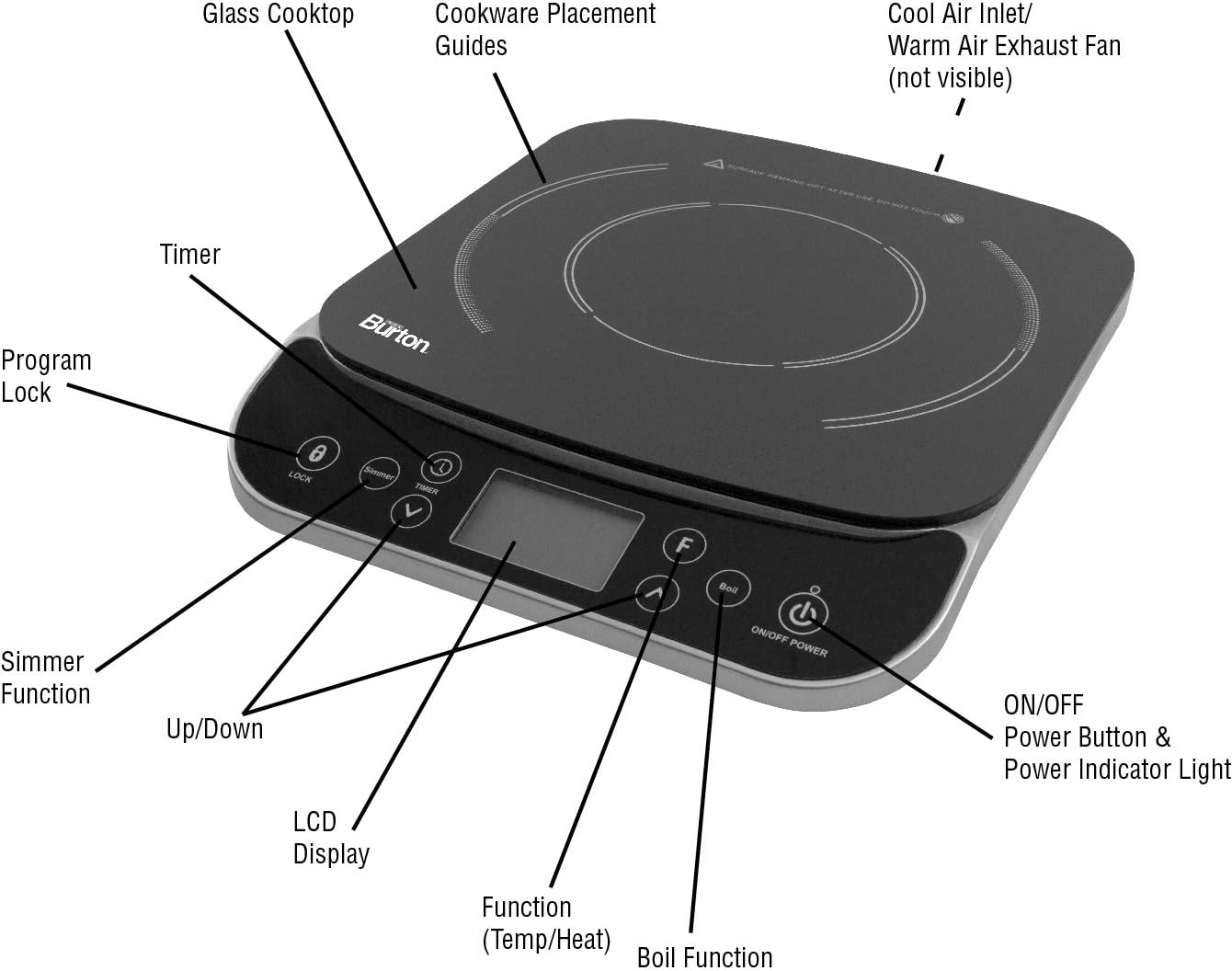
Image: Max Burton #6450 Digital LCD 1800 Watt Induction Cooktop with key components labeled.
This image displays the cooktop's glass surface, cookware placement guides, cool air inlet, warm air exhaust fan, program lock, simmer function, timer, up/down buttons, LCD display, function (Temp/Heat) button, boil function, and ON/OFF power button with indicator light.
- Glass Cooktop: Durable and easy-to-clean cooking surface.
- Cookware Placement Guides: Indicate the optimal area for cookware.
- Cool Air Inlet / Warm Air Exhaust Fan: Essential for cooling the internal components during and after operation.
- LCD Display: Shows temperature, power level, and timer settings.
- Control Panel: Touch-sensitive buttons for various functions.
- ON/OFF Power Button: Activates and deactivates the unit.
- Function (Temp/Heat) Button: Toggles between temperature and power level settings.
- Up/Down Buttons: Adjust temperature, power, or timer settings.
- Timer Button: Sets the cooking duration up to 180 minutes.
- Simmer Function: One-touch setting for gentle cooking.
- Boil Function: One-touch setting for rapid boiling.
- Program Lock: Prevents accidental changes to settings during operation.
Setup
- Unpack the cooktop and all accessories.
- Place the cooktop on a dry, level, and stable surface, ensuring adequate ventilation around the unit. Do not block the air inlet or exhaust fan.
- Plug the power cord into a standard 120V AC household outlet. The unit will beep once, and the LCD display will show "OFF".
Operating Instructions
1. Powering On/Off
- Press the ON/OFF button to turn on the cooktop. The display will illuminate.
- To turn off, press the ON/OFF button again. The fan may continue to run for a short period to cool the unit.
2. Selecting Cooking Mode (Temperature or Power)
- After powering on, place induction-compatible cookware on the cooktop.
- Press the Function (Temp/Heat) button to switch between Temperature Mode and Power Mode.
- Temperature Mode: Adjust temperature from 100°F to 450°F in 25°F increments using the Up/Down buttons.
- Power Mode: Adjust power levels from 500W to 1800W using the Up/Down buttons.
3. One-Touch Functions
- Press the Simmer button for a gentle, consistent heat ideal for simmering.
- Press the Boil button for maximum power to rapidly boil liquids.
4. Setting the Timer
- Press the Timer button. The display will show "00:00".
- Use the Up/Down buttons to set the desired cooking time in 1-minute increments, up to 180 minutes.
- The cooktop will automatically turn off once the timer expires.
5. Program Lock
- Press the Lock button to prevent accidental changes to the settings. The display will show a lock icon.
- Press the Lock button again to unlock the control panel.

Image: Close-up of the Max Burton #6450 Digital LCD 1800 Watt Induction Cooktop's control panel.
This image highlights the digital LCD screen and the touch-sensitive buttons for various functions, including power, temperature, timer, simmer, boil, and program lock.
Compatible Cookware
The Max Burton #6450 Induction Cooktop requires cookware with a magnetic base. If a magnet sticks to the bottom of your pan, it is compatible.
Compatible Materials:
- Cast iron
- Enameled iron and steel
- Stainless steel with a magnetic bottom
- Any cookware used with an induction interface disk (e.g., Max Burton 6010 Induction Interface Disk).
Non-Compatible Materials:
- Aluminum
- Copper
- Glass
- Ceramic

Image: Max Burton #6450 Digital LCD 1800 Watt Induction Cooktop with a stainless steel pot placed on its surface.
This image illustrates the cooktop ready for use with appropriate magnetic cookware.
Video: Demonstration of an MSMK Induction Nonstick Pan with Lid.
This video, provided by MSMK, showcases an induction-compatible nonstick pan, which is suitable for use with the Max Burton #6450 Induction Cooktop. It highlights the magnetic properties required for induction cooking.
Maintenance and Cleaning
- Always unplug the cooktop and allow it to cool completely before cleaning.
- Wipe the glass surface with a damp cloth and mild detergent. For stubborn stains, use a non-abrasive cleaner specifically designed for glass cooktops.
- Do not use abrasive pads, harsh chemicals, or steel wool, as these can scratch the surface.
- Clean the control panel with a soft, damp cloth.
- Ensure the air inlet and exhaust fan are free from dust and debris to maintain proper ventilation.
Troubleshooting
| Problem | Possible Cause | Solution |
|---|---|---|
| Cooktop does not turn on. | Not plugged in; power outage; ON/OFF button not pressed. | Check power connection; ensure power is available; press ON/OFF button. |
| Cookware is not heating. | Non-compatible cookware; cookware not centered; cooktop in error mode. | Use induction-compatible cookware; center cookware on the guide; check for error codes on LCD. |
| "POT" error message. | No cookware detected or non-compatible cookware. | Place compatible cookware on the cooktop. |
| Unit shuts off unexpectedly. | Overheating; short circuit; overvoltage; prolonged use (over 3 hours). | Allow unit to cool; check power supply; restart if safe. |
Specifications
- Model: Max Burton #6450
- Power: 1800 Watts
- Voltage: 120V AC (Standard household outlet)
- Temperature Range: 100°F to 450°F (in 25°F increments)
- Timer: Up to 180 minutes (in 1-minute increments)
- Controls: Digital LCD Touchpad
- Heating Elements: 1
- Product Dimensions: 9.1"D x 9.1"W x 9.1"H
- Item Weight: 6 Pounds
- Material: Glass Cooktop, Stainless Steel accents
- Safety Features: Auto shut-down (short circuit, overvoltage, overheating, 3-hour operation), incompatible cookware detection.
Warranty and Support
For warranty information, product support, or to inquire about replacement parts, please contact Max Burton customer service. Refer to the product packaging or the official Max Burton website for the most up-to-date contact details.
Manufacturer: Aervoe
UPC: 769372064507
Date First Available: August 15, 2018