
1. Introduction
This user manual provides essential information for the safe and effective use of the MENICS LTC-1000 Extension Cable. Please read this manual thoroughly before using the product and retain it for future reference. The LTC-1000 is designed to extend electrical connections, featuring a 40-inch length, 22 AWG cable, and a Brass 110 connector.
2. Safety Information
Always observe the following safety precautions to prevent injury or damage to the product:
- Do not exceed the specified electrical ratings of the cable or connected devices.
- Inspect the cable for any damage (frayed wires, cracked insulation) before each use. Do not use if damaged.
- Keep the cable away from water, excessive heat, and sharp objects.
- Ensure connections are secure and fully inserted to prevent arcing or overheating.
- Do not run the cable through doorways or under carpets where it can be pinched or damaged.
- Unplug the cable from the power source before disconnecting any devices.
3. Product Overview
The MENICS LTC-1000 is a specialized extension cable designed for specific electrical applications. It consists of a 40-inch length of 22 AWG wire, terminated with a Brass 110 connector.
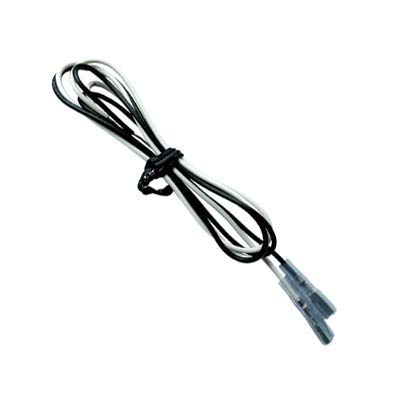
Figure 3.1: The LTC-1000 Extension Cable. This image shows the coiled black and white wires of the cable, secured by a tie, leading to the brass 110 connector at one end.
The cable's construction ensures reliable electrical conductivity and durability for its intended use.
4. Setup
The LTC-1000 extension cable is designed for straightforward integration into compatible electrical systems. Follow these steps for proper setup:
- Identify Connection Points: Determine the device or component requiring extended connection and the corresponding power source or signal point.
- Inspect Cable: Before connecting, visually inspect the LTC-1000 cable and its Brass 110 connector for any signs of damage, bends, or corrosion.
- Connect Securely: Insert the Brass 110 connector firmly into the designated port on your device or system. Ensure a snug fit to prevent intermittent connections.
- Route Cable Safely: Route the 40-inch cable in a manner that avoids kinks, sharp bends, or areas where it could be tripped over or damaged by moving parts.
- Verify Connection: Once connected, gently tug on the cable near the connector to confirm it is securely seated.
This cable is typically used in low-voltage applications or for signal extension where a Brass 110 connector is standard.
5. Operating Instructions
The LTC-1000 extension cable operates passively, extending an existing electrical or signal path. No active operation is required from the user beyond proper connection.
- Once connected, the cable facilitates the flow of electricity or signal between the two connected points.
- Ensure that the power source or signal generator is active and compatible with the connected device.
- Monitor the performance of the connected system to ensure stable operation.
- If the connected device fails to operate as expected, first check the cable connections for security and integrity.
6. Maintenance
Proper maintenance extends the lifespan of your LTC-1000 extension cable. This cable requires minimal maintenance.
- Cleaning: If necessary, gently wipe the cable and connector with a dry, lint-free cloth. Do not use liquid cleaners or solvents.
- Storage: When not in use, coil the cable loosely to prevent kinks and store it in a cool, dry place away from direct sunlight and extreme temperatures.
- Inspection: Periodically inspect the cable for any signs of wear, cuts, abrasions, or damage to the connector. Replace the cable if any damage is observed.
- Avoid Stress: Do not pull the cable by the wire itself when disconnecting; always grasp the connector. Avoid bending the cable sharply near the connector.
7. Troubleshooting
If you experience issues with your LTC-1000 extension cable, consider the following common troubleshooting steps:
| Problem | Possible Cause | Solution |
|---|---|---|
| No power/signal through cable | Loose connection at either end | Ensure both ends of the cable are fully and securely inserted into their respective ports. |
| No power/signal through cable | Damaged cable or connector | Inspect the cable for visible damage (cuts, kinks, frayed wires) and the connector for bent pins or corrosion. Replace if damaged. |
| No power/signal through cable | Incompatible device or power source | Verify that the devices being connected are compatible with the cable's specifications (e.g., voltage, current, connector type). |
If the problem persists after attempting these solutions, contact MENICS customer support or a qualified technician.
8. Specifications
The following are the technical specifications for the MENICS LTC-1000 Extension Cable:
- Model Number: LTC-1000
- Cable Length: 40 inches
- Wire Gauge: 22 AWG
- Connector Type: Brass 110 Connector
- Manufacturer: MENICS
- Item Weight: 1.6 ounces
- ASIN: B07GHQWG97
- First Available: August 15, 2018
9. Warranty and Support
MENICS products are manufactured to high-quality standards. For specific warranty information regarding your LTC-1000 Extension Cable, please refer to the warranty card included with your purchase or visit the official MENICS website. For technical support, troubleshooting assistance, or inquiries about replacement parts, please contact MENICS customer service through their official channels.
Note: Keep your purchase receipt as proof of purchase for warranty claims.