
Introduction
This manual provides instructions for the proper use and maintenance of the ACTOO 4 Pin JST SM Connector LED Power Cable Adapter. This product is designed to facilitate secure and reliable electrical connections for 3528 and 5050 LED light strips, ensuring efficient power transmission.
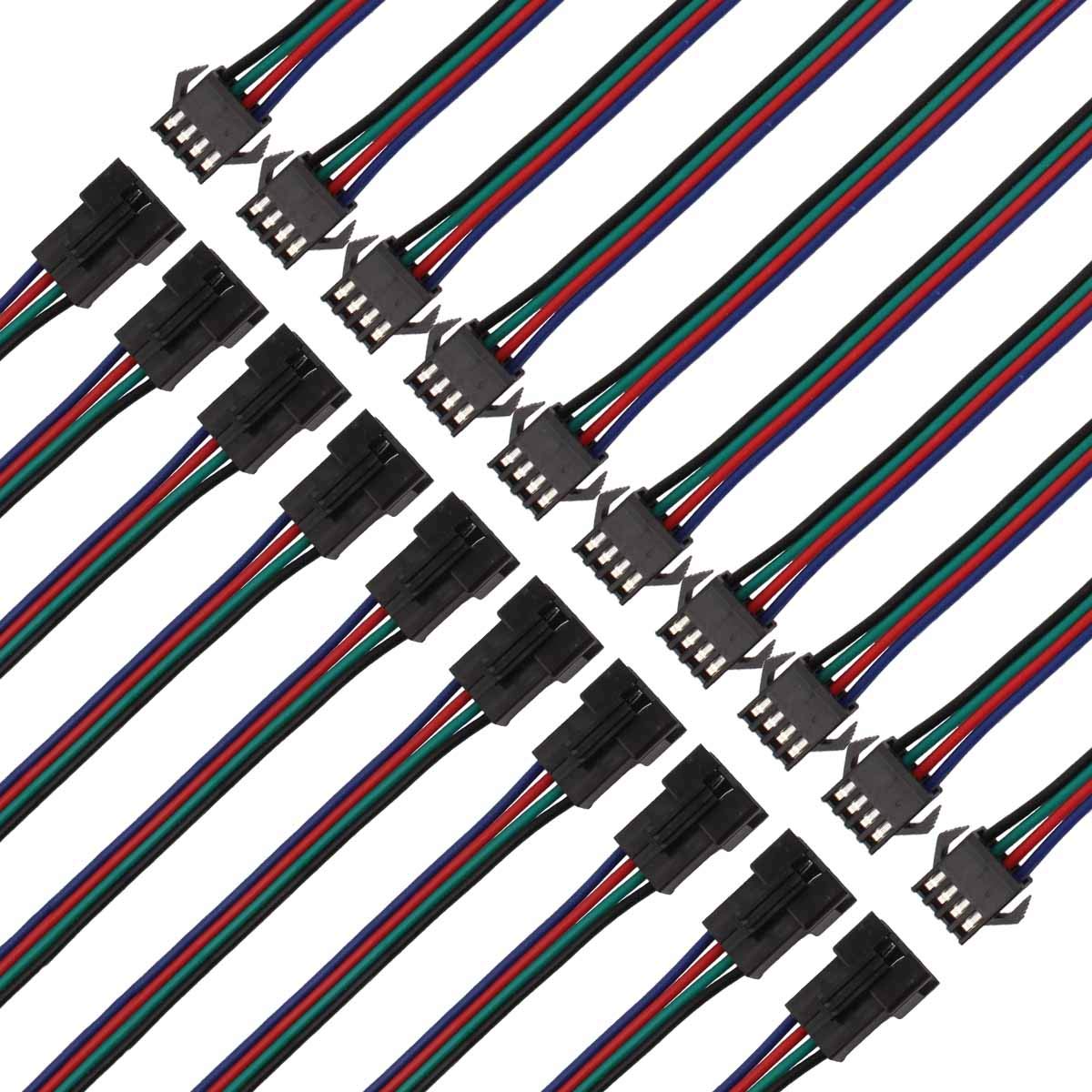
Image: Overview of the ACTOO 4 Pin JST SM Connector cables, illustrating the male and female ends and their approximate length of 150mm (5.91 inches).
Product Features
- Connector Type: JST SM 4 Pin Male to Female.
- Compatibility: Suitable for 3528 and 5050 LED light strips.
- Material: Durable plastic construction for connectors and insulated wiring.
- Secure Connection: Designed for a firm and reliable connection, preventing accidental disconnections.
- Ease of Use: Simple plug-and-play design for quick installation.
Package Contents
Each package typically contains:
- ACTOO 4 Pin JST SM Male Connector Cable
- ACTOO 4 Pin JST SM Female Connector Cable
- (Quantity may vary based on specific product packaging)
Setup Instructions
Follow these steps to properly connect the JST SM cable adapter to your LED light strip system:
- Identify Connector Types: Locate the male and female ends of the JST SM connector cables. The male connector has pins, and the female connector has corresponding receptacles.
- Align Connectors: Carefully align the male connector with the female connector. Ensure the pins on the male end are correctly oriented to slide into the receptacles on the female end. The connectors are designed to prevent incorrect polarity if aligned properly.
- Connect Firmly: Gently push the male and female connectors together until they click into place. A secure connection is indicated by a distinct click or a firm seating of the connectors. Avoid excessive force.
- Verify Connection: After connecting, gently tug on the cables to ensure the connection is secure and will not easily separate.
- Integrate into System: Connect the other ends of the adapter cables to your LED light strip and power source as required by your specific LED setup.

Image: Detailed view of the male and female JST SM 4-pin connectors, highlighting their distinct designs and the individual wires.

Image: A close-up demonstrating the correct alignment of the male and female JST SM connectors before they are joined.

Image: Illustration of the connection process, showing the male and female connectors being pushed together to form a secure link.
Operating Instructions
The ACTOO JST SM connectors are passive components designed to facilitate electrical connections. Once properly installed, their operation is integrated with the LED light strip system they are part of.
- Ensure all connections are secure before applying power to the LED system.
- The connectors transmit power and data (if applicable for 4-pin RGB/RGBW strips) between components.
- Refer to the instruction manual of your specific LED light strip and power supply for operational details of the entire system.
Maintenance
These connectors require minimal maintenance. Adhere to the following guidelines:
- Keep Dry: Avoid exposing the connectors to moisture or liquids, as they are not designed to be waterproof.
- Cleanliness: Keep the connector pins and receptacles free from dust and debris to ensure optimal electrical contact. Use a dry, soft brush if cleaning is necessary.
- Avoid Stress: Do not pull on the wires to disconnect; always grasp the connector housing firmly.
- Inspect Periodically: Check connections periodically for any signs of wear, damage, or looseness, especially in applications involving movement or vibration.
Troubleshooting
If you encounter issues with your LED light strip system after installing the connectors, consider the following:
- No Power/Intermittent Connection:
- Ensure both male and female connectors are fully seated and clicked into place.
- Verify that the wires are correctly connected to the LED strip and power source, matching polarity (e.g., + to +, R to R, G to G, B to B).
- Inspect the connector pins and receptacles for any visible damage, bending, or foreign objects.
- Advanced Check (if comfortable): Some connectors may have spring-loaded contacts that lose tension. If an individual wire connection is intermittent, and you have experience with small electronics, you might carefully inspect the female connector's internal springs. This typically requires specialized tools and expertise.
- Incorrect Color Display (for RGB/RGBW strips):
- Confirm that the color channels (Red, Green, Blue) are correctly matched between the LED strip, connector, and controller.
- Loose Connection:
- If the connectors feel loose even when fully inserted, ensure there is no debris preventing a tight fit.
- The latching mechanism should engage firmly. If it does not, the connector may be damaged.
If troubleshooting steps do not resolve the issue, consult a qualified technician or contact customer support.
Specifications
| Feature | Detail |
|---|---|
| Brand | ACTOO |
| Model | SM-4P*10 |
| Connector Type | JST SM 4 Pin (Male to Female) |
| Material | Plastic |
| Cable Type | Flat Ribbon |
| Item Weight | Approximately 0.01 Ounces (per unit) |
| UPC | 657631380935 |
Warranty and Support
ACTOO products are manufactured to high-quality standards. For specific warranty information, please refer to the product packaging or the retailer's terms of sale at the time of purchase.
If you require technical assistance or have questions regarding this product, please contact ACTOO customer support through the retailer's platform or the official ACTOO website.