
Rohent R8
Rohent RV Backup Camera Wireless System User Manual
Model: R8

The Rohent R8 RV Backup Camera Wireless System, featuring a 7-inch monitor and two HD 1080P cameras.
Introduction
This manual provides comprehensive instructions for the installation, operation, and maintenance of your Rohent R8 RV Backup Camera Wireless System. Designed for enhanced safety and convenience, this system offers stable digital signal transmission, high-definition video, and versatile viewing options for various vehicles including RVs, trailers, motorhomes, and trucks.
Package Contents
Please verify that all items listed below are included in your package:
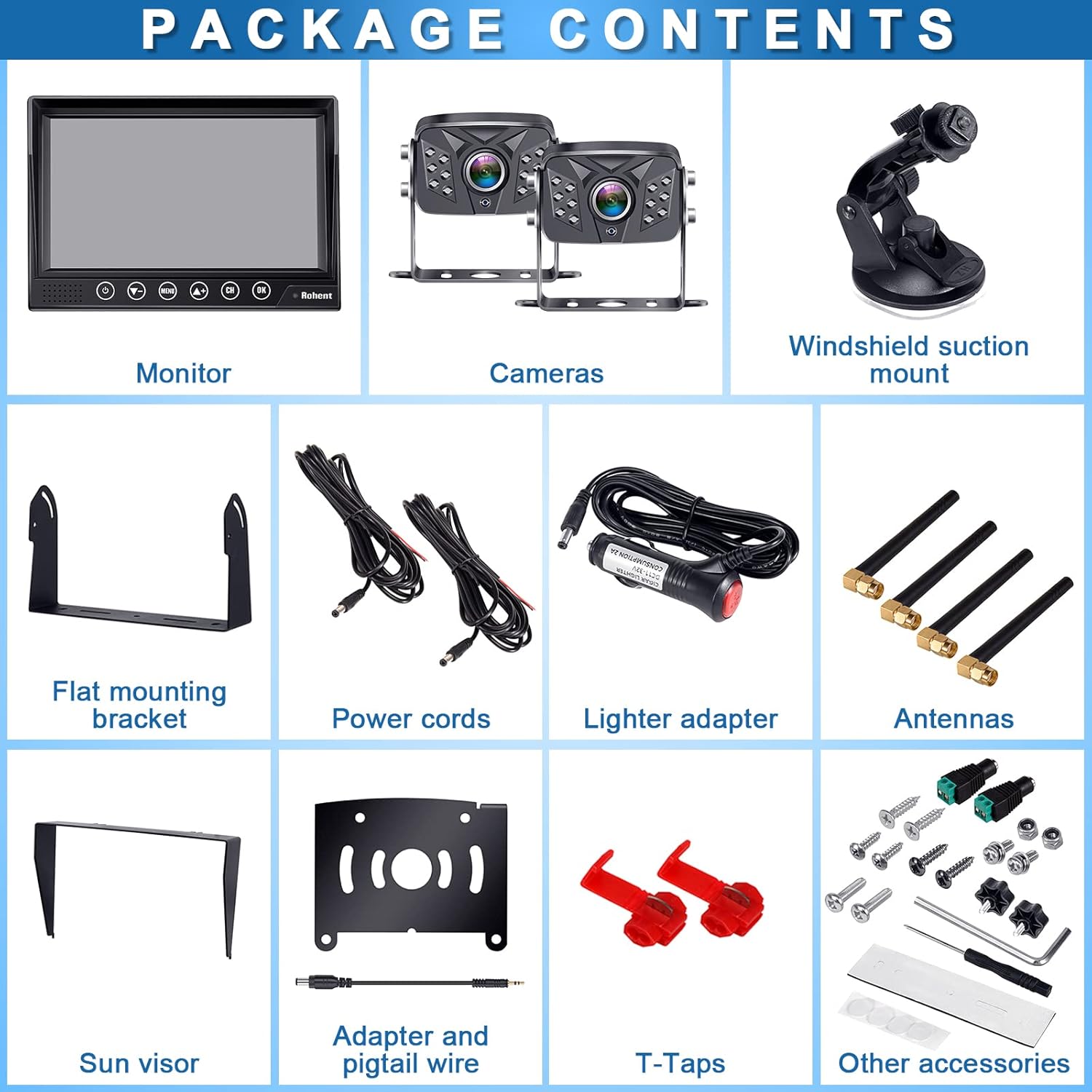
Visual representation of all components included in the Rohent R8 RV Backup Camera Wireless System package.
- 7-inch DVR Monitor
- 2 x HD 1080P Wireless Cameras
- Windshield Suction Mount
- Flat Mounting Bracket
- Power Cords
- Cigarette Lighter Adapter
- 4 x Antennas
- Sun Visor for Monitor
- Furrion Pre-Wired Adapter and Pigtail Wire
- T-Taps (for wiring connections)
- Other Installation Accessories (screws, hex key)
Setup and Installation
The Rohent R8 system is designed for easy installation. Follow these steps for general or Furrion pre-wired setups.
General Installation
For vehicles not pre-wired for Furrion, connect the camera to your vehicle's tail light, running light, or reverse light for power. Ensure a proper ground connection.

General wiring diagram for camera power connection and a simplified diagram for Furrion pre-wired setup.
Furrion Pre-Wired Installation
If your RV is Furrion pre-wired, use the included adapter and pigtail wire for a quick and seamless connection. Simply remove the existing plate, connect the adapter, and mount the camera.

The adapter and pigtail wire are included for compatibility with Furrion pre-wired RVs, simplifying installation.
Monitor Setup
Mount the 7-inch monitor on your dash using the provided suction mount or flat bracket. Connect it to a 12V power source via the cigarette lighter adapter or direct wiring. The monitor features a capacitive touch button for easy operation.
This video demonstrates the digital wireless dual backup camera system, including the 7-inch DVR monitor kit, suitable for RVs, trucks, and 5th wheels.
Operating Instructions
Your Rohent R8 system offers various features to enhance your driving and parking experience.
Multi-View Options
The 7-inch monitor supports up to four camera inputs (CAM1, CAM2, CAM3, CAM4) and allows for split-screen or quad-screen viewing. This enables comprehensive monitoring around your vehicle.

The monitor can display up to four cameras simultaneously, offering various split-screen and quad-screen layouts for comprehensive views.
This video demonstrates the Rohent RV Backup Camera Wireless System with its 7-inch monitor, showcasing its clear display and functionality.
This video highlights the monitor's capability to support four channels and split-screen viewing, along with its driving record function.
This video illustrates the monitor's four available video input channels (V1/V2/V3/V4), demonstrating its versatility.
Recording Function
The DVR monitor supports 8GB-128GB SD cards for recording, allowing you to capture footage for safety or review.

The DVR monitor includes a recording function, supporting SD cards from 8GB to 128GB for continuous recording.
Image Adjustments and Views
Adjust brightness, contrast, and hue directly on the monitor. You can also flip the image between mirror view (for rear observation) and front view, with optional backup lines for precise parking.

Adjust image settings like brightness, contrast, and hue, and utilize various views for towing, parking, and changing lanes.
Maintenance and Durability
To ensure the longevity and optimal performance of your Rohent R8 system, follow these maintenance guidelines:
- **Cleaning:** Use a soft, damp cloth to clean the monitor and camera lenses. Avoid abrasive cleaners or solvents.
- **Temperature Resistance:** The cameras are designed to withstand extreme temperatures from -22℉ (-30℃) to 176℉ (80℃).
- **Waterproof Rating:** The cameras are IP69K waterproof, ensuring reliable operation in various weather conditions, preventing lens water or fog issues.

The 7-inch monitor provides a sharp picture, and the cameras boast an IP69K waterproof rating for all-weather reliability.
Troubleshooting
If you encounter issues with your Rohent R8 system, refer to the table below for common problems and solutions.
| Problem | Possible Cause | Solution |
|---|---|---|
| No Signal/Black Screen | Power issue, loose connection, signal interference. | Check all power connections. Ensure antennas are securely attached. Minimize obstructions between camera and monitor. |
| Image Blurry/Distorted | Dirty lens, poor signal, incorrect settings. | Clean camera lens. Adjust brightness/contrast on monitor. Check signal strength. |
| No Recording | SD card full, corrupted, or not inserted correctly. | Format or replace SD card. Ensure SD card is properly inserted. |
| Intermittent Signal | Long distance, heavy interference, weak power. | Ensure clear line of sight between camera and monitor. Check power supply stability. Consider relocating antennas. |
Specifications
- Product Dimensions: 11.6 x 9.8 x 3.46 inches
- Item Weight: 4.09 pounds
- Model Number: R8
- Wireless Communication Technologies: Wi-Fi
- Display Technology: LED
- Screen Size: 7 Inches
- Lux Rating: 0.1 Lux
- Compatible Devices: Monitor
- Installation Type: Surface Mount
- Video Capture Resolution: 1080p
- Voltage: 12 Volts
- Optical Sensor Technology: CMOS
- Waterproof Rating: IP69K
- Operating Temperature: -22℉~176℉ (-30℃~80℃)
Warranty and Support
Rohent is committed to providing high-quality products and excellent customer service.
Warranty Information
The Rohent R8 RV Backup Camera Wireless System comes with a 3-year warranty, ensuring peace of mind regarding product quality and performance.
Technical Support
For any technical assistance, installation queries, or troubleshooting beyond this manual, please contact Rohent Customer Service. Our team is ready to provide comprehensive support.

Rohent provides dedicated technical support services to assist with any product-related inquiries.
You may also find additional resources and video guides on the official Rohent website or YouTube channel by scanning the QR code provided in your product packaging.
Ask a question about this manual
Ask about setup, troubleshooting, compatibility, parts, safety, or missing instructions. Manuals+ will review the question and use this page’s manual context to help answer it.