
1. Introduction
The H2Pro Glass Canopy is designed to cover your aquarium, providing several benefits for your aquatic environment. Made with high-quality tempered glass, this canopy is clear, durable, and effectively reduces water evaporation. It also serves as a barrier to prevent fish from jumping out of the aquarium, ensuring their safety.
This manual provides essential information regarding the installation, usage, and maintenance of your H2Pro Glass Canopy.
2. Compatibility and Important Notes
It is crucial to measure your aquarium's opening precisely before purchasing and installing this glass canopy. Aquarium manufacturers vary, and exact dimensions are necessary for a proper fit.
- This canopy is NOT compatible with 55-gallon Marineland brand fish tanks.
- It ONLY fits 15/20H gallon Marineland & Perfecto brand fish tanks.
- It also fits 15/20H/55 gallon Aqueon & All Glass brand fish tanks.
- The dimensions of the canopy with the back strip are approximately 23.07 x 11.69 x 0.16 inches (58.6 x 23.2 x 0.4 cm).
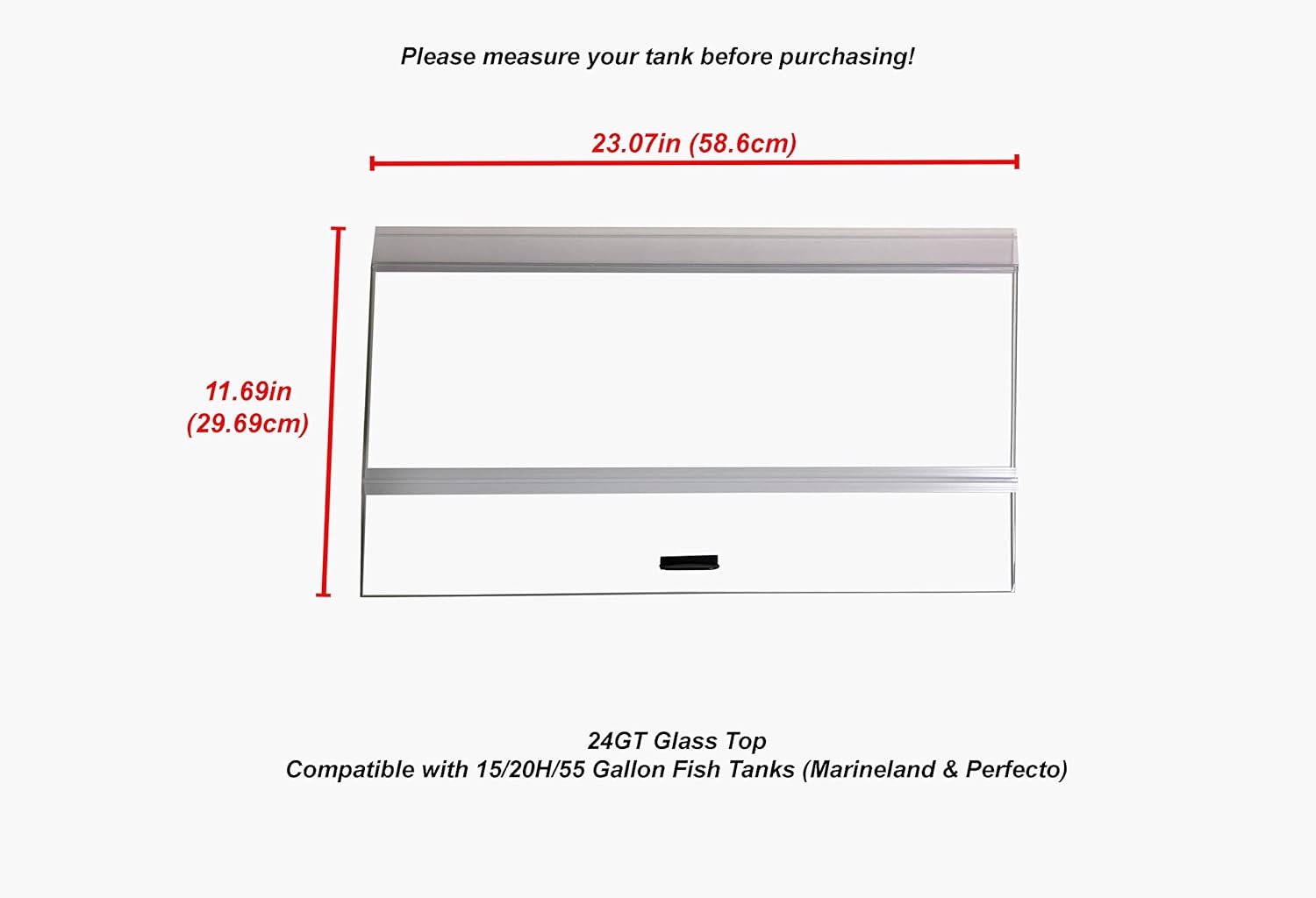
Figure 1: H2Pro Glass Canopy with key dimensions highlighted. Please measure your tank opening carefully.
3. Setup and Installation
Follow these steps to properly install your H2Pro Glass Canopy:
- Unpack Components: Carefully remove the glass canopy, the clear vinyl back strip, and the easy lift handle from the packaging. Inspect all components for any damage.
- Measure and Cut Back Strip: The clear vinyl back strip is designed to be cut to fit your specific aquarium. Measure the required length for the opening at the back of your tank, considering any filters, heaters, or other equipment that needs to pass through. Use a sharp utility knife or strong scissors to cut the vinyl strip to the appropriate size.
- Attach Back Strip: Slide the cut vinyl back strip into the designated channel on the back edge of the glass canopy. Ensure it is securely seated. This strip provides an area for lighting to sit while allowing access to your aquarium.
- Attach Lift Handle: The canopy includes an easy lift handle with 3M double-sided tape. Peel off the protective backing from the tape on the handle. Carefully position the handle on the front edge of the glass canopy, typically centered, and press firmly to secure it in place. Allow the adhesive to cure for a few minutes before use.
- Place Canopy on Aquarium: Gently lower the assembled glass canopy onto the top edges of your aquarium. Ensure it sits evenly and securely, covering the entire opening.

Figure 2: Assembled H2Pro Glass Canopy ready for placement on an aquarium.
4. Operating and Usage
Once installed, the H2Pro Glass Canopy operates passively to enhance your aquarium environment:
- Evaporation Reduction: The primary function of the canopy is to significantly reduce water evaporation from your aquarium. This helps maintain stable water parameters and reduces the frequency of water top-offs.
- Fish Containment: The canopy acts as a physical barrier, preventing fish and other aquatic pets from jumping out of the tank, which is especially important for species prone to jumping.
- Heat Retention: By covering the tank, the canopy helps retain heat, contributing to a more stable water temperature, especially beneficial for tropical fish.
- Light Placement: The clear vinyl back strip allows for the placement of aquarium lighting fixtures directly on top of the canopy, ensuring optimal light penetration into the tank.
- Access: Use the attached lift handle to easily raise the canopy for feeding, water changes, or maintenance tasks.
5. Maintenance
Regular cleaning will ensure the longevity and clarity of your H2Pro Glass Canopy:
- Cleaning: Wipe the glass surfaces with a soft, damp cloth. For stubborn water spots or mineral deposits, use a glass cleaner specifically designed for aquariums or a solution of white vinegar and water. Avoid abrasive cleaners or pads that could scratch the glass.
- Handle and Strip Check: Periodically check the adhesion of the lift handle and the seating of the vinyl back strip to ensure they remain secure.
- Avoid Harsh Chemicals: Do not use household cleaning chemicals on or near the canopy, as residues could be harmful to your aquatic life.
6. Troubleshooting
If you encounter any issues with your H2Pro Glass Canopy, consider the following:
- Canopy Does Not Fit: Double-check your aquarium's exact dimensions against the canopy's specifications (23.07 x 11.69 x 0.16 inches). Refer to Section 2 for specific brand compatibility. If the dimensions do not match, the canopy may not be the correct size for your tank.
- Excessive Evaporation: Ensure the canopy is properly seated on all edges of the aquarium and that the back strip is correctly installed and cut to minimize gaps.
- Handle Detaches: If the lift handle detaches, clean both the handle's adhesive surface and the glass surface where it attaches. Reapply with strong double-sided tape (like 3M VHB tape) if the original adhesive has lost its tackiness.
- Scratches on Glass: Avoid dragging abrasive materials across the glass surface. Use soft cloths for cleaning. Minor scratches may be polished with specialized glass scratch removal kits, but deep scratches may require replacement.
7. Specifications
| Attribute | Detail |
|---|---|
| Brand Name | H2PRO |
| Model Name | 24GT |
| Item Model Number | 24GT |
| Product Dimensions (LxWxH) | 23.07 x 11.69 x 0.16 inches (58.6 x 29.69 x 0.4 cm) |
| Item Weight | 3.64 pounds (1.65 kg) |
| Material | Tempered Glass |
| Color | Clear |
| Included Components | Glass Canopy, Clear Vinyl Back Strip, Easy Lift Handle |
| Specific Uses for Product | Indoor Aquarium Cover |
| Vivarium Type | Aquarium |
| UPC | 704119288648 |
8. Warranty and Support
H2PRO products are manufactured to high standards. For any questions, concerns, or support regarding your H2Pro Glass Canopy, please contact H2PRO customer service. Please retain your proof of purchase for any warranty claims.
For the most up-to-date contact information and warranty details, please visit the official H2PRO website or refer to the packaging of your product.


