
ZHIWHIS ZWS-103
ZHIWHIS Portable AM/FM DSP Digital Radio User Manual
Model: ZWS-103
1. Introduction
Thank you for purchasing the ZHIWHIS Portable AM/FM DSP Digital Radio. This compact and lightweight radio is designed for convenient listening on the go, featuring advanced DSP technology for stable signal reception and a clear LCD display. Please read this manual thoroughly before use to ensure proper operation and to maximize your listening experience.

Image: The ZHIWHIS Portable AM/FM DSP Digital Radio, a compact black unit with an LCD display and control buttons, shown with its included stereo earphones.
2. Package Contents
Verify that all items listed below are included in your package:
- 1 x ZHIWHIS Portable Radio
- 1 x Stereo Earphones
- 1 x Neck Strap
- 1 x Hand Strap
- 1 x USB Charging Cable
- 1 x User Manual
- 1 x Waterproof Storage Bag

Image: All items included in the ZHIWHIS Portable Radio package, neatly laid out. This includes the radio unit, earphones, straps, USB cable, user manual, and a waterproof storage bag.
3. Product Overview
3.1. Components and Controls
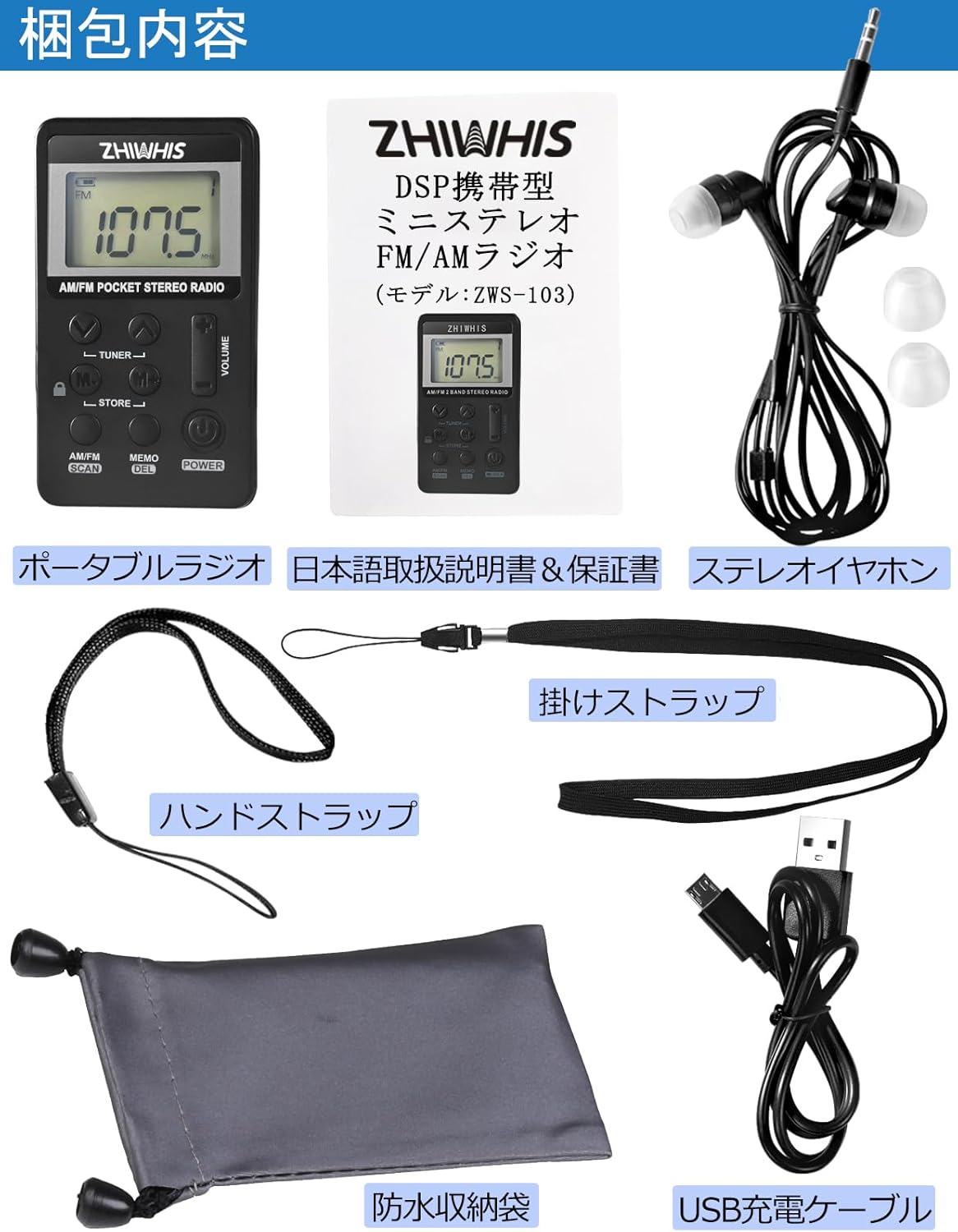
Image: Detailed diagram of the ZHIWHIS Portable Radio, highlighting its dimensions (85mm height, 48mm width, 12mm thickness) and labeling key components such as the LCD display, volume controls, tuner buttons, store/memory buttons, AM/FM/Scan button, Memo/Del button, Power button, 3.5mm earphone jack, charging port, and strap holes.
- LCD Display: Shows frequency, battery level, and other status indicators.
- Volume +/-: Adjusts the audio output level.
- Tuner Up/Down: Used to manually tune frequencies.
- M-/M+: Selects previously stored stations.
- Store: Saves the current frequency to memory.
- AM/FM/Scan: Switches between AM and FM bands, and initiates auto-scan.
- Memo/Del: Accesses memory functions and deletes stored stations.
- Power: Turns the radio on/off.
- 3.5mm Earphone Jack: For connecting the included stereo earphones.
- USB Charging Port: For recharging the internal battery.
4. Setup
4.1. Charging the Battery
The radio is equipped with a built-in 500mAh lithium battery. Before first use, fully charge the device.
- Connect the supplied USB charging cable to the radio's USB charging port.
- Connect the other end of the USB cable to a USB power adapter (not included), a computer's USB port, or a power bank.
- The battery indicator on the LCD display will show charging status. A full charge typically takes 2-3 hours and provides over 12 hours of playback.
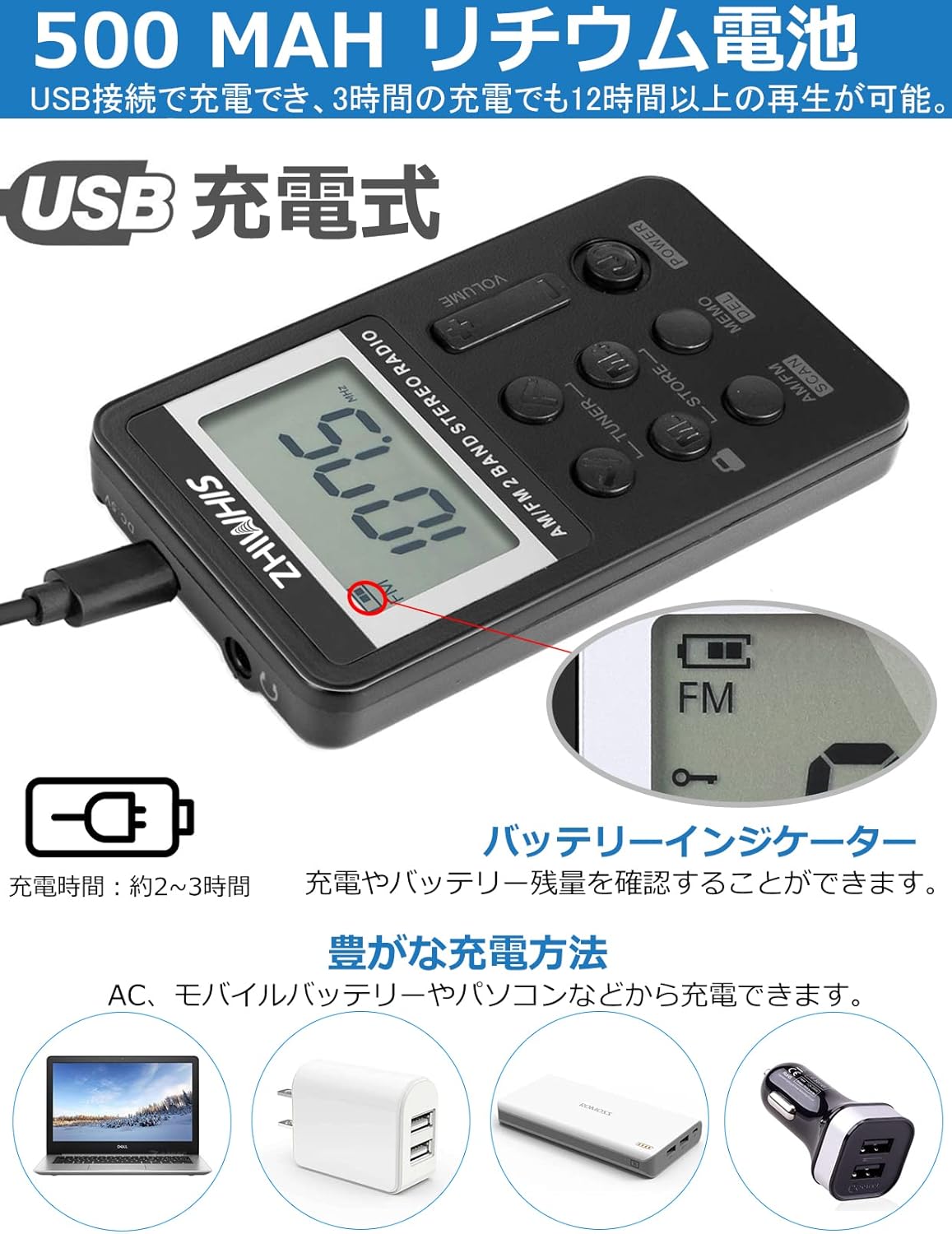
Image: The ZHIWHIS Portable Radio connected to a USB charging cable, with an inset showing the battery indicator on the LCD screen. Below are icons illustrating various charging methods: laptop, wall adapter, and power bank.
Note: If the device does not charge properly, please ensure you are using the original USB charging cable provided with the product.
4.2. Attaching the Strap
You can attach either the neck strap or the hand strap for convenient carrying.
- Locate the strap hole on the side of the radio.
- Thread the thin loop of the strap through the hole.
- Pass the main part of the strap through the loop and pull to secure.

Image: Demonstrates the compact size of the ZHIWHIS Portable Radio, showing it fitting into a shirt pocket and being worn around the neck with the included strap, suitable for various activities like cycling.
5. Operating Instructions
5.1. Power On/Off
- To power on, press and hold the POWER button.
- To power off, press and hold the POWER button again.
5.2. Band Selection (AM/FM)
- Press the AM/FM SCAN button briefly to switch between FM and AM bands.
- The selected band will be displayed on the LCD.
5.3. Tuning Stations
5.3.1. Automatic Scan (ATS)
- Press and hold the AM/FM SCAN button to initiate an automatic scan. The radio will scan for available stations and automatically store them in memory.
5.3.2. Manual Tuning
- Press the TUNER UP (▲) or TUNER DOWN (▼) buttons briefly to fine-tune the frequency step by step.
- Press and hold the TUNER UP (▲) or TUNER DOWN (▼) buttons to automatically scan for the next available station.

Image: Displays the ZHIWHIS Portable Radio with its LCD screen showing "107.5" MHz, indicating FM reception. The image also highlights the radio's support for Wide FM, DSP digital tuning, LCD display, stereo output, AM/FM 29-station memory, key lock function, 500mAh lithium battery, and USB charging.
5.4. Storing and Recalling Stations
5.4.1. Storing Stations
- Tune to the desired station.
- Press the STORE button (M+ or M- depending on the specific button layout, usually M+ for storing). The display might flash or show a memory location.
- Use the TUNER UP (▲) or TUNER DOWN (▼) buttons to select a memory preset number.
- Press STORE again to confirm and save the station.
5.4.2. Recalling Stations
- Press the M- or M+ buttons briefly to cycle through your stored stations.
5.5. Volume Adjustment
- Use the VOLUME + or VOLUME - buttons to adjust the listening volume.
5.6. Key Lock Function
- To prevent accidental button presses, press and hold the MEMO/DEL button (or the dedicated lock button if present, indicated by a lock icon) until a lock icon appears on the display.
- To unlock, press and hold the same button again until the lock icon disappears.
6. Specifications
| Feature | Specification |
|---|---|
| Model Number | ZWS-103 |
| FM Frequency Range | 64-108 MHz (including Wide FM) |
| AM Frequency Range | 522-1710 KHz (9KHz/10KHz step selectable) |
| Power Source | Built-in 500mAh Lithium Polymer Battery |
| Charging Time | Approx. 2-3 hours |
| Battery Life | Up to 12 hours (depending on usage) |
| Dimensions (H x W x D) | 85mm x 48mm x 12mm |
| Weight | 0.06 kg (60 grams) |
| Interface | USB (for charging) |
| Material | Plastic ABS, UV Shell |
| Features | Auto Scan, Lock Function, Shutdown Memory, Preset Stations, Automatic Memory |
7. Maintenance and Care
- Clean the radio with a soft, dry cloth. Do not use abrasive cleaners or solvents.
- Avoid exposing the radio to extreme temperatures, direct sunlight, or high humidity.
- Do not disassemble the radio. This will void the warranty.
- Store the radio in a cool, dry place when not in use for extended periods.
- The included waterproof storage bag can be used for protection during transport or light rain. Note that the radio itself is not waterproof.

Image: The ZHIWHIS Portable Radio being placed into its waterproof storage bag, demonstrating its compact size and portability. Another image shows the radio fitting into a shirt pocket.
8. Troubleshooting
| Problem | Possible Cause | Solution |
|---|---|---|
| No power | Battery is depleted. | Charge the radio using the supplied USB cable. |
| Poor reception / Static | Weak signal; Interference from electronic devices. | Move to a location with better signal. Move away from other electronic devices. For FM, ensure earphones are plugged in as they act as an antenna. |
| Buttons not responding | Key lock function is active. | Press and hold the MEMO/DEL button (or lock button) to deactivate the key lock. |
| Cannot charge | Faulty cable or power source. | Try a different USB port or power adapter. Ensure the supplied USB cable is used. |
| No sound | Volume is too low; Earphones not properly connected. | Increase the volume. Ensure earphones are fully plugged into the 3.5mm jack. |
9. Warranty and Support
ZHIWHIS provides a 1-year quality warranty for this product from the date of purchase. If you encounter any issues or have questions regarding your product, please do not hesitate to contact us. We aim to respond and resolve your inquiries within 24 hours.
For support, please refer to the contact information provided on the product packaging or the official ZHIWHIS store page on Amazon.
This product has undergone strict inspection before shipment. In case of any trouble or defect within one year from the order date, please contact us. We will take responsibility and respond accordingly.
Ask a question about this manual
Ask about setup, troubleshooting, compatibility, parts, safety, or missing instructions. Manuals+ will review the question and use this page’s manual context to help answer it.