
iKanzi TWSX9
iKanzi Wireless Earbuds Bluetooth Headphones User Manual
Model: TWSX9 | Brand: iKanzi
Introduction
Thank you for choosing iKanzi Wireless Earbuds. This manual provides detailed instructions for setting up, operating, and maintaining your new earbuds to ensure optimal performance and longevity. Please read this manual thoroughly before use.
What's in the Box
- iKanzi Wireless Earbuds (Left and Right)
- Portable Charging Case
- USB Charging Cable
- Multiple Sizes of Ear Tips
- User Manual
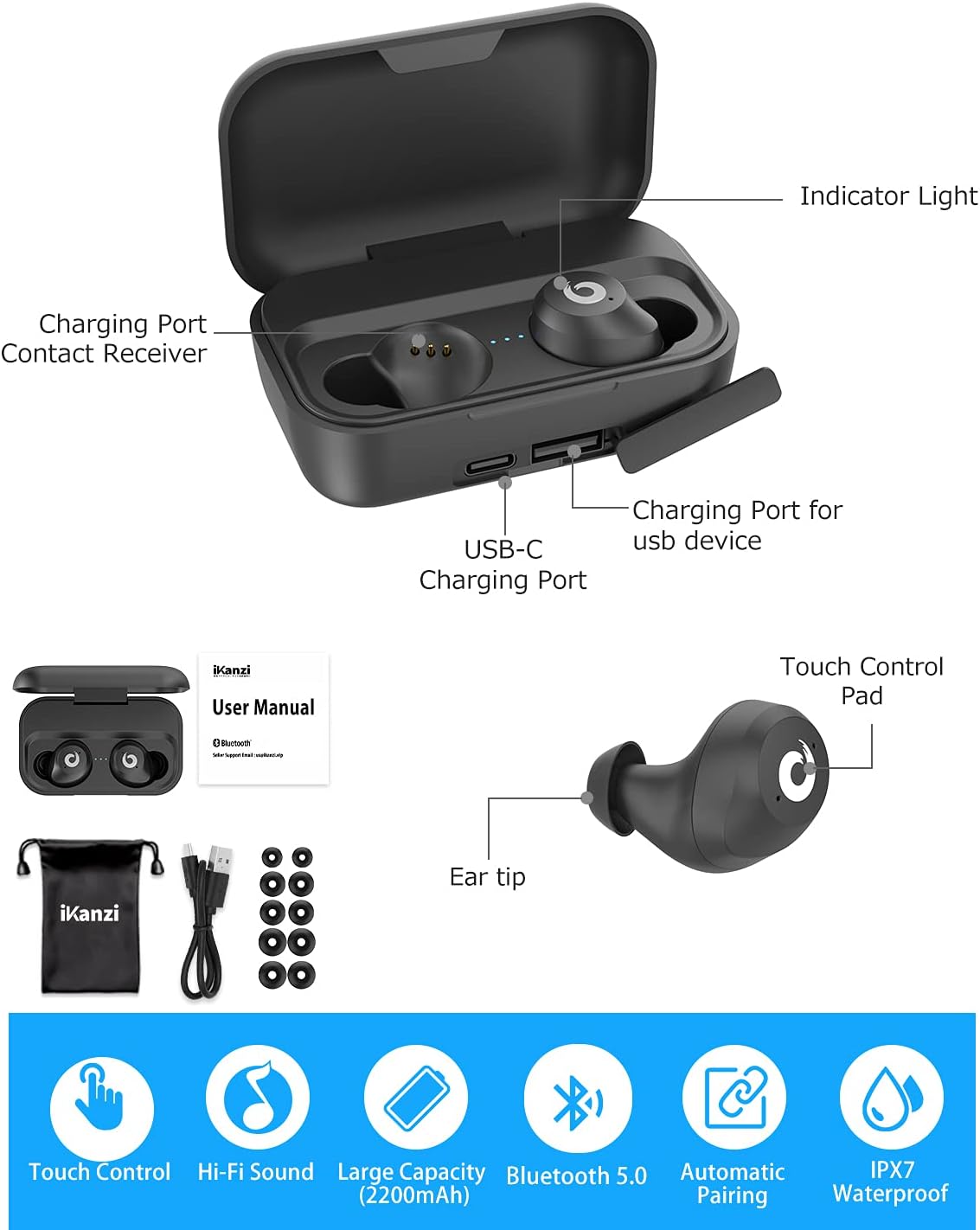
Image: Contents of the iKanzi Wireless Earbuds package, showing the earbuds, charging case, USB-C charging cable, and various ear tip sizes.
Product Overview
Familiarize yourself with the components of your iKanzi Wireless Earbuds and charging case.
Image: Detailed diagram illustrating the various parts of the iKanzi earbuds and their charging case, including indicator lights, charging contacts, USB-C port, and touch control areas.
- Indicator Light: Shows charging status and pairing mode.
- Charging Port Contact Receiver: Connects earbuds to charging case.
- USB-C Charging Port: For charging the case.
- Charging Port for USB Device: Allows the case to act as a power bank.
- Touch Control Pad: For managing playback, calls, and voice assistant.
- Ear Tip: Ensures comfortable fit and sound isolation.
Setup
1. Charging the Earbuds and Case
Before first use, fully charge the charging case and earbuds.
- Connect the USB charging cable to the USB-C port on the charging case and a power source.
- The indicator lights on the case will show charging progress.
- Place the earbuds into the charging case. They will automatically begin charging.
- The earbuds can play for 3-4 hours on a single charge, and the 2200mAh charging case provides up to 18 full charges, totaling 72 hours of cycle play time.
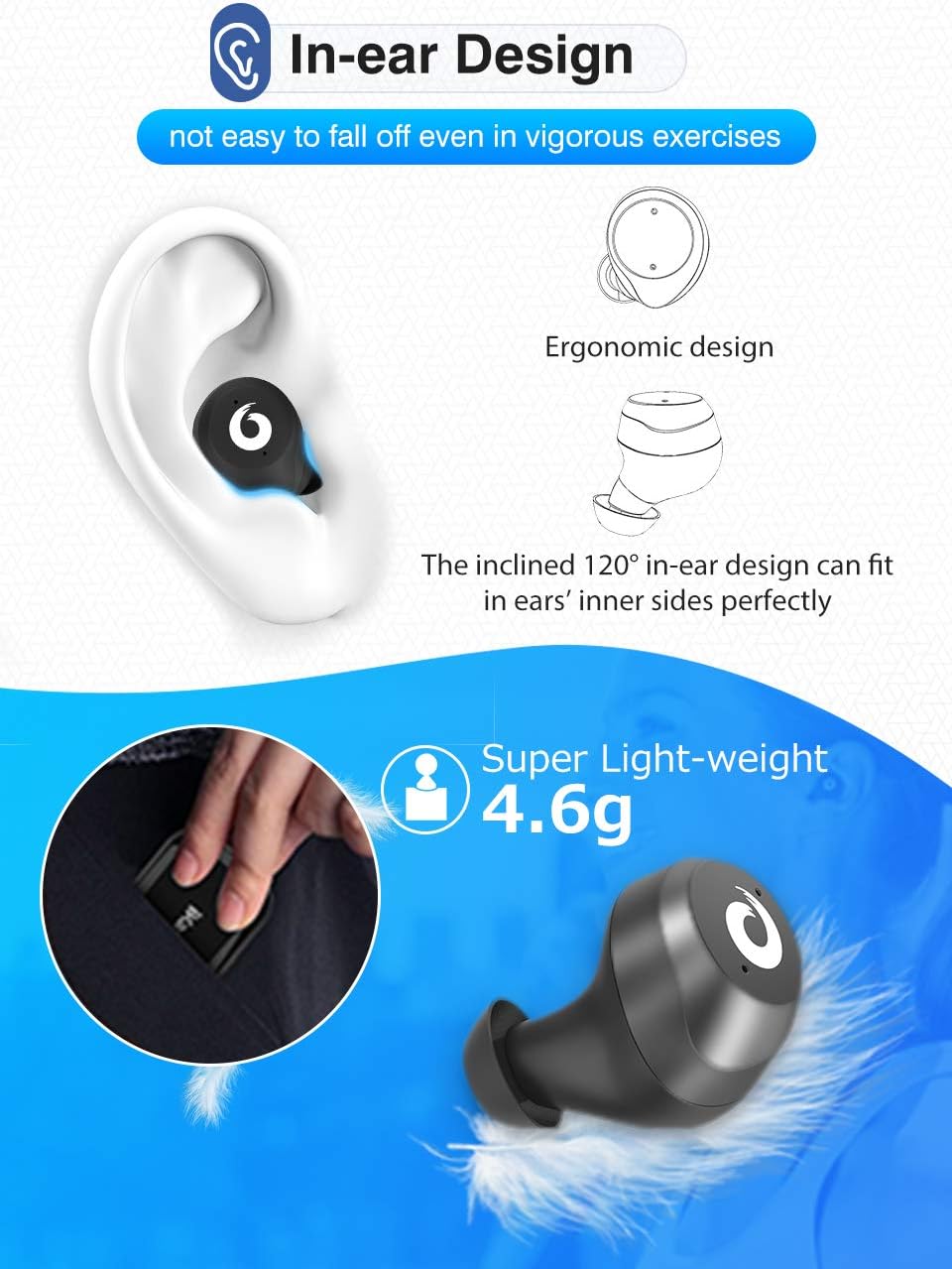
Image: Illustration of the 2200mAh large capacity charging case, showing its ability to charge the earbuds multiple times and also function as a power bank for mobile phones. Also highlights the IPX7 waterproof feature.
2. Automatic Power On and Pairing
The iKanzi X9 earbuds feature automatic power on and pairing for convenience.
- Remove both earbuds from the charging case. They will automatically power on and enter pairing mode.
- On your device (smartphone, tablet, etc.), enable Bluetooth.
- Search for "iKanzi X9" (or similar name) in the list of available Bluetooth devices and select it to connect.
- Once connected, you will hear a confirmation tone, and the earbud indicator lights will change.
- To power off and charge, simply place the earbuds back into the charging case.

Image: The iKanzi Wireless Earbuds in their charging case, with one earbud shown automatically connecting, symbolizing the auto-pairing feature.
Operating Instructions
Touch Controls
The iKanzi X9 earbuds feature intuitive touch controls on the outer surface of each earbud.

Image: Visual guide to the touch control functions of the iKanzi earbuds, including power on/off, play/pause, answer/hang up calls, and activating voice assistant.
| Action | Function |
|---|---|
| Single Tap | Play/Pause music, Answer/End call |
| Double Tap (Left Earbud) | Previous track |
| Double Tap (Right Earbud) | Next track |
| Triple Tap | Activate Voice Assistant (Siri, Google Assistant) |
| Long Press (2 seconds) | Reject call |
Binaural Calling
The iKanzi X9 supports binaural calling, allowing you to hear calls through both earbuds for a clearer experience.
Video: Demonstration of iKanzi wireless earbuds features, including binaural calling, showing the earbuds connecting to a phone for calls.
Maintenance
- Cleaning: Regularly clean the earbuds and charging case with a soft, dry cloth. Avoid using harsh chemicals or abrasive materials.
- Storage: When not in use, store the earbuds in their charging case to protect them and keep them charged.
- Water Resistance: The earbuds are IPX7 waterproof, meaning they can resist sweat and rain. However, they are not designed for swimming or prolonged submersion. Ensure they are dry before placing them back in the charging case.
Troubleshooting
| Problem | Solution |
|---|---|
| Earbuds not pairing with device. | Ensure earbuds are fully charged. Place them back in the case, then remove them to re-enter pairing mode. Turn off and on Bluetooth on your device. |
| Only one earbud is working. | Place both earbuds back into the charging case. Close the lid for 5 seconds, then open and remove them simultaneously. This should re-sync them. |
| Earbuds not charging. | Check if the charging cable is securely connected to both the case and the power source. Ensure the charging contacts on the earbuds and in the case are clean and free of debris. |
| Poor sound quality. | Ensure earbuds are properly seated in your ears. Try different sized ear tips for a better seal. Check the audio source device's volume and sound settings. |
Specifications
| Feature | Detail |
|---|---|
| Model Name | [Updated Version] Wireless Earbuds Bluetooth Headphones IKANZI iPX7 Waterproof 72H Cycle Play Time, 2200mAh Bluetooth 5.0 Auto Pairing |
| Connectivity Technology | Bluetooth 5.0 |
| Bluetooth Range | Up to 33 Feet |
| Charging Case Capacity | 2200mAh |
| Earbud Play Time (single charge) | 3-4 hours |
| Total Play Time (with charging case) | Up to 72 hours |
| Water Resistance Level | IPX7 (Sweat and Rainproof) |
| Control Method | Touch |
| Earbud Weight | 4.54 g (0.16 ounces) |
| Compatible Devices | iPhone X, 8, 8 Plus, 7, 7 Plus, Samsung Galaxy S9, S9 Plus, S8, S8 Plus, S7, Note 8, Note 7, Note 5, Note 4, Huawei, LG G5, G4, G3, iPad, etc. |

Image: Graph illustrating the superior music quality and noise reduction capabilities of the iKanzi earbuds' built-in audio chip.

Image: Depiction of the ergonomic in-ear design of the iKanzi earbuds, highlighting their secure fit during vigorous activities and their super lightweight of 4.6g.
Warranty and Support
iKanzi is committed to providing quality products and excellent customer service. If you encounter any problems or have questions, please feel free to contact us.
- Warranty: The product comes with a 24-month care plan.
- Contact: Please refer to the contact information provided with your product packaging or visit the official iKanzi website for support.

Image: Visual representation of iKanzi's customer support, emphasizing the 24-month care plan for the product.
no relevant documents