
1. Introduction
This manual provides detailed instructions for the proper setup, operation, and maintenance of your SKMEI GADIN-9165 Quartz Sports Watch. Please read this manual thoroughly to ensure optimal performance and longevity of your timepiece. Keep this manual for future reference.
2. Product Overview
The SKMEI GADIN-9165 is an analog quartz sports watch featuring a durable metal case, a comfortable leather strap, and chronograph functionality. It is designed for daily wear and offers water resistance for splashes and brief immersion.
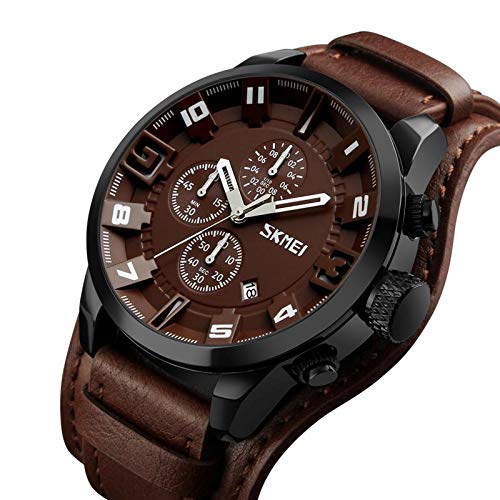
Figure 2.1: Front view of the SKMEI GADIN-9165 watch, showcasing the brown dial, sub-dials, and black case.
Components:
- Crown (A): Used for setting time and date.
- Pusher (B): Upper pusher, typically for chronograph start/stop.
- Pusher (C): Lower pusher, typically for chronograph reset.
- Dial: Displays time, date, and chronograph functions.
- Leather Strap: Secures the watch to the wrist.
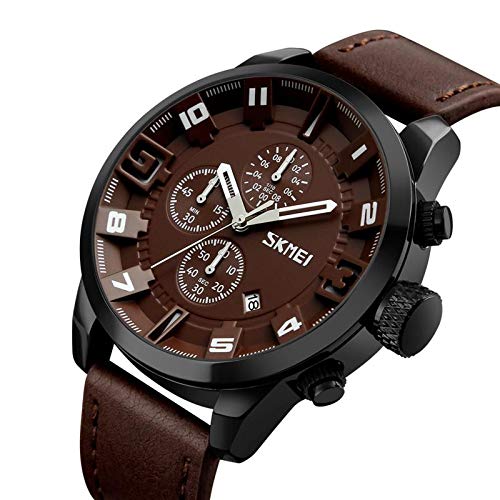
Figure 2.2: Side view illustrating the crown and pushers on the watch case.
3. Setup
3.1 Setting the Time
- Pull the crown (A) out to the second click position.
- Rotate the crown (A) to move the hour and minute hands to the desired time.
- Push the crown (A) back into its normal position to start the watch.
3.2 Setting the Date
- Pull the crown (A) out to the first click position.
- Rotate the crown (A) clockwise or counter-clockwise (depending on the movement) to adjust the date.
- Once the correct date is displayed, push the crown (A) back into its normal position.
Note: Avoid setting the date between 9:00 PM and 3:00 AM, as this may interfere with the automatic date change mechanism. If the date changes during the day, advance the time by 12 hours.
4. Operating the Chronograph
The SKMEI GADIN-9165 features a chronograph function for measuring elapsed time.
4.1 Starting and Stopping the Chronograph
- Press pusher (B) to start the chronograph. The chronograph second hand will begin to move.
- Press pusher (B) again to stop the chronograph. The elapsed time will be indicated by the chronograph hands.
4.2 Resetting the Chronograph
- After stopping the chronograph (as described in 4.1), press pusher (C) to reset all chronograph hands to their zero positions.
- Note: The chronograph must be stopped before it can be reset.
5. Maintenance
5.1 Cleaning Your Watch
Regular cleaning helps maintain the appearance and function of your watch.
- For the case and crystal: Wipe gently with a soft, dry cloth. For stubborn dirt, a slightly damp cloth can be used, followed by immediate drying.
- For the leather strap: Avoid prolonged exposure to water, direct sunlight, and harsh chemicals. Clean with a dry, soft cloth. Specialized leather cleaners can be used sparingly if needed.
5.2 Water Resistance
This watch is water resistant up to 30 meters (3 ATM). This means it is suitable for daily use, splashes, rain, and brief immersion in water. It is not suitable for showering, swimming, diving, or any water sports where the watch might be subjected to high water pressure or prolonged immersion.
- Ensure the crown is fully pushed in before any contact with water.
- Do not operate the crown or pushers while the watch is wet or submerged.
- If the watch is exposed to saltwater, rinse it with fresh water and dry it thoroughly.
5.3 Battery Replacement
When the watch stops or the hands move erratically, the battery may need replacement. Battery replacement should be performed by a qualified watch technician to ensure proper sealing and water resistance.
6. Troubleshooting
- Watch not running: Check if the crown is fully pushed in. If it is, the battery may need replacement.
- Incorrect time/date: Refer to Section 3 for instructions on setting the time and date.
- Chronograph hands not resetting to zero: Ensure the chronograph is stopped before pressing the reset pusher (C). If the issue persists, a recalibration or service may be required.
- Condensation inside the watch: This indicates a loss of water resistance. Avoid further contact with water and seek professional service immediately.
For issues not covered here, please contact customer support.
7. Specifications
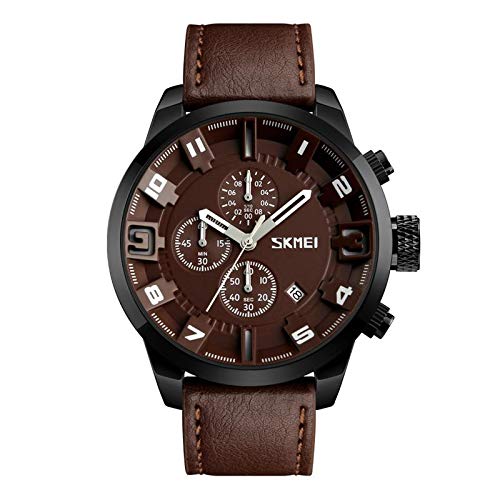
Figure 7.1: Detailed view of the watch dial and case.
| Feature | Specification |
|---|---|
| Brand | SKMEI |
| Model Number | GADIN-9165 |
| Movement Type | Quartz |
| Display Type | Analog |
| Case Material | Metal |
| Case Diameter | 48 Millimetres |
| Case Thickness | 13 Millimetres |
| Band Material | Leather |
| Band Colour | Brown |
| Dial Colour | Brown |
| Crystal Material | Hardlex |
| Water Resistance Depth | 30 Metres (3 ATM) |
| Clasp Type | Buckle |
| Item Weight | 90 Grams |
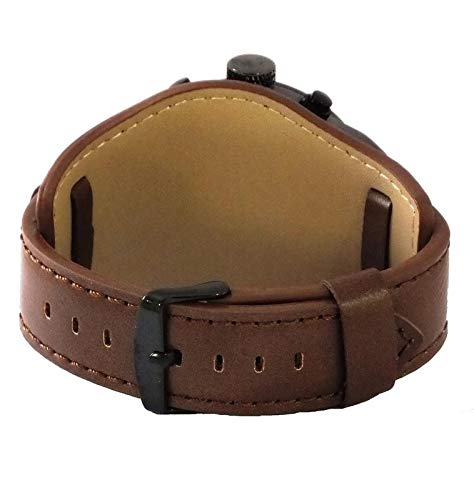
Figure 7.2: View of the watch's underside and leather strap with buckle closure.
8. Warranty and Support
Your SKMEI GADIN-9165 watch comes with a 1-year manufacturer warranty from the date of purchase. This warranty covers manufacturing defects under normal use. It does not cover damage resulting from misuse, accidents, unauthorized repairs, or normal wear and tear.
For warranty claims or technical support, please contact your retailer or the official SKMEI customer service. Ensure you retain your proof of purchase for warranty validation.


