
1. Introduction
Thank you for choosing the Orpat Alarm Clock 307. This analog alarm clock is designed for reliable timekeeping and alarm functionality. This manual provides detailed instructions for setting up, operating, and maintaining your new alarm clock to ensure optimal performance and longevity.
2. Safety Instructions
- Do not expose the clock to water or excessive moisture.
- Avoid placing the clock in direct sunlight or near heat sources.
- Use only the specified battery type (typically AA or AAA, refer to battery compartment for details).
- Remove batteries if the clock will not be used for an extended period to prevent leakage.
- Keep out of reach of small children.
- Do not attempt to disassemble or repair the clock yourself. Contact qualified service personnel.
3. Package Contents
Please check the package for the following items:
- Orpat Alarm Clock 307 (Black)
- Instruction Manual
4. Product Overview
The Orpat Alarm Clock 307 features a classic analog display with clear markings for easy readability. It is powered by batteries, making it portable and suitable for various indoor settings like bedrooms.
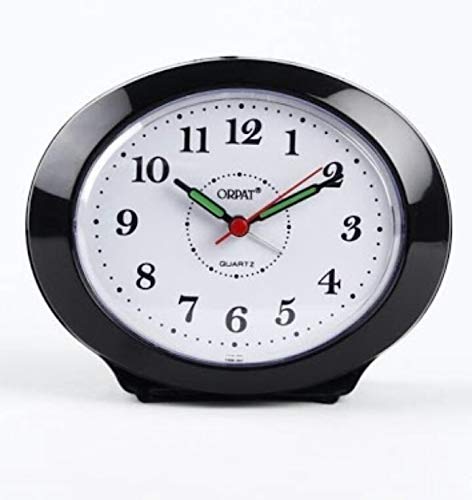
Image: Front view of the Orpat Alarm Clock 307, showcasing its analog display with hour, minute, and second hands, and the alarm setting dial.
5. Setup
5.1. Inserting Batteries
- Locate the battery compartment cover on the back of the clock.
- Slide or unclip the cover to open it.
- Insert the required batteries (e.g., 1 x AA battery) according to the polarity indicators (+ and -) inside the compartment.
- Replace the battery compartment cover securely.
5.2. Initial Time Setting
- Locate the Time Setting Knob on the back of the clock.
- Rotate the knob in either direction to move the hour and minute hands until the correct current time is displayed.
6. Operating Instructions
6.1. Setting the Alarm
- Locate the Alarm Setting Knob on the back of the clock.
- Rotate this knob to move the alarm hand (usually a smaller, distinct hand) to your desired alarm time.
- Ensure the alarm time is set accurately, considering AM/PM if your clock has a 12-hour display.
6.2. Activating/Deactivating the Alarm
On the back or side of the clock, there is an Alarm ON/OFF switch. Slide this switch to the 'ON' position to activate the alarm. Slide it to the 'OFF' position to deactivate the alarm. When the alarm sounds, you can typically turn it off by sliding this switch to 'OFF'.
7. Maintenance
7.1. Cleaning
To clean the clock, gently wipe the surface with a soft, dry cloth. Do not use abrasive cleaners, solvents, or chemical sprays, as these can damage the finish or internal components.
7.2. Battery Replacement
When the clock's movement slows down, or the alarm sound weakens, it is time to replace the batteries. Follow the instructions in Section 5.1 for battery insertion. Always dispose of used batteries responsibly according to local regulations.
8. Troubleshooting
| Problem | Possible Cause | Solution |
|---|---|---|
| Clock not working / Hands not moving | Dead or incorrectly inserted batteries. | Check battery polarity; replace with fresh batteries. |
| Alarm not sounding | Alarm switch is OFF; Alarm time not set correctly; Low battery. | Ensure alarm switch is ON; Re-set alarm time; Replace batteries. |
| Time is incorrect | Time not set accurately; Low battery affecting movement. | Re-set the current time; Replace batteries. |
9. Specifications
| Feature | Detail |
|---|---|
| Brand | Orpat |
| Model | 307 |
| Colour | Black |
| Display Type | Analog |
| Style | Modern |
| Special Feature | Alarm |
| Product Dimensions | 33W x 33H Centimeters |
| Power Source | Battery Powered |
| Room Type | Bedroom |
| Shape | Round |
| Indoor/Outdoor Usage | Indoor |
10. Warranty and Support
Orpat products are manufactured to high-quality standards. For specific warranty information, please refer to the warranty card included with your purchase or visit the official Orpat website. For technical support or service inquiries, please contact Orpat customer service through their official channels.
Customer Support: Please refer to your purchase documentation or the manufacturer's website for contact details.