
Introduction
The AKG Y500 On-Ear Wireless Bluetooth Headphones are designed for a seamless audio experience. These headphones feature wireless Bluetooth connectivity, on-ear controls, and smart features like automatic play/pause when removed or placed back on your ears. They offer a long-lasting battery and quick charging capabilities, making them suitable for daily use and travel.

Image: Close-up view of the AKG Y500 headphone, showing the sleek design and 'YSERIES' detail on the headband.
What's in the Box
Verify that all items are present in the package:
- AKG Y500 On-Ear Wireless Bluetooth Headphones
- Micro USB charging cable
- 3.5MM audio cable with 1-button remote & microphone
- Protective Case
- Quick Start Guide (not included in this manual)

Image: The protective pouch included with the AKG Y500 headphones.
Setup
1. Charging the Headphones
Before first use, fully charge your AKG Y500 headphones. Connect the Micro USB charging cable to the charging port on the headphones and to a power source. The LED indicator will show charging status.
- A 5-minute charge provides approximately 1 hour of playback.
- A full charge provides up to 33 hours of playback.
2. Bluetooth Pairing
- Power on the headphones by pressing and holding the Power button until the LED indicator flashes.
- Activate Bluetooth on your device (smartphone, tablet, etc.).
- Select "AKG Y500" from the list of available Bluetooth devices.
- Once paired, the LED indicator will show a steady blue light.
Multi-Point Connectivity: The AKG Y500 headphones can be paired with two Bluetooth devices simultaneously. They will intuitively switch between devices for calls and music playback.
3. Wired Connection
For a wired listening experience or when the battery is depleted, use the included 3.5mm audio cable. Connect one end to the headphone's audio jack and the other end to your audio source.

Image: The Micro USB charging cable and 3.5mm audio cable provided with the headphones.
Operating Instructions
Power On/Off
- Power On: Press and hold the Power button until the LED indicator lights up.
- Power Off: Press and hold the Power button until the LED indicator turns off.
Music Playback and Volume Control
- Play/Pause: Press the multi-function button once.
- Automatic Play/Pause: The headphones will automatically pause music when removed from your ears and resume when placed back on.
- Volume Up/Down: Use the dedicated volume controls located on the ear cup.
- Next Track: Double-press the multi-function button.
- Previous Track: Triple-press the multi-function button.
Call Management
- Answer/End Call: Press the multi-function button once.
- Reject Call: Press and hold the multi-function button.
Ambient Aware Technology
The Ambient Aware feature allows you to hear your surroundings while listening to music. Activate this feature using the dedicated button on the ear cup to stay aware of your environment without removing your headphones.
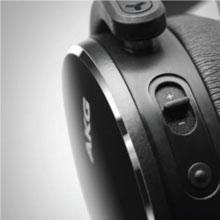
Image: Illustration of the multifunction on-ear controls.
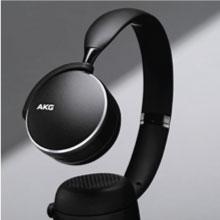
Image: Illustration of Ambient Aware technology.
Maintenance
To ensure the longevity and optimal performance of your AKG Y500 headphones, follow these maintenance guidelines:
- Cleaning: Use a soft, dry cloth to clean the ear cups and headband. Avoid using harsh chemicals or abrasive materials.
- Storage: When not in use, store the headphones in the provided protective case to prevent damage from dust, scratches, and impacts.
- Avoid Moisture: The headphones are not water-resistant. Keep them away from liquids and high humidity.
- Cable Care: Handle the charging and audio cables gently. Avoid sharp bends or excessive pulling.
Troubleshooting
No Power
- Ensure the headphones are fully charged. Connect them to a power source using the Micro USB cable.
- Press and hold the Power button for a few seconds to confirm it's not just in standby mode.
Cannot Pair via Bluetooth
- Make sure the headphones are in pairing mode (LED flashing).
- Ensure Bluetooth is enabled on your device and it is within range (typically 10 meters or 33 feet).
- Try forgetting the device from your phone's Bluetooth settings and re-pairing.
- Restart both the headphones and your device.
No Sound or Low Volume
- Check the volume levels on both the headphones and your connected device.
- Ensure the headphones are properly paired and connected.
- If using the wired connection, ensure the 3.5mm cable is securely plugged into both the headphones and the audio source.
- Test with a different audio source or device.
Specifications
| Feature | Specification |
|---|---|
| Model Name | Y500 |
| Connectivity Technology | Bluetooth 4.2 |
| Wireless Communication Technology | Bluetooth |
| Audio Driver Type | Dynamic Driver |
| Battery Life | Up to 33 Hours |
| Charging Time | 5 minutes for 1 hour playback |
| Headphones Jack | 3.5 mm Jack |
| Control Type | Media Control, Touch |
| Noise Control Features | Sound Isolation |
| Special Features | Foldable, Wireless, Auto Play/Pause, Ambient Aware |
| Item Weight | 230 Grams (8.1 ounces) |
| Product Dimensions | 7.2 x 2.87 x 8.66 inches |
| Water Resistance Level | Not Water Resistant |
| Manufacturer | Samsung |
Warranty and Support
For warranty information and technical support, please refer to the documentation included with your product or contact the manufacturer directly. Keep your proof of purchase for warranty claims.


