
1. Introduction
This manual provides comprehensive instructions for the Kestrel 5200 Concrete Pro Jobsite Weather Kit. This device is designed to accurately measure and log environmental conditions critical for concrete curing, including automatic evaporation rate calculation. It features LiNK Wireless Bluetooth Technology for data transfer and alerts.
2. What's in the Box
Verify that all components are present in your Kestrel 5200 Concrete Pro Jobsite Weather Kit:
- Kestrel 5200 Professional Environmental Meter
- Portable Vane Mount
- Tripod
- Carry Case
- Instruction Manual (this document)
- Cable
- Mounting Hardware

Figure 2.1: Kestrel 5200 Concrete Pro Jobsite Weather Kit in its protective case.
3. Setup
3.1 Battery Installation
- Locate the battery compartment on the back of the Kestrel 5200 meter.
- Using a small screwdriver, carefully remove the battery compartment cover.
- Insert the required batteries (typically AA or AAA, refer to the device for specific type) ensuring correct polarity.
- Replace the battery compartment cover and secure it.
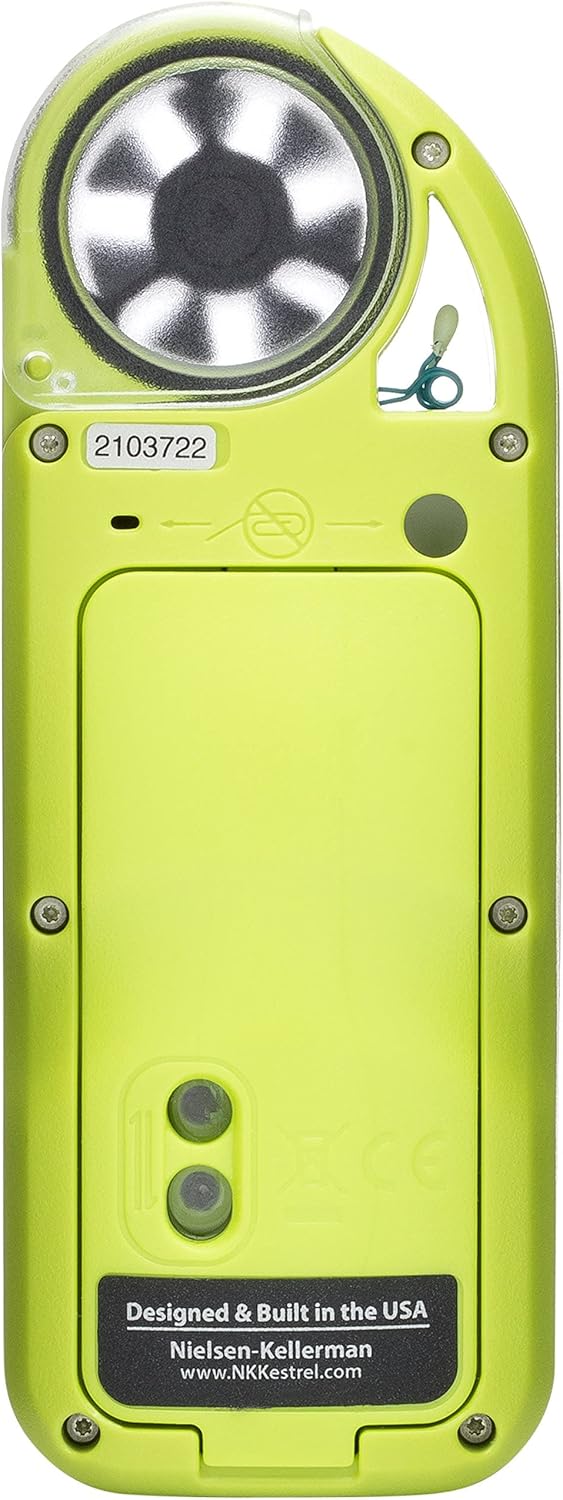
Figure 3.1: Rear view of the Kestrel 5200, indicating the battery compartment.
3.2 Assembling the Portable Vane Mount and Tripod
- Extend the legs of the tripod for stability.
- Attach the portable vane mount to the top of the tripod using the provided mounting hardware.
- Securely attach the Kestrel 5200 meter to the portable vane mount. Ensure the meter is oriented correctly for accurate wind measurements.

Figure 3.2: Kestrel 5200 meter assembled on the portable vane mount and tripod.
4. Operating Instructions
4.1 Powering On and Basic Navigation
- Press the power button (usually located at the bottom of the keypad) to turn on the device.
- Use the arrow buttons to navigate through different measurement screens (e.g., Temperature, Humidity, Wind Speed).
- The 'Enter' button confirms selections or accesses sub-menus.

Figure 4.1: Kestrel 5200 display showing a temperature reading.
4.2 Evaporation Rate Calculation
The Kestrel 5200 automatically calculates the evaporation rate based on the ACI nomograph. To obtain an accurate evaporation rate:
- Ensure the device is positioned to accurately measure ambient temperature, humidity, and wind speed at the jobsite.
- Input the concrete surface temperature manually into the device when prompted.
- The Kestrel 5200 will display the calculated evaporation rate.
4.3 Data Logging and LiNK App Integration
The Kestrel 5200 features comprehensive data-logging capabilities. To access and manage logged data:
- Download the free Kestrel LiNK app on your mobile device (available for iOS and Android).
- Enable Bluetooth on your mobile device and the Kestrel 5200.
- Pair the Kestrel 5200 with the LiNK app.
- Within the app, you can view current readings, access logged data, generate reports, and set customizable alerts for changing weather conditions.

Figure 4.2: Kestrel LiNK app interface on a smartphone.
5. Maintenance
5.1 Cleaning
To ensure accurate readings and prolong the life of your Kestrel 5200:
- Wipe the exterior of the device with a soft, damp cloth. Do not use abrasive cleaners or solvents.
- Keep the impeller (fan) free from dust and debris. If necessary, gently clean it with compressed air or a soft brush.
- Ensure the humidity sensor is kept clean and dry.
5.2 Battery Replacement
Replace batteries when the low battery indicator appears on the display. Refer to Section 3.1 for battery installation instructions.
5.3 Storage
When not in use, store the Kestrel 5200 in its protective carry case in a cool, dry place, away from direct sunlight and extreme temperatures.
6. Troubleshooting
6.1 Device Not Powering On
- Check battery installation and ensure batteries are fresh.
- Ensure the battery compartment cover is securely closed.
6.2 Inaccurate Readings
- Ensure the device is positioned correctly and not obstructed.
- Clean the impeller and sensors as described in Section 5.1.
- Verify that the concrete surface temperature input is accurate.
6.3 LiNK App Connectivity Issues
- Ensure Bluetooth is enabled on both the Kestrel 5200 and your mobile device.
- Restart both the Kestrel 5200 and the mobile device.
- Ensure the LiNK app is updated to the latest version.
- Try re-pairing the device through the app's settings.
7. Specifications
| Item Package Dimensions L x W x H | 14.5 x 14.3 x 5.5 inches |
| Package Weight | 1.77 Kilograms |
| Item Weight | 4.3 Ounces |
| Brand Name | Kestrel |
| Color | Black |
| Manufacturer | NK Kestrel |
| Part Number | 0852LVTCK |
| Style | Modern |
| Date First Available | August 1, 2018 |
8. Warranty and Support
8.1 Warranty Information
The Kestrel 5200 Concrete Pro Jobsite Weather Kit is manufactured by NK Kestrel. For specific warranty terms and conditions, please refer to the warranty card included with your product or visit the official Kestrel website.
8.2 Technical Support
For technical assistance, troubleshooting beyond this manual, or service inquiries, please contact Kestrel customer support. Contact information can typically be found on the manufacturer's website or in the product packaging.
