
DeLUX DeLUX-M618Plus Wireless
Delux Wireless Ergonomic Vertical Mouse Instruction Manual
Model: M618Plus Wireless
Product Overview
The Delux Wireless Ergonomic Vertical Mouse (Model: M618Plus Wireless) is designed to provide a comfortable and natural hand posture, reducing wrist discomfort and hand stiffness often associated with traditional mice.
Its unique vertical design promotes a natural handshake grip, aiming to alleviate carpal tunnel syndrome and improve overall comfort during extended use. Key features include a 2.4G wireless connection, adjustable DPI settings (800/1200/1600), silent clicks for a quiet working environment, and a removable wrist rest for enhanced support.

Image: The Delux M618Plus Wireless Ergonomic Vertical Mouse shown with its USB receiver.
Ergonomic Design Benefits
The vertical design of the M618Plus mouse positions your hand in a natural handshake posture, which helps to align your wrist and forearm in a more neutral position. This can significantly reduce strain and pressure on the wrist, a common issue with standard horizontal mice.

Image: Illustration showing the 66-degree vertical holding gesture of the mouse, promoting a more natural and comfortable grip.

Image: A visual comparison highlighting how a traditional mouse grip can cause nerve compression, contrasted with the natural handshake posture offered by the ergonomic vertical mouse to reduce wrist fatigue.
The removable wrist rest further enhances comfort by lifting your wrist from the ground, preventing friction and pressure during mouse movements.

Image: The mouse with its detachable palm rest, designed to protect the wrist and relieve pressure.
Setup Instructions
Battery Installation
The Delux M618Plus Wireless mouse requires one AA battery (not included). Locate the battery compartment on the bottom of the mouse. Open the cover, insert the AA battery according to the polarity indicators, and close the cover securely.
USB Receiver Connection
The 2.4G wireless USB receiver is typically stored within the mouse's battery compartment for safekeeping. Remove the USB receiver from its storage slot.

Image: Diagram showing the USB receiver being plugged into a laptop, with an inset image indicating the receiver's storage location on the mouse's bottom.
Plug the USB receiver into an available USB port on your computer (Laptop, PC, Notebook). The mouse is plug-and-play and should be recognized by your operating system automatically.
Power On
Locate the ON/OFF switch on the bottom of the mouse and slide it to the "ON" position.
Operating Instructions
Button Layout and Functions
The Delux M618Plus Wireless mouse features 6 buttons for various functions:
- Left Button: Standard left-click function.
- Right Button: Standard right-click function.
- Scroll Wheel: For vertical scrolling.
- Forward Button (Left Side): Navigates forward in web browsers or file explorers.
- Backward Button (Left Side): Navigates backward in web browsers or file explorers.
- DPI Button (Bottom): Adjusts mouse sensitivity.

Image: A detailed diagram illustrating the location and numbering of all buttons on the Delux M618Plus mouse, including side and bottom views.
Adjusting DPI (Sensitivity)
The mouse offers 3 adjustable DPI settings: 800, 1200, and 1600. To change the DPI, press the DPI button located on the bottom of the mouse. Each press will cycle through the available settings, allowing you to select the sensitivity that best suits your needs for precision and speed.
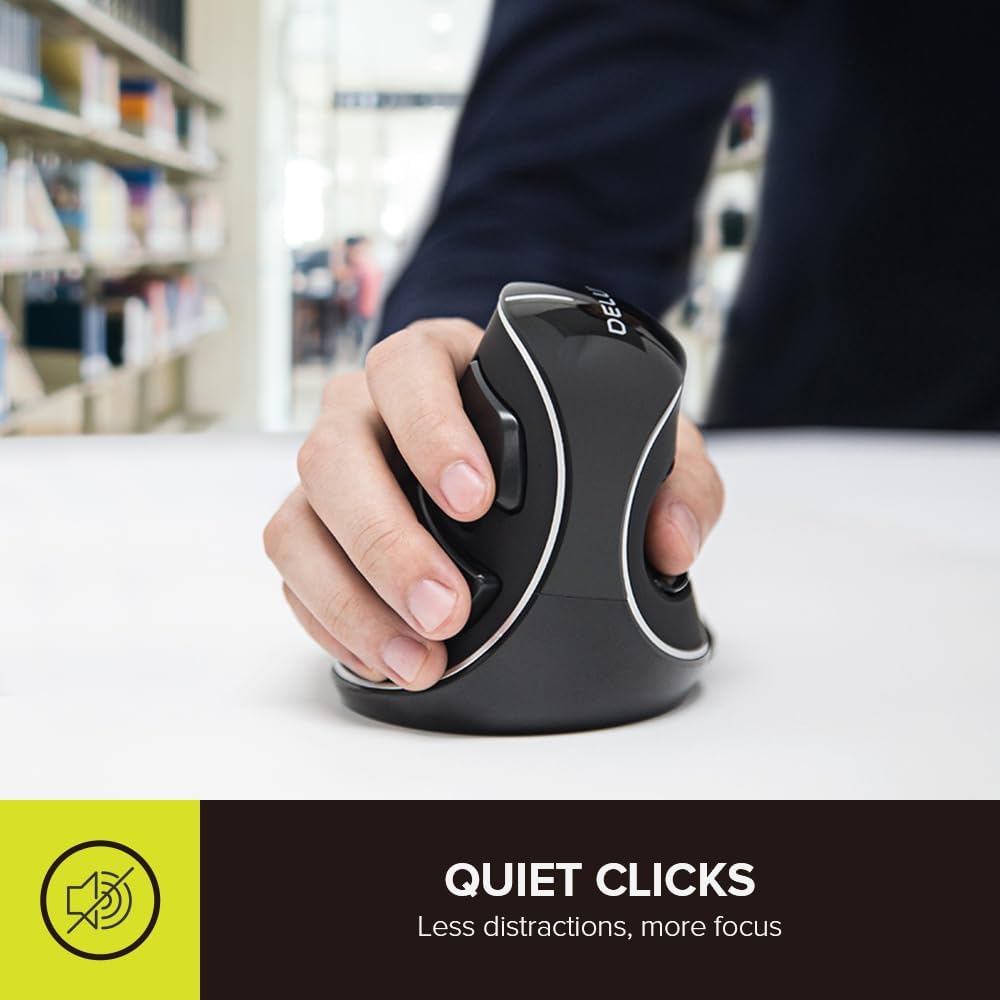
Image: The bottom of the mouse showing the DPI button and indicating the 800, 1200, and 1600 DPI settings.
Quiet Clicks
The Delux M618Plus features noiseless buttons, reducing click sound by over 90%. This allows for a quieter working environment, minimizing distractions for both you and those around you.

Image: A hand operating the ergonomic mouse, emphasizing its quiet click functionality for reduced distractions.
Compatibility
This mouse is compatible with Windows XP, Vista, 7, 8, and 10 operating systems. It works with various devices including Laptops, PC Computers, and Notebooks. For Mac users, there is limited support; the side buttons (Forward/Backward) may not be available.
Maintenance
Cleaning
To clean the mouse, use a soft, dry cloth. For stubborn dirt, slightly dampen the cloth with water or a mild cleaning solution. Avoid using harsh chemicals or abrasive materials that could damage the surface.
Battery Replacement
When the mouse performance degrades or it stops responding, it may be time to replace the AA battery. Follow the battery installation steps in the "Setup Instructions" section.
Troubleshooting
| Problem | Possible Cause | Solution |
|---|---|---|
| Mouse not responding | Low battery; USB receiver disconnected; Mouse is off. | Replace battery; Re-insert USB receiver; Turn mouse ON. |
| Cursor movement is erratic or slow | Low DPI setting; Dirty optical sensor; Unsuitable surface. | Increase DPI; Clean optical sensor; Use a mouse pad. |
| Side buttons not working on Mac | Limited Mac compatibility. | This is a known limitation for Mac OS. |
Specifications
| Feature | Detail |
|---|---|
| Brand | DeLUX |
| Model Number | DeLUX-M618Plus Wireless |
| Connectivity Technology | 2.4G Wireless (USB Receiver) |
| DPI Settings | 800 / 1200 / 1600 |
| Buttons | 6 (Left, Right, Scroll Wheel, Forward, Backward, DPI) |
| Power Source | 1 x AA Battery (not included) |
| Product Dimensions | 4.21 x 3.74 x 3.54 inches |
| Item Weight | 6.3 ounces |
| Special Features | Ergonomic Vertical Design, Silent Clicks, Removable Wrist Rest |
| Compatibility | Windows XP/Vista/7/8/10 (Limited Mac support) |
Official Product Videos
M618PLUS Series Ergonomic Vertical Mouse Overview
Video: This video provides a comprehensive overview of the M618PLUS Series Ergonomic Vertical Mouse, showcasing its design, features, and ergonomic benefits. (Duration: 0:54)
DeLUX M618Plus Vertical Mouse Features
Video: This video highlights various features of the DeLUX M618Plus Vertical Mouse, including its ergonomic design, RGB lighting (for wired versions), and customizable functions. (Duration: 1:01)
Warranty and Support
For detailed warranty information and technical support, please refer to the official user manual or contact DeLUX customer service.
A digital version of the user manual is available for download: User Manual (PDF)
Ask a question about this manual
Ask about setup, troubleshooting, compatibility, parts, safety, or missing instructions. Manuals+ will review the question and use this page’s manual context to help answer it.