
Bestway 58500E
Bestway Flowclear 2200 Gallon Sand Filter Pump Instruction Manual
Model: 58500E
Product Overview
The Bestway Flowclear 2,200-Gallon Sand Filter Pump is designed to maintain clean and healthy water in above-ground swimming pools ranging from 300 to 14,400 gallons. It effectively filters sand and other debris, ensuring a longer lifespan for your pool system. Key features include a durable pre-filter strainer and a ChemConnect Dispenser for stable chlorine distribution.


Setup
Proper setup is crucial for the optimal performance and longevity of your sand filter pump. Follow these steps carefully:
- Positioning: Place the pump on a stable, level surface near your pool. Ensure it is within reach of a 110-120 volt GFCI protected outlet.
- Base Assembly: Securely attach the pump unit to its base.
- Sand Filling: Remove the multi-port valve from the top of the filter tank. Insert the standpipe into the tank. Place the sand guard over the standpipe to prevent sand from entering it. Slowly add #20 silica sand (0.45-0.85 mm) into the tank, ensuring it reaches between the minimum and maximum fill lines. Approximately 44 pounds of sand are required.
- Multi-Port Valve Installation: Carefully remove the sand guard and install the multi-port valve onto the top of the filter tank. Ensure a tight seal.
- Hose Connections: Connect the hoses from your pool to the pump and filter system. The pump includes an adapter for pool valves with an outer diameter of 1.5 inches.

Operating Instructions
The multi-port valve on top of the filter allows for various operating modes:
- Filter (Normal Operation): Water is filtered through the sand bed and returned to the pool. This is the primary operating mode.
- Backwash: Used for cleaning the sand bed. Water flows in reverse through the filter, dislodging trapped debris, and is discharged through the waste port.
- Rinse: Used after backwashing to settle the sand bed and flush out any remaining dirty water before returning to filter mode.
- Recirculate: Water is circulated through the pump and multi-port valve, bypassing the sand filter. Useful for distributing chemicals without filtering.
- Waste: Water is pumped directly out of the pool through the waste port, bypassing the filter. Useful for lowering pool water level or vacuuming heavy debris directly to waste.
- Closed: All flow to the filter and pump is shut off. Use this setting when performing maintenance or when the pump is not in use.
To switch modes, always turn off the pump first, then press down on the multi-port valve handle and rotate it to the desired setting. Release the handle to lock it in place.

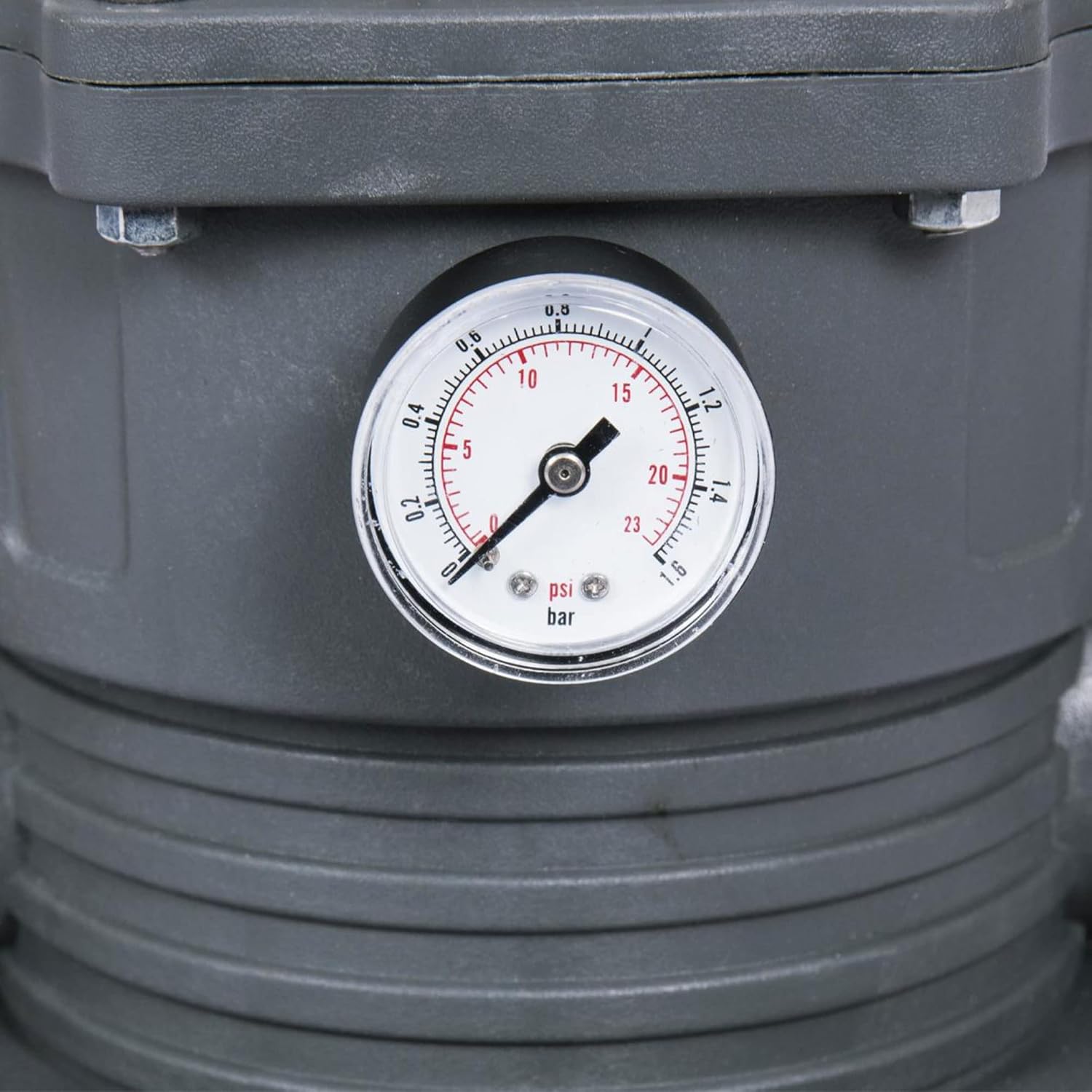
Starting the Pump: Ensure all hoses are securely connected and the multi-port valve is set to 'Filter'. Plug in the pump and turn on the power switch. The pump features a GFCI plug for safety. Monitor the pressure gauge to ensure normal operating pressure.
Maintenance
Regular maintenance ensures the efficiency and longevity of your Flowclear Sand Filter Pump.
- Backwashing and Rinsing: When the pressure gauge reading is 0.56 Bar (8.0 PSI) or higher, or if the water flow to the pool is too low, it's time to clean the sand.
- Turn off the pump.
- Set the multi-port valve to 'Backwash'.
- Turn on the pump and run for approximately 30 seconds, or until the water coming out of the waste port is clear.
- Turn off the pump.
- Set the multi-port valve to 'Rinse'.
- Turn on the pump and run for 10-20 seconds.
- Turn off the pump.
- Set the multi-port valve back to 'Filter' and turn on the pump for normal operation.
- Pre-Filter Strainer Cleaning: Regularly check and clean the pre-filter strainer basket to remove larger debris that could impede pump performance. Turn off the pump, open the strainer housing, remove and clean the basket, then reassemble.
- Sand Replacement: It is recommended to replace the filter sand every 3 years, depending on usage and water quality. Refer to the setup section for sand filling instructions.
- ChemConnect Dispenser: Ensure the ChemConnect Dispenser is regularly refilled with chlorine tablets to maintain stable chemical levels in the pool.

Troubleshooting
If you encounter issues with your sand filter pump, consider the following common problems and solutions:
- Low Water Flow:
- Check the pressure gauge. If high, perform backwash and rinse cycles.
- Clean the pre-filter strainer basket.
- Ensure all valves are fully open and hoses are not kinked.
- Cloudy Pool Water:
- Perform backwash and rinse cycles.
- Check pool chemical balance (pH, alkalinity, chlorine).
- Ensure adequate pump run time (typically 8-12 hours per day).
- Pump Not Starting:
- Check power connection and GFCI plug. Reset if tripped.
- Ensure the multi-port valve is not set to 'Closed'.
Specifications
| Feature | Specification |
|---|---|
| Brand | Bestway |
| Model Name | 58500E |
| Flow Rate | 2,200 Gallons Per Hour (36.6 GPM) |
| Voltage | 120 Volts |
| Item Weight | 13.43 Kilograms |
| Product Dimensions | 21.46"L x 15.16"W x 22.44"H |
| Required Sand Size | #20 silica sand, 0.45-0.85 mm (approx. 44 lbs) |
| Compatible Pool Volume | 300 to 14,400 Gallons |
Warranty
This product comes with No Warranty. Please refer to the product packaging or contact Bestway customer support for any specific warranty information or limitations.
Support
For further assistance, troubleshooting, or product inquiries, please contact Bestway customer support. You can also refer to the official User Manual PDF for detailed diagrams and instructions:
Related Documents - 58500E
 |
Bestway 58500E Sand Filter Pump Owner's Manual - Installation, Operation, and Maintenance Comprehensive owner's manual for the Bestway 58500E Sand Filter Pump. Includes safety instructions, assembly, operation, maintenance, troubleshooting, and specifications for optimal pool water filtration. |
 |
Bestway Flowclear Filter Pump (58390E/58647E) Owner's Manual Official owner's manual for Bestway Flowclear Filter Pump models 58390E and 58647E. Includes safety instructions, installation guides, maintenance tips, and troubleshooting for above-ground pool filter pumps. |
 |
Bestway 58515 Sand Filter Manual and Instructions Comprehensive user manual for the Bestway 58515 Sand Filter, covering safety instructions, assembly, operation, maintenance, and troubleshooting for above-ground pools. |
 |
Bestway 58500E Sand Filter Owner's Manual User guide for the Bestway 58500E Sand Filter, detailing safety, assembly, operation, and maintenance for optimal pool water clarity. Includes specifications and support information. |
 |
Bestway Steel Pro MAX 14' x 33" Round Above Ground Pool Set - Owner's Manual & Installation Guide Comprehensive owner's manual for the Bestway Steel Pro MAX 14' x 33" Round Above Ground Pool Set. Includes detailed safety instructions, step-by-step installation guide, maintenance tips, and storage information for your Bestway pool. |
 |
Bestway Sandfilteranlage #58515 Bedienungsanleitung Umfassende Bedienungsanleitung für die Bestway Sandfilteranlage #58515. Enthält Installationsanweisungen, Betriebshinweise, Wartungstipps und Fehlerbehebung für eine optimale Poolpflege. |
Ask a question about this manual
Ask about setup, troubleshooting, compatibility, parts, safety, or missing instructions. Manuals+ will review the question and use this page’s manual context to help answer it.