
Introduction
Thank you for purchasing the KCR 14.0-inch Portable DVB-T2 Digital TV. This compact and versatile television is designed for both home and portable use, featuring a high-quality LED screen, DVB-T2 digital tuner, and multiple power options. Please read this manual carefully before operating the device to ensure proper use and to maximize its performance and longevity.

Image: Front view of the KCR Portable DVB-T2 Digital TV, showcasing its screen, control buttons, included remote control, and portable antenna.
What's in the Box
Please check the package contents to ensure all items are present:
- Portable TV Unit
- Remote Control
- Power Adapter (AC)
- Car Charger (12V)
- Portable Antenna
- AV Cables
- User Manual

Image: A visual representation of all items included in the product packaging, such as the TV, remote, various cables, and power adapters.
Product Overview
Ports and Connections
Familiarize yourself with the various input and output ports on your KCR Portable TV:

Image: A detailed diagram highlighting the DC-12V power input, power on/off switch, headphone out, AV in, HDMI input, and Aerial (RF coaxial) connection on the side of the TV.
- DC-12V Input: For connecting the 12V power adapter or car charger.
- Power On/Off Switch: To turn the TV on and off.
- Headphone Out: 3.5mm jack for connecting headphones.
- AV In: For connecting external devices using AV cables.
- HDMI In: High-Definition Multimedia Interface for connecting HD signal output devices like set-top boxes or game consoles.
- Aerial (RF): For connecting the portable antenna or a standard RF coaxial cable from a larger antenna.
- USB Port: For connecting USB storage devices to play multimedia files.

Image: Rear view of the KCR Portable TV, showing the integrated kickstand, speaker locations, and the arrangement of the input/output ports on the side.
Setup
Powering On the TV
The KCR Portable TV offers three power options:
- AC Power: Connect the provided AC power adapter to the DC-12V input on the TV and plug it into a standard wall outlet.
- 12V Car Power: For use in vehicles or RVs, connect the provided 12V car charger to the DC-12V input and plug it into your vehicle's cigarette lighter socket.
- Rechargeable Battery: The TV has a built-in rechargeable battery. Ensure it is charged before portable use. A full charge provides approximately 2-2.5 hours of playback. Charging takes approximately 4 hours.

Image: The KCR Portable TV connected to a 12V car power cable, illustrating its use in a vehicle or RV setting.
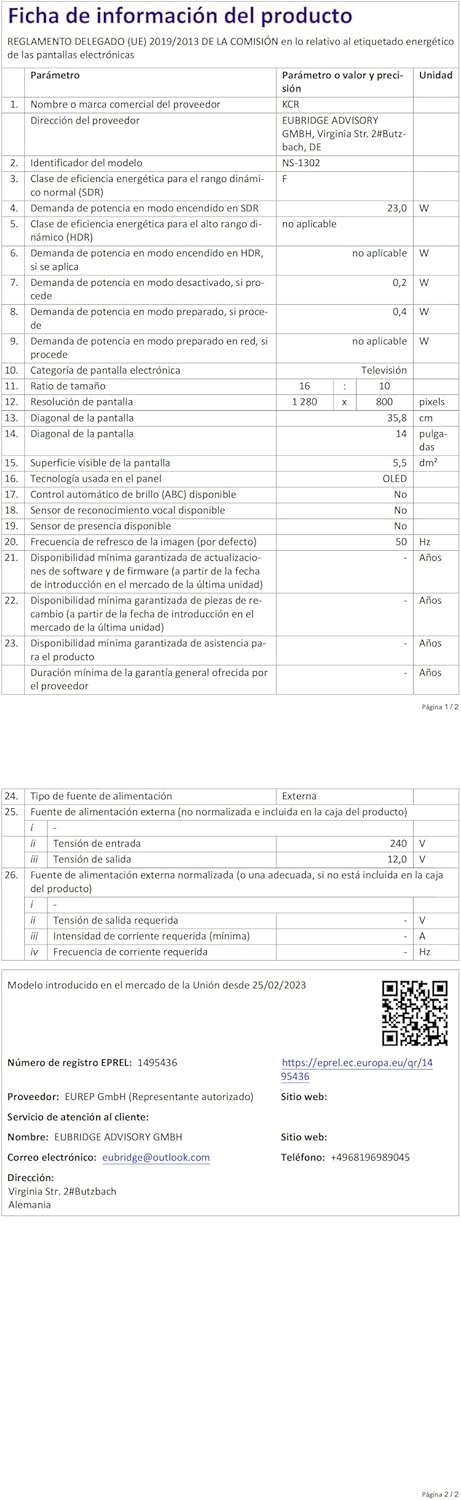
Image: The KCR Portable TV displayed with an icon indicating its rechargeable battery feature, emphasizing its portability.
Antenna Connection
To receive digital TV channels, connect the portable antenna (or your external antenna) to the Aerial (RF) input on the TV.

Image: A close-up view of the rear of the KCR Portable TV, showing the portable antenna connected to the RF input port.
Initial Channel Scan
After connecting the power and antenna, turn on the TV using the power switch. The first time you power on, or after a factory reset, the TV may prompt you to perform an automatic channel scan. Follow the on-screen instructions to scan for available DVB-T2 digital channels in your region. This process will automatically detect and store all receivable channels.
Operating Instructions
Basic TV Operation
- Power On/Off: Use the power switch on the TV or the power button on the remote control.
- Channel Selection: Use the CH+/CH- buttons on the TV or the remote control to change channels. You can also enter channel numbers directly using the remote's numeric keypad.
- Volume Adjustment: Use the VOL+/VOL- buttons on the TV or the remote control to adjust the volume.
- Menu Navigation: Press the MENU button to access the TV's settings. Use the arrow keys (Up/Down/Left/Right) and OK button on the remote to navigate and select options.
- Source Selection: Press the SOURCE button to switch between different input sources (DVB-T2, HDMI, AV, USB).
Multimedia Playback (USB)
The KCR Portable TV supports playback of various multimedia files from a USB storage device. Insert your USB drive into the USB port on the TV. Select 'USB' as the input source. You can then browse and play your movies, photos, and music.
Supported formats include:
- Video: AVI, MP4, MPG, MOV, MKV, DIVX, VOB, FLV, 3GP, DAT, MPEG, H.264, H.265 (HEVC)
- Audio: MP3, WMA, M4A, AAC
- Image: JPG, JPEG, BMP, PNG

Image: A graphic illustrating the various multimedia formats (video, audio, image, text) supported by the KCR Portable TV for playback via its USB port.
Connecting External Devices
- HDMI: Connect a device such as a set-top box, DVD player, game console, or streaming device to the HDMI input for high-definition video and audio.
- AV: Use the provided AV cables to connect older devices with composite video and stereo audio outputs.
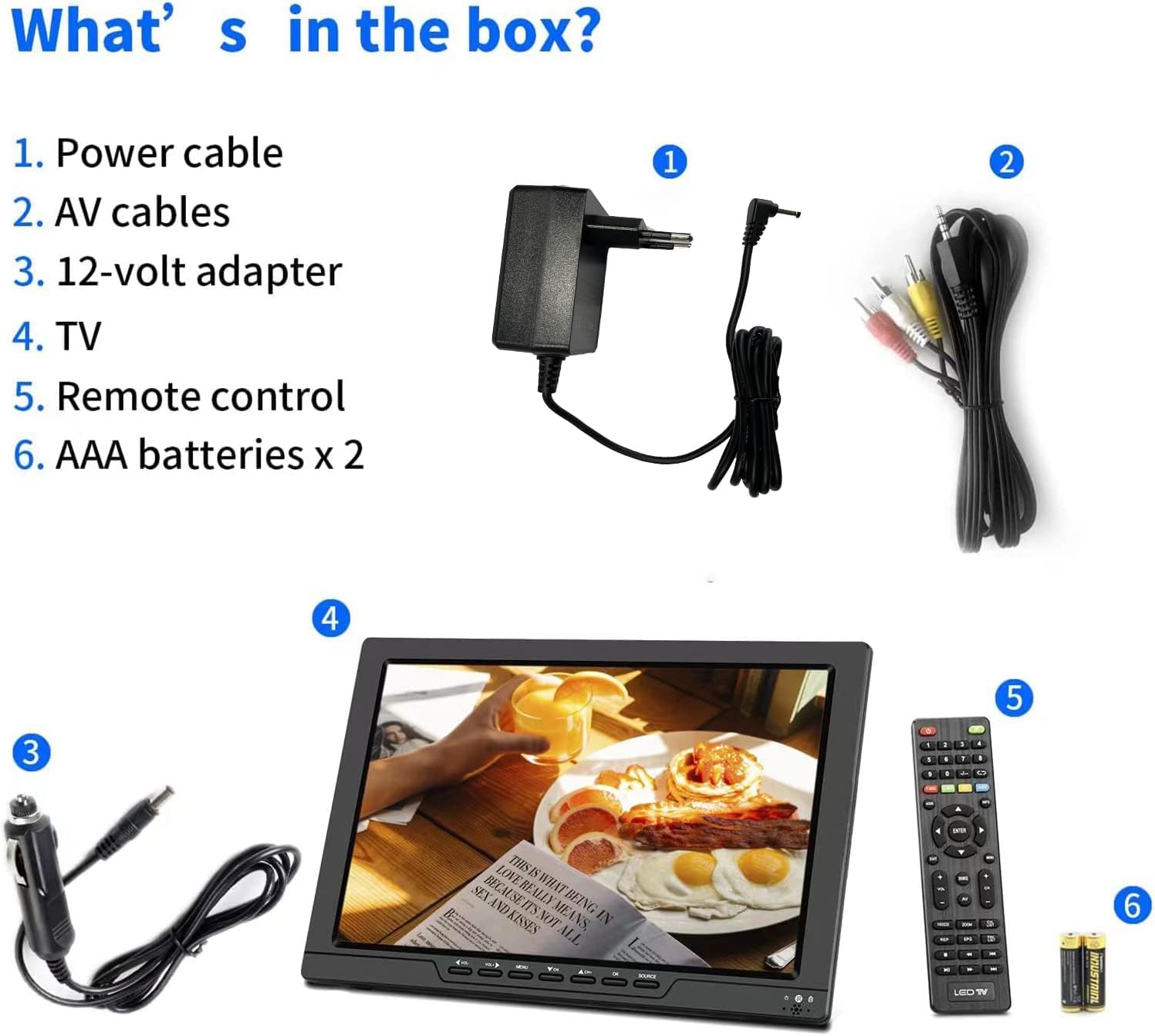
Image: A close-up of an HDMI cable being connected to the KCR Portable TV, highlighting the HDMI input port and its function for high-definition media.
Maintenance
- Cleaning: Use a soft, dry cloth to clean the screen and exterior of the TV. For stubborn marks, slightly dampen the cloth with water. Avoid using harsh chemicals or abrasive cleaners.
- Storage: When not in use for extended periods, store the TV in a cool, dry place away from direct sunlight and extreme temperatures.
- Battery Care: To prolong the life of the built-in rechargeable battery, avoid fully discharging it frequently. If storing for a long time, charge it to about 50% every few months.
Troubleshooting
| Problem | Possible Cause | Solution |
|---|---|---|
| No power | Power adapter not connected; battery discharged; power switch off. | Ensure power adapter is securely connected and plugged in. Charge the battery. Turn the power switch to ON. |
| No signal / Poor picture quality | Antenna not connected or positioned correctly; weak signal; incorrect input source. | Check antenna connection and position. Try repositioning the antenna for better reception. Perform a channel scan. Ensure correct input source is selected (DVB-T2). |
| No sound | Volume too low or muted; external device audio issue. | Increase volume. Check if muted. If using external device, check its audio settings and cables. |
| Remote control not working | Batteries dead or incorrectly inserted; obstacle between remote and TV; remote sensor blocked. | Replace batteries. Ensure correct polarity. Remove any obstacles. Point remote directly at the TV's sensor. |
| USB media not playing | Unsupported file format; USB drive not recognized. | Check if the file format is supported (refer to Multimedia Playback section). Ensure USB drive is formatted correctly (FAT32 recommended). Try another USB drive. |
Specifications
| Feature | Specification |
|---|---|
| Brand | KCR |
| Model Name | KCR TV Digital Portátil DVB-T2 |
| Model Number | DVP-SR520P |
| Screen Size | 14 inches |
| Display Technology | LCD (TN Panel) |
| Resolution | 1366x768 (720p) |
| Refresh Rate | 60 Hz |
| Tuner Technology | DVB-T2 |
| Connectivity | USB, HDMI, AV Input |
| Audio Output Mode | Digital, Stereo |
| Speaker Output Power | 10 Watts (Max 15 Watts) |
| Power Supply Type | AC & Battery |
| Battery Type | Lithium Ion (rechargeable, included) |
| Product Dimensions | 22.86 x 27.94 x 17.78 cm |
| Item Weight | 500 grams |
For detailed product information and energy efficiency data, please refer to the official EU EPREL database:
Warranty and Support
For information regarding warranty coverage and customer support, please refer to the documentation provided with your purchase or contact the seller directly. Keep your proof of purchase for any warranty claims.