
Introduction
The Robotouch Classic Plus Foot Massager is an advanced device designed to provide comprehensive massage therapy for the feet, calves, and thighs. It incorporates intense kneading and vibratory reflexology to alleviate pain and discomfort from overworked muscles. This model features an ergonomic design with PU leather upholstery. This manual provides essential information for the safe and effective operation, maintenance, and troubleshooting of your massager.

Image: The Robotouch Classic Plus Foot Massager in yellow and black, showcasing its ergonomic design.
Safety Information
For external use only. Always consult a healthcare professional before using this device if you have pre-existing medical conditions, are pregnant, or have any concerns. Do not use the massager in wet environments or with wet hands. Keep out of reach of children.
Setup
- Unpacking: Carefully remove the massager from its packaging. Retain all packaging materials for future storage or transport.
- Placement: Place the massager on a flat, stable surface. Ensure there is adequate space around the unit for proper ventilation and user comfort.
- Power Connection: Connect the power cord to the massager and then plug it into a suitable electrical outlet (Rated Voltage: 110-120V 60Hz or 220-240V 50Hz/60Hz).
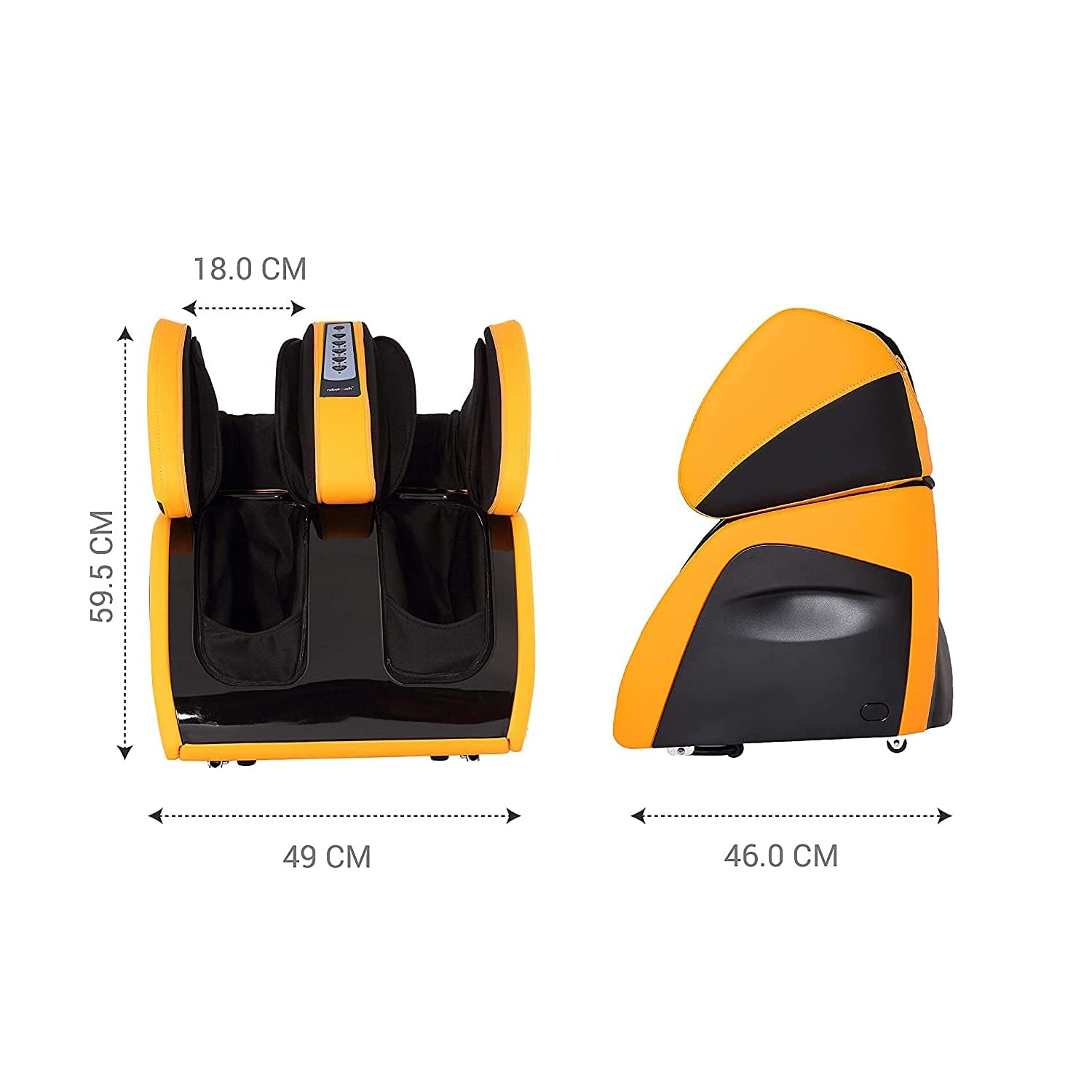
Image: Product dimensions for proper placement, showing length, width, and height measurements.

Image: The detachable foot massage unit, illustrating how the upper section can be inclined over 110 degrees and the lower bracket over 20 degrees for adjustable positioning.
Operating Instructions
The Robotouch Classic Plus offers various massage modes and features for a personalized experience. The device is designed for a rated working time of 15 minutes per session, after which it will auto shut off.
Key Features:
- Airbag Compression: 30 built-in airbags provide a kneading effect for enhanced therapeutic benefits, targeting thighs, calves, and instep.
- Roller Massage: Integrated 3 active rollers are designed to activate acupressure points on the feet.
- Heat Therapy: Specialized carbon-fiber generated heat on thigh and ankle areas promotes relaxation by delivering soothing warmth.
- Adjustable Sections: Two up & down sections with an overturn function for greater efficiency. The 110-degree turning radius allows for ideal knee positioning.
- Massage Modes: Power-packed with 3 distinct air massage models, 3 intensity options, and three roller massage models.

Image: Overview of the massager's key features, including roller levels, program modes, airbag count, and heat therapy.

Image: Detailed explanation of the heat therapy function, highlighting its benefits for muscle relaxation.

Image: Comparison between the Classic and Classic Plus models, emphasizing the foot roller feature unique to the Classic Plus.

Image: Method of Usage, demonstrating how to adjust the upper section for knee and calf massage, and turning over for knee massage.

Image: Illustration of the calf airbag system, detailing how the 30 airbags and 3 active rollers work to massage muscles and stimulate reflex points.
Maintenance
- Cleaning: Disconnect the power cord before cleaning. Wipe the exterior of the massager with a soft, damp cloth. Do not use abrasive cleaners or solvents. Ensure the device is completely dry before reconnecting to power.
- Storage: Store the massager in a cool, dry place away from direct sunlight and extreme temperatures. If storing for an extended period, cover the unit to protect it from dust.
- Kneading Cover: The kneading cover comes with a zipper for easy removal and cleaning.
Troubleshooting
| Problem | Possible Cause | Solution |
|---|---|---|
| Massager does not turn on. | Power cord not properly connected; Power outlet malfunction. | Ensure power cord is securely plugged into both the massager and the wall outlet. Test the outlet with another device. |
| Massage intensity feels weak. | Incorrect intensity setting; Airbags not fully inflating. | Adjust the intensity setting using the control panel. Ensure proper positioning of legs within the massager. |
| Heat function is not working. | Heat function not activated; Internal malfunction. | Ensure the heat function is turned on via the control panel. If the issue persists, contact customer support. |
| Unusual noise during operation. | Obstruction; Internal component issue. | Check for any foreign objects. The device operates at less than 45db sound level. If noise is excessive, discontinue use and contact support. |
Specifications
| Attribute | Detail |
|---|---|
| Model Number | 693258 |
| Product Dimensions (LxWxH) | 57 x 49 x 63 cm |
| Item Weight | 27 kg |
| Rated Voltage | 110-120V 60Hz / 220-240V 50Hz/60Hz |
| Rated Power | 110W |
| Rated Working Time | 15 Minutes (Auto Shut-off) |
| Noise Level | Less than 45db |
| Included Components | Massager |
| Country of Origin | India |
Warranty and Support
The Robotouch Classic Plus Foot Massager comes with a 1 Year Warranty from the date of purchase. This warranty covers manufacturing defects and malfunctions under normal use. For warranty claims or technical support, please contact RoboTouch customer service.
For assistance, please visit the official RoboTouch store or contact their customer support channels. You can find more information and contact details on the RoboTouch Store on Amazon.