
Product Overview
This manual provides instructions for the DecoLife Cute Handheld Mini USB Fan, a portable and rechargeable device designed for personal cooling. It features three adjustable speeds and includes wearable accessories for convenience.
- Cute Mouse Design: Adorable and eye-catching, perfect for various activities. Available in multiple colors.
- Outstanding Performance: Offers 3 speed levels (low/medium/high) adjustable via a single button. Powerful and rechargeable, providing up to 3 hours of cooling per charge. Charges via USB cable (included).
- Portable & Wearable: Compact size, similar to a cellphone, and lightweight. Includes wearable accessories for enhanced portability.
- Versatile Use: Ideal for theme park trips, outdoor activities, or daily personal cooling.
- Durable Construction: Made of quality ABS material, safe and odor-free.

Image: The DecoLife Mini USB Fan in red, featuring black mouse ears, is shown held in a hand, highlighting its compact and portable nature. This fan is designed for easy carrying and personal cooling on the go.
Setup
Initial Setup and Charging
Package Contents
- 1 x DecoLife Mini USB Fan (Red)
- 1 x USB Charging Cable
- 1 x Finger Loop (optional attachment)
- 1 x Lanyard (optional attachment)
First Use & Charging
Before first use, fully charge the fan to ensure optimal performance.
- Connect the provided USB charging cable to the fan's charging port (located on the side).
- Connect the other end of the USB cable to a compatible USB power source (e.g., computer, power bank, USB wall adapter).
- The fan's indicator light will illuminate red during charging.
- Once fully charged, the indicator light will turn off. A full charge typically takes 2-4 hours.
The fan is rechargeable and designed for extended use, providing up to 3 hours of cooling time on a single charge depending on the speed setting.
Attaching Wearable Accessories
The fan includes a finger loop and a lanyard for convenient carrying and hands-free use.
- Finger Loop: Locate the designated attachment point on the back of the fan. Securely attach the finger loop by pressing its adhesive base onto the fan's surface.
- Lanyard: Thread the lanyard through the small loop on the fan's body.

Image: A close-up of the DecoLife Mini USB Fan showing the finger loop accessory attached to its back, allowing for a secure grip.
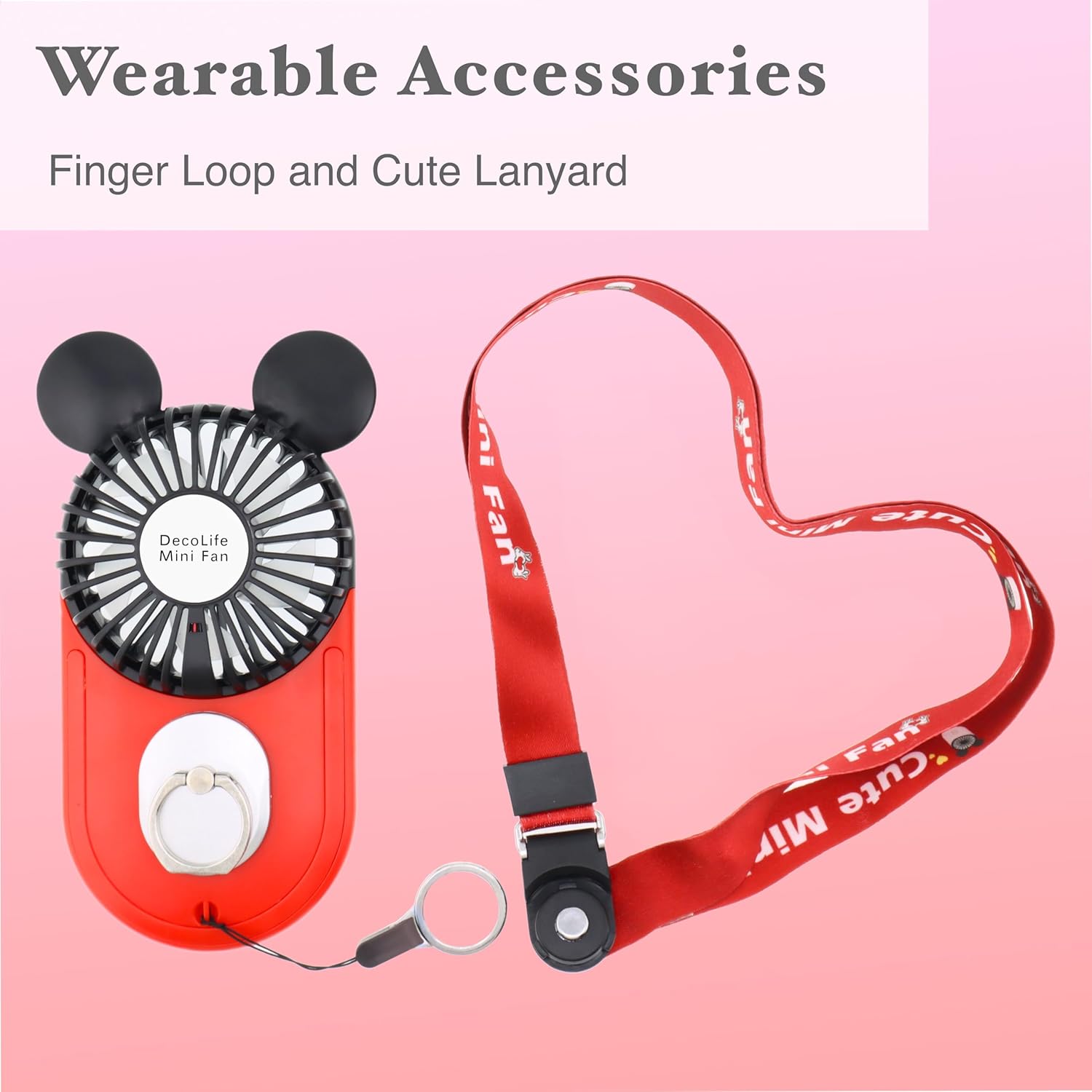
Image: The DecoLife Mini USB Fan with a lanyard attached, illustrating how it can be worn around the neck or wrist for easy access.
Operating
Fan Operation
Power On/Off and Speed Adjustment
The fan features a single button for power control and speed adjustment.
- Power On / Speed 1 (Low): Press the main button once to turn on the fan at the lowest speed setting. The fan blades will illuminate with a blue light.
- Speed 2 (Medium): Press the button a second time to increase the fan speed to medium.
- Speed 3 (High): Press the button a third time to activate the highest fan speed.
- Power Off: Press the button a fourth time to turn off the fan. The blue light will extinguish.

Image: A detailed view of the DecoLife Mini USB Fan's power button and the fan blades glowing with a blue LED light, indicating operation.
Official Product Video: Fan Operation
Video: This official seller video demonstrates the basic operation of the DecoLife Mini USB Fan, including how to power it on, adjust the three speed settings, and observe the LED light indicator.
LED Light Indicator
The fan blades illuminate with a blue LED light when operating, providing a visual indication that the fan is active and which speed setting is currently engaged.
Maintenance
Care and Maintenance
Cleaning
To clean the fan, ensure it is powered off and unplugged. Use a soft, dry cloth to gently wipe the exterior. For the fan blades, use a cotton swab or a soft brush to carefully remove dust. Do not use harsh chemicals or immerse the fan in water.
Storage
Store the fan in a cool, dry place away from direct sunlight and extreme temperatures when not in use.
Troubleshooting
Troubleshooting Guide
Fan Not Turning On
- Check Battery: Ensure the fan is fully charged. Connect it to a power source using the provided USB cable.
- Power Button: Press the power button firmly. If the fan has been off for an extended period, it might require a longer press.
Weak Airflow
- Speed Setting: Verify the fan is set to the desired speed (medium or high).
- Obstructions: Check for any obstructions around the fan blades that might impede airflow.
Short Battery Life
- Charging Cycle: Ensure the fan is charged for the recommended duration (2-4 hours for a full charge).
- Usage: High-speed settings will consume battery faster than low-speed settings.
Specifications
Product Specifications
| Brand | DecoLife |
| Model Name | 1 |
| Color | Red |
| Electric Fan Design | Wearable Fan |
| Power Source | Battery Powered |
| Number of Speeds | 3 |
| Wattage | 2.5 watts |
| Voltage | 5 Volts |
| Item Weight | 4.66 ounces |
| Product Dimensions (D x W x H) | 3.54"D x 6.48"W x 0.98"H |
| Material | Plastic |
| Reusability | Rechargeable |
| Main Power Connector Type | USB |
| UPC | 711221949411 |
Warranty and Customer Support
For warranty information or technical support, please refer to the product packaging or contact DecoLife customer service directly. Keep your purchase receipt for warranty claims.