
Introduction
This manual provides comprehensive instructions for the safe and efficient use of your EPtech 12V AC Adapter, designed for YuHai Electronic (NanHai) Model YH-UA-1212 and similar devices requiring a 12VAC 1000mA (1A) 12W Class 2 Transformer Power Supply. This adapter features a barrel round plug and may include various interchangeable tips for versatile compatibility. Please read this manual thoroughly before use and retain it for future reference.
Product Overview
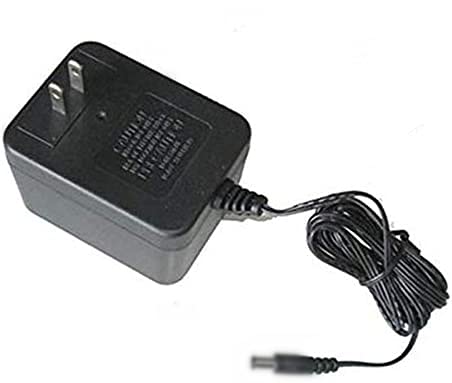
The EPtech 12V AC Adapter, featuring a standard US plug and a barrel-type output connector.

The AC adapter is supplied with a variety of interchangeable DC power tips to ensure compatibility with various electronic devices.
Key Features
- Input Voltage: 110VAC 50Hz, suitable for standard North American outlets.
- Output: 12VAC 1000mA (1A) 12W, providing stable power to compatible devices.
- Cord Length: Approximately 6.5 feet, offering flexibility in placement.
- Safety Features: Includes over current protection, total power protection, over voltage protection, and short circuit protection.
- Certifications: Manufactured with high-quality materials and certified by FCC, CE, and RoHS standards.
Design and Construction

The power cable features high-quality copper wire and durable PVC insulation for enhanced safety and longevity.

The adapter boasts a durable and compact design, making it suitable for various environments and easy to store.

Integrated safety features include protection against over-temperature, over-voltage, over-current, and short circuits.
Setup Instructions
- Verify Compatibility: Ensure your device requires a 12V DC input and that the current draw does not exceed 1A (1000mA). Check your device's specifications for voltage and current requirements.
- Select Correct Tip: If your adapter came with multiple interchangeable DC tips, select the tip that correctly fits your device's power input port. Ensure a snug and secure fit.
- Connect to Device: Insert the selected DC power tip into your device's power input port.
- Connect to Power Outlet: Plug the AC adapter into a standard 110VAC 50Hz wall outlet.
- Power On Device: Once connected, power on your device. The adapter should provide power or begin charging if applicable.
Important: Always ensure the adapter's output voltage and current match your device's requirements to prevent damage.
Operating Instructions
The EPtech 12V AC Adapter operates automatically once connected to a compatible device and a power source. No user intervention is required during operation.
- The adapter is designed for continuous use within its specified limits.
- Avoid covering the adapter during operation to ensure proper ventilation.
- Disconnect the adapter from the power outlet when not in use for extended periods.
Maintenance
To ensure the longevity and safe operation of your AC adapter, follow these maintenance guidelines:
- Cleaning: Disconnect the adapter from power before cleaning. Use a soft, dry cloth to wipe the exterior. Do not use liquid cleaners or solvents.
- Storage: Store the adapter in a cool, dry place away from direct sunlight and extreme temperatures. Avoid tightly coiling the power cord to prevent damage.
- Inspection: Periodically inspect the power cord and adapter housing for any signs of damage, such as cuts, fraying, or cracks. If damage is found, discontinue use immediately.
- Environmental Conditions: Do not expose the adapter to water, high humidity, or dusty environments.
Troubleshooting
If you encounter issues with your EPtech 12V AC Adapter, refer to the following common troubleshooting steps:
- No Power to Device:
- Ensure the adapter is securely plugged into a working wall outlet. Test the outlet with another device.
- Verify that the DC power tip is firmly connected to your device's power input.
- Confirm that the selected DC tip is the correct size and polarity for your device.
- Check the adapter's cord for any visible damage.
- Intermittent Power:
- Check all connections for looseness.
- Ensure the adapter is not overheating. If it feels excessively hot, disconnect it and allow it to cool.
- Device Not Charging/Operating Correctly:
- Double-check that your device's voltage and current requirements precisely match the adapter's output (12V, 1A).
- The adapter is a Class 2 transformer; ensure your device is compatible with this type of power supply.
If these steps do not resolve the issue, please contact customer support.
Specifications
| Brand | EPtech |
| Model Number | YH-UA-1212 (also A1807266003) |
| Input Voltage | 110VAC, 50Hz |
| Output Voltage | 12VAC |
| Output Current | 1000mA (1A) |
| Output Power | 12W |
| Cord Length | 6.5 Ft |
| Safety Class | Class 2 Transformer |
| Certifications | FCC, CE, RoHS |
| Item Weight | 8 ounces |
| Manufacturer | SHENZHEN TENGSHUN POWER SUPPLY CO LTD |
Warranty and Support
For warranty information or technical support, please contact EPtech customer service.
Email: epcustomerservice@yahoo.com
Please have your product model number (YH-UA-1212) and purchase details ready when contacting support.