
Introduction
This manual provides detailed instructions for the safe and effective use of your Lomvum T28B Digital Multimeter. This advanced auto-ranging multimeter is designed for measuring AC/DC voltage, AC/DC current, resistance, capacitance, frequency, temperature, and for diode and continuity tests. It features True RMS measurement for accurate readings and a Non-Contact Voltage (NCV) detection function for enhanced safety. Please read this manual thoroughly before operation and keep it for future reference.

Figure 1: Lomvum T28B Digital Multimeter. This image shows the front view of the multimeter with its display, rotary switch, function buttons, and input jacks. Dimensions are indicated, showing a width of 9.2cm, height of 19.5cm, and display dimensions of 6.5cm by 4.5cm. The device is orange and black with a protective rubber casing.
Safety Information
WARNING: To avoid possible electric shock or personal injury, and to avoid possible damage to the meter or to the equipment under test, follow these safety rules:
- Do not use the meter if it is damaged or if the test leads are damaged.
- Inspect the test leads for damaged insulation or exposed metal. Check the test lead continuity.
- Do not apply more than the rated voltage, as marked on the meter, between the terminals or between any terminal and earth ground.
- Use caution with voltages above 30V AC RMS, 42V peak, or 60V DC. These voltages pose a shock hazard.
- Always turn off the power to the circuit under test and discharge all high-voltage capacitors before testing resistance, continuity, diodes, or capacitance.
- Do not operate the meter around explosive gas, vapor, or dust.
- When using the probes, keep your fingers behind the finger guards.
- Remove the test leads from the meter before opening the battery door or meter case.
- Replace the battery as soon as the battery indicator appears.
- Do not use the meter with the battery door or case open.
- Use the correct terminals, function, and range for all measurements.
- Do not exceed the maximum input value of any range.
Setup
1. Battery Installation
The Lomvum T28B Multimeter is powered by batteries. To install or replace batteries:
- Ensure the multimeter is turned off and disconnect all test leads from the input terminals.
- Locate the battery compartment cover on the back of the device.
- Unscrew the retaining screw(s) and remove the cover.
- Insert new batteries, observing the correct polarity (+ and -).
- Replace the battery compartment cover and secure it with the screw(s).
2. Connecting Test Leads
Connect the red test lead to the "VΩHz" or "mA" or "20A" input jack, and the black test lead to the "COM" input jack. Ensure a secure connection for accurate readings and safety.

Figure 2: Connecting test leads for a DC Voltage test. The red lead is connected to the VΩHz input, and the black lead to the COM input. The image shows the multimeter displaying a DC voltage reading while connected to a battery.
Operating Instructions
The Lomvum T28B features an auto-ranging function, simplifying operation by automatically selecting the appropriate measurement range.
1. Power On/Off
Turn the rotary switch to any desired function to power on the multimeter. To power off, turn the rotary switch to the "OFF" position. The device also features an automatic power-off function to conserve battery life.
2. Function Selection
Rotate the central dial to select the desired measurement function (e.g., V for voltage, A for current, Ω for resistance, °C for temperature). For functions with multiple modes (e.g., AC/DC voltage), press the FUNC/HOLD button to toggle between modes.
3. Non-Contact Voltage (NCV) Detection
The NCV function allows for detection of AC voltage without direct contact. Rotate the dial to the NCV position. Bring the top of the multimeter near the suspected voltage source. The device will indicate the presence of AC voltage through visual and audible alerts.
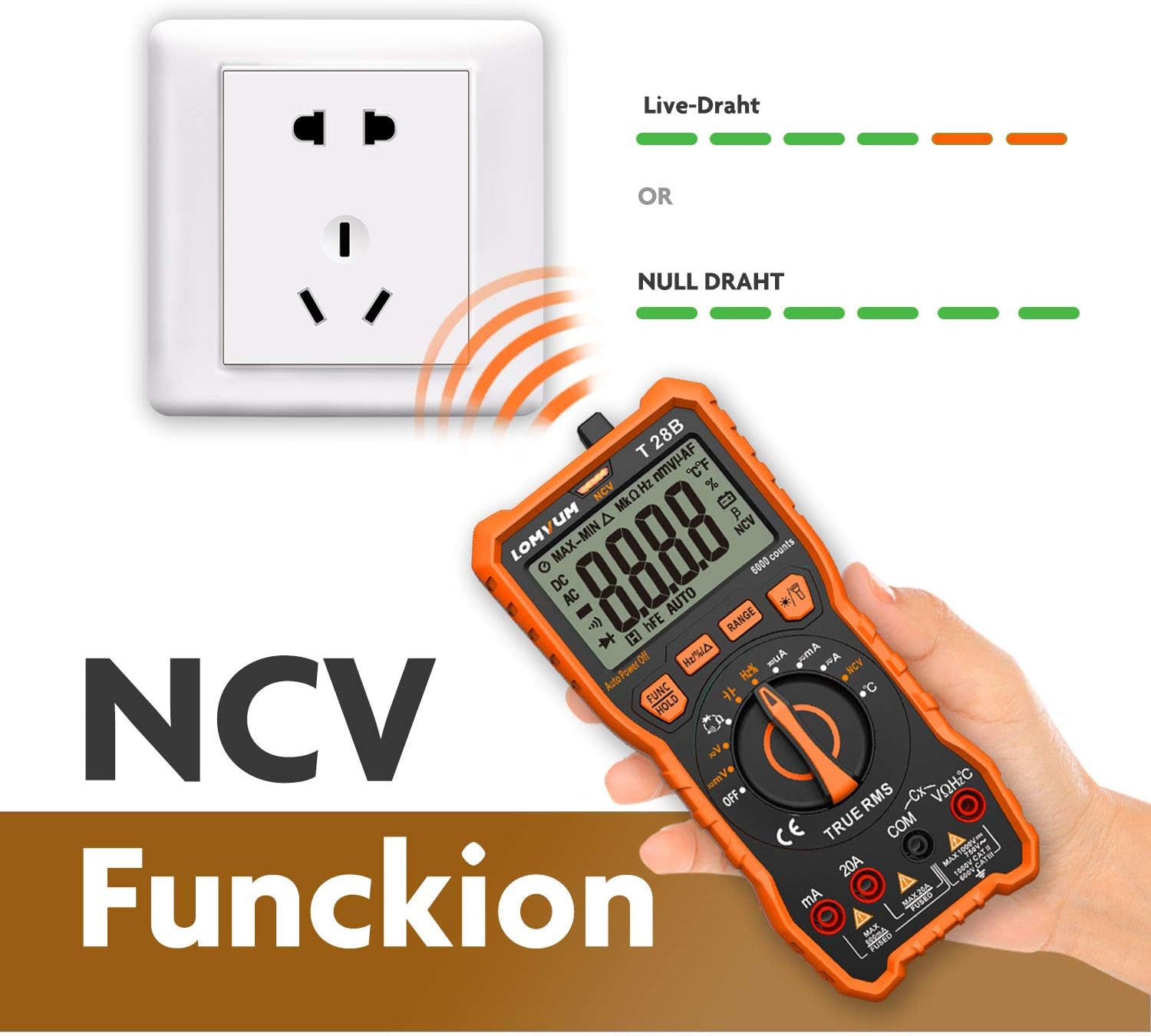
Figure 3: NCV Function. The multimeter is shown detecting voltage near an electrical outlet. The display shows "NCV" and the device indicates live wire detection with green and red lights, and null wire detection with green lights.
4. Measuring Voltage (AC/DC)
- Turn the rotary switch to the V~ (AC Voltage) or V- (DC Voltage) position.
- Connect the red test lead to the VΩHz input and the black test lead to the COM input.
- Connect the test probes in parallel to the circuit or component you wish to measure.
- Read the voltage value on the display.
5. Measuring Current (AC/DC)
- Turn the rotary switch to the A~ (AC Current) or A- (DC Current) position.
- For mA range, connect the red test lead to the mA input. For 20A range, connect the red test lead to the 20A input. Connect the black test lead to the COM input.
- WARNING: Connect the test probes in series with the circuit. Do not connect in parallel, as this will blow the fuse.
- Read the current value on the display.
6. Measuring Resistance
- Turn the rotary switch to the Ω position.
- Connect the red test lead to the VΩHz input and the black test lead to the COM input.
- Ensure the circuit is de-energized before connecting the probes across the component.
- Read the resistance value on the display.

Figure 4: Resistance Test. The multimeter is shown with its back cover removed, and test leads are connected to measure resistance on an internal circuit board. The display shows a resistance reading in kΩ.
7. Measuring Temperature
- Turn the rotary switch to the °C/°F position.
- Connect the temperature probe to the VΩHz and COM inputs, observing polarity if applicable.
- Place the tip of the temperature probe on or in the object whose temperature you wish to measure.
- Read the temperature value on the display.

Figure 5: Temperature Test. The multimeter is shown displaying a temperature reading while its probe is immersed in a liquid in a glass cup.
8. Data Hold Function
Press the FUNC/HOLD button briefly to freeze the current reading on the display. Press it again to release the hold and resume live measurements.

Figure 6: Data Hold Function. The multimeter display shows a frozen reading ("1.914") with "HOLD" indicated, demonstrating the data hold feature. The image also shows the multimeter on a desk with blueprints and a laptop.
Maintenance
1. Cleaning
Wipe the case with a damp cloth and mild detergent. Do not use abrasives or solvents. Keep the terminals free of dirt and moisture.
2. Battery Replacement
When the battery indicator appears on the display, replace the batteries immediately to ensure accurate readings. Refer to the "Battery Installation" section under Setup for detailed steps.
3. Fuse Replacement
If the current measurement function fails, the fuse may need replacement. The Lomvum T28B uses dual ceramic protection fuses. To replace a fuse:
- Ensure the multimeter is turned off and disconnect all test leads.
- Open the battery compartment cover (and potentially the main case, depending on design).
- Carefully remove the old fuse and replace it with a new fuse of the same type and rating.
- Close the case and secure all screws.
4. Storage
If the meter is not to be used for a long period, remove the batteries to prevent leakage and damage to the device. Store the multimeter in a dry, cool environment.

Figure 7: Protective Rubber Casing. The image shows the Lomvum T28B multimeter nestled in its orange rubber protective casing, which helps shield the device from impacts and provides a comfortable grip.
Troubleshooting
- No display or faint display: Check battery level and replace if necessary. Ensure batteries are installed with correct polarity.
- Incorrect readings:
- Ensure test leads are correctly connected to the appropriate input jacks for the selected function.
- Verify the rotary switch is set to the correct measurement function.
- Check test lead continuity.
- For current measurements, ensure the fuse is not blown.
- Ensure the circuit under test is de-energized for resistance, continuity, and capacitance measurements.
- No NCV detection: Ensure the NCV function is selected and the meter is brought close enough to the AC voltage source.
- Meter does not turn on: Check batteries. If the issue persists, contact support.
Specifications
| Feature | Detail |
|---|---|
| Brand | Lomvum |
| Model Number | T28B |
| Power Source | Battery |
| Display Type | Digital (6000 counts) |
| Measurement Type | Multimeter, Voltmeter, Ammeter, Ohmmeter |
| Special Features | Auto Range, True RMS, NCV Detection, Temperature Measurement, Continuity, Diode Test, Data Hold |
| Overload Protection | Dual ceramic fuse protection |
| Automatic Power Off | Yes |
| UPC | 743022992129 |
| ASIN | B07FVT5HVX |
Warranty and Support
Lomvum offers a 12-month warranty for this product. Additionally, a 30-day money-back guarantee is provided for risk-free purchase. Technical support is available to assist with any operational questions or issues you may encounter.
For warranty claims, technical assistance, or further inquiries, please refer to the contact information provided with your purchase or visit the official Lomvum website.
You can visit the Lomvum store on Amazon for more products and information: Lomvum Amazon Store