
Origaudio 30929
Origaudio Hive Portable Surround Sound Bluetooth Speaker User Manual
Model: 30929 | Brand: Origaudio
Introduction
The Origaudio Hive is a versatile portable Bluetooth speaker designed to deliver dynamic 5W sound with a built-in subwoofer. Its true wireless technology allows for pairing multiple units to create an immersive surround sound experience throughout your home or office. The Hive speaker is built for portability, offering over 6 hours of play time and a 32-foot Bluetooth range, making it suitable for various indoor and outdoor activities.
Key Features
- Total Surround Sound: Pair up to 100 speakers together for a comprehensive audio experience.
- Built-in Microphone: Features integrated speaker controls and a microphone for convenient phone calls.
- Extended Play Time: Enjoy over 6 hours of music playback on a single charge.
- Portable Design: Compact and lightweight, fitting easily in the palm of your hand, with a 32-foot Bluetooth range.
- Wall Mountable: Each Hive speaker includes an easy-to-use wall mount for flexible placement in your home or office.
- Waterproof: Designed to withstand splashes, making it suitable for outdoor use.

Figure 1: Key features of the Origaudio Hive speaker.
What's in the Box
Your Origaudio Hive speaker package includes:
- Origaudio Hive Portable Bluetooth Speaker
- Wall Mount (includes two plates, drywall anchors, and 3M adhesive)
- Charging Cable (not provided in the product data, but implied)
Setup Guide
1. Initial Charging
Before first use, fully charge your Hive speaker. Connect the charging cable (not provided in the product data, but implied) to the speaker's charging port and a suitable USB power source. The indicator light will show charging status and turn off when fully charged.
2. Powering On/Off
Press and hold the power button on the speaker for a few seconds to turn it on or off. You will hear an audible prompt indicating the power status.
3. Bluetooth Pairing (Single Speaker)
- Ensure the Hive speaker is powered on and in pairing mode (indicated by a flashing LED).
- On your device (smartphone, tablet, etc.), go to Bluetooth settings and search for available devices.
- Select "Origaudio Hive" from the list.
- Once connected, the speaker will provide an audible confirmation, and the LED will stop flashing.
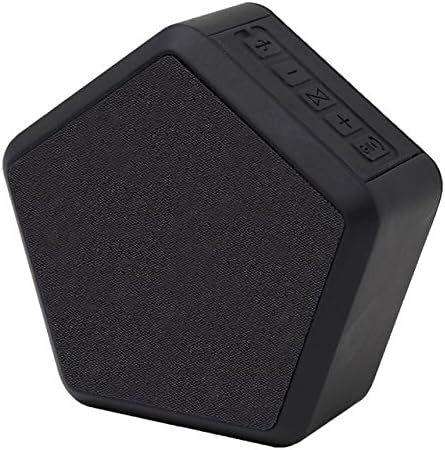
Figure 2: The Origaudio Hive speaker.
4. Multi-Speaker Pairing (True Wireless Stereo)
The Hive speaker supports pairing up to 100 units for a true surround sound experience. For optimal performance, ensure speakers are within the 32-foot Bluetooth range and not too close to each other (recommended 5-10 feet apart to prevent cutting out).
- Turn on the first Hive speaker and pair it with your device as described in step 3. This will be your primary speaker.
- Turn on the second Hive speaker (and any subsequent speakers).
- On the secondary speaker, press the dedicated pairing button (often indicated by a sideways hourglass symbol or similar icon).
- The secondary speaker will automatically search for and connect to the primary speaker. Repeat for additional speakers.
- Once connected, all paired speakers will play audio in sync, creating a multi-room or surround sound setup.
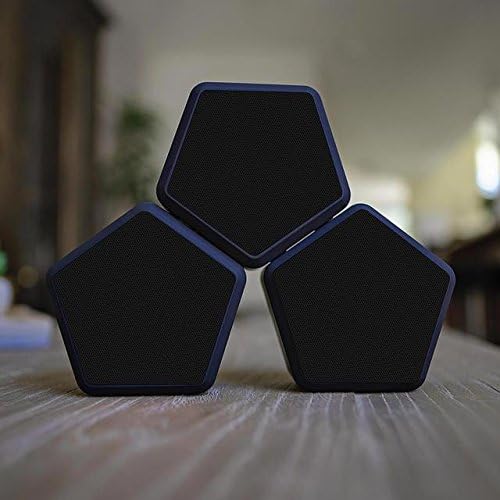
Figure 3: Multiple Hive speakers paired for surround sound.
5. Wall Mounting
Each Hive speaker comes with mounting hardware for easy installation. The hardware includes two mounting plates, drywall anchors, and 3M adhesive for various surfaces like brick or drywall.
- Choose a suitable location for mounting.
- Attach the mounting plate to the wall using the provided screws and drywall anchors, or the 3M adhesive for smooth surfaces.
- Align the notches on the back of the Hive speaker with the mounting plate and gently push until it clicks into place.

Figure 4: Origaudio Hive speaker mounted on a wall.
Operating Instructions
1. Basic Controls
The Hive speaker features intuitive controls for managing your audio:
- Volume Up/Down: Use the '+' and '-' buttons to adjust the volume.
- Play/Pause: Press the play/pause button to start or stop audio playback.
- Skip Track: Use the forward/backward buttons to navigate between tracks.
2. Making/Receiving Calls
With its built-in microphone, the Hive speaker allows for hands-free calls:
- Answer/End Call: Press the call button (often integrated with play/pause) to answer an incoming call or end an ongoing call.
- Reject Call: Press and hold the call button to reject an incoming call.
3. Battery Life and Charging
The Hive speaker provides over 6 hours of continuous play time. When the battery is low, an indicator light will signal the need for recharging. Connect the speaker to a USB power source using the appropriate charging cable.
Maintenance
To ensure the longevity and optimal performance of your Origaudio Hive speaker, follow these maintenance guidelines:
- Cleaning: Use a soft, dry cloth to wipe down the speaker. Avoid using harsh chemicals or abrasive cleaners.
- Storage: Store the speaker in a cool, dry place away from extreme temperatures and direct sunlight when not in use.
- Water Exposure: While waterproof, avoid submerging the speaker in water for extended periods. Ensure charging port is dry before charging.
Troubleshooting
| Problem | Possible Cause | Solution |
|---|---|---|
| Speaker does not turn on | Low battery | Charge the speaker fully. |
| Cannot pair with device | Speaker not in pairing mode / Device Bluetooth off / Too many devices connected | Ensure speaker is in pairing mode. Turn device Bluetooth off and on. Disconnect other Bluetooth devices. |
| Multi-speaker pairing issues (cutting out) | Speakers too close together / Out of range | Ensure speakers are at least 5-10 feet apart. Verify all speakers are within the 32-foot range of the primary speaker. |
| Poor sound quality | Low battery / Speaker placement / Interference | Charge the speaker. Adjust speaker placement for optimal acoustics. Move away from sources of interference. |
Specifications
| Feature | Detail |
|---|---|
| Model Name | Hive |
| Model Number | 30929 |
| Speaker Type | Surround Sound, Subwoofer, Outdoor |
| Speaker Maximum Output Power | 5 Watts |
| Connectivity Technology | Bluetooth |
| Bluetooth Range | 32 Feet (9.75 Meters) |
| Battery Life | 6 Hours |
| Item Weight | 0.91 Pounds (14.6 ounces) |
| Product Dimensions | 6.02 x 7.6 x 2.83 inches |
| Is Waterproof | TRUE |
| Included Components | Wall mount |
| Manufacturer | Origaudio |
Warranty and Support
Warranty Information
The Origaudio Hive speaker comes with a Limited Warranty. Please refer to the warranty card included in your product packaging for specific terms and conditions, or visit the official Origaudio website for detailed warranty information.
Customer Support
For technical assistance, troubleshooting, or general inquiries, please contact Origaudio customer support through their official website or the contact information provided in your product documentation. Always provide your product model number (30929) and purchase details when seeking support.
Related documents30929


Ask a question about this manual
Ask about setup, troubleshooting, compatibility, parts, safety, or missing instructions. Manuals+ will review the question and use this page’s manual context to help answer it.