
1. Introduction
This manual provides essential information for the safe and effective operation, maintenance, and troubleshooting of your Dongcheng DSM04-100A Professional Metal Polisher. Please read these instructions thoroughly and understand them completely before using the tool. Retain this manual for future reference.
2. General Safety Instructions
Always follow basic safety precautions to reduce the risk of fire, electric shock, and personal injury when operating power tools.
2.1 Work Area Safety
- Keep the work area clean and well-lit. Cluttered or dark areas invite accidents.
- Do not operate power tools in explosive atmospheres, such as in the presence of flammable liquids, gases, or dust. Power tools create sparks which may ignite the dust or fumes.
- Keep children and bystanders away while operating a power tool. Distractions can cause you to lose control.
2.2 Electrical Safety
- Power tool plugs must match the outlet. Never modify the plug in any way. Do not use any adapter plugs with earthed (grounded) power tools. Unmodified plugs and matching outlets will reduce risk of electric shock.
- Avoid body contact with earthed or grounded surfaces, such as pipes, radiators, ranges, and refrigerators. There is an increased risk of electric shock if your body is earthed or grounded.
- Do not expose power tools to rain or wet conditions. Water entering a power tool will increase the risk of electric shock.
- Do not abuse the cord. Never use the cord for carrying, pulling, or unplugging the power tool. Keep cord away from heat, oil, sharp edges, or moving parts. Damaged or entangled cords increase the risk of electric shock.
2.3 Personal Safety
- Always wear eye protection. Use appropriate personal protective equipment such as dust mask, non-skid safety shoes, hard hat, or hearing protection for appropriate conditions.
- Stay alert, watch what you are doing, and use common sense when operating a power tool. Do not use a power tool while you are tired or under the influence of drugs, alcohol, or medication.
- Prevent unintentional starting. Ensure the switch is in the off-position before connecting to power source, picking up or carrying the tool.
- Remove any adjusting key or wrench before turning the power tool on. A wrench or a key left attached to a rotating part of the power tool may result in personal injury.
- Do not overreach. Keep proper footing and balance at all times. This enables better control of the power tool in unexpected situations.
- Dress properly. Do not wear loose clothing or jewelry. Keep your hair and clothing away from moving parts. Loose clothes, jewelry, or long hair can be caught in moving parts.
2.4 Polisher Specific Safety
- Always use the auxiliary handle provided with the tool. Loss of control can result in personal injury.
- Always ensure the wheel guard is properly installed and adjusted before operation.
- Do not use damaged accessories. Inspect accessories such as polishing pads or discs for cracks, tears, or excessive wear before each use.
- Hold the tool firmly with both hands. A strong grip is essential to maintain control.
- Be aware of kickback. Kickback is a sudden reaction to a pinched or snagged rotating wheel. It can cause the tool to be thrown violently towards the operator. Always maintain proper body positioning and grip to resist kickback forces.
- Never place the tool down until the accessory has come to a complete stop.
3. Product Overview
The Dongcheng DSM04-100A is a professional metal polisher designed for various polishing tasks. Familiarize yourself with its components before operation.
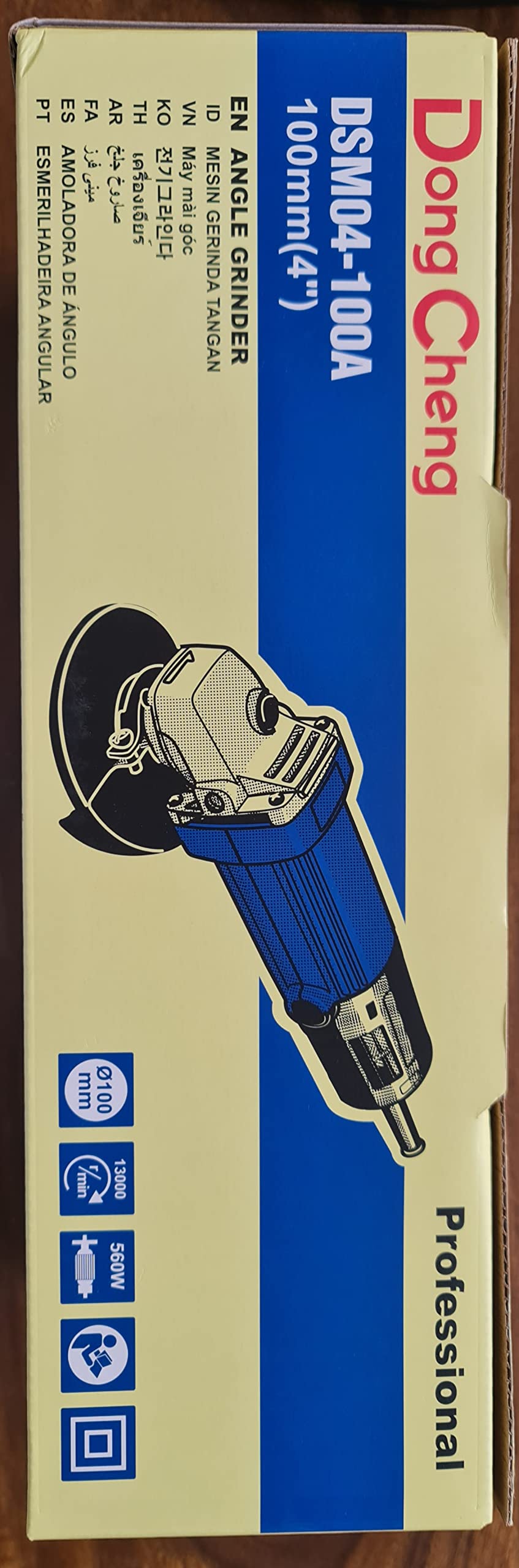
3.1 Main Components
- Main Body: Houses the motor and internal mechanisms.
- Power Cord: For connecting to an electrical outlet.
- Spindle Lock Button: Used to lock the spindle for easy accessory changes.
- On/Off Switch: To power the tool on and off.
- Auxiliary Handle (not shown attached): Provides additional grip and control.
- Wheel Guard: Protects the user from debris and accidental contact with the rotating accessory.
- Spanner Wrench: Used for tightening and loosening the locking nut for accessories.
- Polishing Disc/Wheel (not included): The abrasive or polishing accessory attached to the spindle.
4. Setup and Assembly
Before connecting the tool to a power source, ensure all components are correctly assembled.
4.1 Attaching the Auxiliary Handle
- Locate the threaded holes on the gear housing of the polisher.
- Screw the auxiliary handle firmly into one of the threaded holes. Choose the position that offers the best control and comfort for your application.
4.2 Mounting the Wheel Guard
- Loosen the screw on the wheel guard clamp.
- Slide the wheel guard over the gear housing until it sits securely.
- Adjust the guard's position to provide maximum protection for your specific task. Ensure it covers the rotating accessory adequately.
- Tighten the screw firmly to secure the wheel guard in place.
4.3 Installing the Polishing Disc/Wheel
- Ensure the tool is unplugged from the power source.
- Press and hold the spindle lock button.
- Place the inner flange onto the spindle.
- Position the polishing disc/wheel onto the inner flange, ensuring it is centered.
- Screw the outer flange (locking nut) onto the spindle.
- While still holding the spindle lock button, use the spanner wrench to firmly tighten the outer flange. Do not overtighten.
- Release the spindle lock button.
5. Operating Instructions
Always wear appropriate personal protective equipment, including eye protection, hearing protection, and gloves, during operation.
5.1 Switching On/Off
- To switch on: Push the On/Off switch forward.
- To switch off: Push the On/Off switch backward.
5.2 Polishing Techniques
- Ensure the workpiece is securely clamped or held to prevent movement.
- Start the polisher before bringing it into contact with the workpiece.
- Apply light, even pressure. Excessive pressure will reduce efficiency and may damage the workpiece or the tool.
- Move the polisher smoothly across the surface in a consistent pattern to achieve an even finish.
- Avoid tilting the polisher excessively, as this can cause uneven wear on the polishing disc and potential kickback.
- After polishing, lift the tool from the workpiece before switching it off.
6. Maintenance
Regular maintenance ensures the longevity and safe operation of your polisher. Always unplug the tool before performing any maintenance.
6.1 Cleaning
- Keep the ventilation openings clean to prevent motor overheating. Use a soft brush or compressed air to clear dust and debris.
- Wipe the tool's exterior with a damp cloth. Do not use harsh chemicals or abrasive cleaners.
6.2 Inspection
- Regularly inspect the power cord for damage, cuts, or fraying. If damaged, have it repaired by a qualified technician.
- Check the auxiliary handle and wheel guard for secure attachment and any signs of damage.
- Inspect the spindle and flanges for wear or damage.
6.3 Carbon Brushes
The motor is equipped with carbon brushes. If the tool experiences reduced power or intermittent operation, the carbon brushes may need inspection or replacement. This task should ideally be performed by a qualified service technician.
6.4 Storage
Store the polisher in a dry, secure place out of reach of children when not in use.
7. Troubleshooting
Before attempting any repairs, always unplug the tool from the power source.
| Problem | Possible Cause | Solution |
|---|---|---|
| Tool does not start | No power supply Faulty power cord/plug On/Off switch faulty Worn carbon brushes | Check power outlet and circuit breaker Inspect cord/plug for damage; replace if necessary Contact service center Have carbon brushes inspected/replaced |
| Excessive vibration | Damaged or unbalanced polishing disc Loose accessory Internal component issue | Replace polishing disc Ensure accessory is securely tightened Contact service center |
| Poor polishing results | Worn polishing disc Incorrect polishing technique Incompatible polishing compound | Replace polishing disc Review operating instructions for proper technique Ensure correct compound for material and desired finish |
8. Technical Specifications
| Feature | Specification |
|---|---|
| Model | DSM04-100A |
| Rated Power Input | 560 Watts |
| No-Load Speed | 13000 RPM |
| Max. Wheel Diameter | 100 mm (4 inches) |
| Hole Diameter of Wheel | 16 mm |
| Voltage | 230 Volts |
| Material | Copper (Armature) |
| Item Weight | 1.7 kg (1700 Grams) |
| Color | Blue |
9. Warranty and Support
Please note that no manufacturer warranty is explicitly provided for this product as per available information.
For technical assistance, spare parts, or service inquiries, please contact your retailer or the authorized Dongcheng service center in your region. Always provide the model number (DSM04-100A) when seeking support.