
Introduction
Thank you for purchasing the JUSTOP LED Bluetooth Portable Speaker, model JT19LED. This speaker is designed to provide high-quality stereo sound with enhanced bass, featuring a portable and rechargeable design, built-in microphone for hands-free calls, and dynamic LED lighting. This manual will guide you through the setup, operation, maintenance, and troubleshooting of your new speaker to ensure optimal performance and longevity.
Safety Information
- Do not expose the speaker to extreme temperatures, direct sunlight, or high humidity.
- Avoid dropping or subjecting the speaker to strong impacts.
- Do not disassemble, repair, or modify the speaker yourself. Contact qualified service personnel if needed.
- Keep the speaker away from water and other liquids.
- Use only the provided or a certified charging cable.
- Clean the speaker with a soft, dry cloth. Do not use abrasive cleaners or solvents.
Package Contents
Please check the package for the following items:
- JUSTOP LED Bluetooth Portable Speaker (JT19LED)
- USB Charging Cable
- User Manual
Product Overview
Familiarize yourself with the various parts and controls of your JUSTOP LED Bluetooth Portable Speaker.

Image: The JUSTOP LED Bluetooth Portable Speaker (blue model) shown alongside a smartphone, illustrating its compact size and connectivity. The speaker features control buttons on its base.
Controls and Ports:
- Mode Button: Switches between Bluetooth, MicroSD (if available), and other input modes.
- Play/Pause Button: Plays or pauses audio. Also used for answering/ending phone calls.
- Volume Down / Previous Track Button (-/<<): Press and hold to decrease volume; short press to go to the previous track.
- Volume Up / Next Track Button (+/>>): Press and hold to increase volume; short press to go to the next track.
- USB Charging Port: For charging the speaker's internal battery.
- Microphone: For hands-free calling.
- LED Lights: Dynamic lighting effects around the speaker.

Image: A close-up top view of the JUSTOP LED Bluetooth Portable Speaker, highlighting the speaker grille and the illuminated LED ring around its circumference.
Setup
1. Charging the Speaker
- Connect the small end of the USB charging cable to the USB charging port on the speaker.
- Connect the larger end of the USB cable to a USB power adapter (not included) or a computer's USB port.
- The LED indicator will illuminate during charging and turn off or change color when fully charged.
- Allow approximately 2-3 hours for a full charge before first use.
2. Powering On/Off
- To Power On: Press and hold the Play/Pause button for a few seconds until you hear an audible prompt and the LED lights activate.
- To Power Off: Press and hold the Play/Pause button again for a few seconds until you hear an audible prompt and the LED lights turn off.
3. Bluetooth Pairing
- Ensure the speaker is powered on and in Bluetooth pairing mode (the LED indicator will typically flash rapidly).
- On your device (smartphone, tablet, etc.), go to the Bluetooth settings.
- Search for available devices. You should see "JUSTOP Speaker" or a similar name appear in the list.
- Select "JUSTOP Speaker" to connect. Once paired, you will hear a confirmation sound, and the LED indicator will stop flashing and remain solid or pulse slowly.
- If prompted for a password, enter "0000".
Operating Instructions
1. Playing Music
- Bluetooth Mode: After successful pairing, open your music player app on your connected device and start playback. Audio will stream wirelessly to the speaker.
- MicroSD Card Mode (if applicable): Insert a MicroSD card with MP3 audio files into the designated slot. The speaker should automatically switch to MicroSD mode. If not, press the "Mode" button to switch.
2. Volume Control
- Increase Volume: Press and hold the +/>> button.
- Decrease Volume: Press and hold the -/<< button.
3. Track Navigation
- Next Track: Short press the +/>> button.
- Previous Track: Short press the -/<< button.
4. Hands-Free Calling
- Answer Call: When a call comes in, short press the Play/Pause button to answer.
- End Call: During a call, short press the Play/Pause button to end the call.
- Reject Call: When a call comes in, press and hold the Play/Pause button to reject the call.
5. LED Light Modes
The speaker features dynamic LED lighting. The lights typically activate automatically when the speaker is powered on. Specific controls for changing light modes are not detailed in the product specifications, but they usually cycle automatically or can be turned off by a long press of the 'Mode' button if available.
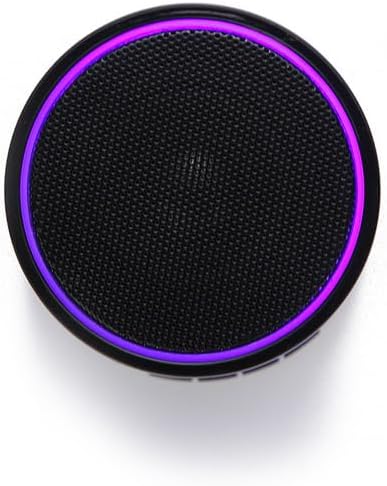
Image: An overhead view of the JUSTOP LED Bluetooth Portable Speaker, showcasing its circular design and the vibrant purple LED light ring around the speaker grille.
Maintenance
- Cleaning: Wipe the speaker with a soft, dry, lint-free cloth. Do not use liquid cleaners, aerosols, or solvents.
- Storage: When not in use for extended periods, store the speaker in a cool, dry place away from direct sunlight and extreme temperatures.
- Battery Care: To prolong battery life, fully charge the speaker before storing it for long periods. Avoid completely draining the battery frequently.
Troubleshooting
| Problem | Possible Cause | Solution |
|---|---|---|
| Speaker does not power on. | Low battery. | Charge the speaker fully. |
| Cannot pair with Bluetooth device. | Speaker not in pairing mode; Bluetooth off on device; device too far. | Ensure speaker is in pairing mode. Turn on Bluetooth on your device. Move device closer to speaker (within 10 meters). Forget previous pairings on your device and try again. |
| No sound or low volume. | Volume too low on speaker or device; speaker not connected. | Increase volume on both the speaker and your connected device. Ensure the speaker is successfully paired and connected. |
| Sound distortion. | Volume too high; device too far; interference. | Reduce volume. Move device closer to speaker. Avoid obstacles between speaker and device. |
Specifications
| Feature | Detail |
|---|---|
| Brand | JUSTOP |
| Model Number | JT19LED |
| Speaker Maximum Output Power | 3 Watt |
| Connectivity Technology | Bluetooth, Wireless |
| Audio Output Mode | Stereo |
| Mounting Type | Tabletop |
| Speaker Type | Bluetooth |
| Special Features | Wireless, Portable, LED Lights, Built-in Microphone |
| Compatible Devices | Tablets, Smartphones (iPhone, iPad, Android, Samsung) |
| Manufacturer | Justop Limited |
| First Available Date | January 15, 2020 |
Warranty and Support
For warranty information and customer support, please refer to the warranty card included with your product or visit the official JUSTOP website. Keep your purchase receipt as proof of purchase for any warranty claims.