Introduction
This manual provides essential information for the safe and efficient operation, installation, and maintenance of your new Frigidaire Professional 30'' Built-in Convection Microwave Oven. Please read this manual thoroughly before using the appliance and retain it for future reference.
The Frigidaire FPMO3077TF is a versatile 1.6 cu. ft. capacity appliance featuring 1750 watts of power and 9 power levels. It combines the functionality of a microwave and a convection oven, offering Power Sense Cooking Technology, Power Sense Auto Defrost, Power Sense Broil & Grill, Power Bright LED lighting, and a Keep Warm function with an adjustable timer. Its smudge-proof stainless steel finish ensures durability and ease of cleaning.

Figure 1: Front view of the Frigidaire FPMO3077TF Convection Microwave Oven.
Safety Information
Always follow basic safety precautions when using electrical appliances to reduce the risk of burns, electric shock, fire, injury to persons, or exposure to excessive microwave energy.
- Read all instructions before using the appliance.
- Do not attempt to operate this oven with the door open as this can result in harmful exposure to microwave energy.
- Do not place any object between the oven front face and the door or allow soil or cleaner residue to accumulate on sealing surfaces.
- Do not operate the oven if it is damaged. It is particularly important that the oven door closes properly and that there is no damage to the: (1) door (bent), (2) hinges and latches (broken or loosened), (3) door seals and sealing surfaces.
- The oven should not be adjusted or repaired by anyone except properly qualified service personnel.
- Ensure proper ventilation around the appliance.
- Use only microwave-safe cookware.
Setup
This Frigidaire Professional microwave oven is designed for built-in installation. Proper installation is crucial for optimal performance and safety. Refer to the separate installation guide for detailed instructions regarding cabinet cutouts, electrical requirements, and securing the unit.
Before initial use, remove all packing materials from inside the oven cavity and from the door. Clean the interior with a damp cloth and mild detergent. Ensure the ceramic plate and metal rack are correctly positioned.
Operating Instructions
The control panel features a touch interface with various cooking functions and settings. The LED display shows the time and cooking status.

Figure 2: Control panel layout with touch buttons for various cooking modes and settings.
Basic Operation:
- Setting Time: Use the clock icon button to set the current time.
- Microwave Cooking:
- Place food in a microwave-safe dish on the rotating ceramic plate.
- Close the drop-down door.
- Select desired power level (1-9) using the number pad or adjust using the "Power" button.
- Enter cooking time using the number pad.
- Press "OK/START" to begin.
- Using the Timer: Press the "Timer" button, enter the desired time, and press "OK/START".
Advanced Functions:
This appliance offers several advanced cooking modes:
- CONV COOK (Convection Cooking): For baking and roasting with circulating hot air. Use the metal rack for optimal results.
- COMBI COOK (Combination Cooking): Combines microwave and convection heat for faster cooking and browning.
- SENSOR COOK: Automatically adjusts cooking time and power based on food moisture levels.
- SENSOR REHEAT: Reheats food to an optimal temperature without overcooking.
- MELT / SOFTEN: Specific settings for melting butter, chocolate, or softening ice cream.
- PREHEAT / WARM: Preheats the oven for convection cooking or keeps food warm.
- BROIL / GRILL: For browning and crisping. Use the metal rack.
- DEFROST: Power Sense Auto Defrost for efficient thawing.
- VEGGIES: Pre-programmed setting for cooking vegetables.
- POPCORN: Optimized setting for popping popcorn.
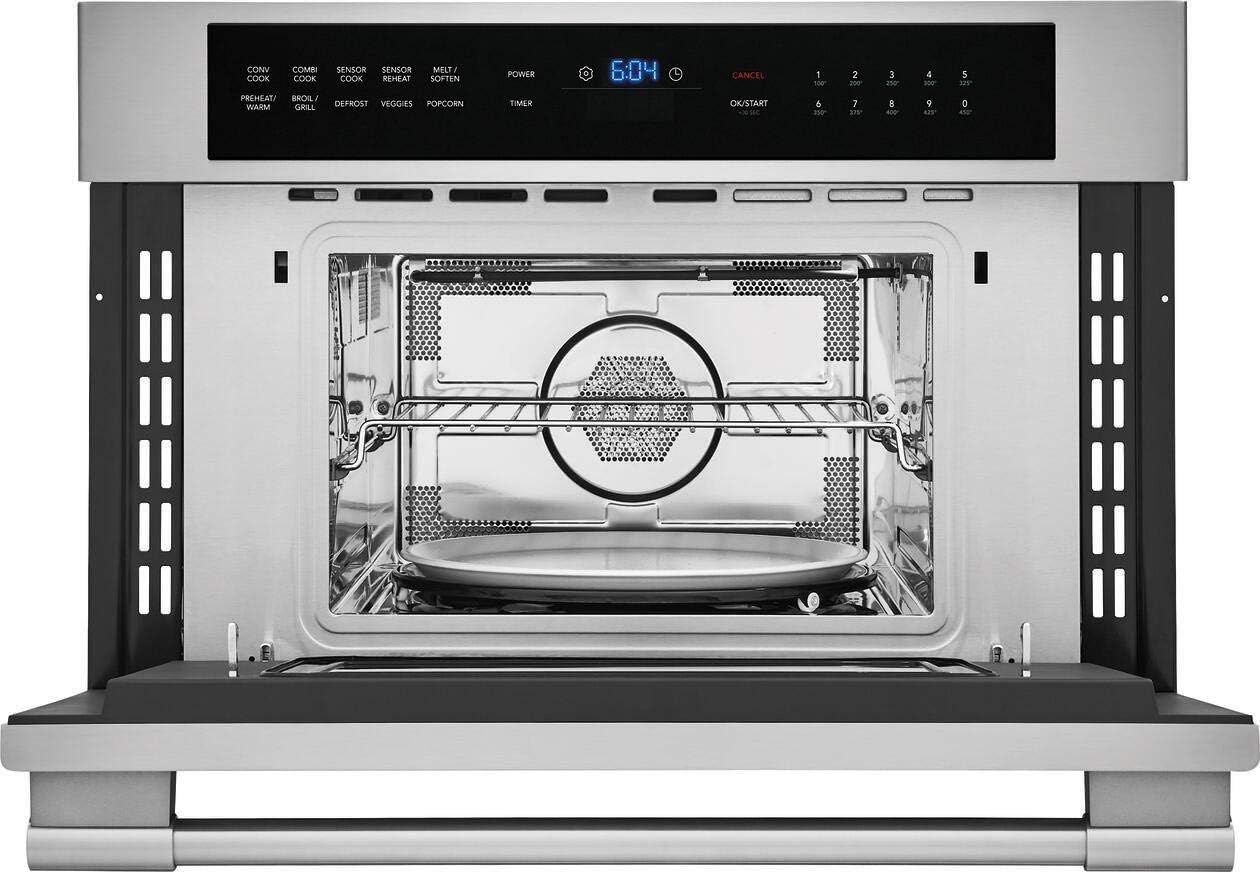
Figure 3: Interior view showcasing the removable metal rack and rotating ceramic plate.

Figure 4: Example of food being prepared using the broil/grill function on the metal rack.
Maintenance and Cleaning
Regular cleaning and maintenance will ensure the longevity and optimal performance of your appliance.
- Interior Cleaning: Wipe the interior cavity with a damp cloth and mild detergent after each use. For stubborn stains, a microwave-safe cleaner can be used.
- Exterior Cleaning: Clean the smudge-proof stainless steel exterior with a soft cloth and a stainless steel cleaner. Avoid abrasive cleaners or scouring pads.
- Door and Seals: Keep the door seals and surrounding surfaces clean. Use a soft cloth and mild soap.
- Removable Parts: The metal rack and ceramic plate can be removed for cleaning. Wash them with warm, soapy water or in a dishwasher if specified.
Troubleshooting
If you encounter issues with your Frigidaire Professional microwave oven, refer to the following common solutions before contacting service.
| Problem | Possible Cause | Solution |
|---|---|---|
| Oven does not operate. | No power, door not closed properly, fuse blown. | Check power supply, ensure door is securely latched, check household fuse/circuit breaker. |
| Food not cooking evenly. | Improper stirring/turning, incorrect power level/time. | Stir or turn food during cooking, adjust power level and cooking time as needed. |
| Oven light not working. | Light bulb needs replacement. | Contact qualified service personnel for bulb replacement. |
| Excessive noise during operation. | Turntable not seated correctly, fan noise. | Ensure ceramic plate is properly seated. Some fan noise is normal during convection/broil modes. |
Specifications
| Feature | Detail |
|---|---|
| Brand | Frigidaire |
| Model Number | FPMO3077TF |
| Capacity | 1.6 Cubic Feet |
| Wattage | 1750 Watts |
| Power Levels | 9 |
| Installation Type | Built-In |
| Color | Stainless Steel |
| Material | Stainless Steel |
| Product Dimensions (DxWxH) | 25"D x 31"W x 21"H |
| Item Weight | 96 pounds |
| Special Features | Defrost, Timer, Convection, Broil/Grill, Keep Warm |
| Controller Type | Touch |
Warranty and Support
For warranty information and customer support, please refer to the warranty card included with your appliance or visit the official Frigidaire website. You may also contact Frigidaire customer service directly for assistance with product registration, troubleshooting, or service requests.
Note: Keep your purchase receipt and model/serial numbers readily available when contacting support.