
Jabra Talk 15
Jabra Talk 15 Bluetooth Headset User Manual
Introduction
This manual provides detailed instructions for the Jabra Talk 15 Bluetooth Headset. The Jabra Talk 15 is engineered for clear hands-free calls, featuring a high-quality microphone and speaker optimized for conversations. It also supports wireless streaming of GPS directions, music, and podcasts from your mobile phone. With up to 6 hours of talk time and 14 days of standby time, the headset offers reliable Bluetooth wireless communication throughout the day on a single charge.

Image: Front view of the Jabra Talk 15 Bluetooth Headset.
What's in the Box
The Jabra Talk 15 package includes the following components:
- 1 Jabra Talk 15 headset
- 3 eargels (one pre-mounted standard eargel)
- 2 earhooks (Small & Large)
- 1 USB charging cable
- Quick start guide
- Warning and warranty leaflets

Image: All components included with the Jabra Talk 15 headset.
Headset Overview
Familiarize yourself with the buttons and indicators on your Jabra Talk 15 headset:
- Multi-function button: Power on/off, answer/end calls, play/pause audio.
- Volume buttons (+/-): Adjust call volume or media volume.
- LED indicator: Shows battery status, pairing status, and call status.
- Microphone: For clear voice transmission during calls.
- Micro USB charging port: For connecting the charging cable.
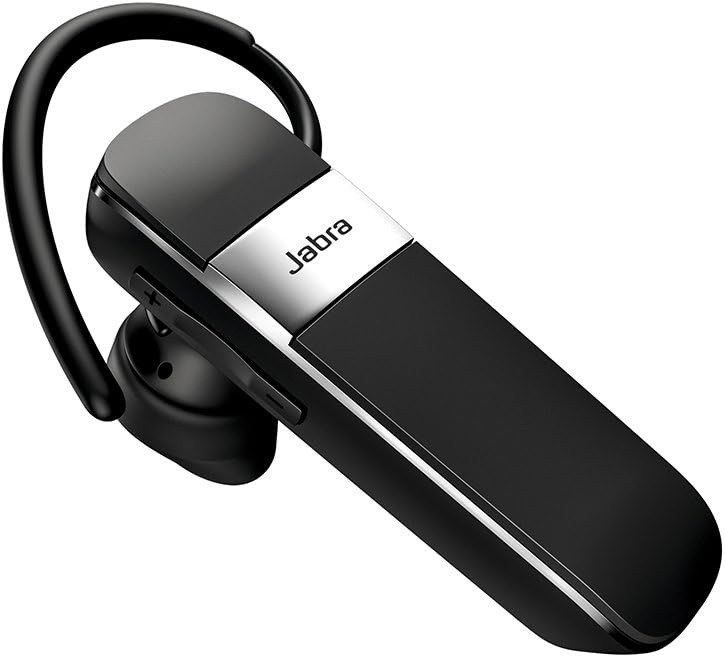
Image: Side view of the Jabra Talk 15 headset, highlighting the volume controls.
Wearing the Headset
The Jabra Talk 15 can be worn with or without an earhook. Choose the eargel and earhook combination that provides the most comfortable and secure fit for your ear.
- Select an eargel size (small, medium, or large) that fits snugly in your ear canal.
- Attach the chosen earhook to the headset if desired. The earhook should loop over the back of your ear.
- Gently insert the eargel into your ear and adjust the earhook for stability.

Image: Man wearing the headset comfortably.

Image: Woman wearing the headset comfortably.
Charging the Headset
Before first use, fully charge your Jabra Talk 15 headset. A full charge takes approximately 6 hours.
- Connect the supplied USB charging cable to the Micro USB port on the headset.
- Connect the other end of the USB cable to a USB power source (e.g., computer USB port or wall charger).
- The LED indicator will show charging status. It will typically turn solid when fully charged.
The headset provides up to 6 hours of talk time and 14 days of standby time on a full charge.
Pairing with a Device
To use your Jabra Talk 15 headset, you must first pair it with your Bluetooth-enabled mobile device.
- Turn on the headset: Slide the On/Off switch to the 'On' position. The LED indicator will flash blue.
- Enter pairing mode: If this is the first time using the headset, it will automatically enter pairing mode. If not, press and hold the Multi-function button for approximately 3 seconds until the LED flashes blue and announces "Pairing mode".
- Enable Bluetooth on your device: Go to the Bluetooth settings on your smartphone or other device.
- Select Jabra Talk 15: From the list of available devices, select "Jabra Talk 15". If prompted for a passcode, enter "0000" (four zeros).
- Confirm pairing: Once paired, the headset will announce "Connected" and the LED will turn solid blue.
The headset can remember up to 8 paired devices. When turned on, it will automatically try to connect to the last connected device.
Operating the Headset
Making and Receiving Calls
- Answer/End Call: Press the Multi-function button.
- Reject Call: Press and hold the Multi-function button for 2 seconds.
- Make a Call: Dial the number on your phone. The call will automatically transfer to the headset.
- Redial Last Number: Double-tap the Multi-function button.
- Adjust Volume: Press the Volume + or Volume - buttons during a call.
Streaming Audio
The Jabra Talk 15 allows you to stream audio such as music, podcasts, and GPS directions from your paired device.
- Play/Pause Audio: Press the Multi-function button.
- Adjust Volume: Press the Volume + or Volume - buttons to control media volume.
Voice Assistant
Activate your smartphone's voice assistant (e.g., Siri, Google Assistant) directly from the headset.
- Activate Voice Assistant: Press and hold the Multi-function button for 1 second when not on a call or streaming audio.
Maintenance
To ensure the longevity and optimal performance of your Jabra Talk 15 headset, follow these maintenance guidelines:
- Cleaning: Regularly wipe the headset with a soft, dry cloth. Avoid using harsh chemicals or abrasive materials.
- Storage: Store the headset in a cool, dry place away from extreme temperatures and direct sunlight.
- Charging: Do not leave the headset connected to a charger for extended periods after it is fully charged.
- Water Exposure: While the headset is water-resistant, avoid submerging it in water or exposing it to heavy rain.
Troubleshooting
If you encounter issues with your Jabra Talk 15, try the following troubleshooting steps:
| Problem | Solution |
|---|---|
| Headset will not turn on. | Ensure the headset is charged. Connect it to a power source using the USB cable. |
| Cannot pair with device. |
|
| No sound or poor sound quality. |
|
| Difficulty with On/Off switch. | The On/Off switch is located on the back of the device. It may be easier to operate before placing the headset on your ear. |
Specifications
| Feature | Detail |
|---|---|
| Model Name | Talk 15 |
| Item Model Number | 100-92200900-02 |
| Connectivity Technology | Bluetooth, Wireless |
| Bluetooth Version | 5.0 |
| Wireless Communication Technology | Bluetooth |
| Battery Life (Talk Time) | Up to 6 hours |
| Standby Time | Up to 14 days |
| Charging Time | Approximately 6 hours |
| Noise Control | Active Noise Cancellation |
| Microphone | Included |
| Water Resistance Level | Water Resistant |
| Dimensions | 4.19 x 1.28 x 6.94 inches |
| Item Weight | 1.44 ounces |
| UPC | 615822010856 |
Warranty and Support
Jabra products are designed for reliability and performance. For detailed warranty information, please refer to the warranty leaflet included in your product packaging or visit the official Jabra website.
For further assistance, technical support, or to download the full user guide, please visit the Jabra support page or refer to the provided PDF documents:
Ask a question about this manual
Ask about setup, troubleshooting, compatibility, parts, safety, or missing instructions. Manuals+ will review the question and use this page’s manual context to help answer it.