
Introduction
Thank you for purchasing the iTOMA CKS708 Alarm Clock Radio. This device combines multiple functions including a digital alarm clock, FM radio, Bluetooth speaker, USB charging port, and a night light, designed to enhance your daily routine. This manual provides detailed instructions for setup, operation, and maintenance to ensure optimal performance and longevity of your device.
Product Features
- Large, Bright Display & FM Radio: Features a 1.4-inch Ice Blue LED display for easy readability and an FM radio with 20 programmable presets. An external FM wire antenna ensures better radio reception.
- Night Light & Dual Alarm: Includes a one-touch ON/OFF night light with a warm ice blue glow. Two individual alarms allow for flexible scheduling.
- 6-in-1 Functionality: Combines digital alarm clock, dual alarm, FM radio, Bluetooth function, snooze, manual dimmer control, and a USB charging port for mobile devices.
- 3-Level Brightness & Auto Dimmer: Offers 4-level dimmer control for the LED display, including an auto-dimmer function, allowing adjustment to your preference.
- Convenient Additional Features: Equipped with battery backup to maintain settings during power outages and a 1A/5V USB charging port for mobile devices.
What's in the Box
- iTOMA CKS708 Alarm Clock Radio
- Power Adapter
- User Manual
Setup
1. Power Connection
Connect the provided AC adapter to the DC IN jack on the back of the unit and plug the other end into a standard wall outlet. The unit will power on and the display will light up.
2. Battery Backup
For backup power during outages, insert 1 x CR2032 lithium metal battery (not included) into the battery compartment on the bottom of the unit. This battery preserves time and alarm settings in case of power interruption.
3. Setting the Time
- Press and hold the TIME SET button located on the top panel until the display flashes.
- Use the VOL +/- buttons to adjust the hour. Press TIME SET again to confirm.
- Use the VOL +/- buttons to adjust the minute. Press TIME SET again to confirm.
- The time is now set.

Image: The iTOMA CKS708 alarm clock radio, showcasing its large LED display and the convenient USB charging port in use with a smartphone.
Operating Instructions
1. Alarm Settings (AL1 / AL2)
- Press and hold the AL1 or AL2 button until the alarm time flashes.
- Use the VOL +/- buttons to adjust the alarm hour, then press the respective alarm button (AL1 or AL2) to confirm.
- Use the VOL +/- buttons to adjust the alarm minute, then press the respective alarm button to confirm.
- Select the alarm source (Buzzer or FM Radio) using the VOL +/- buttons, then press the alarm button to confirm.
- To activate/deactivate an alarm, press the AL1 or AL2 button briefly. An indicator will appear on the display when the alarm is active.
- To use the SNOOZE function, press the SNOOZE button when the alarm sounds. The alarm will pause for 9 minutes and then sound again.
2. FM Radio Operation
- Press the MODE button to switch to FM Radio mode. The FM frequency will appear on the display.
- To auto-scan and save stations, press and hold the PLAY/PAUSE/SCAN button. The radio will scan and save up to 20 available stations.
- To manually tune, briefly press the PREV/NEXT buttons to fine-tune the frequency.
- To recall saved stations, briefly press the MEM button, then use PREV/NEXT to select a preset.

Image: The iTOMA CKS708 in FM Radio mode, showing the frequency display and indicating the presence of a sleep timer and earphone jack.
3. Bluetooth Speaker Function
- Press the MODE button until "BT" appears on the display, indicating Bluetooth mode. The unit will enter pairing mode.
- On your mobile device, enable Bluetooth and search for "iTOMA CKS708".
- Select "iTOMA CKS708" to pair. Once connected, you will hear a confirmation tone.
- You can now play audio from your device through the alarm clock's speaker.

Image: Demonstrating the iTOMA CKS708's Bluetooth capability, allowing users to stream music from their mobile devices.
4. Display Dimmer Control
The display brightness can be adjusted manually or set to auto-dim.
- Press the DIMMER button repeatedly to cycle through brightness levels (High, Medium, Low, Off).
- To activate auto-dimming, continue pressing the DIMMER button until "AU" appears on the display. The display will automatically adjust brightness based on ambient light.

Image: Visual representation of the iTOMA CKS708's manual and auto dimmer functions, showing various brightness levels.
5. Night Light
The integrated night light provides a soft, warm glow.
- Press the LED button to turn the night light ON or OFF.
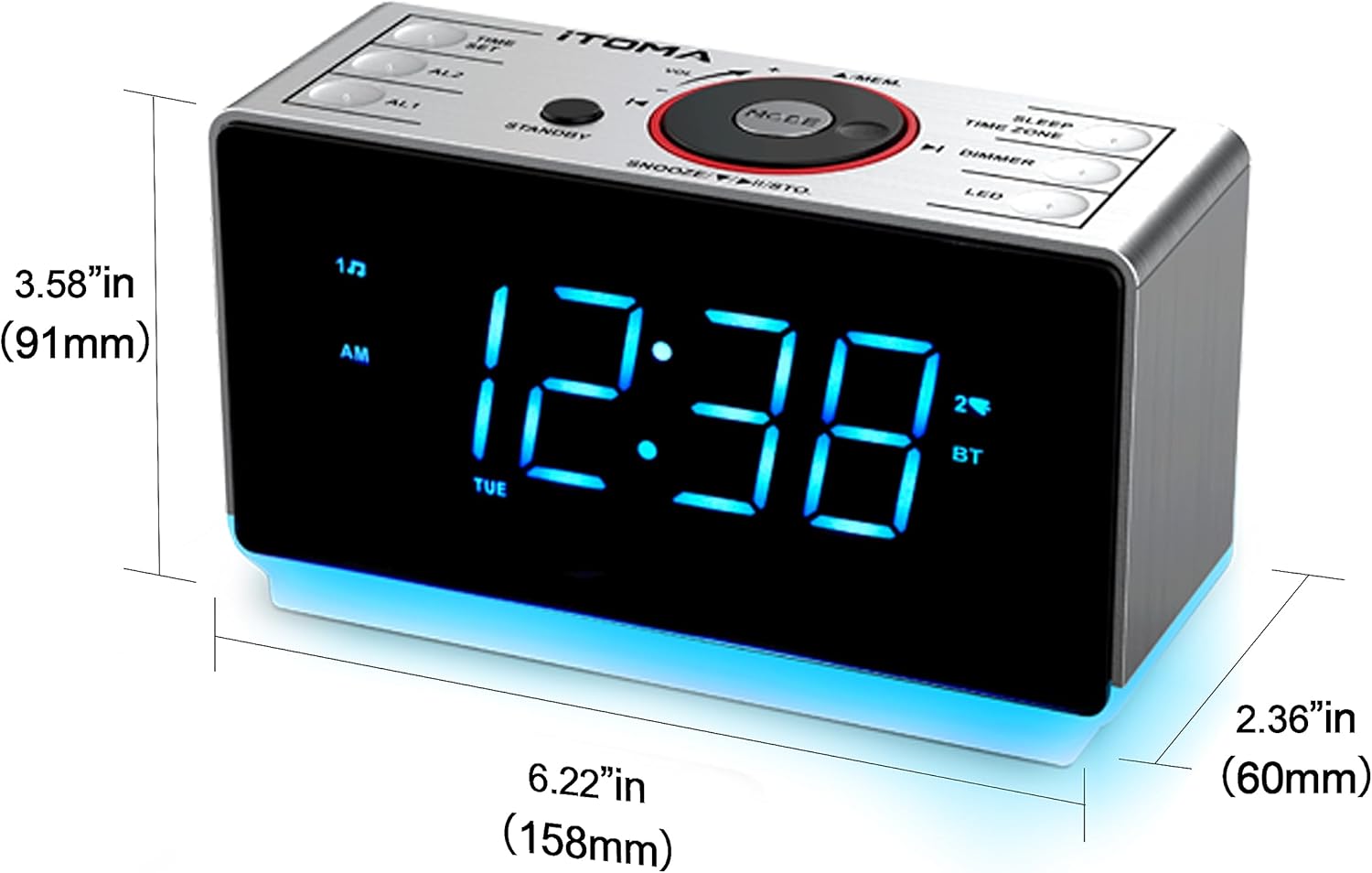
Image: The iTOMA CKS708 with its night light feature activated, providing ambient illumination.
6. USB Charging Port
The 1A/5V USB port on the back of the unit allows you to charge your mobile devices.
- Connect your device's USB charging cable to the USB port on the iTOMA CKS708.
- Ensure your device is compatible with 1A/5V charging.
7. Control Buttons Overview
Familiarize yourself with the main control buttons on the top panel:
- TIME SET: Press and hold to set time.
- AL1 / AL2: Press and hold to set Alarm 1 or Alarm 2; brief press to activate/deactivate.
- VOL +/-: Adjust volume; also used for setting time/alarm values.
- MODE: Cycle through modes (FM Radio, Bluetooth, etc.).
- SNOOZE / PLAY/PAUSE / STD: Snooze alarm; Play/Pause in Bluetooth/FM; Standby.
- PREV / NEXT: Change radio stations/tracks; adjust settings.
- DIMMER: Adjust display brightness.
- LED: Turn night light ON/OFF.

Image: Detailed view of the iTOMA CKS708's control panel, illustrating the various buttons and their functions.
Care and Maintenance
- Keep the unit away from direct sunlight, excessive heat, and moisture.
- Clean the unit with a soft, dry cloth. Do not use abrasive cleaners or solvents.
- Do not disassemble the unit. Refer all servicing to qualified personnel.
- Ensure proper ventilation around the unit.
Troubleshooting Guide
| Problem | Possible Cause | Solution |
|---|---|---|
| No power/Display off | Power adapter not connected; power outage. | Ensure AC adapter is securely plugged in. Check household power. If using battery backup, ensure battery is installed correctly. |
| Alarm not sounding | Alarm not activated; alarm volume too low; incorrect alarm time. | Press AL1/AL2 to activate (indicator should show). Increase volume. Verify alarm time is set correctly (AM/PM). |
| Poor FM radio reception | Antenna not extended; interference. | Fully extend the FM wire antenna. Reposition the unit to reduce interference from other electronic devices. |
| Bluetooth not pairing | Unit not in Bluetooth mode; device too far; previously paired. | Ensure unit is in Bluetooth mode ("BT" displayed). Keep devices within 10 meters. Forget "iTOMA CKS708" on your device and try pairing again. |
Product Specifications
| Feature | Detail |
|---|---|
| Brand | iTOMA |
| Model | CKS708-EU |
| Product Dimensions | 15.8 x 3.81 x 8.9 cm (6.22 x 1.5 x 3.5 inches) |
| Weight | 381 g (0.84 lbs) |
| Display Type | Digital LED (Ice Blue) |
| Screen Technology | LED |
| Power Source | Corded Electric |
| Battery Backup | 1 x CR2032 Lithium Metal (not included) |
| USB Charging Output | 1A/5V |
| Radio Bands Supported | FM |
| Connectivity | Bluetooth, USB |
| Material | Acrylonitrile Butadiene Styrene (ABS) |
Warranty and Customer Support
iTOMA products are designed and manufactured to the highest quality standards. For warranty information or technical support, please refer to the warranty card included with your purchase or visit the official iTOMA website. Please retain your proof of purchase for any warranty claims.